Desert Online General Trading LLC
Dubai, United Arab Emirates
Desert Online General Trading LLC
Dubai, United Arab Emirates


⚡ Power Your Productivity with 14 Ports of Pure Potential
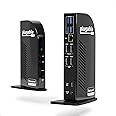
The Plugable 14-in-1 USB C Docking Station UD-3900C4 is a TAA-compliant, multiport hub designed for professional multitaskers. It supports up to four 1080p HDMI displays at 60Hz, delivers 96W charging power, and offers extensive connectivity including USB 3.0, USB-C, Ethernet, SD card, and audio ports. Compatible with Windows 10+ and ChromeOS, this dock streamlines your workspace with robust performance and reliable support.


| Number of USB 3.0 Ports | 4 |
| Brand | Plugable |
| Series | UD-3900C4 |
| Item model number | UD-3900C4 |
| Item Weight | 1.07 pounds |
| Product Dimensions | 10 x 6 x 4 inches |
| Item Dimensions LxWxH | 10 x 6 x 4 inches |
| Color | Black |
| Manufacturer | Plugable |
| ASIN | B09TSQYGKS |
| Country of Origin | Taiwan |
| Date First Available | March 3, 2022 |
M**.
Great Product, and Great Customer Support
I purchased this for use with a new Dell Precision 3591 laptop and two LG 32" curved monitors.When I first set everything up, it just worked. No muss, no fuss, everything connected and was recognized.Then I had one issue-when pushed hard, the monitors would freeze for a moment, then come back. I thought about all my options, and decided to touch base with Plugable's support and see if they had any ideas.Imagine my surprise when I received a reply within an hour with a suggestion to changing the configuration (moved the HDMI ports to #3&4 instead of #1&2). That corrected the issue, and it's been working perfectly since.The real test of a company is how responsive they are when there's a problem. Plugable has phenomenal customer support, both fast and knowledgeable. I would not hesitate to recommend them, or purchase their products in the future.
J**N
Absolute Game Changer for My Workspace
This Pluggable docking station has completely transformed my dual-computer setup. As someone who switches between a MacBook (for work) and a Windows PC (for personal use), the ability to toggle between them with one button press is incredibly convenient. After several weeks of daily use, it’s become an essential part of my workstation.What Works Great:- Effortlessly switches between my Mac and Windows PC with a single button- Keeps all my monitors and peripherals neatly connected in one hub- No lag or connectivity issues when using two screens (for both systems)- Compact design helps reduce cable clutter on my desk- Plug-and-play setup was straightforward with DisplayLink softwareOne Small Limitation:On my MacBook, connecting a third screen occasionally causes freezing—though this might be my computer’s hardware limitation rather than the dock itself. Two screens work perfectly on both systems.Important Note:Since this uses DisplayLink software, you’ll need admin rights to install drivers. If your workplace restricts software downloads, this might not be the right solution.Real-World Use:I use this dock 8+ hours daily for work (video calls, spreadsheets, design software) and personal browsing. It handles everything without overheating or disconnections. The single-cable connection to my laptop is a lifesaver for quick transitions between work and personal time.Final Thoughts:If you need a reliable way to manage multiple computers with minimal cable hassle—and can install the required software—this dock is absolutely worth it. I’d buy it again just for the seamless switching capability alone.Pro Tip: Update your DisplayLink drivers regularly for optimal performance, especially after macOS updates.
R**Z
Great dock, working fine under Linux
This dock has been working extremely well with my HP Dev One (System 76 colab) running Pop OS Linux. I have 2 external monitors attached to it, use it for PD for my laptop, and use it as a USB hub so that I can connect a total of 1 cable to my laptop to dock it at my desk. I also use the card reader semi-frequently and that works reliably. While I don't use audio through the device often I have used it once or twice and it seemed to work fine as well. I would highly recommend this dock.
D**C
Damaged by Video Card use - like sharing screens in a meeting
Edit: Monitors were flickering a lot, support was very responsive, firmware fixed it for about 1 month, then they sent me a new "Tested" unit, and this time I noticed exactly when the flickering began.It started flickering as soon as I shared my screen in a video meeting (worst possible time, but also made me realize what was causing it).It flickered again when I recorded my screen, edited a video, and played a video game. These activities seem to also damage the unit over time making the flickering get worse and worse.Great as a USB hub that supplies power, but the HDMI docking is useless if you actually do anything on your computer, ultimately leading to the need to plug those directly to the computer along with the hub.Customer Service was really great, but can't make up for a bad product.----Had an issue where it was flickering every 45 minutes or so for 5-10 seconds the monitors would all go black.It took me over a week of talking with tech support and running their custom diagnostics, sending them tons of data from my computer before they sent me a firmware update that fixed it.It would have been 5 stars if the firmware update was somewhere it can be found, but unfortunately it is at an obscure link.I tried to post the link in my original review, but Amazon flagged the link as violating a community guidelines.If you do buy this, I would recommend reaching out to Tech support right away and explicitly asking for the firmware update and declining to do the extensive diagnostics that gives them a ton of data about your computer until after you have the firmware update.Update 2023-10-03:The monitors are going black again - I've had this product for less then 3 months, and it is just a constant source of frustration.Personally, I wish I'd returned it when I could have, absolutely not worth the money to deal with a product that only works 80% of the time.I have been presenting on my screen for work and had it black out, it's just flat out embarrassing, especially when the cheap $30 HDMI splitter I was using before never had this kind of trouble.Save your money, get something that costs less and actually works.
T**C
Almost Perfect
Has the ports you need. (HDMI, USB, Analog , etc.)2 HDMI ports use Display link technology. The other 2 HDMI ports use Alt mode which may or not work for your motherboard
Trustpilot
1 month ago
1 week ago