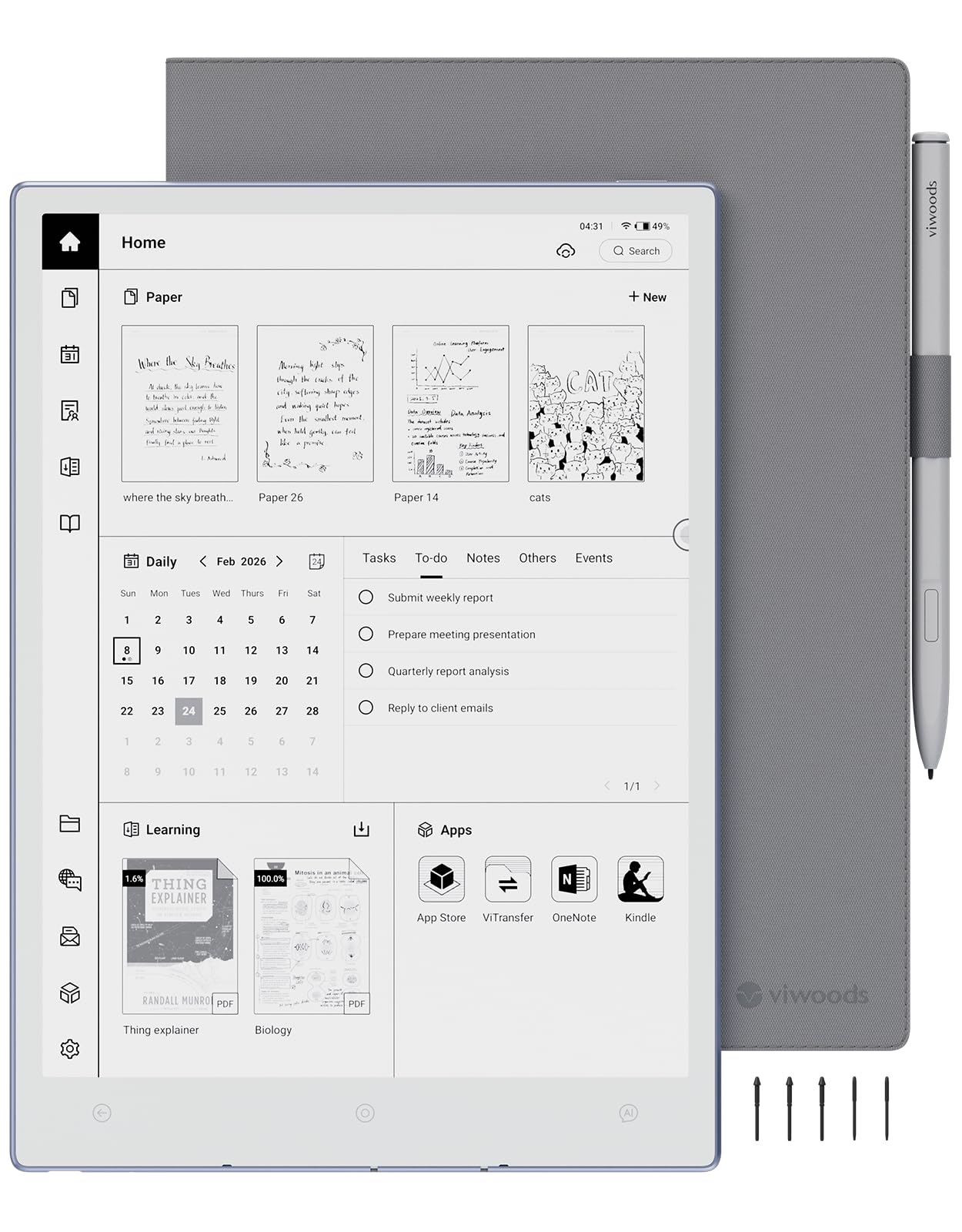
📝 Elevate your note game with the sleekest AI-powered e-ink tablet on the market!
The VIWOODS AiPaper is a cutting-edge 10.65'' E Ink tablet featuring a high-contrast Carta 1300 Mobius screen at 300PPI, an ultra-thin 4.5mm design weighing just 370g, and a powerful octa-core 2.0 GHz processor. It offers 128GB of storage without subscription fees, a premium stylus with 5 spare nibs, and AI-driven tools for note summarization, organization, and calendar integration. Perfect for professionals seeking a paper-like digital notebook that syncs seamlessly with major cloud platforms and boosts productivity on the go.


| ASIN | B0FNWC3ZCR |
| Best Sellers Rank | #16,167 in Electronics ( See Top 100 in Electronics ) #342 in Computer Tablets |
| Brand | VIWOODS |
| Card Description | Integrated |
| Color | AiPaper+W2 Stylus Pro+Cover+5 Nibs |
| Customer Reviews | 4.0 4.0 out of 5 stars (73) |
| Date First Available | August 27, 2025 |
| Flash Memory Size | 128 GB |
| Item Dimensions LxWxH | 9.7 x 0.17 x 7 inches |
| Item Weight | 2.03 pounds |
| Manufacturer | VIWOODS |
| Max Screen Resolution | 2560*1920 Pixels |
| Operating System | Android 13 |
| Processor Brand | MediaTek |
| Product Dimensions | 9.7 x 0.17 x 7 inches |
| Series | AiPaper |
| Standing screen display size | 10.65 Inches |
M**E
An E-Ink Device That Replaces Everything Else
I absolutely love my AiPaper. It’s completely replaced all my other devices and even paper and pencil for both work and personal use. I use it for everything—taking notes for work, journaling, reading comics on Marvel Unlimited and Shonen Jump, and even catching up on articles from the web. It’s also been fantastic for reading epubs in KOReader, which works seamlessly on this device. One of the standout aspects of the AiPaper is its exceptional customer service. The stylus I initially received had an issue with the nibs falling out. I reached out to customer service, and they immediately sent me a replacement stylus, which arrived in just two days and worked perfectly. Their quick response and attention to customer satisfaction made a lasting impression. The bundle that comes with the AiPaper is also a huge plus. It includes a high-quality leather or faux leather half folio case, the stylus, and 14 nibs (12 in the box and 2 cleverly stored in the side of the case). Everything feels premium and well thought out, adding to the overall value of the device. Another reason I chose the AiPaper over other brand’s devices is the dedication of the development team. They consistently roll out updates (scheduled for at least one a month from Sept-Dec 2024, and have done about two times that so far) and are highly responsive to feature requests, which gives me confidence in the long-term potential of this device. I can see a strong community forming around such a well-supported product, and that’s something I’m excited to be a part of. The hardware is equally impressive. The 4100mAh battery lasts much longer than most other devices in this category, yet the device itself is incredibly lightweight—just 370g, which is even lighter than my phone! It’s perfect for extended use without feeling heavy or cumbersome. The Carta 1300 screen at 300 PPI was the final selling point for me. While many brands are chasing color displays, I was looking for a solid black-and-white device, and this screen is exactly that: bright, crisp, and incredibly clear. In short, the AiPaper has become my go-to device for everything: work, reading, journaling, and more. It checks all the boxes—top-notch customer service, a high-quality bundle, a dedicated development team, exceptional battery life, lightweight design, and a stunning monochrome display. I really couldn’t ask for more. Highly recommended!
A**R
You won't regret buying this tablet!!!
Awesomely versatile, intuitive, extremely adaptable & just sparks creativity ~ Tried "Remarkable" & bailed on it ~ Pen is exceptional, & the thin size allows you to take it anywhere ~ Greatly appreciate writing, drawing & note taking capabilities ~ Best purchase ever ~
M**A
Pricey, but a nice eReading device
This is a review of the updated 8.2 inch ViWoods AiPaper Mini and my comments only apply to that device, I bought this device mainly as an eBook reader. I have a couple of 7 inch Kindles but wanted something with a larger screen but still small and light enough to carry around and the 8.2 inch seemed to be a perfect size. I listen to Audible books so I also wanted a device that was audio capable. I almost never do any note taking or markups so this review does not cover that functionality. The ViWoods Mini is a well designed piece of hardware. It is small and light enough to hold in one hand and the finish is beautifully done. When I run my finger from the glass screen to the bezel I cannot even feel the transition. It comes with a nice case and It is held in the case by magnets so it can be removed and replaced without any problems. There is only one real button which serves as both a fingerprint reader and power button and the only other break in the frame is for the usb-c connector. The device is several years old and runs Android 13. In many ways this is a great eReader. It fits nicely in one hand and is very light. The screen is amazingly white and the display is crystal clear and stands out well even though it is only Carta 1000. While the chip is a bit old the device is very responsive and page turns are very fast while setup page navigation is a bit laggy. Since it is Android you can add most apps that you would want, it has a built-in fingerprint reader and is reasonably customizable. It hosts Chrome which seems to work well and includes along with the case a very nice pen with an eraser. Writing and erasing works well, the Google Play Store is available and ViWoods includes its own App Store which has a number of good eReading apps. It has 3 sensors on the bottom of the front bezel for Back and Home and AI with several choices of which AI server you wish to use. I have no problems side loading books using my Mac and the Android File Transfer app and, of course, you can download them from your online storage as well. I have sent questions to ViWoods support and have always received prompt and helpful responses. One thing I want to emphasize is the quality of the screen display. Zooming in on maps and photos produces a much nicer and more finely detailed image than I generally see on my Kindle Paperwhite and the larger screen also helps. While the difference between a 7 inch and 8.2 inch screen may not seem large, measurements of the screens shows that the Mini has about a 38% increase in display space over the Kindle Paperwhite. The Dark Mode setting is pleasing for night reading and the daytime display is better than any of my other eReaders. There are also some drawbacks. It is fairly pricey for what is, as of this review, a 2-3 year old device and runs a 3 year old Android version. It is not waterproof although the case is listed as being waterproof. It does not have any speakers so any audio playback has to be done using bluetooth speakers or earbuds and the bluetooth pairing functionality does not seem very strong. I had to place my earbuds directly on the device for it to find and pair with them. There are no physical volume or brightness buttons so that has to be done in the setup panel. The ViWoods App Store has some useful apps but the choices are limited and being an eInk device it sometimes responds slowly. Most online reviews of this device tout the battery life but if you are like me and use the front light a lot it may drain the battery more quickly and I find I need to recharge every 3 - 5 days, at least while I am actively setting up the device or reading a lot in dark rooms. Being an older device it does not support wireless charging. There are also some odd design features. The Google Play Store does not come pre-installed and installing it is a bit of a hassle. There is a special section in the main Settings dialog (Settings -> Play Store) to help you do the install and there are some YouTube videos explaining how to do that as well. The Play Store installation took me 5-10 minutes, but ViWoods could just have pre-installed it on the device and saved everyone the trouble. The volume control is done through software but the slider only appears if there is an active bluetooth connection. While the Kobo app is easily installed from either the ViWoods or Google stores it is a bit surprising that it was not pre-installed. All in all I am happy with this device. It shines so much as an eReader that the drawbacks and oddities seem to less significance than they might otherwise. It is easier to use for reading single handed than my Kindle and it runs all of my eReading apps flawlessly, I think that the price is about $50-$75 too high considering how old the device is but, again, I am pleased enough with it to ignore that. Overall I think that this is a good choice for anyone wanting an intermediate size eReader provided it fits in their budget. I have removed one star because I think it is a bit overpriced, so 4 stars.
G**8
Flickering screen, Bad Unit: Returning it
Very clean product, gave it to my Son for his music teaching for this years graduation however after the initial first few days of trying to work thru all the apps and instructions and practice using the devise...it was notable that the screen would flicker and lock up...I tried reaching out to the company but not able to get an answer to the issue as well as you rest your hand on the devise the three action buttons along the edge are activated (you can turn the buttons off in the setup) but it's super inconvenient turn the buttons on when you need to use them Ultimately the unit may habe been defective I was unable to work on it for more than 20 sec without the screen flashing on and off and going to the start home page...I continued to try to find answers but no luck I'm sad to have been excited for this purchase and now I'm returning it in homes to do more research and find out if my unit was a fluke or are others having the same problem?
Trustpilot
1 month ago
2 weeks ago