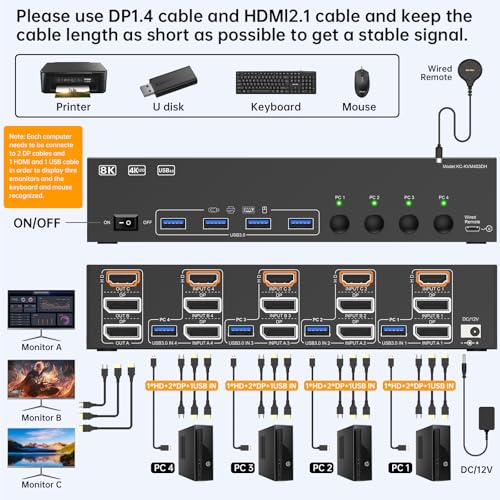
🚀 Elevate your multi-PC workspace with 8K clarity and lightning-fast control!
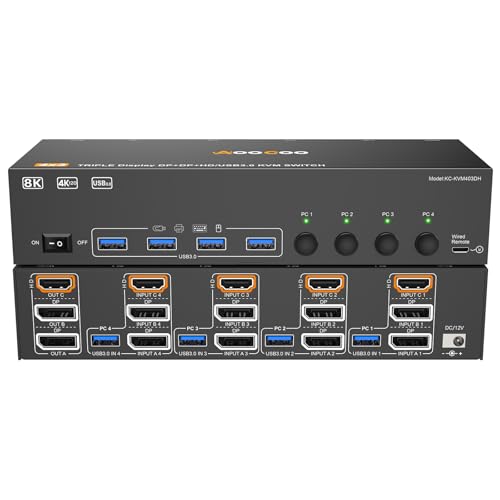
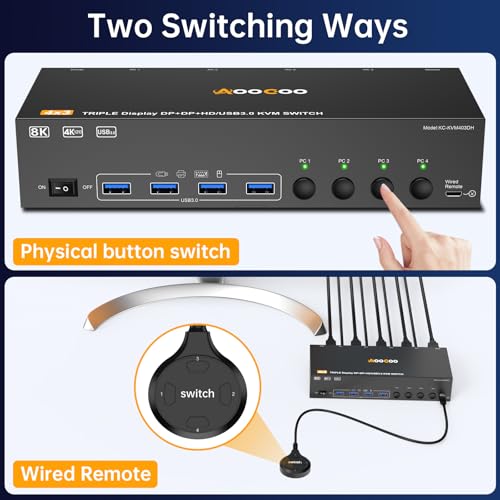
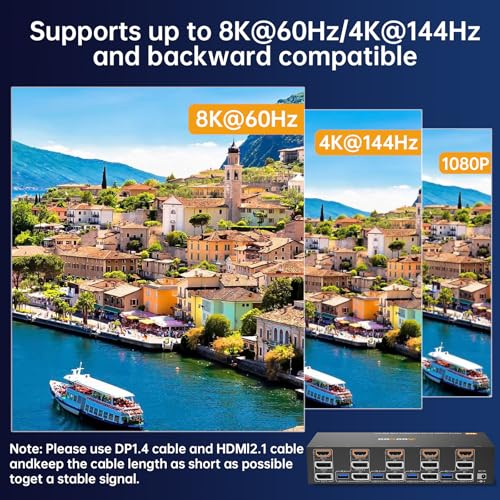
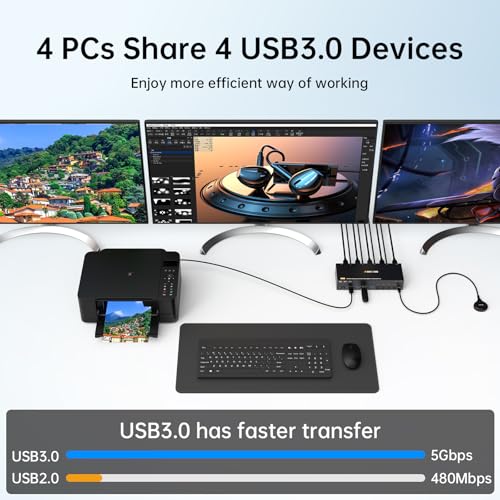
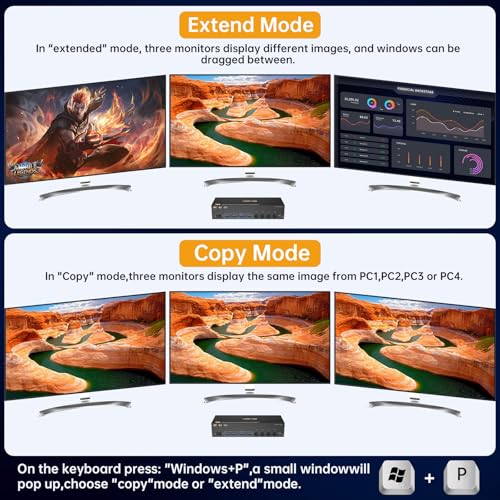
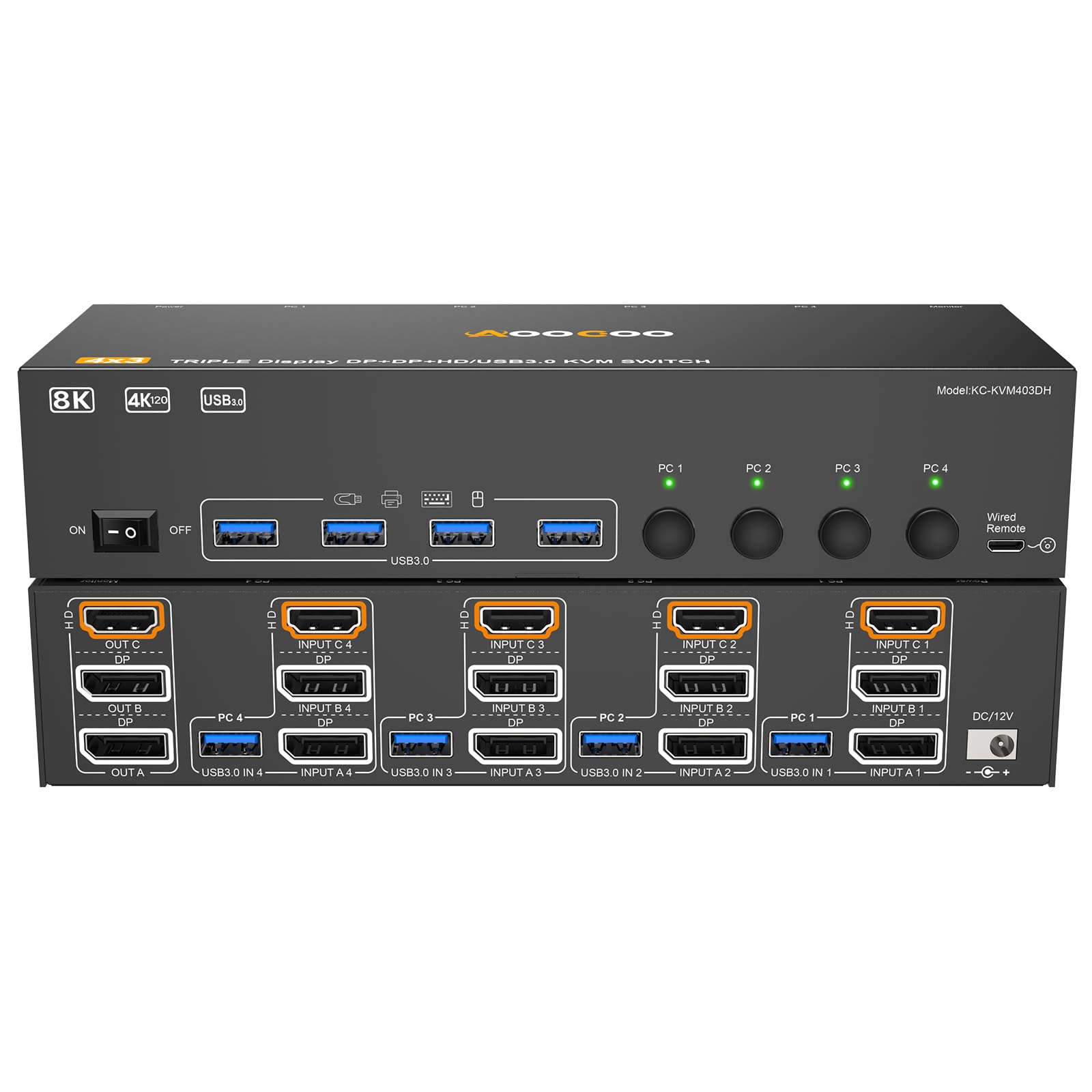
The AOOCOO HDMI Displayport KVM Switch enables seamless control of up to 4 PCs across 3 monitors with support for ultra-high resolutions of 8K@60Hz and 4K@144Hz. Featuring 4 USB 3.0 ports for high-speed peripheral connectivity and flexible display modes, it includes a wired remote for effortless switching. Ideal for professionals seeking a clutter-free, high-performance multi-computer setup.


| ASIN | B0F242H8Y7 |
| Best Sellers Rank | #112 in KVM Switches |
| Brand | AOOCOO |
| Circuit Type | 4-way |
| Connector Type | Plug In |
| Contact Material | Metal |
| Contact Type | Normally Open |
| Control Method | Remote |
| Current Rating | 2 Amps |
| Date First Available | March 21, 2025 |
| Item Weight | 2.31 pounds |
| Manufacturer | AOOCOO |
| Number of Positions | 4 |
| Operating Voltage | 5 Volts |
| Operation Mode | ON-ON |
| Package Dimensions | 10.31 x 6.06 x 2.6 inches |
| Terminal | Plug in |
| UPC | 029082951994 |
| Unit Count | 1.0 Count |
J**R
Great product
Works great!
A**R
Works as Advertised
So far, the 3 channel KVM works as advertised. The only problem we've had is it will not wake any of the computers from sleep when a keyboard key is tapped or when moving the mouse. The power button on the machine(s) has to be pressed to wake them from sleep. Overall, it is a good product, has a clear picture, and all 3 channels are working.
Q**E
Solid KVM, no USB-C Support
Update: The KVM still works great. I was able to connect the second display, a Dell U2713HM, to all three computers. 1. The Lenovo with two Ugreen Revodocks (B0F24B1VJN) with Amazon Basics DisplayPort 1.4 6' cables (B08FBJYWTJ) works pretty consistently. Sometimes my USB peripherals don't light up when switching to that KVM input. Switching to another input and back usually resolves it immediately. I think it probably has to do with sleep behavior on the laptop, and not an issue with the KVM. 2. The Mac Mini works without any problem at all, using two Warrky USB-C to DisplayPort 1.4 cables (B07RY75V7Q). I get 144Hz refresh rate on one display, and 60Hz on the other, which is the max for both. 3. My PC with an RTX 3060 Ti works great on the primary display, a Dell S3422DWG. The secondary display switches to Nvidia failsafe, and does 640x480. Sometimes I can get it to switch to its native resolution of 2560x1440 and when I can it works great. But most of the time, it just doesn't work. I'm going to try some different DisplayPort cables, but will probably have to settle for a single monitor on my PC. Initial Review: This is the best KVM I've picked up so far. I don't have all the right cables yet, but it supports 144hz@3440×1440, which is great. I'm waiting on additional DisplayPort cables to show up so I can connect my second monitor, but initial impressions are solid. - Switches reliably between inputs. - No weird video problems. - Correctly passes audio over DP. I have two complaints. There are no USB-C ports. I had to use a USB A to C adapter to connect the USB 3 cable from the KVM to my Mac Mini, but it worked. There are also only 4 USB inputs, but that just happens to work for me. The second complaint is that the status lights are way too bright. I "fixed" that by placing a piece of painter's tape over the LEDs. They're still extremely bright.
D**E
Power to usb ports cycles when switching sources.
It's ok. It does it's job, which by itself would be four stars. Seems quality, no problems hooking it up. My problem with it is that, when switching sources, the power to the usb ports drops off. Which means any devices you have connected to them cycle. Not a big deal I guess for a mouse and keyboard, but I have a set of speakers that are powered through the usb. And so every time I switch sources, the lights on the speakers, which I prefer to be off, turn back on and a voice tells me that the speakers are in usb mode. Not sure how good cycling power to the electronics is for them either.
C**R
Display port function
Works perfectly. I am using the display ports for 2 computers and the monitor.
B**P
Does the job, works like a charm
I got one of these so I could stop switching between computers during and after my work day (software engineer, two work laptops + personal desktop). My only complaint is not with the KVM itself, but rather the fact that DisplayLink doesn't work through KVMs in general. I don't know if there is something manufacturers could do to allow this kind of passthrough behavior, but I'd love to see someone try.
P**I
Claims EDID - Fails to deliver
While the switch is quite affordable and does in fact support 2 displays and 3 PCs, toggling between them still results in any PC thinking you just unplugged and plugged everything back in. The only thing even slightly EDID about this is the sticker. With laptops on docking stations it's not the worst, they act like they've been undocked and docked again -- UNLESS you accidentally hit the button for the computer you're already viewing (ex. set it to #3 when it's already on 3). If you do this, it's like it disconnects and reconnects everything 1 plug at a time and all displays forget their settings (location, resolution, extend vs duplicate, scaling, etc). The buttons on the remote don't work very well. You have to mash on them repeatedly. Since this means you'll have to keep the switch where you can reach it, say goodbye to any hopes of hiding the cord monster as you'll have tons of wires coming out of both the front and back of it. Bottom line - buy a cheap kvm, get a cheap kvm.
A**X
Works well with Mac and Windows setups
This works well so far and is a great value. For those interested in a similar setup, I'm using this to switch between a PC personal setup, and a MacBook Pro 24 work setup. After much trial and error, I have it fully functional via: HDMI/DP from PC to KVM Thunderbolt to HDMI cable/Thunderbolt to DP cable to KVM (have to connect into the two Thunderbolt ports of the Mac for two separate video streams, no MST) Monitor connections (HDMI, DP) Peripherals into the KVM USB A to USB A with a USB A to USB C Adapter into the remaining port on the Mac. I will say the switching is a bit slow, but that could be unrelated to the switch. Thought it was worth mentioning. I would recommend this to anyone looking to simplify their setup on a budget!
N**C
Ce commutateur KVM HDMI permet de connecter 2 PC à un seul moniteur, tout en partageant clavier, souris et périphériques USB grâce à la technologie USB 3.0. Il prend en charge des résolutions ultra-hautes : 8K à 60 Hz et 4K à 120 Hz, idéal pour les usages professionnels, le gaming ou le home cinéma. La commutation se fait facilement via un bouton ou une télécommande filaire fournie, avec un voyant LED pour indiquer l’ordinateur actif. L’installation est plug-and-play, sans besoin de pilote, et l’alimentation dédiée assure la stabilité même avec plusieurs périphériques connectés. Le boîtier en métal protège efficacement contre les interférences et la surchauffe. Un choix fiable, polyvalent et moderne pour optimiser votre espace de travail ou de divertissement
F**.
Avevo già provato in passato uno switch USB, ma questo dispositivo si è rivelato decisamente più completo: consente di condividere fino a 3 porte USB (senza l'ausilio di un hub) e due connessioni HDMI tra due dispositivi, ad esempio un PC fisso e un notebook. Nel mio caso ho condiviso tastiera, mouse e monitor tra i due computer. Il passaggio tra un dispositivo e l’altro è immediato e si effettua tramite la pressione del bottone di switch sul dispositivo stesso o un telecomando cablato incluso, molto comodo soprattutto se lo switch è posizionato in un punto non facilmente accessibile. Ottima la qualità costruttiva: la struttura in metallo conferisce solidità e una sensazione di qualità superiore rispetto a molti prodotti in plastica leggera. In dotazione ci sono anche due cavi USB di buona lunghezza, un alimentatore esterno e tutto il necessario per un’installazione ordinata. Supporta risoluzioni elevate fino a 8K@60Hz e 4K@120Hz, caratteristiche difficili da trovare in questa fascia di prezzo. In sintesi, è un prodotto ben progettato, funzionale e affidabile. Per chi cerca una soluzione semplice e stabile per condividere periferiche e monitor tra due computer, lo consiglio senza riserve. Nel mio setup è diventato subito indispensabile.
A**R
Este conmutador ha resultado ser un producto polivalente y muy eficiente para mi setup, siendo muy útil tanto a nivel laboral como para streaming. Lo probé en mi PS3 y en mi ordenador secundario, y ha cumplido perfectamente su función. Me ha permitido gestionar ambos dispositivos con un solo monitor, teclado y ratón sin complicaciones. Pasé de no poder usar mi único monitor con HDMI a usarlo para varios dispositivos, lo que ha sido una auténtica gozada. Lo primero que destaca es la compatibilidad. Funciona perfectamente con Windows y, en principio, es compatible con Mac, además de ser totalmente compatible con monitores HDMI, que fue uno de los motivos por los que me decanté por él. La instalación es sencilla y no requiere drivers adicionales; es plug-and-play y listo, a disfrutar. El cambio entre dispositivos es muy rápido. Puedes alternar entre la PS3 y el PC de manera casi instantánea usando el botón físico. Es muy práctico, especialmente cuando necesitas cambiar de dispositivo rápidamente. Además, el USB 3.0 incluido permite conectar el teclado, ratón y otros periféricos sin ningún tipo de problema. Para ser el primer producto de este tipo que pruebo, me enamoró por lo útil que es; se ha convertido en un imprescindible en mi espacio de trabajo y hobby. En cuanto a la resolución y el rendimiento, es lo que realmente lo hace sobresalir. Soporta hasta 8K a 60Hz y 4K a 120Hz, lo cual es ideal para gamers o para quienes trabajan en tareas que requieren alta calidad de imagen, como diseño gráfico o web, como es mi caso. La imagen es nítida y no he experimentado ningún tipo de retraso, lo cual es un puntazo que mejora notablemente la experiencia de uso. En cuanto a las desventajas, son pocas, pero las menciono. Primero, no incluye cables HDMI, y por el precio, esperaba al menos uno. Aunque trae dos cables USB 3.0, que son bastante útiles. Otro inconveniente es que el mando es por cable, lo cual no es ideal comparado con otros modelos que incluyen mandos inalámbricos, lo que aporta mayor comodidad y mejor organización del espacio. También es importante mencionar que requiere fuente de alimentación, lo que puede ser un inconveniente para aquellos que prefieren evitar más cables conectados a la corriente, aunque en mi caso no es un problema mayor. En resumen, este conmutador es una excelente opción si buscas conectar dos dispositivos a un solo monitor sin perder calidad o rendimiento. La facilidad de uso, lo eficiente que es para cambiar entre dispositivos y la buena resolución lo hacen ideal tanto para un uso más casual como para tareas profesionales. A pesar de algunos inconvenientes, como la falta de cables HDMI y el mando por cable, sigue siendo una compra muy recomendable. Al principio lo veía como algo caro, pero después de probarlo, realmente merece muchísimo la pena.
M**A
Prodotti molto interessante che può risolvere svariati problemi anche in mobilità in base alle vostre esigenze, sicuramente non e' l'unico nel mercato ma funziona con un buon prezzo . La qualità costruttiva non e' indimenticabile ma cmq apprezzabile. Consigliato
A**O
Este conmutador KVM se presenta como una solución muy eficiente y polivalente para gestionar dos ordenadores con un único conjunto de periféricos. Su diseño compacto, con una carcasa metálica que transmite solidez, lo hace ideal para escritorios con poco espacio. Soporta altas resoluciones como 8K a 60Hz y, especialmente destacable, 4K a 120Hz. La conmutación entre los dos equipos es casi instantánea y muy cómoda, gracias a la doble opción de cambio: un botón en el propio dispositivo y un cómodo mando a distancia con cable que se puede colocar en un lugar más accesible. La instalación es sencilla y "plug-and-play", aunque es importante tener en cuenta que no incluye los cables HDMI. El hub USB 3.0 integrado funciona a la perfección, permitiendo compartir teclado, ratón y otros dispositivos sin problemas de latencia. En resumen, es un dispositivo que cumple su función de manera excelente, con un cambio rápido y cómodo. Su rendimiento y su buena relación calidad-precio lo convierten en una compra muy recomendable.
Trustpilot
1 week ago
2 months ago



