We remain fully operational. Our teams are working around the clock to ensure your deliveries continue safely.

DOWNLOAD THE APP


Customer Services
Copyright © 2025 Desertcart Holdings Limited
DOWNLOAD THE APP

🚀 Elevate your data game: Speed, space & security in one sleek powerhouse!
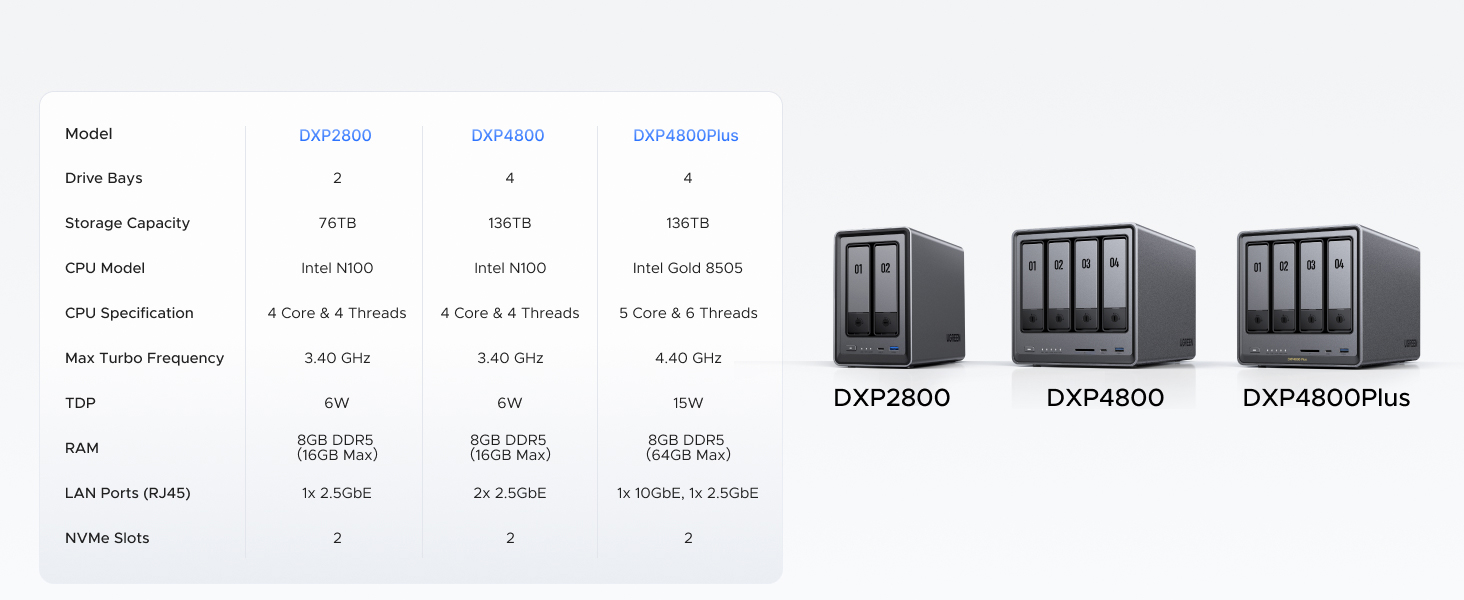
The UGREEN NAS DXP2800 is a premium 2-bay desktop NAS designed for small teams and enthusiasts, featuring a 12th Gen Intel N100 quad-core CPU, 8GB DDR5 RAM, and 2.5GbE networking. It supports up to 76TB storage with dual SATA bays and 2 M.2 NVMe slots, offers 4K HDMI output for media streaming, and runs on user-friendly UGOS Pro OS. This diskless NAS delivers fast, secure, and centralized data management with advanced AI photo organization and broad device compatibility, making it a cost-effective alternative to cloud storage with 24/7 support and a 2-year warranty.




| ASIN | B0D22HBFK1 |
| Batteries | 1 CR2032 batteries required. |
| Best Sellers Rank | #2 in Network Attached Storage (NAS) Devices |
| Brand | UGREEN |
| Color | Grey |
| Computer Memory Type | DDR5 SDRAM |
| Customer Reviews | 4.5 4.5 out of 5 stars (872) |
| Date First Available | April 18, 2024 |
| Hard Drive | 2x SATA, 2x M.2 NVMe Slots |
| Hard Drive Interface | Serial ATA-600 |
| Item Dimensions LxWxH | 9.33 x 4.29 x 6.97 inches |
| Item Weight | 5.68 pounds |
| Item model number | DXP2800 2-Bay |
| Manufacturer | UGREEN |
| Number of Processors | 1 |
| Operating System | UGOS Pro |
| Processor | 3.4 GHz |
| Processor Brand | Intel |
| Product Dimensions | 9.33 x 4.29 x 6.97 inches |
| RAM | 8 GB |
| Series | DXP2800 2-Bay |
W**L
Great entry level NAS with advanced features to explore
VERY solidly constructed with a thick, HEAVY aluminum unibody, no sharp edges or unfinished surfaces. The design is well thought out and easy to access the M.2 drives and RAM. I thought there were 2 RAM slots but realized you can upgrade to a single 16 GB stick. It would be nice if there were 2 slots so I didn't have to keep a spare 8 GB stick, plus a 16 GB stick adds another big chunk of money to the total cost. Everything was easy to setup and works flawlessly with 2x12TB HDDs and 2x2TB M.2s. With an HDMI port this functions as a low cost HTPC and NAS in one box that doesn't require me to get too deep in the weeds managing things. I was considering the UGREEN mini PC with 4x M.2 drives but this one allows for much cheaper, larger capacity drives with the option for M.2 speed.
D**C
Simple, Fast, Performant, Great Software. Buy now, don't look back.
This is the easiest, best 4 bay NAS money can buy. You will be up and running in _no_ time. Snapping in four drives of whatever size you choose takes moments. I unwrapped four Toshiba N300 Pro 18TB drives and snapped them into the chassis in about 4 minutes. Connected the NAS to my 2.5GB ports on my lan and had everything up and running and updated with the latest software in under 30 mins. Time to get going is important, but what's more important is how does it run over time? I am 9 weeks into owning the thing and I can tell you this: The software is easy. The system is complete... it's robust... it has features I'll never use--and that's cool if you're looking for a gimungous media server or whatever... I needed it for digital camera RAW storage in a RAID5 scenario. I couldn't say more good things about the product. Managing permissions for users on your LAN is easy, managing storage and basic drive management, etc. is easy. Updating the software routinely as patches and security updates are released is easy. Once upon a time Apple owned "easy" and now iOS has 1138 settings in the general tab and nobody can make it do anything--but this NAS is _easy_. And good. High performance reads and writes near theoretical limits... I literally can not say enough good things about it. Buy it and don't look back. Great value, great performance.
B**7
Great NAS, UGREEN is awesome
I'm an IT nerd by trade. Normally, i build my own NAS units out of old machines. This time i decided to bite it and just buy a NAS because i'm lazy in my older age. This NAS is easy to set up and get running. has a ton of options for anyone, completely user friendly, easy to upgrade. Flexible thatit supports most x86/x64 based operating systems. you'd just need to upgrade the primary boot drive internally which is a 128gb SSD i believe. Yes you can run windows server on this thing but the default UOS has everything you'd need with less overhead. You can run TrueNAS or UnRaid if you want. tons of videos online showing you what to expect. Note that if you do change / swap the OS, you should either image the default boot drive or pull the drive and replace it then store the original drive in a safe place because ugreen has said you cannot download the stock base OS and restore it. The image i included or attached is the desktop. this is the web interface. the unit has a physical HDMI port and does supply video but i have not used it. Do yourself a favor though. upgrade the ram. the 4 bay unit has 1 ram slot. uses DDR5 i have DDR5 5900 in it, a single 32GB module. The Ram module runs at 1.1v i believe too. it will speed up the transfers and help the unit do what it needs to. Also drop in a pair of 512gb NVME drives and assign them as cache drives. this will boost the overall throughput too. i dropped in a pair of 2tb nvme drives just because i have a couple of them laying around. My unit i stuffed in 4 24TB sata NAS drives. you can use desktop drives but just know this thing will hammer on those drives so desktop drives might suffer in longevity and might prematurely fail. NAS / Enterprise grade drives will last longer and they are built to suffer. I have NAS grade drives in my unit. All are 7200 RPM. i get anywhere from 240MB/s to about 290MB/s transfer speeds this is before i added the cache drives. now i usually get around 730MB/s the unit manages the cache automatically. it will fill the cache drives then shove the data from cache to long term storage as it goes. I have mine configured for RAID 0, BFS file system. it asks you how you want it configured when you plug drives in and do the initial setup.
K**A
⭐️⭐️⭐️⭐️⭐️ Beginner-Friendly, Blazing Fast, and Beautifully Built – UGREEN NASync DXP2800 Nails It
I’m a beginner when it comes to setting up my own NAS for business use, but the UGREEN NASync DXP2800 made the process incredibly simple. From unboxing to full setup, it took me just 20 minutes to figure out what needed to be done, install my WD 20TB hard drives, and configure the system. The only caveat: formatting the drives took a couple of hours—but that’s expected with high-capacity storage. 💾 Performance Upgrade: I paired the NAS with UGREEN’s Cat8 Ethernet cables (3ft and 10ft) to connect my router to my internet switch and then to the NAS. My system used to feel clunky with competitor cables and older hardware, but now it’s blazing fast and incredibly responsive. 🧠 Easy Setup for Beginners: The tool-free chassis and intuitive interface made setup a breeze. Even with zero prior NAS experience, I was up and running in no time. 🎯 Smart Features: Supports RAID, dual M.2 SSD slots for caching, and AI-driven photo management. It’s perfect for organizing client files and securely archiving business data. 📺 Connectivity & Design: The HDMI output and multiple USB ports offer great flexibility. The unit looks sharp, and paired with UGREEN’s blue and black braided Ethernet cables, my setup is both professional and stylish. Bonus: the braiding is resistant to love bites from my wife’s fur babies, which is a real win in our pet-friendly office. 🙌 Reliable Support: UGREEN’s customer service was excellent. I had a few setup questions, and their team was responsive and helpful.
C**O
El mejor más en éste rango de precio
M**L
I’ve been following the UGREEN NASync series since its Kickstarter days, and as soon as it hit Amazon Canada, I didn't hesitate. After nearly a year of daily use, I can confidently say this is one of the best tech investments I’ve ever made. The "Apple Tax" Solution: The real value of this NAS became clear when I bought my new MacBook. As many know, upgrading internal storage on a Mac is incredibly expensive. By using the DXP2800 as my personal cloud, I was able to buy the base model laptop and store all my heavy files, photos, and media on the NAS. I can access everything from anywhere in the world, saving me hundreds of dollars in hardware upgrades. Performance & Reliability: Even with the stock 8GB DDR5 RAM (I haven't felt the need to upgrade yet), the Intel N100 CPU handles everything smoothly. I primarily use it for: Automatic Photo Backups: It syncs my phone photos instantly, allowing me to keep my phone storage free. Media Streaming: It serves as a flawless movie hub for my home. Fast Connectivity: The 2.5GbE port is a must-have. A great pro-tip: if you need even more speed, you can use one of the USB ports for an extra ethernet adapter! Software & Build: UGREEN has been very consistent with software updates. The app is intuitive and improves every month. The build quality is premium and feels like it was designed to last. It’s quiet, efficient, and fits perfectly on my desk. Pros: Significant long-term savings on phone/laptop storage. Easy M.2 NVMe and RAM upgrade paths. Solid 2.5GbE performance out of the box. Consistent software improvements. Cons: As a "light to moderate" user, I haven't found any real flaws. It does exactly what it promises. Final Verdict: If you want to own your data and stop paying for monthly cloud subscriptions or overpriced hardware storage upgrades, this is the way to go. Highly recommended for families and small teams!
M**S
Es un NAS increíble y las capacidades que tiene da mucho margen para sus usos Solo me gustaría que en la galería de fotos se pudieran etiquetar las fotos para poder organizar mas facialmente las fotos
T**N
Great NAS! Got it on sale, and its been awesome and running straight for a month. Slotted in 3-12tb NAS drives and run them in RAID 5. Took 3 days to build the array, but its been running well. It only has a few Apps available at the store so far, including Docker and Jellyfin which work pretty well if you configure them right. Took me a few hours to learn how to do it and configure everything, but thats from 0 knowledge and it was pretty easy to pick up. I wouldn't really run VMs on it, just because the CPU is rather limited. Mostly set up as a photo back up(with the sync and backup App) and a media server(Jellyfin). I run the Jellyfin server on my Linux server though, since I find its easier to configure. You just have to permanently mount your network drives so you can access the NAS storage. It even has a built in remote access without configuring ports, so you can access and backup when your away from you local network Would definitely recommend to get this if you have no experience with NAS, since its very easy to pick up
S**N
Thanks UGREEN! Product arrived on time. Opened it up and everything inside was well protected and packaged. Setup the new NAS and was thoroughly impressed and easy to use. Fantastic product and highly recommended.
Trustpilot
2 months ago
3 weeks ago