
DOWNLOAD THE APP


Customer Services
Copyright © 2025 Desertcart Holdings Limited
DOWNLOAD THE APP
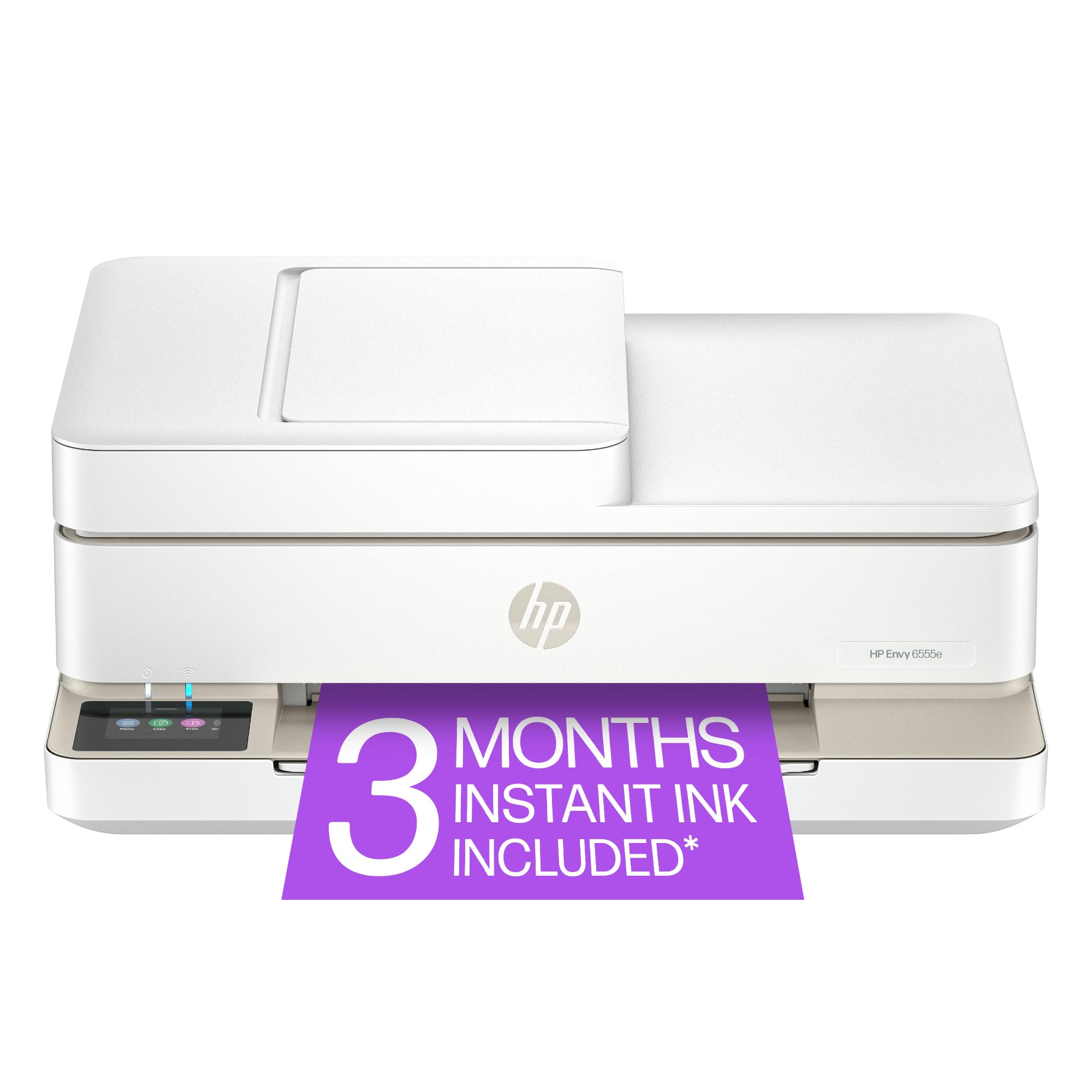
🖨️ Print smarter, live greener, stay connected.
The HP Envy 6555e is a compact, AI-enabled wireless all-in-one inkjet printer designed for home and home office use. It delivers vibrant, true-to-screen color prints at up to 7 ppm, with duplex printing, a 35-sheet auto document feeder, and a 100-sheet input tray. Featuring a user-friendly 2.4" color touchscreen and seamless mobile printing via the HP app, it also supports eco-conscious users with 60% recycled plastic construction and a 3-month Instant Ink trial for hassle-free ink replenishment.



| ASIN | B0D7KCJT3W |
| Additional Printer functions | All In One |
| Best Sellers Rank | #4,270 in Office Products ( See Top 100 in Office Products ) #24 in Inkjet Computer Printers |
| Color Depth | 24 Bits |
| Compatible Cartridge | HP 68 Black Original Ink Cartridge (~160 pages yield) 7FP21TN; HP 68 Tri-Color Original Ink Cartridge (~120 pages yield) 7FP20TN; HP 68e EvoMore Black Original Ink Cartridge (~320 pages yield) 7FP22TN |
| Compatible Devices | Laptops, PC, Smartphones |
| Control Method | App |
| Customer Reviews | 3.9 3.9 out of 5 stars (1,716) |
| Date First Available | September 16, 2024 |
| Dual-sided printing | Yes |
| Duplex | Automatic |
| Hardware Interface | USB |
| Included Components | HP Envy 6555e All-in-One Printer; HP 68 Setup Black Cartridge; HP 68 Setup Tri-Color Cartridge; Regulatory flyer; Setup guide; Reference guide; Power cord |
| Initial page print time | 22 Seconds |
| Ink Color | Black; Cyan; Magenta; Yellow |
| Item Weight | 13.5 pounds |
| Item model number | 714N5A#B1H |
| Manufacturer | HP |
| Max Input Sheet Capacity | 100 |
| Max copy resolution black-white | Up to 300 x 300 dpi |
| Max copy resolution color | 300 x 300 dpi |
| Maximum Black and White Print Resolution | Up to 1200X 1200 rendered dpi (when Printing from a computer) Dots Per Inch |
| Maximum Color Print Resolution | Up to 4800 x 1200 optimized dpi color (when printing from a computer on selected HP photo papers and 1200 input dpi) Dots Per Inch |
| Maximum Media Size | 8.5 x 11.7 in |
| Maximum copies per run | Up to 99 copies |
| Memory Storage Capacity | 256 MB |
| Model Series | Envy |
| Number of Trays | 1 |
| Number of USB 2 Ports | 1 |
| Output sheet capacity | 25.0 |
| Power Consumption | 4.25 Watts |
| Print media | Envelopes, Labels, Paper (plain) |
| Printer Ink Type | Original Ink Cartridge |
| Processor Count | 1 |
| Product Dimensions | 14.21"D x 17.05"W x 6.73"H |
| Scanner Type | Flatbed |
| Sheet Size | 3 x 5 to 8.5 x 12 in; Duplex:3 x 5.5 to 8.5 x 11.7 in Inches |
| Smart Home Compatibility | Smart Home Compatible |
| Specific Uses For Product | Home and home office |
| Supported Media Sizes | 3 x 5 inches, 4 x 6 inches |
| Total USB Ports | 1 |
| UPC | 197029817617 |
| Warranty Type | One-Year limited hardware warranty with option to extend to two-years with acceptance of HP+ Offer. For more info please visit us at support.hp.com . |
| Wattage | 100 watts |
J**B
Nice printer
Works well but took some time to get everything working
D**A
Great little WIRELESS printer, easy set up too.
Good little desktop printer. Setup was the easiest I've ever done. Packaging was really well done, thank you! Wireless and I love that! Phone app was very easy to use and understand. I could see on my phone the photo or document I needed to print and I liked that. I use my smart phone for about everything these days so I liked that I can pull up my email and print from my phone a file sent to me in an email without having to boot up my laptop! I was a bit surprised that it had photos and PDF files as the only two print options, but the help support documents tells how to handle files other than jpg or PDF. One thing I would love to see is a port for a SD card from my camera to scan and save or print photos and documents. There is USB port in the back near the power cord plug in. My old printer had the ports in the front. Not critical, just different than what I'm accustomed to. I like the wireless feature a lot more. For the amount I spent, VERY reasonable and does everything I need. It's quiet, works well, prints nice copies in either black and white or color. The little touch screen menu is very easy to use and read. I appreciate that too. I can read it without my glasses 😆. I'm very well pleased with the printer, functions, and price. I'd recommend it as a nice little desktop printer. It doesn't take up a lot of space and is perfectly fine for my needs.
T**R
While your buying this printer also buy a bottle of Tylenol
After owning this printer 3 months I'm already looking for a different brand or same brand different model. First, the ink is very expensive much more than I've paid for other hp printers. Hint: when choosing a printer check the price of ink and if there are 3rd party refill ink cartridges that are reliable. And give the ink price a part of deciding. Ink for this runs about $90 average for even generic brands and there are not many available. Yes hp sells a black cartridge for $23 bucks. It says 160 pages but more like 80. So it will require at least 2 in a month or 5 weeks. So with tax about $200 a year or more. The printer is very moody and very loud. When it starts printing it makes a loud bang sound. The printing is quite noisy. Sometimes it works and sometimes it doesn't. It typically doesn't work when I need it. It seems to get stuck with processing a print job. So you unplug it and often too unplug you're computer or device. Plug them back in restart and 50/50 chance it will clear. Most of often have to download the apps to diagnose then fix the issue. Close your eyes and visualize doing this once or twice a day when you have to get documents printed quickly. Idk I paid $99 bucks but I'm willing to throw it out or donate. It's a shame. Now when it works irs very good and prints fast. If you're a casual user and don't mind constantly troubleshooting then it's for you.
M**Y
Good print quality, difficult to set up, uses a lot of ink.
Great little printer in that it prints high quality pages and works quickly, quietly and efficiently. It was a little difficult to set up because it only connects via bluetooth, you cannot use a cord. Also we have two router units in the house so two different wi-fi addresses. The printer will not print from my husband's laptop because he uses a different wi-fi address. There are codes to get around this but they won't work. I am very tech savvy too so it's not me. Lastly, it is an INK PIG and uses a lot more ink that any printer I have ever owned despite my settings. Otherwise I am happy with it, not thrilled.
C**L
Easy to set up
I have always had an HP printer and I would not have anything else. This one works great my other printer died after how many years I can’t remember. I love that it scans and copies and the print is really good. Easy to use. U
W**A
Very easy to set up!
I bought this printer to replace the HP printer that lasted 14 years for home use! I researched other brands, read multiple reviews and consulted my tech savvy oldest son prior to the purchase. I was a little nervous about setting it up myself because I am not tech skilled and my son lives several hours away. He assured me that I could do this. I proudly texted him that it only took me 45 minutes from unpacking the printer to printing the first document from my phone! I love the latest features, too.
J**H
Very good printer I think so what need it for
Good price I think so
S**D
Not as expected
C**E
Ayant des problèmes de connectivité avec mon ancienne HP, j'ai choisi ce modèle pour son écran à même l'appareil et je ne suis aucunement décue! Elle imprime très bien et son utilisation est simple grâce au panneau de commande. J'ai imprimé une centaine de photos et plusieurs documents même recto-verso sans difficulté
G**O
Works well but doesn’t always stay connected to Wi-Fi, but otherwise very happy with this product.
S**G
Bought this printer a month ago based on ratings. Worst printer ever. Longest to print a sheet from PC now at 17 hrs, 12 minutes. Doesn't like or will connect to assigned router when 2 routers are present with different names, same password. Their solution... change password... Yea right, and change a dozen devices all working perfectly from each router. Ethernet direct connected still wants WI-FI connection., Now waiting 1 hr and counting for 1 page to print. Chews up ink like no other machine. Loved my 3830. worked flawlessly for years till it didn't.
J**C
The set up was easy. The printer is slow, which is fine for me, but may not work for someone who needs to print quickly.
Trustpilot
1 month ago
2 weeks ago