⚡ Unlock your laptop’s full potential with the ultimate 6-in-1 USB-C hub!
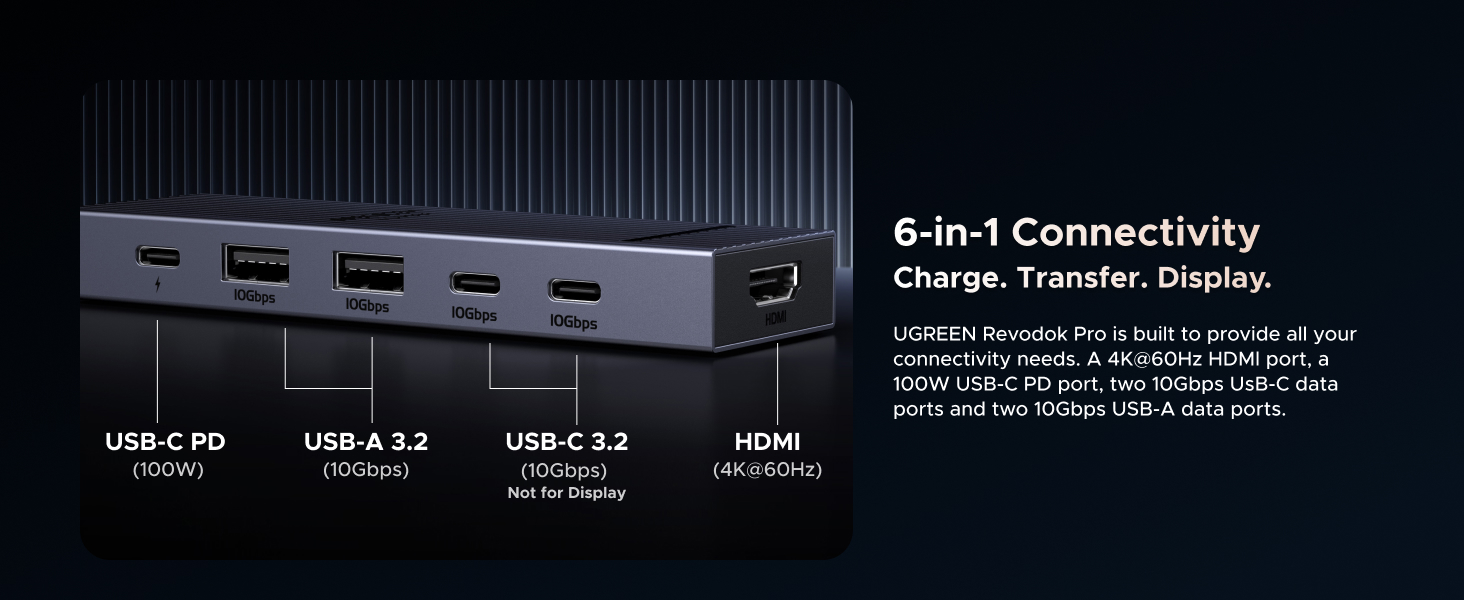
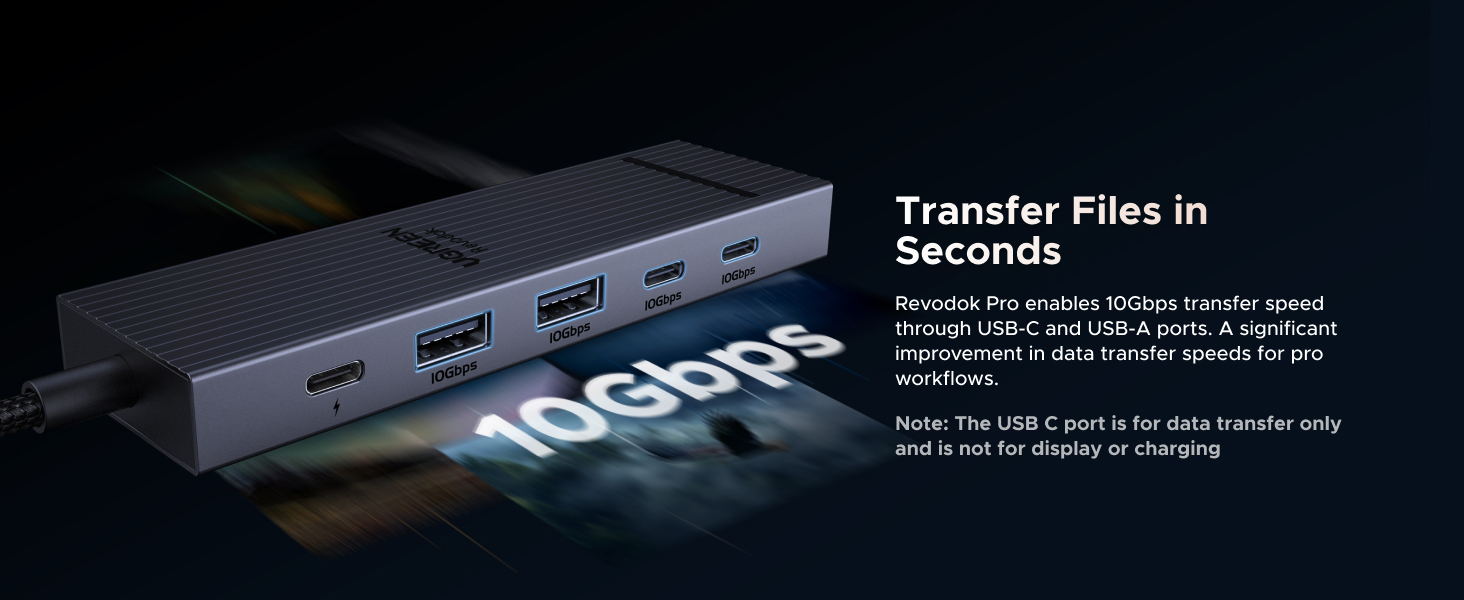
The UGREEN Revodok Pro USB-C Hub is a premium 6-in-1 docking solution featuring dual 10Gbps USB-C and USB-A ports, a 4K 60Hz HDMI output, and 100W power delivery. Compatible with a wide range of devices including MacBook Pro/Air, iPad Pro, and gaming laptops, it offers fast data transfer, seamless plug-and-play operation, and a sleek, portable aluminum design—perfect for professionals seeking to streamline connectivity and power in one compact hub.


| ASIN | B0D1XLNWP2 |
| Additional Features | Fast Data Transfer, Lightweight, Plug and Play, Portable |
| Best Sellers Rank | #11 in USB Hubs |
| Brand | UGREEN |
| Compatible Devices | MacBook Pro, MacBook Air, MacBook M1, M2,M3, iMac, iPad Pro, iPhone, Chromebook, Surface, Steam deck, Rog Ally Compatible Devices MacBook Pro, MacBook Air, MacBook M1, M2,M3, iMac, iPad Pro, iPhone, Chromebook, Surface, Steam deck, Rog Ally See more |
| Customer Reviews | 4.5 out of 5 stars 5,351 Reviews |
| Data Transfer Rate | 10 Gigabits Per Second |
| Enclosure Material | Aluminum, Plastic |
| Global Trade Identification Number | 06941876243631 |
| Hardware Interface | HDMI , USB, USB Type C |
| Item Weight | 180 Grams |
| Manufacturer | Ugreen Group Limited |
| Number of Ports | 6 |
| Operating System | Mac OS 9, Windows 10, Windows 7 |
| Special Feature | Fast Data Transfer, Lightweight, Plug and Play, Portable |
| Total USB Ports | 4 |
| Total Usb Ports | 4 |
| Warranty Description | 2 Year Manufacturer |
H**R
Works great
i was thinking to buy long time, and I’m glad I finally did it. This UGREEN Revodok Pro USB-C Hub is exactly what I needed for my devices. I use it with my laptop and tablet, and it works very well and very stable. The 6-in-1 design is really useful. I can connect HDMI, USB devices, and still charge my laptop with the same hub. The HDMI output works great. I have 34 inch monitor, it it looks clear and sharp. There is no flickering or random disconnects. The USB ports are fast too, copying files to my external drive is much quicker than with my old hub. I like that it supports 100W Power Delivery. I just plug my charger into the hub and my MacBook. laptop still charges without any problem while everything else is connected. This keeps my desk cleaner and I don’t have to plug and unplug many cables all the time. The build quality feels solid and premium. The hub is small, light, and easy to carry in a bag, but it does not feel cheap. The cable is flexible but strong, and the metal body helps it stay cool even when I use several ports at once. I have tried it with different devices (MacBook, iPad Pro, and a Windows laptop and linux), and it was plug-and-play every time. No drivers, no extra setup. Everything just works.
A**K
Fast, reliable and inexpensive
I love the value of this adapter. My laptop was in repair so I used this with my Pixel 8 Pro to connect my external monitor and powered hub. You'll need a 100w (GAN) powered hub. It powers one HDMI monitor at 4k 60hz. I plugged my other USB-3.0 male into it and it ran the Ethernet through it as well as sound and video through the HDMI. Niggles are you need an Ethernet adapter on another hub (some more expensive adapters include it), it only drives on monitor. Also watch out for phone screen burn in so use a black screen program. But for $20 if you just need to power one monitor it's great.
R**.
Still Going Strong After Years — Reliable, Fast, and Worth It
I’ve been using the UGREEN Revodok Pro USB-C Hub (6-in-1, 10Gbps, 4K@60Hz, 100W PD) for over four years, and it’s still going strong. I originally used it for HDMI output, which worked flawlessly, and now I mainly use it as a hub for my MacBook Pro. Just plugged it in and it works. The build quality and performance have held up perfectly — ports are still snug, connections are stable, and the transfer speeds remain fast. It’s compact, reliable, and has become a permanent part of my setup. What I like Excellent reliability even after years of daily use Fast transfer speeds and stable HDMI output Compact, sturdy design that travels well Works perfectly with MacBook Pro The bad Honestly, nothing significant — it’s held up impressively well Overall After years of consistent use, this hub continues to perform like new. If you want a dependable, all-in-one USB-C hub for your Mac, this is an easy 5-star pick. Durable, fast, and worth every penny.
P**R
All the Essential Ports in One Device
This hub is a compact, well‑built, and highly reliable accessory. It provides fast data transfer, stable connections, and all the essential ports you need for everyday work. Everything functions smoothly with no drops, overheating, or compatibility issues. A practical and efficient hub that truly enhances any setup
M**S
Great USB C hub, can also serve as a dock
I bought this to use with a Minisforum mini PC I have to expand one of the rear type C USB 4 ports, not only for more connectivity, but to prevent regular plugging and unplugging from the computer itself. It's a great little hub with all of the IO I need, including an HDMI port which, honestly, I don't really need since the PC itself has both an HDMI and a DisplayPort connection. It provides 2 USB type A ports, two 10 Gbps type C ports and a third type C port that is capable of 100 watt power delivery. That combined with the HDMI output means this hub could also feasibly be used as a dock for something like a Steam Deck, ROG Ally, a laptop PC, etc. I tested it with my Steam Deck OLED and it worked just fine and was able to output an HDR signal to my LG television while charging the Deck at full speed since the Deck's charger puts out way less than 100 watts. It feels reasonably sturdy, has a braided cable and even a faint little LED to let you know when it's actually plugged in. The cable could have been a little longer, though it's serviceable since it spends its time just sitting on a desk right beside the PC. When I tested it with my Steam Deck though, to test whether it could serve as a dock for that, it was short enough that the hub couldn't lay flat on the desk behind the Deck and was sort of suspended in the air by the tension in the cable, which would probably damage it over time, so if you want to use this as a dock for another device I would consider mounting it to the back of the device's stand or to the wall or something to keep it from just hanging from its own cable. I also think more companies should consider opting for the more open Displayport instead of the more proprietary HDMI. Not having to pay licensing fees to use HDMI could have brought the cost down a little bit. Overall though it's easy to use, turns my otherwise hard to reach rear facing USB 4 port into something more accessible and can even charge attached devices at up to 100 watts. I'm pretty happy with the purchase and will definitely consider UGreen for my needs in the future.
R**N
Better than a dedicated dock
Great dock alternative! I've never liked the form factor of a dedicated dock with a slot for the device to stand in, this form factor is much more pleasant. I have not yet reached the limit of what this USB hub can do either! And the LED indicator is a nice touch when troubleshooting.
K**E
Great for the ROG Ally, does 1440p 144hz, HDR, and 30 watt turbo mode (with 100 watt charger)
This dock will fully power the ROG Ally in 30 watt turbo mode if you use a 100 watt USB C power supply. Unfortunately the changer that comes with he Ally is not enough when going through the dock for some reason. A 65 watt Amazon basics charger that I have was also not enough. So if you want your Ally to run at max power you will need a 100 watt USB C power supply. I got a cheap $10 EIZLXQ 100W GaN Charger here on Amazon and it has been powering the Ally just fine in 30 watt mode through this dock. Overall the dock works really well, it can handle 1440p 144hz HDR through HDMI while also transferring files over USB at 100+MBs, a mouse with a 1000hz polling rate, and power delivery in 30 watt turbo mode on the ROG Ally all at the same time with no lag. Also no lag while playing games on the external display. In the week that I have been using the new dock I have not encountered a single issue with the display or connectivity. So I am very pleased with the dock for $14 and would highly recommenced it. Really the only minor complaints that I have is that variable refresh rate does not seem to be working through the dock. My display supports freesync and it works on my main computer, but the ROG Ally does not detect it as freesync compatible through this dock. It is possible that is something to do with the Ally or my specific monitor instead of the hub, I can't be sure. Also there are not enough USB A ports, I just do not use USB C data ports very much, but I just got some USB C to A adapters. The $6 BENFEI hub that I was using before this would have occasional lags just with the display running at 60hz (that is all it could do at 1440p) along with a mouse and keyboard. And it had horrible lag to the point of becoming basically unusable when a USB 3 drive was plugged in and pretty much just froze up when transferring data, so this is a massive upgrade over that.
C**E
Excellent, but has some power distribution quirks in high drain applications.
Had this for about 4 months now. Physical build is excellent with no build quality issues. 10gbps on 4 ports is amazing for this price. HDMI works well. Power delivery with a 100w usb-pd charger sends 85w to the computer. Connecting a pd charger does switch power to the hub's ports, but the power distribution to the ports on the hub is a bit "dirty" (regardless of whether a charger is connected to the hub). Allow me to explain. Even when the hub is powered externally, connecting a high draw device (like a phone or tablet) can cause other high draw devices (like spinning 2.5 inch hard drives) can cause those hard drives to blip, click, or otherwise disconnect, due to voltage drop. Happens with SSDs sometimes too. Seems like the ports all share the same power rails. Additionally, when connecting high drain devices, the power distribution to the ports is a bit "noisy" as well. Audio interfaces I've connected are able to pick up the unstable power, and it can be heard as noise in the recordings and monitoring, when something is charging or otherwise drawing power. I will note that this isn't an issue in a lot of other hubs that I've used, even cheap ones. This hub is amazing for its price, and for the vast majority of people it will be more than sufficient. My situation is an edge case where I believe going to something more fancy would work better.
Trustpilot
1 week ago
1 week ago