
DOWNLOAD THE APP


Customer Services
Copyright © 2025 Desertcart Holdings Limited
DOWNLOAD THE APP


🚀 Elevate your Raspberry Pi 5 with NVMe speed and style!
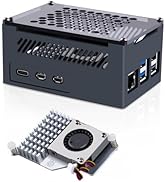
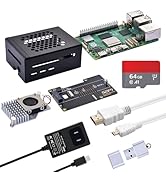
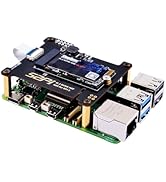
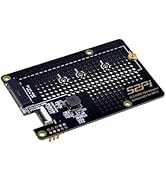
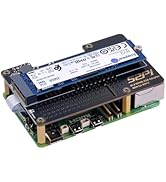
The GeeekPi N04 M.2 NVMe to PCIe Adapter is a precision-engineered expansion card designed exclusively for Raspberry Pi 5. It supports multiple M.2 NVMe SSD sizes (2230 to 2280) with PCIe Gen2 and Gen3 x1 interfaces, ensuring high-speed data transfer up to PCIe 3.0 standards. Featuring a no-solder CNC mount screw, included installation hardware, and a ventilation-optimized design, it delivers reliable performance and easy setup. An integrated 3A voltage regulator ensures stable power, making it the perfect upgrade for professionals seeking to supercharge their Pi 5 storage capabilities.












| ASIN | B0CRK4YB4C |
| Best Sellers Rank | #2,547 in Computers ( See Top 100 in Computers ) #2 in Computer Memory Card Adapters |
| Item model number | N04-New |
| Manufacturer | GeeekPi |
| Package Dimensions | 11.9 x 8.1 x 4.2 cm; 60 g |
B**Y
Works well with 80mm cable to allow for tower cooler. Seeing speeds of 600+. Very happy
J**N
Item (an m.2 add on hat for raspberry pi) worked immediately on my RPi 5. Multi-boot several distros using PINN. Works great. Recommend to anyone that wants to add nvme support to their Pi.
V**A
Works as expected. But you need external machine with usb to nvme converter to re image os. If I tried boot Pi5 from sd card try to image directly from within pi. This way is not yet working as nvme is not shown as drive in pi imager. May be it works in future. Also I have observed when I set boot order as sd->nvme->usb. It misses boot for first time. Second time it boots from nvme.this adds to the boot time. Once booted it is very fast.so yes it works as per expectation but setup could be easier. I used wd blue 512gb ssd to flash ubuntu.
F**N
Works fine.
O**E
Add nvme storage to Rpi 4 or 5 for increased speed, storage space, and performance. Super-easy setup in Raspberry OS. This board plus a nvme stick gave me a 1TB machine, and now it boots in a couple seconds. It's a great upgrade for rPi if you're still using SD card. Once it boots, rPi can clone the SD into the nvme. No need for any other adapter. Instructions on the rPi site are great.
Trustpilot
2 months ago
4 days ago