🚀 Elevate Your Data Game with Instant Access!
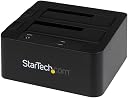
The StarTech.com Dual-Bay USB 3.0 / eSATA to SATA Hard Drive Docking Station is a powerful tool for IT professionals, enabling quick access to 2.5/3.5" SATA drives for backup, imaging, and data transfer. With a blazing fast 5 Gbps transfer rate, hot-swap capability, and a toolless design, this docking station is built for efficiency and durability, making it the perfect addition to any tech-savvy workspace.


| Hard Disk Form Factor | 2.5 Inches |
| Compatible Devices | Compatible with USB and eSATA enabled computer systems such as EliteBook 8470p and 2.5in or 3.5in SATA solid-state Drives and hard drives |
| Data Transfer Rate | 6 Gigabits Per Second |
| Maximum Number of Supported Devices | 2 |
| Hardware Platform | Mac |
| Memory Storage Capacity | 4 TB |
| Hardware Interface | USB 3.0 |
| Item Weight | 0.49 Kilograms |
| Material | Plastic |
| Color | Black |
P**E
Very fast.
I have this device connected via eSATA to a SATA card plugged into the PC motherboard. That card is a dual port eSATA card and it does support port multiplier, because of this Win11 on my PC does in fact see both drives. This is a good configuration for me. This device is an excellent match with the eSATA/SATA card I am using which is PEXESAT3221. Of course it is for a PCIe motherboard slot. If you are thinking of doing this make sure you have an open PCIe slot on your motherboard and if so get both. They will work perfectly and in this configuration they support RAID zero, which is what I was looking for. I hope this helps you.
J**Y
Power button is idiotic, no cloning, and too expensive. Otherwise, it's fine.
MAJOR FLAW - if the power goes out, you have to be on site to physically press the power button (unlike most docks which have a rocker or toggle switch in the back. This is for a boot drive for a local media server, so that's a real pain.Minor "flaw" - it doesn't include a stand-alone cloning feature. That's not so bad but then why does it cost twice as much as other docks with both (A) cloning and (B) an eSATA connector in addition to USB 3.0.That being said, I was happy to see that I could in fact connect the eSATA to the motherboard the way you'd connect the boot drive and the drive inside works just fine. Considering SATA only allows one drive (unlike old-timey ATA ribbon cables, or "PATA" as you kids call it now) it's understandable that you can't use both drive bays at the same time. Not sure why the HDD2 slot takes precedence over the HDD1 slot when you use both this way, but that's just a curiosity, not positive or negative.
H**1
nice SATA III external enclosure.
I have several already but they are SATA II This one is III. That is double the Data Transfer Speed from 300 to 600 MB/s. Loving it, have Installed, Booted and ran several Linux Distros from an 2.5 SSD and runs af it were running directly from the onboard mboard SATA ports.copy data between drives. To install, test or run newer Linux Distros temporarily and not disturb the m.2 internal permanent distros, like Manjaro,OpenSuse, Fedora, Debian and ArchLinux based-like distros. I wish I had bought this one before the pandemic, price has increased but still worth it. I take SATA over USB hands down.
B**8
Quick enouch and reliable
Quite surprised so many negative reviews. Not my experience, possibly due to other hardware or software differences.I purchased the StarTech.com USB 3.0 / eSATA Dual 2.5/3.5" SATA HDD Dock with UASP, part # SDOCK2U33EB. NOTE: two drive, not 4 drive capacity. As the name states, I use both 2.5' (SSDs) and 3.5"spinning drives with it. The Amazon purchase was in March 2015, perhaps updated from earlier. I've used the dock intermittently for 7 months.I ran Windows 8.1 Pro when purchased and Windows 10 Pro now. I use a tablet as a desktop (Microsoft Surface Pro 3, normally on the Surface Pro 3 dock station for its added USB, Ethernet, DisplayPort connections). So I'm using Windows, a purchased, not home made device, with USB version 3 connections, full power, no battery. That eliminates many who had (IMO: a self-inflicted) complaints.Next, I do not leave the dock connected and on all the time. It is simply an offline backup method so why leave it on risking possible (never happened yet) malware or virus. Offline is safer.As I started pen this, I completed a 50GB copy from my internal SSD to a slower SATA 3 Gb/s spinner, I'm now copying another folder 33GB in size. Done long ago. I see transfer speeds of 15 to 86 Mbps. Windows Explorer fully reported removal of a SSD (press down on left side ejector) then insertion of a 3.5" spinner. No freezes. No need to reboot etc.I do not award full 5 stars. The industry is awash with its SATA 1, SATA II, eSATA, PCIe, NVMe protocols with unrealistic speed ratings fully not relevant but repeated by manufacturers without a heads up to the uninformed consumer. They could do better. I have purchased and returned a competitors dock that did not transfer at USB 2 speeds so yes, this is better than other HDD docks.
Trustpilot
3 weeks ago
2 months ago
5 days ago
1 month ago