
DOWNLOAD THE APP


Customer Services
Copyright © 2025 Desertcart Holdings Limited
DOWNLOAD THE APP


🎯 Elevate your game with Santorini’s swift precision and magnetic magic!
The Akko MOD007B Santorini gaming keyboard combines a stylish 75% compact design inspired by Greek island aesthetics with cutting-edge Rapid Trigger technology for ultra-fast 0.1mm key actuation. Featuring Kailh Sakura Pink magnetic switches that are hot-swappable, it supports dynamic keystrokes allowing up to 4 actions per key. Connectivity is versatile with wired USB-C, 2.4GHz wireless, and Bluetooth 5.0 modes, including multi-device pairing. Built with premium polycarbonate and a tactile metal volume knob, it offers onboard memory for custom profiles and a long-lasting rechargeable battery, making it a top-tier choice for professional gamers and productivity enthusiasts alike.


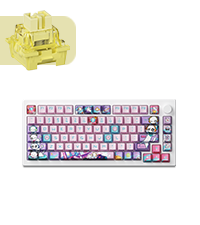


| ASIN | B0CP7BX9C4 |
| Additional Features | Backlit, Rechargeable |
| Antenna Location | Gaming |
| Best Sellers Rank | #1,052 in Computer Keyboards |
| Brand | Akko |
| Built-In Media | USB Cable |
| Button Quantity | 104 |
| Color | Santorini |
| Compatible Devices | Gaming Console |
| Connectivity Technology | Bluetooth, USB-C, Wi-Fi |
| Customer Reviews | 4.1 out of 5 stars 154 Reviews |
| Enclosure Material | Polybutylene Terephthalate |
| Global Trade Identification Number | 06925758627764 |
| Hand Orientation | Ambidextrous |
| Keyboard Backlighting Color Support | RGB |
| Keyboard Description | Gaming |
| Keyboard Layout | QWERTY |
| Manufacturer | Akko |
| Model Name | MOD007B |
| Model Number | MOD007B |
| Number of Keys | 104 |
| Number of Sections | 5 |
| Power Source | Battery Powered |
| Processor Count | 1 |
| Recommended Uses For Product | Gaming |
| Series Number | 7 |
| Special Feature | Backlit, Rechargeable |
| Style Name | Modern |
| Switch Type | Kailh Sakura Pink |
| Theme | Santorini |
| Unit Count | 1.0 Count |
| Warranty Description | 1 |
Y**R
Fantastic keyboard!
I love this keyboard and it's my favorite one so far. Performance-wise there's nothing to complain whatsoever it performs great, good response times, keys feels nice to press and the sound is one of the best out of the box sounding keyboard I've ever tried, and I've tried many of them. It feels heavy, is built well, sturdy and the design is really cool, the battery can go for days once fully charge and could even go for more if you turn off the RGB lighting. Honestly for the price this is one of the better keyboards out there it's such a good deal it's not even funny. The only complaint I would have is that to switch between cable, battery power, windows and mac mode you need to remove the caps lock, I mean why not just add it to the back of the keyboard or something but I guess it doesn't bother me much I won't be switching modes.
M**Y
Close to perfection and probably the best keyboard you can buy at this price point!
I have been a gamer for as long as I remember and enjoy playing different FPS games like Valorant, Fortnite, Overwatch, etc. Rocking a 8k polling rate mouse with optical switches, 240hz monitor, and powerful PC, I was on the lookout for the next thing to upgrade in my setup to further enhance my gaming experience. This keyboard caught my eye recently when exploring the new Hall effect switch technology, and I decided to give it a try. This is my first time owning an Akko keyboard, and I am impressed with how good it is. I had multiple keyboards in the past and this keyboard is the absolute best when it comes to typing. The sound that the keys make and the feeling during typing is amazing. I feel like I make fewer mistakes than before, and my keystrokes register more consistently. This keyboard is quite heavy and is built very good. None of the keyboards I owned before from brands like Razer, Corsair, and Logitech come close to the typing experience and build quality. The case is made out of polycarbonate, giving it both a premium feel and sturdy structure. The volume knob is metal and has tactile bumps when turning left and right. Pressing on it switches between controlling Volume to controlling the RGB brightness. I don't like the existing RGB presents in the software. Since I have the World Tour Tokyo version, I found the Static Red LEDs present to look the best with it, adding to the beautiful Japanese Sakura design. Pros: 1. Beautiful Design. 2. Detachable USB-C cable. 3. Sturdy and high quality materials. 4. Wired, Wireless dongle, and Bluetooth capabilities. 5. Hot swappable switches (Supports both magnetic and 3 pin mechanical switches). 6. Big battery that lasts a very long time. 7. Ability to connect to up to 3 Bluetooth Devices at same time. 8. RGB is present in wireless mode. 9. Good software with a lot of customization. 10. Adjustable Actuation point aka Rapid Trigger. Cons: 1. Keycaps are easily susceptible to scratches on the sides if not carefully handled with the keycap removal tool. (I wouldn't recommend using other keycaps pullers. Stick to the one included with the keyboard). Wouldn't be a huge problem if the keycaps themselves didn't cost $70 on their website, if you considered replacing them later on. 2. Power supply ON/OFF is under the Caps Lock keycap, making it both difficult to access and easy to scratch the sides of the Caps Lock key, if not doing it very carefully. This is not a huge con since you will rarely need to access that switch. 3. Existing RGB presents in the software aren't great, but there is a possibility to make custom RGB effects and download the effects/settings that other users have created. 4. South facing switches. This keyboard uses South facing switches severely limiting the type of key caps you can use. You can't use pudding key caps or other key caps with transparent lettering on top of the keys since they will appear dim due to the light being on the opposite direction to the one on normal keyboards. Switching between different modes: If you are trying to use this keyboard in wireless or wired mode, you have to press : Fn + U for Wired mode Fn + Y for 2.4G Dongle Wireless mode (Make sure to remove the Caps Lock key and shift the switch to bottom to enable the battery power to use wirelessly) You can also use this keyboard with up to 3 Bluetooth devices at the same and switch between them using the following buttons: Fn + E Bluetooth device 1 Fn + R Bluetooth device 2 Fn + T Bluetooth device 3 The power switch under the Caps Lock key has 3 modes: Top: If you are using an Apple device, like Mac/MacBook/iMac etc., this is the mode you want to have your keyboard on. It also enables power to be used wirelessly. Center: This is wired mode for Windows devices, the battery/power supply is disabled. Bottom: This enables the battery/power supply to the keyboard, allowing you to use this keyboard both in wired and wireless modes. (Pressing and holding Fn + Space bar allows you to see the battery level of keyboard) For those who had issues with ghost keystrokes or keyboard becoming not usable after software update: After software update, make sure to calibrate the magnetic keys though the software in "About" section. Otherwise, you either won't be able to use the keyboard (keys will not register) or you will have ghost presses. Conclusion: This is an awesome keyboard with a lot of different connectivity options, great build quality, compatibility, design, and software. I wish the keyboard had north facing switches so I can use pudding key caps with transparent lettering to let RGB shine though but it is what it is. This keyboard RGB software presents are pretty disappointing as well, so I guess it's not really designed for that.
J**N
My first premium mechanical keyboard experience.
The Keyboard I bought was the Akko mod007bHE Wireless TRI MODE Creamy Yellow Magnetic Switches: As my headline might indicate I havent gone too far down the rabbit hole of mechanical keyboards. Ive customized mechanical keyboards before, though. Ive experimented with different hot swappable switches trying out tactile, linear, and silent switches and different types of keycaps. The mods that require a bit more tear down into the base of the keyboard are new to me. Ive often drooled over some keyboard gurus builds and they do make a dreamy sounding keyboard. Of course its all subjective to your tastes whether you want thock or clack...or "creamy". I tried to do a little research on this board and ended up seeing videos of people press all they keys on "this model of keyboard" and they sounded like hollow 10 dollar keyboard trash! They claimed that you had to tear this board down and apply tape to the circuit board and lube all the switches... add foam or whatever and then they would let you listen to what it sounded like after doing "all those things." I was prepared to have to do all that to this keyboard mostly because compared to the competition that have similar HE features this board is A) Way cheaper B) Actually instock and C) A bit more customizable as it accepts 3 pin traditional switches as well as the magnetic ones (though, a note on these switches later) Got my package...Opened the box...tapped a few keys....nah.. Im not doing it! I am not tearing this thing apart. It doesn't need it. Some new keycaps yeah.. but if you aren't some keyboard aficionado wiz this keyboard is going to be just fine. This is my first out of the box creamy experience. This is the dreamy board I would watch videos of that someone had to do the WHOLE TEAR DOWN and tinker to achieve. Yes some people like that kind of tinkering and unfortunately for them these new keyboards are shipping already great AND getting affordable. The board I got sent is nearly exactly what I hoped to achieve after modding it. Think creamy glass... that might make more sense after you try this board, though. Can one mod it anyway and make improvements? SURE, but Im glad I dont have to. I played around with the software a bit and I'm still figuring out what I actually would tweak with the HE switch actuation setting, but for now just trying out the default gaming mode and will go from there (btw this keeb has on board memory so you dont always have to have the software open as you can use hotkeys to toggle default, sensitive, gamer, and a custom settings). You can also download other users submitted settings and switch between those and some are titled for the game they use them on. Theres some fun RGB effects, personally i lean towards a single color and something that keeps most key illuminated. okay so about the switches. Magnetic switches... cool!! right? well HE boards have had a recent resurgence in 2023 and the board everyone tries to compare it to uses slightly different switches. The testimonials i read said that the magnets for this switch is actually reversed compared to the other boards. If you are wanting to change those out down the road you might have to wait til options made for this board come out as even the ones in it right now aren't even for sale. Is it the best out of the box at this price..? For me yes. It was on sale, too. I cant answer that for you. It depends on your expectations and what you want from a keyboard. To me it was worth it. Hopefully this scratches the itch for me long enough. Ill try to add more as it comes as this thing is still pretty new, too.
S**E
Piece of junk - update
I LOVE typing on this keyboard. It’s beautiful and as I’m working it’s nice to look down and see something pretty while I”m working. Mechanically the keyboard is solid. Not only in performance but also in structure. It feels really solid and stable. The keyboard is so stable it rarely shifts and I’m a keyboard pounder. 4 weeks minimal use 1/2 keys don’t work. Bought 4 and 3 have had to be returned because defective. Last one just past return window and it stopped working as well. Complete waste of money. It’s a beautiful looking brick that won’t work.
K**N
Love it!
I love it! Don’t think about it, just get it! This is my first mechanical keyboard and it’s awesome, I love the weight! The keys are cherry design, the sound is great, it’s not a clack, it’s more of a soft click! The on/off button is underneath the CAPS LOCK key. I downloaded the Akko Cloud Driver - that one is the one that works with this model to customize the color of the up lights. Software to change the colors is user friendly - very easy! The design is very nice!! 15/10 recommend! I’ve already customized/replaced some of the keys to my liking :) can be wired directly via usb plus in or wireless via usb received. You charge it with the wired usb.
S**A
Checks all the boxes. Except you need a PhD to use the software
Slight exaggeration on the software, but it's definitely one of the more convoluted and confusing ones I've used. The keyboard feels premium, solid, and high quality. The keystrokes are ASMR levels of thockiness. Did a tape mod and made it even better. It's got all the features of the expensive hall effect keyboards for much less: deeply customizable actuation, macro, and action layers, as well as the forbidden "rappy tappy", "rappy snappy", "snappy tappy" whatever you want to call it. Reason for 1 star off: -The stabilizers aren't the best. I had to do a tape mod for the spacebar and a few other keys to reduce rattle/wiggle. All the keys have some degree of wobbling. -Incredibly inconvenient design of putting the off/operating switch underneath the Caps Lock key. I barely need to change it, but when I do, I have to get out my keycap puller. -Software is confusing and not intuitive at all. It's learnable, but you have to sit there and experiment. There's also almost no community or discussion about this keyboard. The Akko subreddit is average at best.
L**O
Muy bueno pero con un fallo grave
El teclado es muy bueno, lamentablemente luego de unas semanas empezó a deconectarse con tal solo mover un poco el cable. Mi solución fue utilizar el cable USB de PlayStation(PowerA USB-C for PlayStation 5), de momento no ha vuelto a desconectarse incluso moviendo mucho el cable. Contactaré con akko a ver si me puede brindar una solución, aunque dudo que sea así... Seguiré probandolo con el cable de PlayStation y si todo sale bien, actualizaré mi reseña pero la verdad, si tuviera el dinero no lo compraría, me costó ahorrar el dinero y ahora no sé si podrá durar.
N**O
THOCC Without The Work
So- I was told to look for a keyboard for my birthday. I hunted for maybe four+ hours for something that looked sleek, had hot-swappable switches, and had south facing RGBS for the key caps I wanted to use (see photos they look divine). I didn’t know how DEEP the mechanical keyboard customization world went until I started researching, and it was exhausting. I was going to settle for the Logitech G713. I gave up on searching, went back the next day and Amazon suggested this exact keyboard. It checked all the marks!! I gave it a shot and I absolutely ADORE it. The customization software for lights are incredible, the keys are smooth and the sound is to die for. I would’ve had to lube switches, add tape, and add foam to even get this sound on the other Logitech board (which isn’t even hot swappable apparently). I rarely leave reviews, but I had to because of the absolute RELIEF it was to find this. It’s made of metal and has a great weight to it. Literally the only downside is the charging light under the space bar for the Bluetooth option. Reddit said it will eventually turn off, but it’s not super attractive (not at all a deal breaker though). WARNING: I saw someone mention they had an issue with the keyboard nonstop typing after installing the firmware update through the akko cloud drive. I had this problem too. However, the software quite literally tells you to do a calibration directly after updating the firmware. If you have this issue, hold down fn+~ to factory reset it, then start the calibration test. All you have to do is press down every key on the keyboard one at a time, then hit confirm. Then it’s golden! Slightly confusing because I’m not sure everyone would know to do that, sucks the guy returned it because it was an easy fix. Definitely would purchase again!
Trustpilot
1 week ago
2 days ago