🚀 Unlock seamless CAN bus power with universal USB plug-and-play!
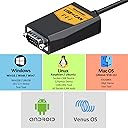
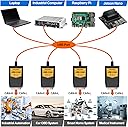
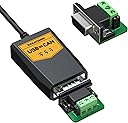
The innomaker USB to CAN Converter Cable is a versatile, industrial-grade interface designed for single board computers and desktops. It offers universal multi-OS support, robust 3000V signal isolation, and programmable CAN bus speeds up to 1Mbps. Perfect for developers and professionals seeking reliable, plug-and-play CAN connectivity with comprehensive SDKs and driver support.


| ASIN | B09K3LL93Q |
| Best Sellers Rank | #702 in Single Board Computers (Computers & Accessories) #7,696 in Cables & Accessories |
| Brand | innomaker |
| Color | Black |
| Customer Reviews | 4.4 4.4 out of 5 stars (198) |
| Date First Available | October 13, 2021 |
| Item Weight | 4.2 ounces |
| Item model number | USB2CAN-C |
| Manufacturer | innomaker |
| Operating System | Linux, Mac OS, Windows, Windows 8 |
| Package Dimensions | 5.08 x 3.5 x 1.85 inches |
| Processor Brand | ARM |
| RAM | LPDDR4 |
| Series | USB2CAN-C |
H**Y
This worked great with my Pi3B+ - seen by linux as Can0 without setup.
I just started using this with my raspberry pi 3B+ to communicate with a solar power controller that uses canbus. Before using this I was trying to use a canable usb to can but it gave me some problems later with not showing up as Can 0 . That may have been related to software issues. But this Innomake usb converter shows up as Can 0 right away without any code setup. I also like the activity leds on this so I know if it is communicating. So it was a good purchase.
D**Y
Excellent little device!
Very happy with this device. Works flawlessly with my custom Linux CAN monitoring application.
G**N
Works for me on Windows 10 - Documentation and Example code is available and useful
Folks, I had no problem getting this device up, running, and working with Innomaker's C# example code (I know that should be the case for any similar product... but unfortunately, it isn't). I'm using VS2013 currently and it took very little work to get this going. I've also started "Secondary Development" and it's also working out for me, so far. In my opinion, this device's USB driver / interface is far better than the plethora of "cheap" Virtual Com Port (VCP) devices that are out there. A good bit of code had to be developed to make them somewhat usable. I had nothing but problems with several of these other USB to CAN "VCP" devices. I could never get them working properly, reliably, or efficiently. They were "cheaper", but ultimately a waste of my valuable time, as the serial interface was problematic (a real weakness in Windows and I tried / developed several drivers but ultimately ended up disappointed), and they provided little to no documentation / example code (either none, unusable, or unreadable). Support was also poor, although I can't comment on Innomaker support, as I haven't had to even ask for support! The Innomaker device is a bit more expensive than the "cheap" ones, but in this case, you do get what you pay for. I've run millions of CAN frames through this device and have had no issues to report. The device was plug and play for me. Others have complained that it wasn't for them. Bottom line... It's early yet, and I still have much testing to do, but so far, my experience has been far better with this "Innomaker" product than with several previous competitor products. I wish I had spent time on this device first before wasting weeks on the other "cheap" devices. I'll update my review as I get more experience with the product. Update 4-17-2024 Everything is still going well but, as with other similar devices, I'm seeing a limitation to how fast messages can be transmitted. Using the synchronous send function and 6 configured extended CAN messages, sent in a loop, I'm averaging just above 100msec per message. The code is optimized at this point, so the only current way to send them faster is to reduce the number of CAN messages being sent. I'm not going to ding my rating on this device at this point because my experience using it has been so good. Note: I have not tried the Async functions yet and have not tested the device queue depth to determine how many messages can be queued before it chokes.
K**.
Good
The interface works on Raspberry PI as indicated and also Linux Mint. It doesn't work with WSL on Windows but the description did't mention it so no big deal. The sample Python scripts is basic, with once script to receive and another to send. It would have been nice if they had a basic GUI that received and send at the same time. Including the DB9 connector with screw terminals is nice to have. I was able to connect to a CANable interface that also used screw terminals It would have been nice if the CAN interface had an enclosure as well.
I**N
Worked as advertised, good equipment
I bought two units and was able to easily write a test program to send data back and forth between them. Very usable tech. I would buy this again in a second. It could not have been easier to integrate.
A**Y
Plug and play Linux Socketcan device
These are great USB to socket can devices that require no setup for default Ubuntu distributions. All that's required is setting the interface baud rate, which is to be expected.
K**C
Not supported, does not work with Mac
Ancient super sketchy drivers, if you want to be a chinese cyper spy enabler or DDOS node, you should definitely buy this product and install their driver. If not, you'll never get it to work on a Mac.
A**7
Good
Great for messing with vehicle CAN bus, works great with linux
G**Ş
Merhaba kullanım kılavuzu gelmedi Windows için driver ve Rx tx çıkışları şeması iletirmisiniz rica etsem
R**S
El conversor de USB a CAN es una herramienta imprescindible para ingenieros, técnicos y desarrolladores que trabajan con sistemas de comunicación basados en el protocolo CAN Bus, muy utilizado en automoción, automatización industrial y electrónica embebida. Este dispositivo permite conectar un ordenador mediante USB directamente a una red CAN para realizar diagnóstico, monitoreo y desarrollo. Diseño y construcción Generalmente compacto y portátil, está fabricado con carcasas resistentes y conectores de calidad para soportar un uso prolongado. Incluye interfaz USB en un extremo y puerto CAN (DB9 o terminales de tornillo, según el modelo) en el otro, asegurando una conexión estable y confiable. Rendimiento Soporta diferentes velocidades de transmisión (normalmente desde 10 kbps hasta 1 Mbps), garantizando compatibilidad con la mayoría de redes CAN. Permite enviar, recibir y registrar tramas en tiempo real, facilitando el análisis de datos y la depuración de sistemas. Facilidad de uso La mayoría son plug & play, compatibles con sistemas operativos Windows, Linux y macOS, y cuentan con librerías o drivers para facilitar su integración en software propio. Algunos incluyen herramientas gráficas para monitorear la comunicación sin necesidad de programación. Ventajas principales Comunicación directa entre PC y red CAN. Compatible con una amplia gama de aplicaciones (automoción, robótica, IoT, etc.). Soporta diferentes velocidades de transmisión. Compacto, portátil y fácil de usar. Aspectos a considerar Es importante verificar la compatibilidad con el software o librerías de desarrollo que se vayan a usar. Algunos modelos económicos pueden carecer de aislamiento eléctrico, lo que limita su uso en entornos industriales exigentes. La funcionalidad avanzada (como filtros CAN o buffers grandes) depende del modelo. Conclusión El conversor de USB a CAN es una herramienta práctica, versátil y esencial para todo aquel que necesite analizar, depurar o desarrollar sistemas basados en CAN Bus. Su facilidad de uso, portabilidad y compatibilidad lo convierten en un accesorio imprescindible en entornos de automoción, automatización y desarrollo electrónico.
J**K
Asked about DB9 to OBD2... Customer service gave me Amazon links to cabes which will work.
G**Z
Funciona muy bien en linux, que lo reconoce sin necesidad de instalar ningún driver
D**.
I bought it to use with some custom controllers. you will notice that the seller does not provide driver on the product page (unless an update was made after my purchase), and you actually need to contact him to get some sort of driver which is not very well documented. The problem with this type of device is that without the proper driver, and compatibility with frameworks like Python-can or Matlab-Simulink or CANApe (etc..), the scope of usage is very limited; in my case it was pretty much useless. Cheap indeed, but not my best move considering there are some other choices out there.
Trustpilot
2 months ago
2 days ago