We remain fully operational. Our teams are working around the clock to ensure your deliveries continue safely.

DOWNLOAD THE APP


Customer Services
Copyright © 2025 Desertcart Holdings Limited
DOWNLOAD THE APP
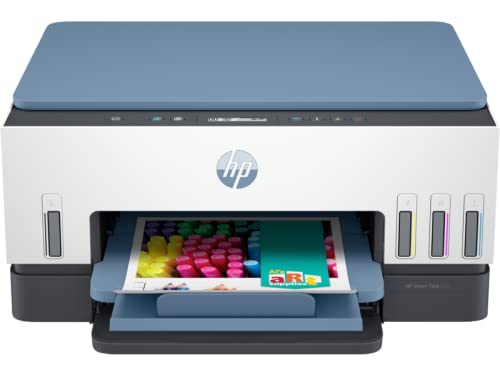
🖨️ Print smarter, live greener, connect faster—because your office deserves the best.
The HP Smart Tank 675 is a high-capacity all-in-one inkjet printer designed for professionals who demand efficiency and eco-consciousness. Featuring automatic duplex printing, dual-band self-healing WiFi, and integrated ink tanks with smart sensors, it delivers fast print speeds (22 ppm black, 16 ppm color) at ultra-low running costs. Setup and control are streamlined via the HP Smart app, making it ideal for mobile and remote workflows. Certified EPEAT Silver and made with 25% recycled plastics, it’s a sustainable choice for the modern workspace.
| ASIN | B09PW8D757 |
| Additional Printer Functions | All In One, Copy, Scan |
| B&W Pages per Minute | 30 ppm |
| Best Sellers Rank | #8,687 in Computers & Accessories ( See Top 100 in Computers & Accessories ) #25 in Ink Tank Printers |
| Box Contents | Ink Bottle, Power Cord, Printhead, Setup guide, reference guide, flyers |
| Brand | HP |
| Brand Name | HP |
| Color Pages per Minute | 24 ppm |
| Colour | Gray |
| Compatible Devices | Smartphones |
| Connectivity Technology | Bluetooth, USB, Wi-Fi |
| Control Method | App |
| Controller Type | Android, iOS |
| Country of Origin | China |
| Customer Reviews | 3.6 out of 5 stars 113 Reviews |
| Dual-sided printing | Yes |
| Duplex | Automatic |
| Hardware Interface | Ethernet |
| Importer Contact Information | Hewlett Packard India Sales Private Ltd. 24, Salarpuria Arena, Hosur Main Road Adugodi, BANGALORE - 560030. |
| Ink Color | black, cyan, magenta, yellow |
| Item Dimensions D x W x H | 37D x 43W x 20H Centimeters |
| Item Type Name | Inkjet Printer |
| Item Weight | 6.38 Kilograms |
| Manufacturer | Cal-Comp Optical Electronics(YueYang)Co.,LTD CP1YY, HP |
| Manufacturer Contact Information | Cal-Comp Optical Electronics(YueYang)Co.,LTD CP1YY |
| Max PrintSpeed BlackWhite | 600 dots_per_inch |
| Maximum Copy Resolution Black and White | 600 dpi |
| Maximum Copy Resolution Color | 600 dpi |
| Maximum Copy Speed Black and White | 12 ppm |
| Maximum Media Size | 3 x 5 inch |
| Maximum Sheet Capacity | 150 |
| Model Name | HP Smart Tank 675 All-in-One Printer |
| Model Number | 28C12A |
| Model Series | Smart Tank 675 |
| Network Connectivity Technology | Bluetooth, USB, Wi-Fi |
| Other Special Features of the Product | Usb |
| Packer Contact Information | Cal-Comp Optical Electronics(YueYang)Co.,LTD CP1YY |
| Paper Size | 8.5x11 centimetres |
| Printer Output Type | Colour |
| Printer Type | Inkjet |
| Printing Media Type | Labels |
| Printing Technology | Inkjet |
| Scanner Type | Flatbed |
| Special Feature | Usb |
| Total USB Ports | 1 |
| UPC | 195908302711 |
| Unit Count | 1 Count |
| Warranty Description | 1 |
U**R
Defective item received and used also
Defective item received
T**R
Poor Experience
I received a defective printer. HP seems to be selling products without proper quality control and testing. If you receive a defective item and fail to check it within the return period, it becomes a headache, you have to go from one service center to another. Overall, it was a very poor experience.
S**R
Value for Money Product
Using 3 days ago. Working properly as expected. Print quality is awesome but how much cost frindly print lets Know.......
J**S
Value for money
Good product, value for money👍🏻
P**R
Working Condition
Good Working. No problem till now👍🏻
J**E
as an IT Guy I can say if you want headache every day buy this printer.
1) As an IT person, I use an HP laptop that is less than a year old and ensure it remains updated with the latest patches. 2) Following the setup instructions, the printer initially prompts for a Bluetooth connection to the laptop, which I successfully established. 3) Subsequently, I encountered difficulties connecting the printer to Wi-Fi, requiring multiple attempts. 4) Upon the printer's request, I updated its firmware, which was performed automatically but resulted in printer functionality issues. 5) After a two-hour struggle, involving multiple printer restarts, I managed to establish a stable connection. 6) Whenever I power on the printer, it consistently shows as offline under printer and devices, necessitating repairs using the HP Smart app toolbox. 7) Despite several attempts, I eventually achieved some success with printing and scanning tasks. 8) Unfortunately, the printer repeatedly went offline. 9) Ultimately, I decided to return the printer and have resolved not to purchase HP printers in the future. Regarding the application: a) The application operates at a frustratingly slow pace, displaying a busy screen with every click, leading to wasted time and reduced productivity. b) The scan application exhibits issues with cropping and lacks user-friendliness, which can be attributed to its bad design.
S**R
Very good quality of product
Its working very nice and very usfull tools for me thank you hp and Amazon
E**M
Time saver
WiFi printers are such a boon.. this one is simple to use. original inks are easily available directly from HP . Have been using it almost daily. Print quality is excellent.
Trustpilot
1 month ago
1 month ago