
DOWNLOAD THE APP


Customer Services
Copyright © 2025 Desertcart Holdings Limited
DOWNLOAD THE APP
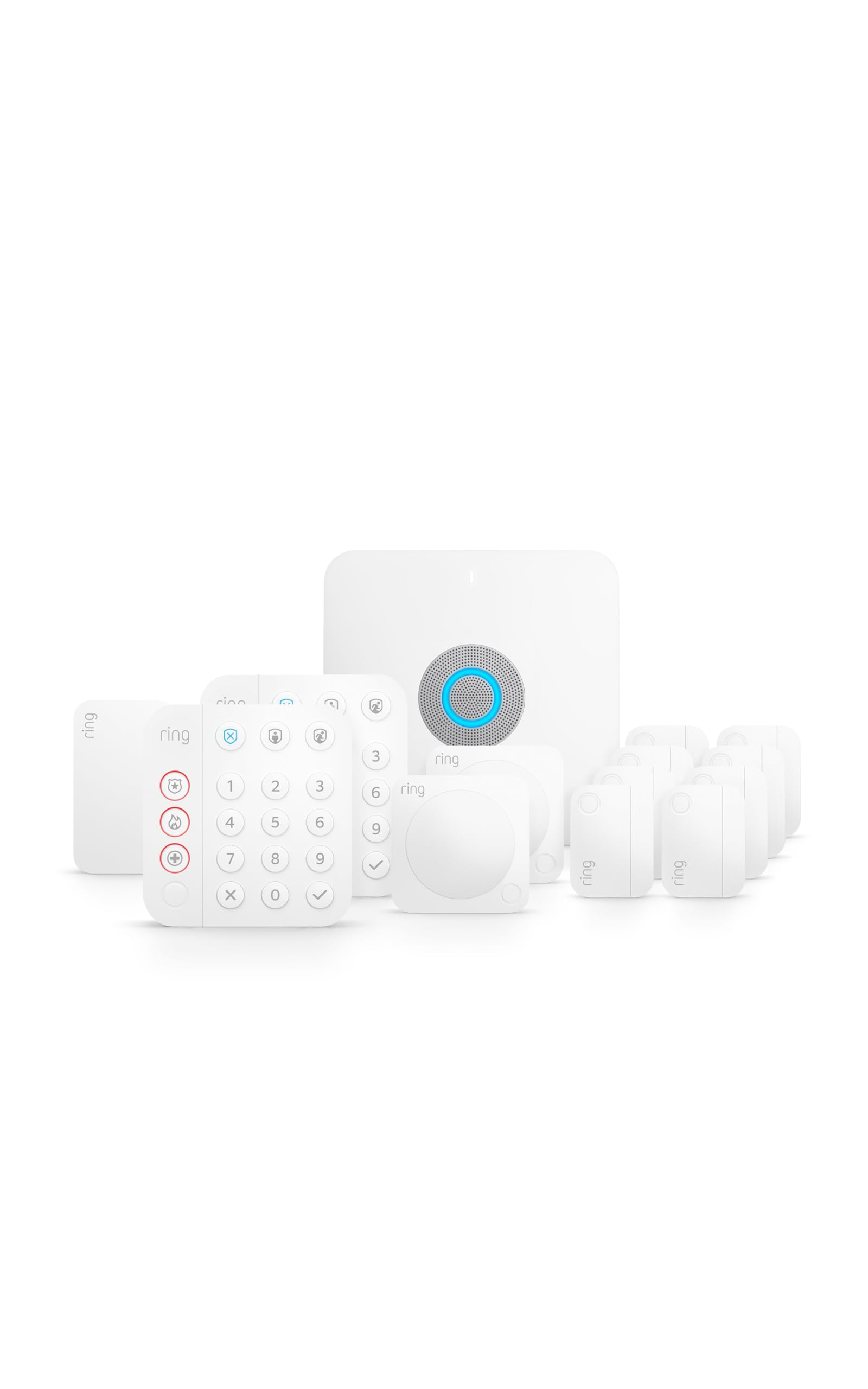
🔐 Elevate your home security and Wi-Fi game—because your smart home deserves the smartest protection.
The Ring Alarm Pro 14-Piece Kit combines advanced home security sensors with a built-in eero Wi-Fi 6 router, delivering fast, reliable internet and comprehensive protection. Designed for easy installation and seamless integration with Alexa and other smart devices, it offers customizable coverage, 24-hour battery backup, and optional professional monitoring with cellular backup. Ideal for modern homes seeking a unified, secure, and connected environment.
| Disclaimers | 1 Ring Alarm and all Ring Alarm accessories require a subscription for in-app features and digital notifications, including but not limited to: digital arming / disarming and integration with other Ring, Echo, Alexa, and third party products. Subscription sold separately. View the Ring Protect Plan here for pricing and details. Customer reviews may reference features that require a subscription. 2 Ring Alarm Professional Monitoring service is available only within the U.S. (all 50 states, but not U.S. territories), and is included with a Ring Protect Pro Plan (subscription required, sold separately). Additional charges may apply in areas that require permits or guard response service for alarm verification. Enrollment required. 3 Extra data charges may apply. Cellular data is provided by a third party carrier. Coverage, uptime, technology, and speeds will vary. May require backup power if the power goes out. Visit here for more details. Ring Alarm Pro is designed to be used as your primary router. It must be directly connected to your modem as the internet gateway. Don’t set up Ring Alarm Pro on an existing wifi network. 4 A compatible Ring Protect subscription required, sold separately. Alarm Cellular Backup uses a third-party carrier. Coverage will vary. 5 Advanced online security features are available to US customers with eero Secure, which is included with a Ring Protect Pro subscription. 6 Battery life is dependent on device settings, usage, and other factors. Internal battery backup lasts up to 24 hours in Low Power Mode. In Low Power Mode, only some security features, including Alarm Cellular Backup, are available. Battery life is dependent on device settings, usage, environment, and other factors. 7 Ring Alarm Pro and a Ring Protect subscription are required to use Ring Edge features. Additionally, a microSD card is required to use Local Video Storage. All sold separately. For more information, visit here. Ring Edge is currently not available for Ring Video Doorbell 4, Floodlight Cam Wired Pro, Always Home Cam, Ring Video Doorbell (1st Gen), or Stick Up Cam (1st Gen). Ring Edge live view and stored videos will be initially available only in the Ring app and not on Ring.com. 8 eero mesh wifi router provides up to 1,500 sq. ft. of coverage. Adding eero Extenders expands coverage in larger homes. We don’t recommend using Ring Alarm Pro as a wifi extender, as it will prevent you from using Ring Protect Pro features. Internet connection speeds depend on your internet service provider. Maximum wireless signal rates are derived from IEEE standard 802.11 specification. Specifications assume wired ethernet connection, experienced speeds may vary based on network configuration. Coverage estimates are based on normal use conditions. Actual range and performance may vary, including due to factors such as interference, device usage, building materials and obstructions. Throughput and coverage estimates are a configuration reference, not a performance guarantee. Use of eero products and services, including the eero wifi router, requires creation of an eero account and agreement to eero’s Terms of Service, found here. You can review eero’s Privacy Notice here. 9 Actual savings vary depending on insurance carrier and policy. 10 Smoke and carbon monoxide monitoring is not available for a business or commercially zoned address. |
| Router | Built-in eero Wi-Fi 6 router. Wifi speeds up to 900 mbps, and coverage of up to 1,500 sq. ft. Add additional eero 6 Extenders for more coverage. |
| Power | 100-240V 50/60Hz AC Adapter included |
| Battery life | Rechargeable 24-hour battery backup⁶ |
| Operating conditions | Indoor use, 32°F to 104°F (0°C to 40°C) |
| Dimensions | 6.65 in x 6.65 in x 1.46 in (168.9 mm x 168.9 mm x 37.0 mm) |
| Installation | Place on any flat surface, such as table tops Ring Alarm Pro is designed to be used as your primary router and must be directly connected to your modem, replacing your existing network. |
| Connectivity | Ethernet, wifi, Z-Wave, Bluetooth for setup (plus Cellular Backup with Ring Protect subscription). Works with Ring certified (WWR) with Kwikset Smart Code Touchpad, Schlage Connect Smart Deadbolt, Yale Real Living Assure, Dome Siren, and First Alert. |
| Warranty and service | Ring Alarm Pro includes 1-year limited warranty and service. Use of Ring Alarm Pro is subject to terms and conditions. |
| Support | Click here to view more information on the Ring Alarm Pro support page. For monitoring licenses, visit ring.com/licenses. |
| Software security updates | Learn more about these software security updates. If you already own a Ring device, visit Software Security Updates in Ring Control Center for information specific to your device. |
| Generation | Ring Alarm Pro Base Station - 1st Gen - 2021 release |
| Power | AC Adapter, rechargeable battery included |
| Security modes | Disarmed, Away, and Home |
| Operating conditions | Indoor use, 32°F to 104°F (0°C to 40°C) |
| Dimensions | 4.13 in x 4.41 in x 0.75 in (104.9 mm x 112.0 mm x 19.0 mm) |
| Installation | Wall mount with Quick-Release Bracket or place it on any flat surface. |
| Connectivity | Z-Wave (250-foot range to Base Station open air, line of sight) |
| Warranty and service | 1-year limited warranty and service included. Use of Ring Alarm Keypad is subject to the terms found here. |
| Support | Click here to view more information on the Ring Alarm support page. For monitoring licenses, visit ring.com/licenses. |
| Software Security Updates | Learn more about these software security updates. If you already own a Ring device, visit Software Security Updates in Ring Control Center for information specific to your device. |
| Generation | Ring Alarm Keypad - 2nd Gen - 2020 release |
| Power | CR2032 coin cell batteries |
| Battery life | Approximately 3 years |
| Maximum distance between sensors | 1 inch. Leave ½” space on non-magnet side to access battery compartment |
| Operating conditions | Indoor use, 32°F to 120°F (0°C to 49°C) |
| Dimensions | 1.56 in x 2.09 in x 0.55 in (39.6 mm x 53.1 mm x 14.0 mm) |
| Installation | Mounts to doors and windows. |
| Connectivity | Z-Wave (250-foot range to Base Station open air, line of sight) |
| Warranty and service | 1-year limited warranty and service included. Use of Ring Alarm Contact Sensor is subject to the terms found here. |
| Support | Click here to view more information on the Ring Alarm support page. For monitoring licenses, visit ring.com/licenses. |
| Software Security Updates | Learn more about these software security updates. If you already own a Ring device, visit Software Security Updates in Ring Control Center for information specific to your device. |
| Generation | Ring Alarm Contact Sensor - 2nd Gen - 2020 release |
| Power | 2 AA batteries |
| Operating conditions | Indoor use, 32°F to 120°F (0°C to 49°C) |
| Dimensions | 2.6 in x 2.6 in x 1.53 in (66.0 mm x 66.0 mm x 38.9 mm) |
| Installation | Mounts to room corners or flat walls. |
| Connectivity | Z-Wave (250-foot range to Base Station open air, line of sight) |
| Warranty and service | 1-year limited warranty and service included. Use of Ring Alarm Motion Sensor is subject to the terms found here. |
| Support | Click here to view more information on the Ring Alarm support page. For monitoring licenses, visit ring.com/licenses. |
| Software Security Updates | Learn more about these software security updates. If you already own a Ring device, visit Software Security Updates in Ring Control Center for information specific to your device. |
| Generation | Ring Alarm Motion Detector - 2nd Gen - 2020 release |
| Power | 100-240V 60Hz |
| Battery life | 24-hr battery backup (lithium ion) |
| Operating conditions | Indoor use, 32°F to 104°F (0°C to 40°C) |
| Dimensions | 1.86 in x 3.19 in x 1.66 in (47.2 mm x 81.0 mm x 42.2 mm) |
| Installation | Plugs into standard power outlets. |
| Connectivity | Z-Wave (250-foot range to Base Station, extends Z-Wave a further 250 feet) |
| Warranty and service | 1-year limited warranty and service included. Use of Ring Alarm Range Extender is subject to the terms found here. |
| Support | Click here to view more information on the Ring Alarm support page. For monitoring licenses, visit ring.com/licenses. |
| Software Security Updates | Learn more about these software security updates. If you already own a Ring device, visit Software Security Updates in Ring Control Center for information specific to your device. |
| Generation | Ring Alarm Range Extender - 2nd Gen - 2020 release |
C**R
Great Home security system
I already had a mesh network created with 4 Eero Routers, working fine without any connectivity issues. I purchased this to add an additional router to improve connectivity on some of the smart devices outside home too, along with replacing my existing alarm system. The setup was pretty seamless, but right after I added this as the gateway router to my network, I started getting connectivity issues with my network. Every minute or so, the network keep disconnecting from my phones and other devices, and then it reconnect immediately after that. You wouldn't notice it usually, but if you are on a video call you can see the video freezes for sometime and then resumes. This keeps on happening every minute or so, making it unusable. I removed the Alarm pro from my eero mesh network and brought back the original 4 router mesh network I had, and then it started working good again. So it is definitely something with this Eero Built-in router. The issue happens even if I have my devices connected to one of the other nodes, so something is killing the entire network for sure. I spent hours with the Ring customer support to figure out the problem, and they were not able to fix the issue either. The security system seems to be working fine, but without having the network built-in, you wont get backup internet option, which means you are not getting what you are paying for the annual monitoring fee. I would instead go with a Simiplisafe system or if you really want to stick with Ring, go with the model without a built-in router. I hope Eero/Ring can find out the issue with this and send a software update for the same issue. Note: Resetting the entire system, adding and removing the routers back, or even creating separate network, none of that helps. Update. I tried powering off my original network equipment, and created a new network with the Ring Alarm Pro, with no other devices added. With this also I Can see the phone connected to this network keeps disconnecting every minute (even when standing right next to it with the phone.). Update Feb 2023: - Thank you for the Customer service and engineers at Eero. They took the feedback from this and now with the Software updates applied, the above disconnect issue is all gone. The network functions seamlessly. And with the newer updates you no longer need to have The Ring Alarm Pro's unit as the gateway unit. This helps when you upgrade your Eeros to the newer / faster versions. You would always want the fastest version to be connected to the modem. In case of an internet outage from the modem, the entire network automatically switches to LTE from the Ring Alarm Pro unit.
S**L
Exceptional Home Security Solution
The Ring Alarm Pro 14-Piece Kit has truly revolutionized the way I protect and monitor my home. This comprehensive home security system offers outstanding features, seamless integration, and reliable performance, making it a standout choice for anyone seeking a top-notch security solution. First and foremost, the Ring Alarm Pro 14-Piece Kit provides exceptional peace of mind. The system includes a range of components, such as motion detectors, door/window sensors, a base station, and more, to cover every entry point and key area of my home. The comprehensive coverage ensures that no potential breach goes unnoticed, allowing me to feel secure and confident in the safety of my household. Installation and setup of the Ring Alarm Pro kit were surprisingly easy and straightforward. The included instructions and intuitive mobile app guided me through the process step by step, without the need for professional assistance. Within a short time, I had all the sensors and devices strategically placed and connected, ready to monitor and protect my home. The user-friendly interface and clear instructions made the installation process a breeze. The integration capabilities of the Ring Alarm Pro are truly impressive. As a hub for smart home automation, it seamlessly connects with other Ring devices and a wide range of compatible smart devices. This integration allows for expanded functionality and convenience, such as controlling lights, locks, and cameras through a single interface. The ability to customize and tailor the system to my specific needs adds an extra layer of convenience and control. The reliability and performance of the Ring Alarm Pro system have been outstanding. The sensors and detectors accurately detect any activity or intrusion, providing timely notifications to my smartphone and triggering the alarm if necessary. The system's responsiveness and real-time updates ensure that I'm always aware of what's happening in and around my home. The peace of mind that comes with this level of monitoring and protection is truly invaluable. Furthermore, the Ring ecosystem offers additional features and services that enhance the overall security experience. Features like professional monitoring, video recording, and neighborhood alerts provide further layers of protection and community engagement. These optional services expand the capabilities of the Ring Alarm Pro system and provide even greater peace of mind. In conclusion, the Ring Alarm Pro 14-Piece Kit is an exceptional home security solution that offers comprehensive coverage, easy installation, seamless integration, and reliable performance. With its user-friendly interface and advanced features, this kit provides unparalleled peace of mind and security. I wholeheartedly give it a five-star rating and highly recommend it to anyone looking to enhance the safety and protection of their home.
C**S
Plug & Play All the Way!
We finally bit the bullet and retired our 30 year old wired alarm system. The big boys wanted way too much money to provide a system that would integrate with our smart home features. When our old Smoke/CO detectors were finally reaching end of life we switched. We highly recommend the new Ring-compatible WiFi wired and interconnected smoke/CO detectors (most recently only available through Home Depot). The old Z-Wave connected detectors are quite frankly stupid and dangerous in that they are not interconnected. The whole point is to wake everybody up and get them out - the new detectors do that and were the deciding factor to the switch to the ring alarm. Installation was very easy as long as you followed instructions. Ring has also now modified their alarms so that they can sit behind an Eero router instead of having to be the primary router - a big plus since we have Max 7 Eero routers and the Ring Alarm only has a 6 or 6+ router at slower speeds. We mounted the alarm in place of our old alarm and ran power to the Ring keypads via our old alarm keypad wiring. This makes they keypads easier to see at night and eliminates the need to recharge every so often. Nice to have - but not a problem if you are not blessed with existing hardwire. We like the cellular backup on the plus version for security and have our Ring controller plugged into a UPS rather than using the Ring backup batteries. Ring's central station monitoring is second to none. We tripped the alarm a couple of times accidentally during installation and had calls in under a minute. Make sure if you have smoke and CO detectors that fire monitoring (most expensive plan, of course) is included. The Ring Alarm integrates with Alexa and locking/unlocking our Z-Wave door locks automatically turns the alarm on/off. We couldn't be happier.
Trustpilot
3 weeks ago
3 days ago