

Desert Online General Trading LLC
Warehouse # 7, 4th Street, Umm Ramool, Dubai, 30183, Dubai
Desert Online General Trading LLC
Warehouse # 7, 4th Street, Umm Ramool, Dubai, 30183, Dubai


🚀 Own your internet speed, ditch the rental fees!
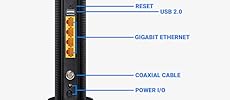
The TP-Link TC-W7960 is a DOCSIS 3.0 cable modem router delivering up to 343Mbps download and 300Mbps WiFi speeds. Certified for major US cable providers like Comcast XFINITY and Spectrum, it eliminates monthly rental fees while combining modem and wireless router functions. With a 2-year warranty and 24/7 technical support, it’s a reliable, cost-saving upgrade for fast, hassle-free home internet.




| Wireless Type | 802.11a/b/g/n |
| Number of USB 2.0 Ports | 2 |
| Brand | TP-Link |
| Series | TC-W7960 |
| Item model number | Cable Modem Router |
| Operating System | Windows 10/8.1/8/7/Vista/2013/2008, OS X 10.4 or later (Ethernet Connection Only) UNIX and Linux |
| Item Weight | 3.2 ounces |
| Product Dimensions | 8.17 x 5.86 x 2.87 inches |
| Item Dimensions LxWxH | 8.17 x 5.86 x 2.87 inches |
| Color | Black |
| Manufacturer | TP-LINK USA |
| ASIN | B01EO5A3RQ |
| Is Discontinued By Manufacturer | No |
| Date First Available | April 23, 2016 |
D**M
Great Router, Easy SetUp, No calling Comcast.
I purchased this as my Xfinity modem/router has been giving me problems for nearly a year. It would work for months without incident, then I'd have days where my connection would drop. It was pretty random, so the few times I called Comcast, they'd reset the router and all would be well for a few weeks. Last week, it started dropping its signal every 10-15 minutes. Now that I work from home, I couldn't take it anymore. Rather than have a tech come out, a friend insisted it wasn't my internet connection but my router. She pointed me in the direction of this router as it's the same router she set up for her 62 year old mother and mom has had zero issues.I was concerned I wouldn't be able to make it work properly, I'm tech savvy in the respect that I can handle SEO an onlne marketing.. but technical issues that run the gamut of hooking things up are not my thing. I'm a plug and play kind of girl (Mac user).. so I'm very accustomed to plugging in things and I'm done. I was worried about the setup process. But, I opened the box, followed the one sheet instructions and BOOM I'm connected. Here's what I did:1. Opened the box and connected the coax cable from my infinity router into the back of the TP LinkRight out of the box - I appreciated how much smaller the unit was in comparison to the large and clunky Xfinity wifi/modem2. Plugged the power cord in3. Pressed the small button beneath the power cord to turn the router on.4. Although my personal computer is a Macbook Air (no ethernet port). My work laptop is a Dell.. so I plugged the ethernet port into that.5. The one sheet instructions led me to the TPLink site where I logged in (username: admin/password: admin)6. I waited for all of the lights to light up. (They are not bright.. the lights are no brighter or intrusive than the light on my AppleTv)7. When I unplugged my ethernet and was wireless, when I tried to go to a web page I was taken to the Xfinity setup page.8. Entered my Xfinity username and password9. Xfinity told me I was done and connected.Things got slightly tricky for me when I went back in to change my Wireless name and password. But I quickly realized it made more sense to change the wireless name and password while connected via the ethernet cable.That was it. I'm now surfing the internet wirelessly again with great speed. I live in the city with tons of routers around me and I'm experiencing no issues or slow downs. I was also able to connect my work laptop to the wireless network via a VPN with no issues.If I could set this thing up... anyone can! It took me about 20 minutes.
A**R
Goodbye Comcast equipment fees!
I think i made the right code by purchasing this Cable modem router, I had three Comcast rental modem and i decided to have my own modem instead of paying 10$ a month!Here is what I think when comparing this to Comcast modem/router:Design: the TP-Link N300 is slimmer and more stylish than Comcast modem, it has elegant look, slim on the edges and little wider in the middle, fits with my furniture more than the bulky Comcast modemSetup: Its very easy to follow instructions, basically you plug it in, and plug there cable, wait for all the lights to be solid, then either your phone, tablet or laptop, you connect to the wifi (SSID and wifi password are written on separate card and also on the bottom of the router), then it will automatically take you to Comcast activation page, it only asked me to put my account number and phone number, click continue, then the router restart, it took about 10 Minutes for all the lights to be solid again, then i was all set, connected to internet.Internet Speed: internet speed was the same as before, nothing more or less, I didn't have any streaming problems, I have all kinds of streaming services, all worked fine.Wifi Range: it still covered my entire apartment, But maybe for bigger places, you could need a repeater, which is easy to install.I think for the price, this can be one of the best modem/routers out there, I don't think you would regret purchasing it.
M**E
Constantly drops WIFI signal
I have no clue how this modem/router has so many good reviews. Probably how I got suckered into purchasing it. I originally was shipped Hardware version 1.0. I was getting dropped WIFI signal 3 or 4 times a day which required a reset or change in Frequency and/or Channel for it to start functioning properly. Strange thing is that while the WIFI dropped out the wired connection still allowed access to the internet just fine. Called TP-Link Customer Support (been back in forth with them for the past 2 months which prompted me to write this review)....the people on the line actually have the best intentions but there is definitely a disconnect between their tech support, their US based depts and RMA department. They suggested I use Frequency 40HZ Channel 11. While that diminished the number of times I had to reset the unit still ended up resetting 1-2 times a day. Keep in mind I ran a WIFI analyzer and there is only one other WIFI signal close and it isn't on the same HZ or Channel. I am now on my 2nd replacement unit. I was hopeful since they sent out Version 2 that my issue would be solved but to no avail. I bought a modem/router but am stuck having to turn the WIFI signal off and now connect/make use of an older N600 router which ironically is TP-Link and that setup has been solid as a rock. That being said, defeats the purpose of my purchase. Do yourself a favor get a different brand modem/router and/or just purchase separate units. Either way, maybe you'll get lucky (as I thought I would) but I wouldn't chance it. The amount of time I've spent on the phone and emailing these folks is ridiculous. I am purely following through on principle since it was only $70. But I honestly feel like taking a hammer to this thing and moving on.
Trustpilot
1 month ago
1 month ago