
DOWNLOAD THE APP


Customer Services
Copyright © 2025 Desertcart Holdings Limited
DOWNLOAD THE APP

🎥 Elevate your video calls—because your presence deserves HD perfection!
The Logitech C270 HD Webcam delivers crisp 720p widescreen video at 30fps with a 55° field of view, enhanced by RightLight 2 for optimal lighting in any environment. Its built-in noise-reducing microphone ensures clear audio up to 1.5 meters away, perfect for professional calls or Nintendo Switch 2’s GameChat mode. Compatible across PC, Mac, and popular platforms like Zoom and Skype, it features a universal clip for secure mounting and plug-and-play USB-A connectivity, making it the go-to choice for seamless, high-quality video communication.
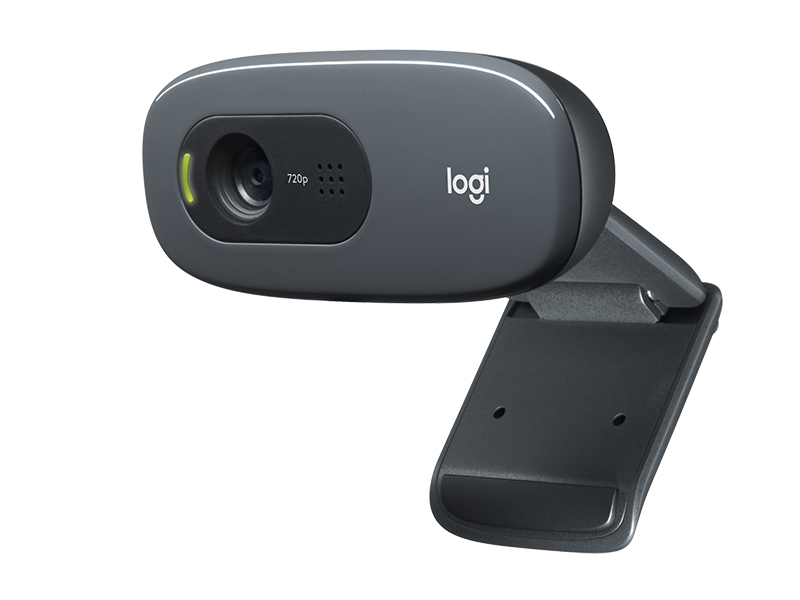


| ASIN | B004FHO5Y6 |
| Antenna Location | Universal mounting clip fits laptops, LCD or monitors |
| Are Batteries Included | No |
| Best Sellers Rank | #1 in Webcams |
| Brand | Logitech |
| Built-In Media | User documentation, Webcam with 5ft cable |
| Camcorder Type | Webcam |
| Color | Black |
| Compatible Devices | Windows 8, Windows 10, Windows 11 or later, MacOS 10.10 or later, Chrome OS, Skype, Google Hangouts, FaceTime for Mac, and potentially other specific devices or brands |
| Compatible Processors | Intel Core2 Duo |
| Connectivity Technology | USB-A |
| Customer Reviews | 4.4 out of 5 stars 26,657 Reviews |
| Display Resolution Maximum | HD |
| Effective Still Resolution | 3 MP |
| Effective Video Resolution | 1280 Pixels |
| Exposure Control Type | Automatic |
| Features | Microphone Input |
| File Format | JPEG |
| Flash Memory Speed Class | C10 |
| Flash Memory Type | Internal flash memory |
| Flash Memory Video Speed Class | V10 |
| Focus Type | Fixed Focus |
| Form Factor | Webcam form factor |
| Global Trade Identification Number | 00097855070739 |
| Has Image Stabilization | No |
| Image Aspect Ratio | 16:9 |
| Image Capture Speed | 30 fps |
| Item Dimensions D x W x H | 9.85"D x 4.94"W x 6.45"H |
| Item Weight | 131.54 Grams |
| Lens Type | Wide Angle |
| Manufacturer | Logitech |
| Maximum Aperture | 1.8 f |
| Maximum Focal Length | 0.01 Millimeters |
| Minimum Aperture | 2.8 Millimeters |
| Minimum Focal Length | 0.01 Millimeters |
| Model Name | 960-000694 |
| Model Number | 960-000694 |
| Number of Batteries | 1 Lithium Ion batteries required. |
| Operating System | MacOS 10.10 or later, Chrome OS, with USB-A port. Works with Skype, Google Hangouts, FaceTime for Mac., Windows 8, Windows 10, Windows 11 or later |
| Photo Sensor Technology | CCD |
| Screen Size | 2.7 Inches |
| Sensor Type | CCD |
| Shooting Modes | Automatic |
| Style Name | 720p |
| Supported Audio Format | PCM |
| Supported Image Format | H.264 |
| UPC | 097855070739 |
| Unit Count | 1.0 Count |
| Video Capture Format | MJPEG |
| Video Capture Resolution | 720p |
| Video Resolution | 720p |
| Viewing Angle | 55 Degrees |
| Warranty Description | 1 Year Limited Hardware Warranty |
| Water Resistance Level | Not Water Resistant |
| White Balance Settings | Auto |
| Wireless Compability | Radio Frequency |
| Zoom | Optical |
C**S
Good webcam for a good price!
Great webcam! I didn't have any issue getting it to stay on my monitor which was something that I was worried about because it's both thin and curved. The cam is literally plug and play, I plugged it in and no extra steps were needed. The cord is decently long, around 5 ft, the quality is good and the picture is clear. I would definitely recommend this!
S**S
Beautiful design
I absolutely love this camera. The design is beautiful, clean, and modern — it looks great on my desk and blends perfectly with my setup. The image quality is super clear and sharp, with excellent color and brightness. It makes my video calls look professional and high definition. It was very easy to set up and works smoothly without any issues. The camera feels well-built and high quality. I’m very happy with this purchase and would definitely recommend it to anyone looking for a stylish webcam with outstanding image clarity.
K**N
Best Webcam I’ve Used. It Hangs Down a Bit on the Monitor unfortunately.
This Logitech Brio 101 is the best webcam I’ve ever used. The picture is crisp and it works great for both meetings. and Setup was quick. I did have to take off one star because the way it clips on causes it to hang down slightly, which blocks a tiny portion of the top of the monitor. Not a dealbreaker, but worth mentioning. The autofocus feature works great. It has a lot of the other modern features as well. Overall, excellent video quality and performance.
C**K
GREAT CAMERA
BEAUTIFUL! WORKS GREAT STRAIGHT OUT OF THE BOX.CLEAR PICTURE MICROPHONE CLEAR ALREADY USED IN MEETING LOVE THIS CAMERA
A**N
Sweet & Affordable Web Cam
Great little USB camera for the price. Plug and play. Windows autatically found drivers for this webcam. However, I would advise you to find the Logitech drivers and save them. A time will definitely come when, despite the number of people who purchased this product, it will be discontinued and the drivers will eventually become impossible to find. Logitech's early USB webcams like "QuickCam" webcams of yesterday are one example of a product's life cycle. They go from having drivers and support to total obsolescence. It's on us to save the drivers. That aside, this webcam arrived fast, was packaged well, works just fine. I have not benchtested the resolution because it wasn't important to me. But I suspect it is as described. I also like the built in mic and the privacy slide.
S**S
Simple to Install and Easy to Use
This product is exactly as described and works great. Plugged it into the computer and worked right away. Easy to use and a great value. Highly recommend.
B**Y
An excellent basic webcam that installs easily on a Mac mini M4
The Logitech Brio 101 is a basic but very functional webcam. I own a new Mac mini M4 and use it with a monitor that has no built-in webcam. It installed easily using Logi +, the Logitech software, and was ready to use in two minutes. I do have two very minor complaints. First, I like the privacy shield on the camera, but the lower tab on the cover extends slightly below the monitor's bezel, which is a distraction. Second, the camera connects via USB-A, not USB-C, which means I have to use an adapter to connect it directly to the Mac mini or to a USB hub that accommodates the larger plug. I don't use the camera all that often, so I tilt it back and slightly up so the bottom tab on the privacy shield is out of the way. It would also be easy to simply remove it, lay it on your desk, and then put it back on the monitor when needed. All in all, if you're looking for a basic webcam to use with Zoom et al., this webcam should be on your short list.
P**T
Good web cam, a little too much zoom
Bought this because it was cheap and I've used logitech webcams before and they were fine. I really like the privacy shade it has to block the lens, although I probably won't use it in this work setup. The video quality and sound quality are good. My only problem is it's zoomed in too much and I don't see any zoom setting in the controls.
Trustpilot
2 months ago
1 month ago