


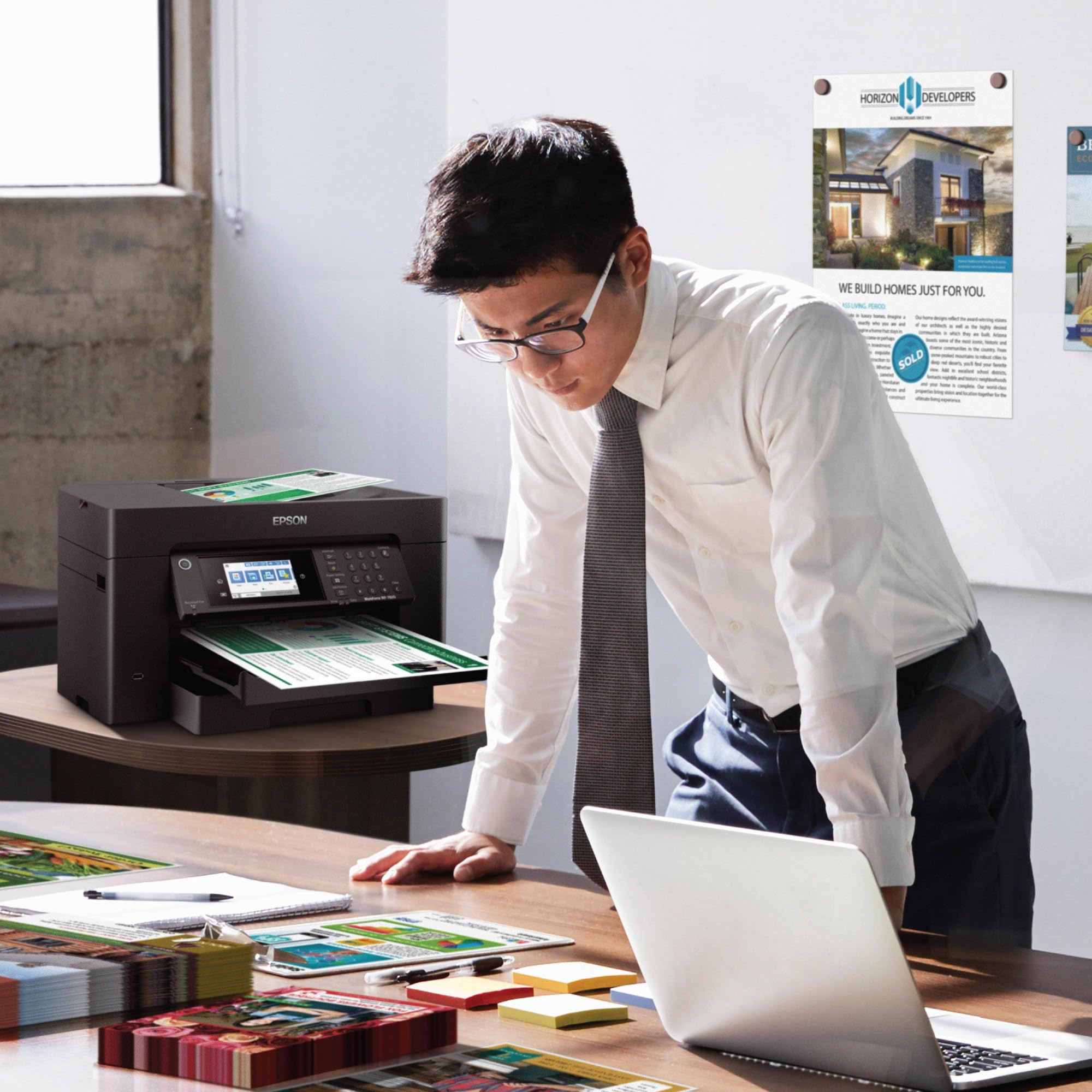
🚀 Elevate your office game with wide-format speed and wireless smarts!
The Epson WorkForce Pro WF-7820 is a versatile wireless all-in-one inkjet printer designed for professionals who demand high-speed, wide-format (up to 13" x 19") printing, copying, scanning, and faxing. Featuring PrecisionCore Heat-Free technology and DURABrite Ultra inks, it delivers crisp, smudge-resistant prints at up to 25 black and 12 color pages per minute. With automatic duplexing, a 250-sheet paper capacity, 50-page ADF, and Alexa voice control, it combines robust office productivity with modern connectivity for seamless mobile and desktop printing.


| ASIN | B08DXHQ9F5 |
| Additional Printer Functions | Copy, Fax |
| B&W Pages per Minute | 25 ppm |
| Best Sellers Rank | #3,085 in Office Products ( See Top 100 in Office Products ) #15 in Ink Tank Printers |
| Brand | Epson |
| Built-In Media | WorkForce Pro WF-7820 printer, quick setup guide, CD-ROM with drivers, power cord, 4x DURABrite Ultra Ink cartridges (1x Black ink cartridge and 3x color ink cartridges: 1x Cyan, 1x Magenta, 1x Yellow) |
| Color | Black |
| Color Pages per Minute | 12 ppm |
| Compatible Devices | PC, Smartphones |
| Connectivity Technology | Wireless |
| Control Method | Voice |
| Controller Type | Amazon Alexa, Vera |
| Customer Reviews | 3.8 out of 5 stars 2,884 Reviews |
| Display Type | LCD |
| Dual-sided printing | Yes |
| Duplex | Automatic |
| Global Trade Identification Number | 00010343924635, 00010343942516 |
| Hardware Interface | Ethernet, USB |
| Ink Color | Black |
| Item Dimensions D x W x H | 20.3"D x 38.4"W x 18"H |
| Item Height | 18 inches |
| Item Type Name | Inkjet Printer |
| Item Weight | 39.9 Pounds |
| Manufacturer | Epson |
| Maximum Copy Resolution Black and White | 1200 x 1200 dpi |
| Maximum Copy Resolution Color | 1200 x 1200 dpi |
| Maximum Copy Speed Black and White | 40 ppm |
| Maximum Print Resolution Black and White | 4800 dpi |
| Maximum Sheet Capacity | 250 |
| Maximum print Resolution Color | 5760 x 1440 |
| Media Size Maximum | 13 x 19 inch |
| Model Name | Workforce Pro |
| Model Number | WF-7820 |
| Model Series | WorkForce Pro |
| Number of Trays | 1 |
| Other Special Features of the Product | Ethernet,Wireless |
| Output sheet capacity | 250 |
| Paper Size | 13 x 19 inch |
| Print media | Paper (plain) |
| Printer Connectivity Type | Wireless |
| Printer Output Type | Color |
| Printer Type | Inkjet |
| Printing Technology | Inkjet |
| Processor Count | 1 |
| Resolution | 4800 x 2400 |
| Scanner Type | Flatbed |
| Series Number | 7820 |
| Special Feature | Ethernet,Wireless |
| Specific Uses For Product | home office |
| Total Usb Ports | 1 |
| UPC | 010343950382 010343942516 010343924635 010343924512 |
| Unit Count | 1.0 Count |
| Warranty Description | 1-Year Limited |
| Warranty Type | limited warranty |
E**7
Reliable, Fast, and Excellent Print Quality — A Great All-Around Printer
I’m extremely happy with this printer and would highly recommend it to anyone looking for a reliable, high-quality device. Setup was quick and straightforward, and it connected seamlessly to both my Wi-Fi and mobile devices. Print quality is excellent—text is crisp, colors are vibrant, and photos come out looking professional. It’s also impressively fast and much quieter than printers I’ve owned in the past. I appreciate the user-friendly interface and the efficient ink usage, which helps keep long-term costs down. Overall, this printer delivers great performance, convenience, and value, making it a fantastic addition to my home office.
Z**6
4 years on - Still - A very good printer, if you can ignore its demands to update firmware
Summary: It is an excellent printer (4.6 out of 5) if you don't mind its constant requirements to update the firmware, which I have not since the day I bought it. I have had this printer for over a year. It has printed close to 5,000 pages of different sizes, papers, colors and document types. As someone said in the other posts (a big thank you), firmware update is only to drive users to get Epson's proprietary ink cartridges. When the printer harasses me to update the firmware, I just keep on ignoring it. Epson does a good job to harass you both on the printer and computer - just ignore it. Pros: 1. Only printer for <$500, which could print Ledger paper (11x17), which was a must for me. This thing prints beautiful and very crisp AutoCAD drawings. The lineweights and scales are phenomenal. 2. Excellent printing quality using stock and generic print cartridges. The printer can be really customized to get the right tones and textures for your print. Works very well with heavy stock papers and photo papers. I am yet to try any stickers, but I do not foresee any issues with it. 3. Good printing speed. It is not blazing like the commercial printers you find in the offices, but it is very fast for what it does. 4. Excellent connectivity. I had no issues with using either Ethernet or wireless. The printer can print on my Windows devices and Mac machine. I do not print from my phone, so cannot comment on that. 5. Heavy duty. The printer has printed approx. 5,000 pages so far without any troubles. I have not seen it overheat nor do any weird activities when it is printing. Indifferent: 1. Scanning. While scanning quality is very good, the direct scan option is cumbersome. You cannot use the scan button on the printer to scan into the computer disk. You have to go to the computer and activate the scan software to perform scanning. This can be an issue, if you have a setup where your office is on one floor and the printer is on another, like I have in my home. Cons: 1. Heavy. This thing is decently heavy and bulky. Don't try to keep on moving it or have it in your mobile office. Also, make sure to have a good sturdy and stable table. The printer twerks, jerks, sashays, parries. 2. Constant harassment to update the firmware. It can sometime be very annoying, but that's a small price to pay, if you get to ignore it. Look at the bigger picture. Price: When I bought it, the price was just below 3 bills, I understand it has gone up by half a bill (however, I am seeing the price going >$400 on some occasions). The new price of 3 and a half is not bad given the shape of the economy and supply chain issues. Also, the OEM cartridges (812) are cheaper at Staples than trying to Subscribe and Save here. Bottom-line: A very good printer, if you ignore and disprove its petulance to update itself. Update 3/23/2023 - I have had it now for over 2 years. The printer continues to print flawlessly and as of now has little under 10,000 pages printed of different sizes and paper weights. It still begs to update its firmware, which I have not done since its purchase. The only wishlist item I have for this printer is if it were to come with the Epson ink-tank. Update 3/28/2024 - Three years into it I have, still not updated it. The printer continues the work. I have now printed about 12,000 pages. In December, after I replaced all my cartridges, it started missing colors' tones, textures, and locations. Did full printer head alignment and cleaning twice (instructions are clear on the printer screen under Settings-> Maintenance menu). Printed test pages, and now it is working flawlessly. Update 3/20/2025 - Marks 4 years of running this printer. Definitely the least amount of pages printed annually - about 1,500. No firmware update performed and it still cries to update. Still running strong on both inks - generic and branded. There is a seller on eBay that offers XL cartridges for the colored ones too. Definitely worth giving a shot. If you are in a market for a prosumer printer consider this one in your list, if you can get it below $300.
V**O
EPSON PRINTER WILL NOT PRINT-BEWARE PLEASE READ THIS BEFORE YOU PURCHASE.
The first thing I have to comment on is the number of firmware updates Epson insists on sending to their printers. But its not to make the printer operate better, it to keep you from using an after market remanufactured print cartridge. They are absolutely ridiculous to the point of anal trying to stop people from using a remanufactured ink cartridge. They are constantly updating the chips on their ink cartridges so its so, very difficult to use anything but a genuine Epson new print cartridge. Now there was a class action lawsuit against Epson because of this and Epson lost the lawsuit and was ordered by the court to stop making it impossible to use remanufactured (refilled) ink cartridges, but Epson is ignoring the court order. NO OTHER COMPANY REQUIRES YOU USE THEIR INK CARTRIDGES LIKE EPSON. I have always used genuine factory cartridges in ALL MY PRINTERS, the Epson I explain below never had a remanufacture ink cartridge put in it ever. I would never ever recommend a friend or family member to ever purchase an Epson printer. If you print with varied print specifications like paper size or specify a tray to print from YOU DO NOT WANT THIS PRINTER OR ANY EPSON PRINTER. First of all the printer is slow as molasses. It does not print anywhere the speed they claim. The Epson software and print drivers are very badly flawed. I have been trying for a little over a year to figure out the best ways to get a print job done, and not get the warning "your paper does not match your paper tray selection" . Time and time again I have specified 11x17 paper, which is in tray 2, (only fits in tray 2) and I get this darn warning time and time again. "Your paper does not match your paper tray selection". I have gone to the extent of removing paper completely from tray 1 and purposely specify tray 2 to in my printer properties, and I get the darn dialog box warning anyway. I called Epson customer support and it is like talking to a wall every single time I call them. THE CUSTOMER SUPPORT IS USELESS. So I unplug the printer and let it sit for 10 minutes. I then remove all print jobs from the que. With the same exact properties as the previous attempt sometimes it would print. Then, the other issue with this printer, is I continue to get paper feed errors. I remove both trays and I shine a flashlight in the empty tray spaces and there is no paper in either tray space or in the plastic feed guides. I then remove the back cover which totally opens up all the paper paths. Still no jammed paper is found. I meticulously put the back cover on and put the trays back in. Then resend the print command, but still, it gives paper feed error. I take it all apart again, I remove the printer from the stand and move it to the kitchen counter which is much higher which makes it easier to look inside at every nook and cranny. Still no jammed or misfed paper. Put all back together again, do everything exactly like I did it before and sometimes it will print, and sometimes I get a feed error. I have had to take the darn thing apart as many as 3 times to get it to print without a paper jam error. I DO NOTHING DIFFERENT THAN I HAD DONE EVERY TIME, but finally it prints. I called customer support at least 4 times. The response I usually get, “that is impossible you are missing a piece of paper that was jammed. “ This last time I took 14 pictures of all the paper pathways from front and back of the printer. I called and explained what was going on, again, and told them I wanted to send the pictures, but they would not let me. I hung up, I removed the printer from the stand and threw it as far as I could out the back door of the house, which I should have done after the second time occurred on any of the issues. That would have kept me from wasting my time and getting totally used up with their customer support at Epson. But this last time I had a deadline which was dropped on my shoulders by State Farm Homeowners insurance with no prior warning, and I HAD to get a printed copy down to my agent. I ended up driving to Office Depot and printing it there. Now I will say one thing, NO COMPANY HAS A PRICE LIKE EPSON HAS, on a printer like this that will print both 11x17 or as big as 13x19 and 18x22 inch paper. The next best prices is over $2000.00. To add insult to injury, I have the Amazon extended warranty option on everything I buy from Amazon, but Asurion ( that’s who does the Amazon extend warranty) would not cover it because they said it was a factory defect. I have asked for proof and they said they would send me documentation.
R**H
Nice quality printer, good price.
Bought this for my home office. It’s big, so plan accordingly. Got around a re-emerge of paper through before I had to order more ink. It was easy to set up, and use by several devices throughout the home. Print quality is good. Noise levels are not terrible. Epson sells larger capacity ink cartridges. Depending on how much you print, these are a better option for black ink at least. Epson printers are known for their longevity, so I expect good results. For the features,it was a good deal and value for the money. I would buy again.
A**.
Paper tray doesn't work
First off, Amazon delivery person did not follow my specified delivery instructions. Next, it was not covered, and it was raining today. The paper tray is not working at all. I'm convinced the unit is defective. I'm having a very hard time resolving the issue. It keeps saying insert cassette correctly. There are only so many ways to do this. I've done them all. It's defective. Now I need to go to more trouble than the product is worth to get it fixed!!! I must edit and add to my initial complaint; the paper tray still doesn't work properly. I decided to keep the printer even though Amazon is sending me another one. It is a very nice all-in-one machine. Everything else works and I got done what I needed to do on 11 x 17 sheets using the rear feed mechanism. It prints an exact duplicate! I almost can't tell the difference. I think the problem with the paper cassette is not the printer but my paper stock instead. I was using HP 11 x 17 copy paper which may be heavier than others in which case my paper settings are set wrong. I don't think it's this machine.
W**N
wi-fi connectivity appears to be fixed! Yay!
Updated: Connectivity has only failed once out of may prints! Yay! 5 stars if this keeps up! LEAVE THE FIRMWARE ALONE NOW! Updated again: This latest firmware update is an improvement. Up to 4 stars now: The printer has worked 2 times out of the last 3 prints. That is better than never working. Killing the Epson task and unplugging/plugging the printer is still the fasted way to fix when connectivity fails. Updated again: Every frequent firmware update makes the connectivity WORSE. Now the printer FAILS TO CONNECT EVERY TIME I PRINT. Right now the printer is installing yet another update. The notification says the firmware update is under SETTINGS. Yes, true, but 4 layers down so I end up searching and scrolling back an forth with every update. Why is it that the most used features are buried in the menus. Coder's revenge, I guess. The connection fails, the connection fixer thing asks a bunch of stupid questions and won't go away. Is the printer on? Did you change your router? Then is fails and suggests trying more stupid stuff. It should say: Use Task Manager to kill the running Epson task. Unplug the printer, then plug it back in. In 5 minutes, you will have your print. How convenient. EVERY TIME I PRINT. I expect this or the next FW update will kill even that. This is a beautiful mechanical machine with idiotic electronics and firmware/software. Updated review: This printer forgets who and where it is about once a week. The printer is only 6 feet from the Wi-Fi router. I have to run the Connection Checker program, answer irrelevant questions, reset the router, blah, blah, blah - the robot version of a customer support call. Make sure you also have an HP or Brother printer in case you need something printed right away when it hangs up. You will end up with an extra copy once the Epson wakes up. This is getting old. My HP printer never does this. My two Brother printers never do this. Epson finally came out with a mechanical masterpiece that always feeds and never jams. Now Epson needs to work on their interface design. I never thought Epson Connection Checker would be on my most-used software list. ---------- Original review: I really like this printer. I am not a photographer and I don't print t-shirts. The WF-7840 prints fast and feeds paper without jamming. That is more than I can say about the Artisan 1430 as a general purpose printer. This is a big printer, but if you have room for it, it is a very nice machine. It does so much that you will need the help file to do much of anything, but it will be there somewhere. I printed all of June, July, and August and part of September on the starter ink cartridges. I only use it for color prints. I have 3 laser printers for B&W prints. The WF-7840 only has ink 4 cartridges instead of 6 like the 1430. I am very happy with my purchase.
P**G
Prints pretty good.
The prints are acceptable. I have a couple of problems with the printer. 1. The little ruler on the back feed was broken, but they packaged the printer anyway and so here I have a broken part. Too hard to send back. 2. I am unable to print from the back tray from my computer even though the ap specifies the back tray. 3. The console is very difficult to navigate since the listings are cryptic and you have to try each one to figure out what the button is for. 4. I did get the computer to print from the back tray but had to turn off the front cassette and take the paper out of it. The setting to do this is buried in the maze of settings. 5. It constantly complains about paper types and refuses to print until you go to the printer and click on it. Do I recommend this printer? It was a fairly cheap wide format printer and I can get it working so yes, if that is what you need then bite the bullet and get it. Despite others saying the ink doesn't last, I haven't noticed that it uses excessive ink compared to other printers I have used.
J**N
So far, very good
I will update this review periodically, so far setup was a little confusing but easy and quick, I use a USB cable so I can’t speak to the ease of operating via WiFi. One appealing aspect of this printer is just that, it’s a printer, it has no fax or scan capability, I need neither, so I felt maybe all my money was going in to the printer and not unused features. The fact that it’s single-function may explain Amazon’s cautionary statement about it being a frequently returned item. If that’s the case buyers aren’t paying attention. The screen takes a little getting used to but again, once it’s figured out it’s fine. Some may feel the printer is too big, but it prints tabloid/ledger size paper, it’s gotta be a certain size just because of that. It replaces a 14 year old Brother that took up more space than the Epson does. I will only be printing 11x17 monochromatic on this, so I like that I can load 11x17 paper in both trays, and I also like that In the print setup there’s a black and white selection, I hope this minimizes use of the colored ink cartridges. The auto duplex was an important feature, as everything I print is two sided and it works very well on this Epson, such a time saver. The print quality is good on the standard setting, certainly acceptable in most cases, the higher setting is very good. I like that the tray automatically extends to receive the printed pages. Stay tuned for updates… January 2025- So far I can safely say this is the best printer I've ever used, it's fast, consistent, the standard settings produce a very nice document, when you send it a job it starts right away, no waiting for it to get going, it truly is amazing for the price.
Trustpilot
2 weeks ago
2 weeks ago



