
DOWNLOAD THE APP


Customer Services
Copyright © 2025 Desertcart Holdings Limited
DOWNLOAD THE APP


🌈 Elevate your game with every click — light, speed, and precision in one sleek package!
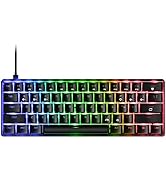
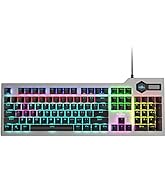
The Fiodio F-2068 Mechanical Gaming Keyboard combines high-performance blue switches with full 104-key anti-ghosting and vibrant rainbow LED backlighting. Designed for durability with splash resistance and tested for over 10 million keystrokes, it offers professional-grade responsiveness and style for PC gamers and professionals alike.





| ASIN | B086161951 |
| Best Sellers Rank | #84,398 in Video Games ( See Top 100 in Video Games ) #3,668 in PC Gaming Keyboards |
| Brand | Fiodio |
| Color | Mechanical-Rainbow Light |
| Customer Reviews | 4.3 4.3 out of 5 stars (485) |
| Date First Available | July 15, 2020 |
| Hardware Platform | Computer, Laptop, PC |
| Item Dimensions LxWxH | 17 x 5 x 1.5 inches |
| Item Weight | 1.8 pounds |
| Item model number | F-2068 |
| Manufacturer | Fiodio |
| Operating System | Windows 2000, Windows Vista |
| Power Source | wired |
| Product Dimensions | 17 x 5 x 1.5 inches |
| Series | F-2068 |
J**G
Great product with great value!
This keyboard is AWESOME! Plug and play, easy setup. The backlit colors are very cool (see images). The keys are very well made and solid. The touch feels so good that I can't stop typing with this keyboard. I truly love this mechanical keyboard and at this price it is definitely a steal.
J**R
Best keyboard by far (forget about the price being low)-- get this keyboard.
I have tried, at length 5 different keyboards over the past year. All of them were more expensive to significantly more expensive than this keyboard. This keyboard, feel, sound, layout, etc. are better than all the other keyboards. I highly recommend this keyboard. If you like the feel/sound/etc. of blue keys, this is the one to get, you can't go wrong at the price it is being sold for. The best keyboard I have found offered in the market today!
F**S
well i love it.
i ordered this along with a desk , i have a steel series keyboard that i love but wanted to try something out . i received this and plugged it in and gave it a test run on wow for raid night (heroic) i play fury warrior and i smack the daylights out of my keys haha and well this keyboard held up and still is a couple weeks later. Some cons, The keyboard does not change colors at all, by which i mean what you see in the picture is the colors you get , but you can change the modes on it as in strobe or when you press a key it goes dark and slowly brightens back up. Also i love loud annoying mechanical keyboards, the more click clack the more i enjoy it and this product is okay , i mean its a mechanical so you get what you buy . I really enjoy it and hadn't went back to my steel series yet
R**L
Not for routine use - Not durable
I have owned this keyboard for under a year and the keys have started to stick in place (depressed position) causing continuous keystrikes until you press the button in such a way to unstick it. Would not recommend for gaming or continuous use. Looks nice and is easy to setup but quality over time is where this keyboard fails. Be ware the warranty is short AF
P**R
Love it for the price
My first mechanical keyboard since back in the MS-DOS days probably. Really love the typing experience on these keys. I would definitely recommend you have a wrist rest if you want to use this keyboard in comfort. The keys sit very high compared to your usual membrane keyboards so your wrist will be turned up and uncomfortable unless you have something to rest them on. Other than that the backlight is fun and settings are novel. I don’t use it for gaming so I can’t comment on that.
J**T
Great Keyboard for the Price
I bought this keyboard as a replacement for a different brand that my son had spilt coffe in. I was expecting much, given the price, but the feel is good, the board has enough weight to stay in place and the keys have a good feel and travel. It's a full size keyboard with numeric keypad. It doesn't really have dedicated media keys (although you can use some chords to get them), but that doesn't matter to me as I never used them anyway. One interesting feature is that the switches are mounted in the top plate of the keyboard, so there's nothing around the keycaps to trap crumbs and detritus, it's easy to use compressed air to blow out dirt around the keys and keep the board clean. It also has braided nylon insulation on the cord, so that should hold up better than the standard PVC insulation you normally see. I'm probably going to buy a second one as a spare.
C**S
Great keyboard, but terrible instructions. SEE THIS REVIEW FOR CUSTOM LED FUNCTIONS / ANTI-GHOSTING!
2023 UPDATE: After 2 and a half years of pretty heavy use, I'm experiencing similar issues as reviewer Sue Alvarez. I thoroughly cleaned my keyboard, and nothing seems to be fixing my H key from double-typing. I'm taking off a star for that - make of that what you will after 2 years of heavy use. === After playing with this keyboard for a day, I believe I've figured out all of the LED functions, including custom recordings and full anti-ghosting. CUSTOM LED RECORDING === If you notice, FN+INS will cycle you through the various light settings, including one where the arrow keys, WASD and ESC key lights up. This is actually the first of 8 different haphazard LED settings, which you can access by hitting FN+1 through 8. They do not have any apparent rhyme or reason to them, so we will ignore them. If you wish to record custom LEDs, you want to use FN+9 and FN+0, which are blank on first blush. Only then do the instructions to hit FN+END to start/stop recording actually work. You will notice it working by the 3 lights next to your arrow keys flashing blue during the record phase. FN+ESC will delete your custom LEDs and reset the keyboard entirely. FULL ANTI-GHOSTING === The instructions are further confusing here, as they have FN+PRTSC labeled as "6 keys anti-conflicting" - and while this is actually true, this does not give you FULL anti-ghosting. In order to access that, you must hit FN+SCRLK. Further note that FN+ESC will reset your anti-ghosting back to 6. MISC === Beyond those functions, FN+DEL, FN+HOME, FN+PGUP, and FN+PGDN will activate additional LED settings. FN+LEFT and FN+RIGHT arrow keys will slow down / speed up the rate at which the lights activate. FN+DOWN and FN+UP arrow keys will adjust the brightness.
R**R
Solid keyboard
So, if you're looking for a light show from your keyboard, this isn't going to impress, the color pattern is set, you can turn it off, and there are a couple of other settings to play with, but it's not a real feature of the board. That being said, I wasn't looking for a light show, I wanted a good working keyboard that would last longer than the standard keyboards, and specifically I wanted a mechanical keyboard. This keyboard has some bells and whistles, but it's clean and tidy, without bulky trim. It's simple, has a pretty small footprint for a full sized keyboard, and the switches are very responsive. Comes with a key cap puller. Overall, this is a great value for the price.
H**O
ASD keys are stuck all the time when gaming, not really a good product
D**E
The product is NOT durable. I am a programmer and the return key now constantly double or triple clicks whenever I use it. The issue only popped up after the warranty period expired so now I can't even return it. I've never experienced this issue with ANY OTHER keyboard.
Trustpilot
2 months ago
1 month ago