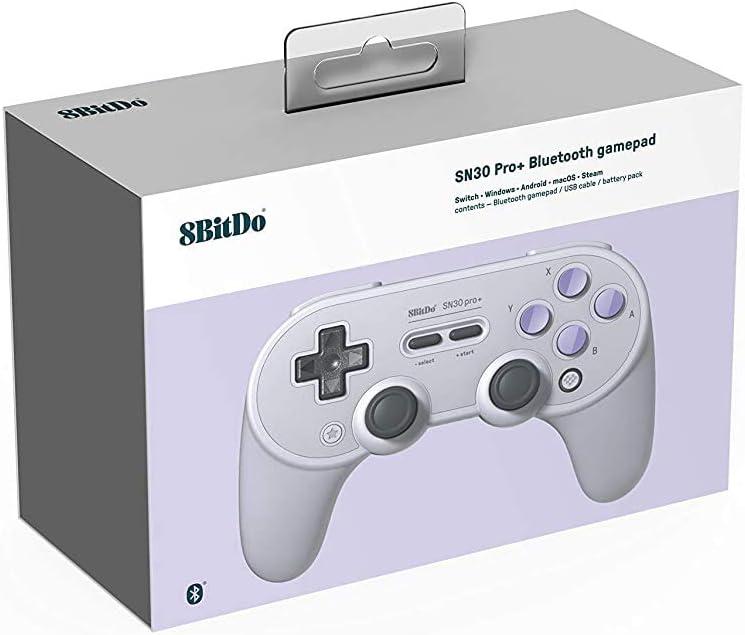

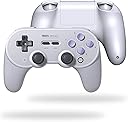

8Bitdo Sn30 Pro+ Bluetooth Controller Wireless Gamepad for Switch, PC, macOS, Android, Steam and Raspberry Pi (SN Edition)
Product ID: 143371893
🎮6-axis motion & rumble
🔋20+ hrs wireless play
⚙️customizable button mapping
🎯 Elevate your game with pro-level precision and wireless freedom!
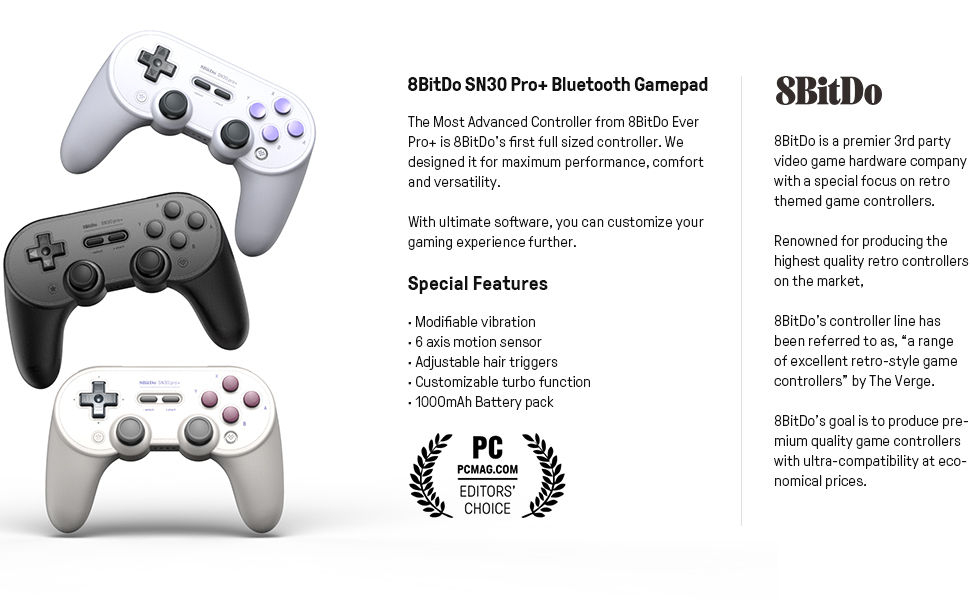
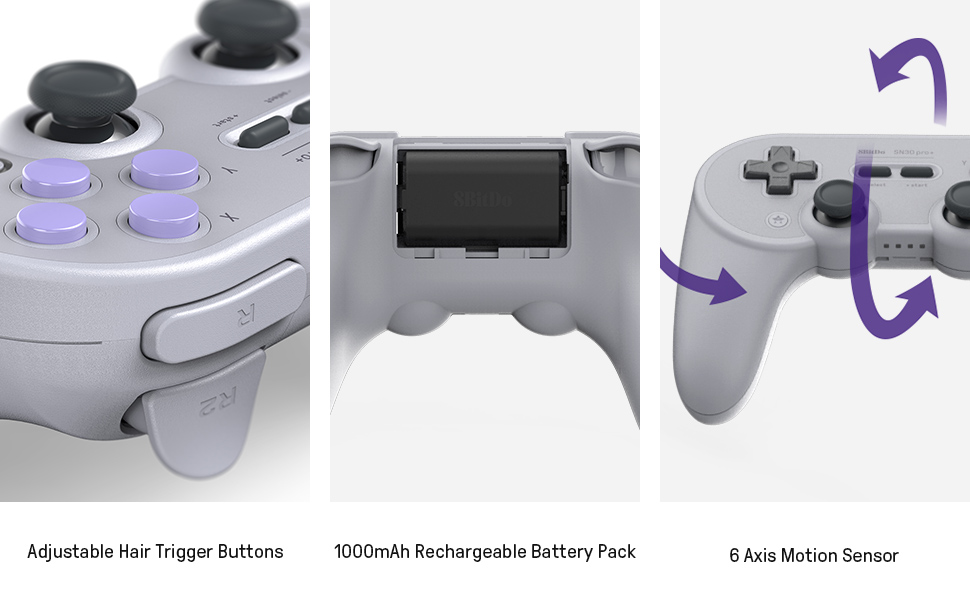
The 8Bitdo Sn30 Pro+ is a versatile wireless Bluetooth gamepad compatible with Switch, PC, macOS, Android, Steam, and Raspberry Pi. Featuring ultra-precise analog sticks with a 0.8% error margin, customizable button mapping, adjustable triggers, and 6-axis motion controls, it delivers a tailored gaming experience. With over 20 hours of battery life, USB-C charging, and robust firmware support, it’s designed for gamers seeking professional-grade performance and comfort across multiple platforms.



| ASIN | B07T8JKVNT |
| Additional Features | Rumble, Wireless |
| Best Sellers Rank | #45,722 in Video Games ( See Top 100 in Video Games ) #64 in Mac Gamepads & Standard Controllers #1,132 in Nintendo Switch Controllers |
| Brand Name | 8Bitdo |
| Button Quantity | 16 |
| Color | SN Edition |
| Compatible Devices | Android, PC, Windows |
| Compatible Video Game Console Models | Nintendo Switch |
| Connectivity Technology | USB |
| Controller Type | Gamepad |
| Customer Reviews | 4.5 4.5 out of 5 stars (6,496) |
| Global Trade Identification Number | 06922621500575 |
| Hardware Platform | mac |
| Item Dimensions | 1 x 1 x 1 inches |
| Item Type Name | 8Bitdo Sn30 Pro+ Bluetooth Gamepad (Sn Edition) - Nintendo Switch |
| Item Weight | 0.8 Pounds |
| Manufacturer | 8Bitdo |
| Manufacturer Part Number | 6922621500575 |
| Model Name | 8Bitdo Sn30 Pro+ Bluetooth Gamepad (Sn Edition) - Nintendo Switch |
| Model Number | 6922621500575 |
| Package Quantity | 1 |
| Power Source | Battery Powered |
I**A
IT JUST WORKS!
Like the headline says, the controller simply works, and I love that. USABILITY: As advertised, it can be used with PC, Nintendo Switch and Android (it can be used with other devices too, but these are my main use cases), but there's more to it; to change from one mode to another it's extremely easy, just press START + the corresponding button, pair with the desired devide and that's it; the connection is extremely fast too, and when the controller goes into sleep mode, you just have to press START again and it automagically reconnects, no need to do any kind of manual reconnection. BATTERY: I've had it for a couple of weeks now, but I use the controller on a daily basis and it hasn't run out of battery so far, not even once. You can even use it wired if you want to play and charge the controller at the same time, or just leave it charging overnight; the controller turns itself off once the battery is fully charged. Awesome! QUALITY: The SN30 Pro+ has got a premium feel. From the joysticks to the triggers, it feels as a top tier controller. It's very comfy too, and all the buttons and the d-pad are very responsive. CONS: To be honest, the only thing i'd complain about, is the fact that in the black version (the one i got) the letters printted on the controller are barely visible. You can see them (sort of) if you look close enough and put the controller against a light source, but otherwise, the controllers looks like it's all black. CONCLUSION: The SN30 Pro+ is so good, I felt i was doing wrong by not leaving a review (sorry, I'm kinda lazy, dont' judge me). It's a high quality product, sold at a reasonable price, and its usability allows it to be the "jack of all trades" of controllers (at least for me). I recommend buying the smartphone adapter sold by 8BitDo if you plan on using it with your phone.
M**S
Great Alternative to the Nintendo Switch Pro Controller
When Nintendo finally released the Super Nintendo Online games for the Switch, I decided to purchase the 8Bitdo Sn30+ controller. The main reason was the d-pad. The Switch Pro Controller's only flaw was that the d-pad had a small design flaw where pressing left and right repeatedly resulted in pressing up (and vice versa). However there are other factors to consider before purchasing one. The 8bitdo Sn30 Pro+ is like a fusion of the PlayStation 4 Dualshock controller and the Super NES controller. It is very comfortable. The rear triggers are like the PS4's but the shoulder buttons, as well as the main buttons and d-pad are like the SNES. However, the Sn30 Pro+ is only compatible with the Switch (as well as devices that run Windows, MacOS, Android, and Rasberry Pi). So, when it comes to gaming, we'll focus more on Nintendo. While 8Bitdo's controller has rumble features, it does not have HD Rumble. You also need to power the controller on when starting up the system, unlike Nintendo's where you press a button to wake the controller. It also doesn't support Amiibo. Next is how one would hold the controller. I only use my index fingers to access the shoulder buttons and rear triggers. Why is this important? Well, when handling the Sn30 Pro+ joysticks I find that my thumbs have to have a longer reach. In other words, it doesn't feel natural like the Switch or PS4 does. However, this is not an issue if you are mainly using the d-pad to game. If you use both your index and middle fingers to reach the shoulder and trigger buttons then the joystick layout makes sense. Doing this on the Switch and PS4 forces my hands to come closer together making my thumbs overreach the joysticks but this kind of grip works well with the 8Bitdo. The buttons on the Sn30 pro+ are very similar to the SNES. The X and Y are concave (indented) while the A and B are convex (bumped up). This is a nice touch if you like the old SNES controller. However, I prefer the Switch shoulder buttons in comparison to the SNES controller buttons which the Sn30 Pro+ has. The start and select buttons (+ and - for switch pro) are also like the SNES except 8Bitdo's are horizontal while the old SNES are diagonal. Again, I prefer the Pro Controller's + and - buttons but it is not a deal breaker. As mentioned before, the main selling point is the d-pad and I'll share my experience. Now, using the Switch Pro Controller for the Online SNES games felt fine mainly because I play these games in a casual manner. Using the Sn30 Pro+ on the other hand felt so much better. There is something about the d-pad that makes the input feel more precise. When playing more intense games that use the d-pad, the difference is night and day. I was playing Celeste (an intense 2-D retro style game) and noticed that my button inputs were not registering correctly when using the Pro Controller whereas the 8Bitdo controller felt more precise. So should you buy? The 8bitdo Sn30 Pro+ is sold for $49.99 while the Nintendo Switch Pro Controller retails at $69.99. You save $20 while sacrificing some of the Switch Pro Controller features but you gain a higher precision d-pad. If you don't use the d-pad for gaming on the Switch AND the other compatible devices, then you probably don't need this controller. Otherwise, it is a must buy. I highly recommend.
R**N
What would happen if a SNES and a PS4 controller had a baby.
I am not one to write reviews that often, but I had to this time given my past experiences with second party controllers. Since getting a Switch as my second console, I struggled to find a controller that was good quality while at the same time benefiting from button mapping. The joy cons were to small for my hands, the Nintendo pro-controller's d-pad and trigger felt uncomfortable, and the second party controllers always had multiple drawbacks (cheaply made, horrible battery life, and uncomfortable). Then by chance I saw the 8BitDo SN30 pro+ controller on Span Wave where the host was dismantling it showing it's functionality. The look caught my eye but all the functions and general look of quality convinced me to get it over once again buying a first party Nintendo controller. As soon as I got it I fell in love with how it looks (got the SNES look) and how responsive it. I have been using it for a couple of months with different games to test out its full functionality and works great. My main console in the last years has been the PS4 and it's controller feels second nature to me, so it was always an annoyance when I transitioned between the PS4 and the Switch. It may sound like something minor but having the A-B and Cross-Square buttons being opposites made is cumbersome to transition. So having a controller that that looks like the love baby of a PS4 and SNES controller was perfect for me. The size if slightly bigger than that of the PS4 with a comfortable button placement, the d-pad is where I like it to be, and the button mapping made it that I can transition from one console to another any issues. There are many good things things about this controller with only a couple of downsides. Pros: Easy to use button mapping. Easy sync with the switch. Long battery life only slightly below the Nintendo pro-controller (I honestly forget to charge it for days). Quality build and attention to details (love how solid it feels and the little details like the concave Y and X buttons) Better range than the joycons. Cons: It won't turn on your Switch, but I don't think any second party controller can do this (still an annoyance though). It won't scan your amiibos (not an issue for me personally). Feels a little light (not featherweight but a little bit extra would have been better). The R2 and L2 triggers are a little of the soft side (this is my preference but I like a more resistance to the trigger buttons). Price (almost 50 dollars is on the higher end of price for most second party controllers but I can understand way given how well build it is).
C**G
Nearly perfect when it's good, BUT....
I feel kinda bad writing this review, as I can certainly tell 8BitDo was really aiming for perfection with this one. And it almost is. My first one arrived with the left analog a bit cockeyed. What I noticed immediately after that, was that upon pressing the d-pad, I saw that there was quite a bit of space between the cutout in the plastic for the d-pad and the actual d-pad button. This leaves a gap where the d-pad loosely slides around the extra space in all directions. This in turn, causes the plastic of the d-pad to rub against the walls of the cutout of the controller when being pressed, making faint, but unpleasant squeaking and plasticky scratchy noises. The friction of the rubbing can sometimes be felt as well. It is most pronounced and noticeable when pressing the 'right' direction. Also, the four face buttons felt a bit wonky on this particular unit. They felt loose in the controller, overly clicky (unrefined and cheap) and felt inconsistent with each other. It overall felt poorly put together. Deciding I can't have any of that, I returned it for a replacement hoping it was just a bad unit. The second one arrived feeling much better overall, leaving me initially impressed. Both analogs were straight, and the face buttons felt better, but not great. The shoulder buttons along with the triggers were perfect on this one (triggers on the first one felt unequal). The glaring problem was still the d-pad. This one actually sounded louder than the previous. It also felt noticeably less firm. It felt a bit squishy and less refined. There wasn't as much of a clear, concise distinction when pressing down on any/all directions as the last one did. It felt a bit muddled, mushy and flat. This was clearly far less than ideal, so, again, I returned it. The third one, *sigh*....again arrived with a slightly crooked left analog stick. The four face buttons felt meh, the shoulder buttons and triggers good. The d-pad, however, still made that same friction/squeaky noise from rubbing against the walls of the cutout, yet slid around freely within the cutout. I'm thoroughly convinced by now that this problem is in part due to a design flaw, and partly due to manufacturing inconsistencies. However, at least this time, the d-pad had a nice, soft, but firm and concise click that felt far better than the last two I had. But still considered defective, as it rattled and made that scratchy/squeaky noise. Returned. This fourth one is the one I should have gotten the first time. This unit is PERFECT. D-pad is flawless, minus the (far less) rubbing and the accompanying noise, albeit MUCH quieter than any of the last three. It's the best it'll ever be, as some slight 'rubbing' is inherent and unavoidable with this design. The two most recent bad ones I had that I mentioned above, I still had on me so I could take them all to UPS in one trip. This gave me a chance to inspect them side by side, and also to verify that these things weren't just in my head. What is different with this good one is that there seems to be some kind of soft, grippy rubber backing on the back of the d-pad keeping it from sliding around as much inside the cutout. It still moves, but MUCH less so, reducing 80% of the rattling I have been hearing in the previous ones. And since it slides around less, it also rubs less, resulting in less squeaks. It also just 'feels' better in every way. The four face buttons also feel much, much improved from all the previous ones I felt. They feel properly cushioned giving the buttons a comparatively more 'premium' feel to it. I don't know if this improvement goes hand in hand, but they rattle a lot less as well eliminating the remaining 20% of the previous controllers' rattles. To clarify what I mean by this 'rattling' is this: If I hold my 4th (good) one in my left hand, and any/both of the bad ones I still had in my right hand and shook them both like I'm using a salt and pepper shaker at varying intensities, the controller in my left hand would be silent, minus the barely audible sounds of the face buttons shaking in place, which is completely normal and would really only be heard when shaken pretty hard. The other two would, by comparison, sound like baby rattles at pretty much any intensity. I kid you not. It's as if the buttons were just kinda 'tossed inside' and called good. I can't say how or why there is so much variation among just this small sample of four controllers, but to me that indicates a QC department that needs attention. I may just have a had a string of bad luck, but reading other reviews, I know this d-pad thing isn't an isolated case. Their d-pads have indeed improved from their previous models, but they still need a little more refinement when it comes to the issues stated above. But how does the d-pad actually perform now that I have one that isn't defective? It performs quite well, in fact. They don't move around nearly as much as the defective ones. If they eliminated the rubbing entirely, it would, in my humble opinion, make the controller perfect in every way. But even as it is, I consider it the best controller out there currently. The best for 2D platformers, the best for 2D fighting games, and the best overall controller period. The controller's ergonomics feels perfect in the hands. It feels like the dualshock4 in terms of form, size, and weight. Any carrying case made for the DS4 will work with this. The actual parts used feel quality. I also like the plastic used for the d-pad on the G-Classic Edition. The smooth plastic with strips of grip texture feels so nice and premium to the touch. The four convex buttons feel high quality to the touch as well, and have a nice, soft, cushioned, but pronounced click to them. The shoulder buttons feel exactly how I remember the OG snes ones to feel like, and the triggers have a smooth, consistent feel to them throughout their entire range. It took no effort to pair them to the Switch, and the Ultimate software is pretty neat as well. It seamlessly updated the firmware to the current v3.01 for me and had me on my way in no time. The d-pad on this thing is so good that I actually haven't seen my brother pull of so many damned shoryukens so effortlessly in a row since the SNES days. I think he may actually give me a challenge now. All in all, this is a nearly perfect controller that will replace the Pro controller as my daily driver. They just need to get rid of that rubbing and improve their quality control. I'm confident they will, as I sense this company's drive to be the best in its class, willingness to listen to customer feedback and make things right with customers when incidents arise with their outstanding support. Thanks, 8BitDo. I hope you guys iron out these small issues in the near future. Thanks to Amazon for making all this so much less painful than it had to be. If I had gotten this perfect of a unit the first time, I would have undoubtedly given the SN30 Pro+ five stars, however, due to my experiences and realizations, I need to deduct one star.
A**S
Best Third-Party Controller
Before we start: I'm a Twitch streamer, and particular about the performance of controllers I buy. I speedrun multiple games, so you know any controller I use has to hold up well. This is a fantastic controller. I'll cover a few pointers here regarding what it can do, and my experience with it. It's important to note up-front that this controller is compatible with 8BitDo's easy to use software, which you can use to alter lots of settings to fine-tune your controller as you like. (The software can also be used to update the controller's firmware in case anything's found wrong with it, so a new controller isn't necessary.) Compatibility * This controller has bluetooth compatibility 4 ways (PC, Switch, Android, and iOS), chosen by holding the correct face button when turning on the controller with Start. I am not a Mac user, but I can confirm by having played with it on PC, Switch, and my Android phone that it syncs well with any of those three and works as intended on all. * Some people might wonder, and yes, other than just charging the controller, you can play with it plugged in. Stuff You Can Do With the Software * Mapping: The buttons are all remappable as you like. * Stick Settings: You can change your sticks' trigger zones ( to determine the deadzones), invert the axes, and swap the sticks if you want. * Analog LT/RT: L2 and R2 are now triggers (they were digital buttons on the original SN30 Pro), and you can use the software to change their trigger zones, and like the sticks, swap them if you want. * Vibration: You can actually set the strength of the left and right motors individually, or turn them off if that's your preference. * Macros: I don't use this functionality, but you can program button macros. I imagine this is useful for fighting games and such. Differences vs. Original SN30 Pro * The actual face of the controller is exactly the same size; the primary difference is the thickness (it's thicker, allowing bigger vibration motors and for the controller to have grips). * L2/R2 are triggers now. * Supposedly, the original SN30 Pro suffered from the d-pad being reasonable, but still not quite what they wanted, and they made improvements on the Plus so it does not suffer. Maybe that's the case, I don't know, they both feel the same to me (both pretty good) and I've never had issues with either d-pad as a result of typical controller use. Experience/Thoughts I've been playing games exclusively with this controller since I got it in late August (so roughly a month and a half). * I like the idea of this newer model being closer to a modern feel with the grips and L2/R2 triggers. * I very much appreciate the stronger rumble and the ability to use the software to tweak anything, should I ever feel a need to. * I have played with official wired XBox 360 and One controllers, the (in?)famous Logitech F310 (trash btw, don't buy that), and the original 8BitDo SN 30 Pro (non-Plus). This is the best controller out of all I've played with, and I use it for literally everything at the moment: I need no others, and have been very happy with it so far. At the end of the day, nothing is absolutely perfect, but it's nice to see that more and more people are seeing the value of 8BitDo trying to do things right, improving things with every iteration, and that they're gaining notoriety as a result; more platforms and games are gaining specific recognition of the controller as an "8BitDo SN30 Pro Plus" rather than seeing that dreaded "Generic Controller" designation you always hate to see. The SN30 Pro+ is simply the best controller yet from a company that prizes doing things as well as possible - and it's for that reason that I (and other streamers as well) support 8BitDo.
D**S
Great feel, super versatile!
I still use this controller and after 5 years, they still go strong. The only thing that wore out was the thumb sticks, but luckily, a cover for them can be easily acquired and put onto them to extend it's lifespan. Great brand, I would recommend it any day!
B**J
Great controller! Would recommend!
Love this controller. Feels really good and definitely a quality build. I got it because I play a lot of 2D and retro style games where the D Pad is pretty much necessary. Love the retro look too, takes me back to my first game boy. Honestly, no complaints at all, it is a very high quality controller. Love that I can use it to play on any console and PC super easily as well. I would 100% recommend to anyone who plays a good amount of 2D games. If you only play 3D games though, I would pass. The left joystick placement just isn’t ideal and it a bit further to reach than a dual shocks. Things to note though, as it’s in the SNES controller style, it’s pretty wide which makes the joysticks a bit further to get to. It’s not ideal, but it works well and I’ve gotten used to it by now. I got this because I wanted it primarily for retro games but didn’t want a controller just for that, I also wanted to use it to play 3D games. Other things are, if you move the left joystick all the way to the right and the right joystick all the way to the left, your fingers touch. Playing games this doesn’t happen often, but it’s a bit distracting when it does and can mess up gameplay every so slightly. The triggers are awesome, but the bumper above them are a bit out of the way to reach). Vibration is good, battery is amazing, and the gyro work well. D Pad feels amazing. It connects a bit more slowly to my switch than the other controllers, but maybe like only 10 seconds longer. It also was super easy to pair to my Switch. Hope this helps!
D**E
Work in Progress
Update: Changed to one star. After a few more months, the controller started doing this thing where it constantly tries to connect to the Switch. As a result, it never turns off, endlessly draining the battery. In effect, this practically bricks it, since the battery is always going to be drained unless you keep it plugged in. Also, the hoped for software improvements never really made enough of a difference. There were some updates, but they didn't address the main problems. I bought this controller as a replacement for the Switch Pro. The Switch Pro is a great controller when it works, but too often it breaks down. I've had to pay to get my Switch Pro fixed several times and I'm tired of it, so I was hoping this would finally provide a viable alternative. Unfortunately, as of right now, the SN30 Pro+ doesn't live up to expectations. Overall, it's a very good controller. I do think the hardware is well-built. The d-pad is solid. For games like 2D platformers, it mostly works great. Strangely though, for more advanced games, it has latency/lag issues. The main reason I wanted this controller was for the motion controls in Splatoon 2. In a game like that, the controller has significant latency/lag, where you hit a button and then you have to wait a beat or two before anything happens. This is pretty consistently a problem, although at times it can get better or worse, and I don't know why. Also, sometimes the motion controls just stop working. This happens at start-up, so if you notice before going into battle, you can try rebooting. If you don't notice before battle, you'll be in for a loss. At other times, the controller will just stop working. My guess is that this happens when the battery is low, but it's hard to say for sure, since it gives no warning about low battery and the lights are still on. All I know is, so far, plugging it in and waiting a while usually fixes the problem. Another thing it does is randomly try to connect to something. Sometimes the little lights that go when it's trying to connect will just go all night (can't be good for the battery, and makes me worry something else might be going wrong). I have had some more serious problems, like once where it stopped working entirely - it seemed to be bricked. I emailed 8bitdo for advice, and they responded promptly with instructions to basically reset the controller. Their advice worked and the controller came back to life. I feel like this is a work in progress. They are still releasing new firmware for the controller. After the last update (which you have to install manually, through a computer), the problems got better. However, they are not fixed yet. I'm hoping they will continue to improve the firmware. I'm also hopeful that the hardware is good, although only time will tell. I have been disappointed with the "Ultimate Software" that lets you customize the controls. The abilities there are actually very limited. You can't set any macros to the d-pad, you can only program very basic button sequences, and I haven't figured out how to make the "turbo" feature work. However, I do believe that the company is working on improving the Ultimate Software, and they are responsive to questions. I didn't buy the controller for the software, but it would be a big plus if it had more functionality. So, so far, I am pretty disappointed. However, from my dealings with the company, I really do think they are continuing to improve on it, with updates to the firmware and the software. For more basic games, like the classic console games, the controller works great. For a game like Splatoon 2, it isn't there yet. ...Just an update on the Turbo feature. I emailed them about it, and they just told me to refer to the manual. I went back to the manual, and in a oretty unclear manner, it suggests that the turbo function will not work for the Switch. I emailed them to verify that, and they responded that that is correct - turbo doesn't work for the Switch. That's a piece of info that they really bury. Disappointing. But still. If they can just get it to work as well as a Pro, and not break down every 3 months like a Pro does, I'll be happy. Hasn't happened yet, but we'll see...
S**3
SN30PRO + grise classic
Ce commentaire concerne la manette 8bitdo SN30PRO + G Classic édition manette commander le vendredi 27 reçu la samedi 28 (livraison très rapide) Concernant le produit la manette est de très grande qualité digne des manette ps4, xbox et autre aufficel. Produit très bien fini, très agréable en prise en main, moi qui est des petite main tout les boutons sont bien accessibles sans problème, tout fonctionne à merveille pour ceux qui aurais des soucis pensé à mettre à jour la manette sur le site 8bitdo officiel et à l'associé en fesant la bonne manipulation pour quel puisse être reconnu directement les plastique sont de très bonne qualité Bref une manette que je recommande vivement au joueur ps4, xbox, pc, rétro-gaming (reconnu de suite sous recalbox sur pi4 ou pi 3 b+) il faut l'associer en mode Android pour recalbox par exemple
K**E
Som förväntat
Ligger bra i handen, sköna knappar, lång batteritid
A**C
Manette qualité, mais ne vaut pas l'officiel
Top qualité, se connecte sans trop de mal, finition de la manettes qui fais pas trop "plastique", bonne accroche ben main en version noir mat, la durée de la batterie 🔋 et plus que bonne sur des sessions de 6 h de jeux, joystick réactif et confortable, bouton rétro et agréable, on n'a l'impression d'avoir plus une manette de ps4 en main que vraiment une super Nintendo, possibilité de la charger via usb-c avec sa 🔋 interne ou la remplacer par des simple pile ( aucun intérêt à vrais dire ) mais j'aime bien le concept, gâchette agréable et précis, je voulais une deuxième manette autre que ma Pro officiel pour la Switch et j'en suis pas déçu, elle et bonne sans vraiment aussi être au niveau de la officiel pro, on va pas se mentir non plus, la seul chose qu'elle a de plus c'est sa comptabilité avec pc, smartphone, Switch etc... Et bien sûr la croix directionnelle qui est fais vraiment pour les jeux rétro type Mario Bross, marker, etc... Bien meilleur que la officiel ... Après pour le prix... Si vous voulez une manette juste pour jouer à la Switch docker, tourné vous sur une pro officiel à quelques euro prêt. Si vous désirez une manette qui s'adapte à plein de périphérique cette manette et faite pour celà. La qualité des matériaux et plutôt propre, et elle fais pas "bas de gamme" comme certaine manettes à 30 euro. Je valide. 🤙
F**A
Bester Controller für die Switch!
Für mich der beste Controller, den man für die Nintendo Switch kaufen kann! Betrachtet man das Preis-Leistungs-Verhältnis, ist dieser mit ca. 40 Euro sogar besser als der originale Nintendo Pro Controller. Hier noch meine Vor- und Nachteile: + Sehr gute Verarbeitung. Fühlt sich mindestens genau so wertig an, wie die originalen PS bzw. Xbox Controller; sind sehr stabil. + Tolles Design. Klar man muss den Retro-Look mögen aber wenn man das tut, hat man hier den perfekten Controller gefunden. Ich habe den schwarzen und den grau-blauen und beide sind wirklich schön! + Gute Ergonomie. Das Gerät ist meinem Gefühl nach fast identisch mit dem PS4 Controller. Kommt zwar nicht ganz an den der Xbox ran, ist aber mehr als in Ordnung. + PC kompatibel. Der Controller kann relativ einfach per BT oder dem mitgelieferten USB-C Kabel am PC angeschlossen werden. Wählt man bei Steam dann bei der Konfiguration den Switch Controller aus, wird dieser erkannt und auch die Knöpfe ordnungsgemäß zugewiesen. (Hat im Gegensatz zum Nintendo Controller analoge Trigger, also auch für Rennspiele super!) + Gyroskop bzw. Bewegungssteuerung. Diese ermöglicht es, die Zusatzfunktionen in bestimmten Switch Spielen zu nutzen. + Austauschbarer Akku. Auf der Rückseite befindet sich, wie bei der Xbox, ein Fach für Batterien, jedoch mit dem Unterschied, dass 8BITDO noch einen aufladbaren Akku dazupackt - für den Preis spitze! + Gute Akkulaufzeit. Habe nicht nachgemessen aber der Akku hält wirklich lange, bis man wieder aufladen muss. o Kein NFC-Sensor. Der Controller kann keine Amiibos oder sonstige Chipkarten lesen. Nutze ich nicht, ist mir also egal. o Die Software, die es von 8BITDO für das Gamepad gibt ist solala und das Erstellen von Profilen ist nicht so toll, da man diese erst immer am Gerät aktivieren muss aber man kann darüber hinwegsehen. o Wenn man das Gerät während dem Spielen laden möchte, muss man dies an der Steckdose tun, da er sich sonst immer per Kabelverbindung mit der Switch pairen möchte und man dann erst in den Optionen diesen als Kabelcontroller aktivieren muss. o Das erste Pairing mit der Switch ist etwas Umständlich bzw. umständlicher als bei originalen Nintendo Produkten (hier sollte man wirklich die Anleitung befolgen). Ist er einmal gepairt, verbindet er sich beim Einschalten sofort. o Man kann die Switch mit diesem Controller nicht einschalten, das geht beim Pro Controller und den Joy-Cons schon aber ebenfalls zu verkraften. Dieser ist mein dritter Controller von 8BITDO (2xSN30 PRO und 1xN30 Pro2) und ich bin absolut überzeugt von der Qualität und dem Preis dieses Herstellers. Von mir eine klare Kaufempfehlung!
J**E
Exceptional. Nuff said.
This controller is rising a new bar in what third party companies can bring to the table as controller solutions, literally the universal remote to any console, especially when paired with a mayflash or 8bit adapter, the D pad is partically a D pad ripped straight outta a snes controller and slapped on a PlayStation controller resulting in the most comfortable and best peformaning controller I've ever paid for. You can even take out the rechargable battery pack and use your own AA batteries, so honestly the only thing missing is RGB, extended thumb pads and rear programmable buttons and touch pad support, who knows we may get those in the future.
Trustpilot
3 days ago
3 weeks ago