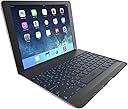
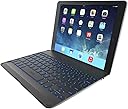



ZAGG Cover with Backlit, hinged, Bluetooth keyboard for iPad Air 1 - Black
Product ID: 1404793
💻6.3mm ultra-thin
🔋3 months battery life
⌨️30% more typing space
Desertcart purchases this item on your behalf and handles shipping, customs, and support to Israel.
💡 Unleash Your iPad's Potential!
The ZAGG Cover with Backlit, hinged, Bluetooth keyboard for iPad Air 1 combines sleek design with functionality, featuring a unique hinge for versatile viewing angles, a compact form factor, and a powerful battery that lasts up to three months. With backlit keys and enhanced typing space, it’s the ultimate accessory for professionals on the go.
C**Y
Landscape works great, portrait mode a problem
This is, at least for me, the best keyboard cover I've used so far. As I've said on my other keyboard cover reviews, the keyboard cover needs to function as both a keyboard and a cover equally well. Though, it's not the perfect cover and doesn't support portrait mode easily, it's about as good as it's going to get for now. So far I've tried the Kensington KeyCover Plus , the Logitech Ultrathin Keyboard Cover and now this ZAGGkeys Cover.This keyboard cover has a micro USB port for charging, an on/off switch, a pairing button, the case hinge and, of course, the keyboard itself. The keyboard is lighted LED. It is about the same thickness as the iPad, but tapering to be slightly thinner at the spacebar edge. When together, the weight feels about double that of the iPad.The CoverThe exterior is a shade of gunmetal grey painted in a similar way as the iPad, but the color is not an exact match (it's slightly brighter and the flakes are bigger). The surface is a little more textured as a result of this paint job. But, it matches closely enough from a distance. The hinge has some rubber strips to keep from sliding on a table, but there are no feet on the bottom. To use this cover, it takes a little elbow grease. You need to take the iPad and push it down into the hinge. The hinge grips the iPad tightly. Once the iPad is in there, though, it's not something you want to pull out often. Hence, the problem with Portrait mode. So, this makes it somewhat inconvenient to hold the iPad in portrait mode. It's quite clear, this cover was primarily designed to hold the iPad in landscape mode. You can pull the iPad out of the hinge, but after doing this a couple of times and having to readjust the iPad to sit properly when closed, it really discourages you from doing it often.On the other hand, the hinge mechanism is perfect for landscape mode. It flexes from closed to 135 degrees open. It looks and feels like a small notebook. The hinge movement itself is tight (like a notebook) so it holds the display in any angle without closing. It works amazingly well for landscape mode.When the cover is closed, the magnet actives that iPad lock mechanism perfectly. When open, it also turns right on. Unfortunately, while it does activate the iPad's locking mechanism well, the keyboard itself does not have its own locking mechanism. So, if you close the iPad and the keyboard light is on, it stays on. The keyboard itself does not shut off when closed. You have to manually do this with the on/off switch.The KeyboardThis keyboard paired on the first attempt with no difficulties, unlike the Kensington. The one thing I noticed while pairing is that the keyboard did not prompt for a password. So, it appears Zagg did not build any security into the bluetooth stack for this keyboard. I don't know that that's a problem for everyone, but it could be for some who are wanting that extra security layer. For example, if you accidentally press the pairing button, someone could pair your keyboard without typing in anything on the keyboard. Note, I don't often see keyboard products that hit the market that don't require a passcode. So, this is a bit unusual and you may want to ask Zagg some questions about this.The lighted keyboard works quite well, is sufficiently bright to cover most instances and turns off after about 30 seconds of inactivity. The light comes right back on when you start typing. You can easily change the color of the lights.As for placement of keys, if you have used any Zagg keyboard products, the key placement is pretty standard for Zagg. However, I would still like to have an ESC key which is still absent on this keyboard. You can create an ESC by ctrl-[, but I'd prefer using an actual key. In the position where the ESC key usually sits is the home (square) key. In fact, there's no real need to have this key on the keyboard when you can reach up and press the home button. Or, it could be placed onto a function key button. I rarely, if ever, push that button. It would be far more useful to have the ESC key there. Better, make that key programmable.Reading ModeI thought I should discuss this a bit. The iPad slips into the tightly gripping groove inside the hinge. It is shaped identically to the iPad case edge so it fits like a glove. However, it's so tight as to make it inconvenient to pull the iPad out often. As a result, it's not easy to pull it out to hold the iPad in portrait mode. Additionally, the hinge maxes out open into a 135 degree position. If you want to use the advertised 'Reading Mode', you have to pull the iPad from the clutches of the hinge grip and then rotate the iPad so it sits face up on top of the keyboard. As you do this, you'll notice magnets pop out of the hinge to help hold both the keyboard and the iPad together.Unfortunately, this 'reading mode' design is not perfect. The magnets are not strong enough to hold edge of the iPad to the keyboard securely together. You'll find that out when the iPad shifts. As soon as the iPad shifts, the magnet comes lose from the case edge. The magnet could have been stronger or better designed for 'Reading Mode'. Better, the hinge should have been designed to rotate all the way back flat against the back of the keyboard. The hinge can't do this. It tops out at a 135 degree angle. So, you are forced to pull the iPad out of the hinge to use portrait mode. Personally, I'll just hold the unit like a book while still in the hinge to use portrait mode when needed. It doesn't make it optimal for using the keyboard in this way.You can pull the iPad out and orient it in portrait mode in the hinge, but it'll become a bit top heavy at certain angles. It also won't close properly, so you'll have to re-orient the iPad back to landscape mode when done with portrait mode.OverallFor me, this is the best matching and thinnest keyboard I've seen so far. The lack of easy portrait mode makes it less than optimal for this purpose. If you like reading books in portrait mode often, you'll need to master the art of pulling the iPad from the cover or look for an alternative cover. When closed in landscape mode, the hinge keeps the unit closed securely like a notebook.I am deducting 1 star for lack of a comprehensive cover solution that supports both portrait and landscape. However, I like the look and feel of the cover when closed and when working with it like a notebook. The lighted keyboard works well, the keyboard has keys optimally placed and the key action works well. I personally like it, but I can't recommend it those who use portrait mode often.
J**.
Best iPad Keyboard So Far, but...
I hastily bought a Belkin keyboard in the AT&T store when I upgraded to an iPad Air. That was a mistake, $99 and no back lit keys. The forward slash was a shift keystroke. The key markings were dim and impossible to see with poor lighting. Often, it would repeat a keystroke indefinitely, at high speed. And, every few days or so, it would lose bluetooth connection. I lived with it for months, then needing back lit keys so my wife would not be disturbed by my lamp, I found the ZAGG Cover on Amazon (http://smile.amazon.com/gp/product/B00EXPSCBC/ref=oh_aui_detailpage_o08_s01?ie=UTF8&psc=1).Pros:1. Keys have a great tactile.2. Back lighting works well and is intuitive to turn of/off and adjust intensity. Changing the backlight color is not intuitive. But the instructions are terse, to the point and easy to understand.3. The forward slash is an unshifted keystroke.4. The top row of special function keys includes copy and paste, no more F8 or Ctl-V.5. Positive LED indication in bluetooth pairing mode.6. Battery-level LED, queried by dedicated key, shows three charge levels by color.7. Caps Lock LED.8. Continuously variable iPad angle is very useful for avoiding reflections.Cons:1. The hinge that holds the iPad is at the extreme rear of the keyboard. When laid back beyond about 45 degrees, the weight of the iPad makes the keyboard want to lift up when tapping the touch screen. I usually let my left hand rest on the front left corner of the keyboard to control this.2. The hinge and the rubber lining that grips the iPad have a little give to them, so that the iPad tends to wabble a bit when tapped. I find this to be about like some other cover designs that I have tried, so I am not put off by it.Now for the caveat. When I first began using my ZAGG Cover, I found that it was losing bluetooth connection a few times a day, much more than my Belkin keyboard did. This is very aggravating, as the fix is to repair the iPad and keyboard, just when you were trying to get on with whatever you were trying to do. Some Goggling of this problem indicated two thoughts, (1) Apple has a software problem and (2) ZAGG had a problem with early models I had received an early version.After contacting ZAGG and going through the motions of extreme repairing process (power off keyboard, reboot iPad, have iPad forget the old pairing and finally doing a fresh pairing) with no results, I called them again and they offered to send a replacement keyboard. This was a $0 purchase that would become a charge if the old unit was not returned. After three weeks, I contacted ZAGG and they sent a second replacement. This one came in several days.Meanwhile, Apple upgraded iOS from 7 to 8, and again to fix issues with 8. I found that my original ZAGG Cover then only lost connection about once a day, as my Belkin keyboard did.Now, I have been using the replacement ZAGG Cover for a full day and it has functioned flawlessly. No disconnection so far.Also, I have noticed a difference in the operation of the two keyboards. With the original ZAGG Cover, it would take one or more keystrokes to wake up the keyboard. The first keystrokes would be lost. With the new ZAGG Cover, one keystroke wakes up the iPad immediately. This tells me that there is a difference in the design and/or firmware in the new unit compared to the old one. So, the idea that old versions are in the supply pipeline seems to be true. Based on this, I suggest that when you order your unit you communicate with the vendor to ensure that you are receiving the latest version product.Bottom line: Now that the wrinkles are ironed out, I love this keyboard and consider it as nearly the perfect keyboard/cover as I ever expect to find.Jim H.
D**S
Minor niggles but otherwise a great keyboard. In fact probably the best for iPad right now
I have only just started using the Zaggkeys cover keyboard but I can already tell that it is a premium product. the iPad fits snugly into the hinge but that does not mean that it is a pain to get in and out of the cover, it is actually fairly easy to do and I can't see this being a problem taking the iPad in and out of the cover regularly. There has been a point made about the little plastic notch that sits in the middle of the hinge potentially scratching the iPad and I can see the concern as this marks my screen protector quite noticeably where the iPad sits, however I cannot comment on if it actually does damage to the iPad itself. I like the fact that you can place the iPad at numerous viewing angles similar to a laptop which is a big bonus over other keyboards in the same category. The advertised reading mode, although a good idea is a bit pointless in my opinion as the iPad does not fit very securely this way and I would rather use the iPad on it's own for things like this as the keyboard does add a noticeable amount of weight to the device. As for typing (I am typing this review using the keyboard) there is the odd typo here and there but I believe this is more me getting used to using the keyboard (although it does occasionally seem to duplicate letters on a press), otherwise it is a joy to use and free's up valuable screen space for typing up long documents etc.Overall the keyboard is a fantastic device with some very minor niggles but I am very happy with it at the moment.
J**R
Turns your ipad into a laptop but detracts from the tablet experience
Does a great job of turning the ipad into a laptop. The keyboard layout is intuitive and the keys are a pleasure to use. However, it doesn't quite do the ipad justice - it's not meant to be a laptop, after all. I think the cases that allow the ipad to be placed and removed more freely strike a better balance and the best examples of these are the Logitech Ultrathin and the Belkin QODE Thin Type.
M**K
Really nice looking keyboard
Best looking ipad keyboard i've come across. Functional as well. Liked the dedicated keys at the top. Returned though as i ordered in white by accident..
C**E
Five Stars
Exactly what I wanted and turns my iPad into a mini laptop
0**3
-the backlit lights are useful when typing in a dark room or lecture hall
This case is a huge pain in the butt but gets the job done.Pros:-Long lasting battery-battery charges very fast and lasts for a long time.-the backlit lights are useful when typing in a dark room or lecture hall.Cons:-if you have a screen protector on your iPad, then forget about the keyboard as it damages it.- if you have a case on your ipad, then forget about this keyboard. everytime you want to use the keyboad, you have to remove the ipad from your existing case and then insert it into the keyboard which can be a pain in the butt sometimes.- The Bluetooth doesn't always connect automatically and therefore you have to manually connect it ( I'm ok with doing this but for some it may be annoying).
Trustpilot
2 months ago
1 month ago