Desertcart purchases this item on your behalf and handles shipping, customs, and support to Israel.
🔗 Unlock wireless RS232 power—ditch cables, keep control!
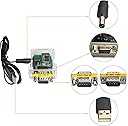
The DSD TECH SH-B23A is a Bluetooth 2.0 to RS232 serial adapter featuring a CSR BC417 chip for stable wireless communication with RS232 devices. It supports Android and Bluetooth-enabled PCs, offers a configurable baud rate and PIN, and delivers a reliable transmission range exceeding 20 meters. Designed for professionals seeking flexible, cable-free serial connections, it includes free setup software and a 1-year warranty with responsive technical support.
| ASIN | B07FP6NZB7 |
| Best Sellers Rank | #408 in Serial Adapters |
| Brand | DSD TECH |
| Color | Transparent |
| Compatible Devices | Android, Laptop |
| Connector Type | db9 |
| Customer Reviews | 3.6 out of 5 stars 169 Reviews |
| Input Voltage | 5 volts_of_direct_current |
| Item Dimensions | 2.1 x 1.4 x 0.3 inches |
| Item Weight | 0.11 kg |
| Item dimensions L x W x H | 2.1 x 1.4 x 0.3 inches |
| Manufacturer | DSD TECH |
| Mfr Part Number | SH-B23A |
| Model Number | SH-B23A |
| Number of Items | 1 |
| Number of Ports | 1 |
| Package Quantity | 1 |
| Power Plug Type | No Plug |
| UPC | 606479964067 |
| Unit Count | 1 Count |
| Warranty Description | 1 year warranty |
| Warranty Type | one-year warranty |
D**K
Very cheap, but quality control needs work
I'd been using the IOGear GBC232A for my projects and spending $70/ea on them. Wish I'd found out about this unit sooner - it does the same thing for a fraction of the price. I've only been using it for < 24 hours, but so far it seems to perform just as well as the IOGear. It also defaults to the sensical 9600, 8N1 so it pretty much works for me right out of the box without any configuration whereas the IOGear's default is 19200. The one issue is that when I use it with devices where a straight-through cable typically works, I have to pair a null modem gender changer with this box instead of the regular one they include - not sure why they don't just include a null modem instead? UPDATE 2/13/2021 - at this point I have purchased and deployed around 20 of these units in the past few months to various customer sites. So far, one simply died after a few weeks of use and another has struggled / refused to connect out of the box. A ~10% defect rate is quite high. Update March 2023 - at this point I have over 80 of these at customer sites and they perform well and are reliable. Other than the occasional one that doesn't work out of the box, none have died since my previous review so I'm updating this to 5 stars.
S**.
Terrible interdace
So far I can’t get it to work after a couple hours of trying using several different methods The instructions provide very little help. I’ll continue to try, but it’s not looking good
W**N
Works great but changing paramenters can be challenging.
Needed to change baud rate to 115200. Downloaded tools easily enough, but couldn't crack the code on how to make it work until I read a review that suggested it might be a HC-05 rather than a HC-06. So I opened it up, pushed the button, and used the HC-05 tab. Then the baud rate change worked. Key point -- Use the test button to verify the unit accepts "AT" commands (returns "OK") Once verified that the "AT" command works, the rest of the configuration commands will also work. I would have given this a 5 star rating (great price also) except for this difficulty.
C**.
I got it to work, and it works well!
I'm an IT hobbyist, not an IT professional. I have above average knowledge for sure. I'm using these for perhaps a unique use case, having one computer transmit data to another computer (multiple, actually). I'm a court reporter, and I can send my realtime transcription to other computers so it can be viewed by attorneys or whomever. There are a few ways to do this (many cloud based options charge high fees), but the classic/free way is via wired serial connection. Ancient tech, but (with a USB to serial cable) it works. I wondered, could I possibly find some wireless solution? And I found this. Like many others, hours of trial and error later, and it works! I could not get it to communicate with the built-in Bluetooth on my laptops, but when pairing it with the Startech USBBT1EDR2 (which I literally had lying around), it works like a charm. I wish I didn't need the extra Bluetooth dongle -- maybe a geekier man than me wouldn't -- but I'm happy.
J**X
No software, support is clueless
For me this worked perfectly right out of the box but I really wanted to customize the name. There is no software because the link that the vendor gives you goes to a dead website. I messaged the vendor on Amazon and they kept telling me to download it from their site and I kept telling them that their site was offline and they kept telling me to download it from their site. They were either intentionally playing dumb or they were not understanding me. For anyone that needs the software to modify the default settings then I would say this product is useless for you. For me it worked great out of the box as a bluetooth bridge between an old serial astronomy computer to be able to access modern astronomy software.
A**.
Worked great for Microsquirt
Purchased as a inexpensive option to connect with my Microsquirt ecu. After downloading the app from the manufacture and following the instructions from Pfloor on the msextra forum, it connected immediately after pairing to my phone. I will ad the jumper wire to eliminate the need for external power (as shown by other reviewers). I am happy with the product.
R**T
Software Works but Incorrectly labled: Took 2 Days and 4-5 Hours to Get Device Working
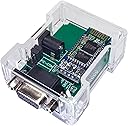
I almost gave up multiple times. But at 3AM on the 2nd day, I finally got it to work. Attempted two USB to serial converters and a desk top computer with an actual serial port in back to communicate with device. Manufacturer's instructions are incorrect and poor at best. Manufacturer's website is useless except to down load software. As other reviewers have written, you must disassemble unit, then ensure 2 jumpers are on "PC" pins to set correct baud rate, then use command tab HC-05 in software (not SH-B23 which is what this device is supposed to be!), open UART, select correct Comm port on your computer, press micro-button inside device, then press "test" in software and most importantly, receive an "ok". Remember to switch the jumpers from “PC” back to “device” after changing baud rate. If you don't get an "OK" after pressing “test”, you're not connected to your computer. And even though it looks like you are changing the device parameters in the software, you are not. Worse, You will still be able to "connect" or "pair" via blue tooth with another device, but the baud rate likely won't be correct (because you never actually changed it) and it will be connected via blue-tooth, but it won't work (ie will not transmit data). For example, a mega-squirt fuel injection computer, where the baud rate MUST be set to 115200, will not transmit data using this device’s default 9600 baud rate. If not for the other reviewers on Amazon, I would not have been able to change the devices baud rate or gotten this device to work. Also Device sent by Amazon is not the same as pictured or as listed on Amazon. Device shipped was a SH-B30, which doesn't even have a command tab in the software. If your time is more important to you than money, use something else.
L**2
Gave up after 2 days. Auto power off, lack of doc for setup.
Bought this to allow reading of RS232 scale to be placed inside a vac chamber, to allow wireless weights while chamber was sealed. Barely worked outside (have to move jumpers from PC-COM to DEVICE or scale would not respond at all), with power provided by computer USB port. Once placed inside chamber, power coming from a 5V supply (battery phone recharger) or from lithium battery stack, would turn off after 60s. Gave up. Odd that it worked with a computer 5V USB out, but not with 6.4V battery or phone recharger. Don't trust this to work - many other reviews about random product substitution. Other reviews have some workarounds that are handy, but look for a different widget than this.
D**N
nice tech tool
mooi afgewerkt. goede behuizing. Goed verpakt om te versturen. Snel geleverd. Top. Dirk
S**T
DSD TECH SH-B23A
Oggetto indispensabile per collegare,bluetooth, un vecchio palmare necessario per il trasferimento dei dati di una stazione totale tipografica. Montato e configurato funziona perfettamente.
M**J
Don’t buy these….
Useless unfortunately. Could not get the devices to perform even basic functionality. Terrible on line support, manufacturers website even refers you to other ‘insecure’ websites. Google search shows many others users struggling to get basic functionality working. Don’t buy these 😔
N**C
Telescope connection works great
Had some problems with this as a cheap solution to connect on to Celestron (SLT mount) but it did work out great. A few things to note assuming you already know how to control your scope via a wired USB virtual serial port. (This unit connects to the bottom on the handset same as your wired serial connector). I powered this from a small 5v power bank and connected it as above but at first I could get no response from it. In order to troubleshoot I connected it in UART mode - connecting to direct to PC via USB virtual serial port but could not get it to acknowledge an 'ok' on software command and ask the supplier tech service for help (no reply, waste of time). I discovered that unless connections are dead tight it would not work- that sorted reconnected again and noticed the blinking led paused on trying to connect to scope. Had to reverse RX and TX wires (the only other one is GND, going to the handset) and got various messages about 'semifore time out' and 'no serial port' and 'no celestron scope detected'. Days later found that either unplugging the 5v power to the device ( it goes into sleep mode) or simply delete the com port in Windows (device manager > Bluetooth serial port> uninstall and then right click and reinstall which takes only a minute) - all errors go away and you have the pleasure of using your phone/tablet/laptop to control the scope. A few times I needed to briefly unplug the 5v supply to it when I see the led does not go steady(i.e not connecting) but no problem as it will reconnect on next attempt and you don't lose alignment. Hope this saved someone a lot of heartache!
C**N
Produit au TOP si l'on prend 5 min pour le configurer!
Produit au TOP si l'on prend 5 min pour le configurer! (comment ai-je pu vivre sans ce produit dans le milieu de l'IT^^) Je vous partage les actions à faire ci-dessous: • Téléchargez le driver à l'aide du QRcode fourni dans la boite • Ouvrez le boitier et modifiez les connecteur Jumper pour les passer des 2 slots "PC-COM" à "DEVICE" • Branchez et alimentez le module avec son cable USB • Se connectez en bluetooth au module (SH-B30 dans mon cas) • Cliquez une fois sur le bouton de configuration du module Bluetooth • Lancez le logiciel "DSDTECH-Tools.exe" précédemment extrait • Sélectionnez "UART:COM5", spécifiez la vitesse "Baud Rate" à "38400" et cliquez sur "Open". Sélectionnez l'onglet "HC-05". • Un message "OPEN UART Success" doit apparaitre" en bas de la fenêtre. • Spécifiez un nouveau nom dans la case "Bluetooth Name" puis cliquez sur "Set" (étape optionnel) • Appliquez une vitesse de 9600 Baud puis cliquez sur "Set" • Spécifiez un nouveau code PIN pour la connexion Bluetooth " puis cliquez sur "Set"(étape optionnel)" • Dans mon cas, j'ai spécifié le rôle du module Bluetooth en "Master=1" puis j'ai cliqué sur "Set" • Une fois tous les paramètres appliqués, redémarrez le module en le débranchant électriquement (attendre au moins 5 secondes). • Une fois le module redémarré et la connexion Bluetooth effectuée, lancez votre terminal favoris en sélectionnant le port COM5, cliquez une fois sur la touche entrée et la magie devrait opérer!!!
Trustpilot
2 weeks ago
1 month ago