


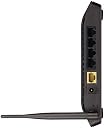


D-Link Dir-600M N150 Broadband Wireless Router (Not a Modem)
Product ID: 75873498
⚡150 Mbps Speed
📶Wide Coverage
🔒Secure Connection
🚀 Elevate Your Connectivity Game!
The D-Link Dir-600M N150 Broadband Wireless Router offers fast wireless speeds of up to 150 Mbps, extensive coverage for your home, and robust security features. With multiple connectivity options and an easy setup process, it’s designed for seamless internet sharing across all your devices. Plus, enjoy the assurance of a 3-year warranty and dedicated technical support.

| ASIN | B00JE6HMNY |
| Antenna Location | Home |
| Box Contents | Wireless N 150 Home Router, Quick Install Guide, Ethernet Cable and Power Adapter |
| Brand | D-Link |
| Brand Name | D-Link |
| Colour | Black |
| Compatible Devices | Laptop, Personal Computer, Smart Television, Smartphone, Tablet |
| Connectivity Protocol | Wi-Fi |
| Connectivity Technology | RJ-45 |
| Control Method | Remote |
| Coverage | Home network coverage |
| Customer Reviews | 4.1 out of 5 stars 13,671 Reviews |
| Frequency | 2.4 GHz |
| Frequency Band Class | Dual-Band |
| Item Weight Unit of Measure | 1.19 Pounds |
| LAN Port Bandwidth | 10/100 megabits_per_second |
| Manufacturer | D-Link |
| Manufacturer Part Number | DIR-600M |
| Maximum Upstream Data Transfer Rate | 150 Megabits Per Second |
| Model Name | Dir-600M |
| Model Number | Dir-600M |
| Number of Ports | 5 |
| Operating System | Windows |
| Other Special Features of the Product | Gaming |
| Security Protocol | WPA2-PSK, WPS |
| Special Feature | Gaming |
| UPC | 790069401138 |
| Voltage | 12 Volts |
| Warranty Description | 1 year warranty for Router and 3 months for adapter |
| Wireless Communication Standard | 802.11b, 802.11b/g, 802.11bgn |
| Wireless Compability | 802.11b, 802.11b/g, 802.11bgn |
T**K
Best product at cheapest price
The D-Link DIR-600 is a wireless router for a small house or apartment. It has a 150Mbps, 802.11n wireless access point, a 4-port 10/100 Ethernet switch, as well as a built-in firewall and filtering settings. You'll have to supply your own modem. The D-Link DIR-600 is small and can be placed flat or vertically on a desk (via a supplied stand), or you can wall-mount it. It has relatively bright, green status lights on the front and only a single antenna sticks out of the rear. Setting up the D-Link DIR-600 is reasonably simple. You have to get past a CAPTCHA screen when you log in to it, which can be annoying, but it's a good way to thwart automated attacks if you always leave your router remotely accessible. Once you're in the web interface, you can let the wizard guide you through all the steps you need to take to get online. However, you'll need to know the type of internet connection you use (PPPoE if you're an ADSL2+ user), as the DIR-600 won't auto-detect it. We wish the D-Link DIR-600's wizard also went through the wireless-networking settings; after you get online, you have to go in and click on the Wireless Setup portion of the menu, and from there you can choose to either use the wizard or enter your network details manually. Either way, we recommend you set up the wireless access point before you run the internet wizard. If you do it manually, you'll be pleased to see that the network name, speed and encryption settings can all be applied from the same page. You can either use Wi-Fi Protected Setup, or manually configure the security of your wireless network. We were pleased at how effortless the latter was with this router. In our tests, the D-Link DIR-600 wireless access point ran at around 135 megabits per second (Mbps) in our test environment, and it recorded transfer speeds that made us smile. From 2m, it averaged a transfer speed of 5.01 megabytes per second (MBps), while from 10m it averaged a faster rate of 7.36MBps. We were able to replicate this several times in our test environment, but the performance might vary in your own environment. This fast average speed over 10m suggests that the router is well suited to streaming video — and that includes HD video. It's a much faster performance than the 150Mbps-based Netgear DGN1000 ADSL2+ modem/router, for example, which recorded average rates of 3.55MBps and 2.98MBps in the 2m and 10m tests respectively. The Advanced section of the router's interface is where you can find the port forwarding and filtering settings. Forwarding ports is simple: simply type in a name for the filter, enter the port range you want to open, and enter the IP address of the destination computer. Or, you could just select one of the predefined rules from the list. Port forwarding is simple and doesn't require too many clicks: just enter your settings and click apply. You can quickly add multiple rules from the same page (up to 24). A QoS setting also exists in the router, but it can't be customised. You can only enable or disable it with the promise that your gaming traffic will be prioritised over Web traffic if you enable it. The firewall is customisable though, and you can tell the router to block traffic that's coming or going through the specified ports of your computers. There is also a DMZ setting and dynamic DNS support (using DynamicDNS or dlinkddns.com). The D-Link DIR-600 also has a parental control page that allows you to block access to (or only allow access to) certain sites — and you can schedule this access. You can't tell it to restrict the access of specific computers on your network, so the filters will apply to all computers. Furthermore, the filter is URL-based, so you can't filter general keywords. That means you'll have to know the address of the sites you want to restrict (perhaps put a call in to Senator Conroy). If a site is blocked, it will not give an error message — it will just look like the site is down, which means your kids might tell you the internet
N**K
Nice router in cheap rate.
First of all before writting this review i want to tell that this is not a modem its just a 600 m router. If you are here to buy a modem kindly search for the modem+router. ============================================= Pros:- ✔ The range of the Router is excellent since it covers 600 m of range so it give a excellent strength to your mobile phone. ✔ It support up to 4 LAN ports which is nice for home as well as for small office. ✔Overall design is nice as expected from Dlink. ✔A hanging port is also given to the router so its easy to hang the router in the wall. ✔ Its very easy to configure the router although it comes with WPA/WPA2 Encryption which gives a nice protection to your connection. ✔ 3 years of warranty. ============================================= Cons:- ✖ The adapter cable of the router is of very low quality. ✖ Although the LAN cable comes with this router is of good quality but it is very short in length. Its around 80 cm approx. Overall its a nice and value for money product..
S**R
Update- after over two years of usage!
Update- wow, it's been over two years before I decorated my home with this piece of Tech. I'm updating my review after almost 1.5years. Yes it's been two years and this router still is the primary one at my home. Although now I also own a JioFi, but still, I have to say, it still impresses me. Over this time, I would be honest, there has hardly been much time when this was left turned off, but still this works great! For my initial review, look below, you'll find the same. 1st Look: It's really a great beginner's router for such an amazing price! It's one of my best buys of the year! Makes you fall in love with Amazon and D-Link! Really it's a bang for the buck. But remember, as your first router, it's perfect! But if you have been using serious routers, this ain't for you. Though very lightweight and fragile, it serves the purpose quite perfectly! I've been using it for months now, and it hasn't given me a chance to complain yet! It has quite a good range for such a price point. I had it installed, and have been using it continuously with hardly much breaks. Appreciate D-Link and Amazon for such amazing products, with such great service! To wrap up, I would totally recommend it to anyone! Thank you!
A**R
Good product only for a small house but pathetic packaging
Packaging pathetic -For a new customer,they have sent a router in a cheap plastic bag instead of neatly packed box.Never buy from seller -Cloudtail Router seemed to be a used one Pros : Good budget router only for small house less than 600sq ft (max 1bhk) Average range but suffices the purpose Small and compact, doesn't occupy much space Configuration is hassle free (try to configure it with the help of your isp) Cons Pathetic packaging by seller Range should have been better.2 bhk or more should stay away. Doesn't support Mac filtering Power supply wire is small Seemed to be a used router Verdict: budget router only good for small house & not worth for more than Rs.800
P**H
works fine for me, a basic DSL Wifi router, and good tech support, bought it for 900 bucks, [IPV6 ready]
the router needs some additional configuration and WAN port won't function w\o proper settings. set WPA2 - preshared key and mac acl filter for best security this is how it works, it pushes out 192.168.0.2 as the IP address (DHCP mode) to the first device it connects. 192.168.0.3 and so on for the next device that connects and so on. default ip pool range is 192.168.0.2 to 192.168.0.254, that gives you what 253 ip addresses to hand out to clients (devices) you can change the subnet and increase the no. of devices that connect to it, adding an entry to the static DHCP table makes sure that a device gets the same IP every time, lets say after the lease period is over or you switch off your router. and its best to use the router configuration backup feature to back up all your settings to a file. it is Ipv6 ready, cool routing table and all.
N**S
Good product
Quality: Good quality
V**M
best budget router with fast speed
A Fast and Reliable Home Network The DIR-600 creates a high-speed home network with wireless speeds of up to 150 Mbps for fast file transfers, seamless web surfing, and smooth online gaming. The built-in internal antenna increases your wireless network’s coverage so you can avoid “dead spots” and get a reliable connection in more places throughout your home. The DIR-600 also has Repeater Mode, which allows you to extend the range of your existing wireless network, allowing you to reach the farthest corners of your home or small office. Flexible Connectivity for Your Devices The DIR-600 keeps you connected, no matter whether you’re using a desktop or laptop PC, a smartphone, or a tablet. Four 10/100 Fast Ethernet ports provide fast and reliable connectivity for your wired devices, while Wireless N 150 lets you connect all your wireless devices across your home. Get some work done on your desktop, play online with your game console, or check out online videos on your smartphone - the Wireless N 150 Home Router lets you access the Internet with all your devices. D-Link Dir-600M Broadband Wireless Router High Speed Connectivity Advanced Security Easy Setup and Futuristic Design Easy to Set Up, Easy to Secure Sharing your Internet connection doesn’t have to be a complicated process - just open a web browser to access the Setup Wizard and follow the easy step- by-step instructions to get started. Create a secure network with the touch of a button using Wi-Fi Protected Setup, which instantly creates a secure connection to a new device without the need to enter settings or passwords. Modern, Artistic Design The unique design of the Wireless N 150 Home Router means that you don’t need to hide another piece of tech clutter in your home. With all ports and connectors discreetly hidden on the back of the device, you can proudly display your DIR-600 as a stylish addition to any modern home Brand D-Link Model Dir-600M Item Weight 549 g Product Dimensions 15 x 17.5 x 3.1 cm Item model number Dir-600M Additional Features Gaming Included Components Wireless N 150 Home Router, Quick Install Guide, Ethernet Cable and Power Adapter Colour Screen No Batteries Included No Batteries Required No Data Transfer Rate 150 Wireless Type 802.11B, 802.11 B/G, 802.11bgn Communication Interface Wireless N Connector Type RJ-45 Includes Rechargable Battery No Includes Remote No
A**R
Damage product
Very bad product.. I give u 0marks to this product... U have send us totally damage piece.. I suggest all to customers plz don't buy this product .. They will send u damaged piece.. And at the tym of return .. They said this product can't be returned
Trustpilot
1 month ago
2 weeks ago