⌨️ Light up your workflow, command your day!
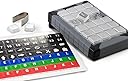
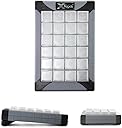
The PI Engineering X-Keys XK-24 is a premium 24-key programmable keypad featuring customizable blue and red backlighting, a durable co-injected case for versatile use, and hardware mode storage for macros. USB powered and compatible across Windows, Mac, and Linux, it’s designed to streamline complex workflows and boost productivity for professionals who demand speed and precision.


| ASIN | B003MB780E |
| Are Batteries Included | No |
| Best Sellers Rank | 145,069 in Computers & Accessories ( See Top 100 in Computers & Accessories ) 172 in Numeric Keypads 7,105 in PC Consoles, Games & Accessories |
| Brand | X-keys |
| Colour | Black and Grey |
| Customer Reviews | 4.3 4.3 out of 5 stars (323) |
| Date First Available | 30 Nov. 2012 |
| Guaranteed software updates until | unknown |
| Hardware Platform | Windows XP |
| Item Weight | 283 g |
| Item model number | XK-24 Keypad |
| Manufacturer | PI Engineering |
| Operating System | Linux, Mac OS X 10.7 Lion, Windows 10, Windows XP |
| Power Source | USB Powered |
| Product Dimensions | 15.24 x 10.16 x 2.54 cm; 283.5 g |
| Series | X-Keys XK-24 USB Keyboard |
S**J
... a little on the expensive side but is a great piece of kit
May be a little on the expensive side but is a great piece of kit. Was bought to work with lighting control software to give me quick access to programming. Very easy to set up and also after a quick look at the webpage about led backlights got it working just how I wanted. Very useful in hardware mode as it then stores the keys/macros/shortcuts in the unit so you do not have to have the software on a computer. With the software running however you do get more options like text strings etc. to set to your keys.
G**N
... of us do - you will find X-Keys and excellent tool to save time + be more productive
If you are spending a lot of time working with computer - as most of us do - you will find X-Keys and excellent tool to save time + be more productive. I save each day a lot of time, because instead of using mouse or looking for shortcut lists, I just press the button on my X-keys. But it also helps me to be more productive, because I can use software functionalities I was unable to use before. Simply because I added a lot of less known shortcut to the buttons of X-key. Actually, I was surprised how much it changed the way I work, well above my expectations. I use it all the days.
A**E
Five Stars
Great item, keys programmed to work with Davinchi Resolve
J**T
but very useful. Works on Apple Mac
Expensive, but very useful. Works on Apple Mac.
H**N
Great for X-Plane 11 flight simulator
Deservs five stars but as you need extra configuration software to get it to run with X-Plane 11 I have just done 4 stars. Keys work nice and positively. Somewhat pricey for a game add-on but that's not what it was really designed for. It has a multitude of uses that I am only just scraping the service. Well done to Stick and Rudder Studios for creating the software to run with X-Plane.
H**.
Five Stars
FANTASTIC
A**S
Quick Comparsion
I compared this one to the Expertkeys EK-58 model and decided to go with the Expertkeys one. Mainly because of the superior design and the cheaper price. This one however has backlighting - if you need that.
J**L
Excellent X-Plane Enhancement
I purchased the XK-80 in order to enhance my use of the X-Plane 11 flight simulator, with this item used alongside a specific plug-in for X-Plane. The XK-80 has transformed the accessibility of X-Plane when performing somewhat more involved flights, such as instrument approaches or otherwise where navigating using instruments. Before I bought this item, I would have been forced to adjust instruments in the cockpit using the mouse pointer, which is fiddly, slow and takes attention away from flying the plane. I can now with mere button presses control these functions in a similar way to how one would in an actual cockpit. This is achievable of course using bespoke flight simulator hardware, but it is prohibitively expensive, in contrast to the XK-80, which achieves essentially the same, but at a fraction of the cost. The hardware build feels solid, with a nice rubberised finish and excellent backlighting. Physically setting-up the keys with your own labels is very easy. Additionally, the software that comes with the XK-80, distinct from X-Plane, enables me to use this hardware in a range of other applications if I chose to.
M**E
I am extremely satisfied with this product, the build quality is excellent and the programming software is flexible and easy to use. I love the design of the key with the removable key caps to allow for easy application of legends and the interchangeable keys make it easy to create custom layout. I am equally happy with the vendor, the customer service is excellent, there was a MINOR mix up with my shipment and they not only responded quickly but they exceeded my expectations in resolving my concern and making sure I was satisfied, I highly recommend Xkeys keyboards and PI Engineering, I will buy from this vendor again.
H**O
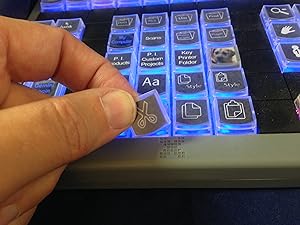
I've customised and used it for vMix for over 2 months now - zero complaint! The keys have good tactile feedback, easy to pull out if needed and the software make printing custom label a breeze!
C**.
Per chi ha Linux necessita l’aggiornamento del firmware fornito dal produttore, che deve essere fatto SOLO ED ESCLUSIVAMENTE con Windows... insomma “un gatto che si morde la coda”. Per il resto ottimo, soddisfa le aspettative
B**S
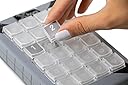
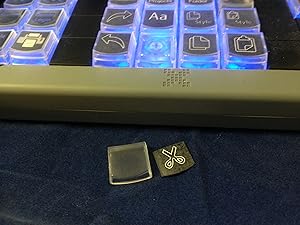
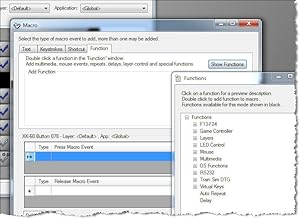
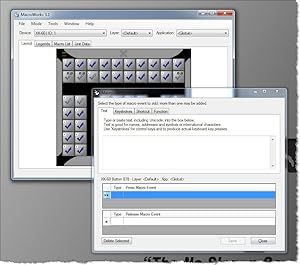
This thing is simply amazing. It Just Works. You don't even need software-resident on your computer-- you can store the keys or keystrokes directly into the device's memory, and then? Never need to re-load the software again, if you don't want to. The software is pretty easy to use; basically you're given a simple graphic of the keyboard, which you double-click each key, to change it. I would be very nice if the software was "smart" enough to blink the corresponding key, when you did that, but as I understand it, the individual key lighting isn't addressable by the main keystroke-programming software. You use a separate utility for that feature. Oh well. When I bought this, I also purchased an assortment of double-keys-- some "tall" and some "wide". These are not interchangable! Depending on how you place the keyboard, these accessories will go left-to-right, or up-and-down across two keys. So you need a pack of each, if you plan on having some double-wide keys, and some double-tall. You can also purchase blanking plates, for unused keys, which can help to highlight your layout. I found the keycaps a bit tricky at first, to remove-- it comes with a little tool (a stainless-steel "tweezer"), but I kept pulling up the whole key--not just the key-cap. With some practice, I found just where to grab with the tool, to *just* remove the thin top-part, and not the whole key. I had ordered several sheets of key-labels, for hand-written legends. I used these at first, and they were okay. However, with 80 keys, it was tiresome hand-writing all those individual legends, to say nothing of my handwriting being too large for the standard sized keys. So I used yet another utility that came with the software, and painstakingly typed in all 80 legends, one key at a time. The interface wasn't too bad-- double-click on a key, click to select one line, two lines or three lines (max). The default justification is centered, but you can left- or right- justify too. I found if you leave it on 3 lines, but click on the middle of three lines, and only use that, it's a wee bit faster, per key. What I wish it had? Was multiple selection feature-- and apply the same legend to a set of keys, then you'd just need to *edit* individual keys some-- it would be much quicker, I think, to edit a minor change or sequence, than to edit each key individually. Even better? Specify a sequence, as in a special symbol is replaced with a sequence, starting with 1, then specifying an adder (usually +1) up to as many keys as is selected in sequence. Or start with "A" and going up the alphabet in sequence. That would have saved me a couple of hours. Once I got all the keys labeled, I simply printed it--on plain paper. The labels it came with? I found rather cumbersome to use, and do *not* recommend them at all. They have mild sticky--but only to hold them to the sheet! The label itself is plain paper, one removed! And between the small size, a mild static electric charge? It was rather a pain to get the keys labeled. With plain paper, I simply cut the individual labels apart with scissors-- an entire row, then individual keys as I was installing them. Very much a pain--and impossible to keep square. Oh well--the printed labels are ever so much better than my hand-written ones anyway. What I would love to see? Is Post-It type glue on a sheet of labels-- that *would* let you keep them perfectly square. I may see if I can find this as a larger sheet, that I can put through my laser printer. I should point out, that the labels are underneath a little plastic cover--so once you have them in place? They are protected, and ought to remain for the life of the keyboard. All in all, this is an amazing product! I would buy it again, in a second. Indeed-- I have considered purchasing a second one, to use as a dedicated directional keypad--but I am worried a bit, that the software would be confused as to which unit was which. So I purchased a different product for that role (keypad) (see my review on a Razor gaming keypad). One additional nit-to-pick: if you allow their programming software to remain resident (in memory at boot-up)? The light pattern you programmed, using the little lighting utility, is messed up the minute you re-start your computer. Then, you are obliged to re-start that utility--which immediately restores your pattern. My solution was to disable their software from remaining in memory-- you don't need it, if you use the "write to device" and "hardware mode". I recommend using hardware mode anyway: many games bypass the built-in software engine that Windows uses, and talk directly to the keyboard at the hardware layer. Such games would simply ignore the resident software key programming, and the keyboard would not work-- or worse, some games would see such software as a "cheat", and disable your game ID! But using *hardware* mode, all the keystrokes are saved to the keyboard's copious memory-- and the game simply sees it as another USB keyboard. To be sure, I have not tried the keyboard's ability to simulate a mouse, so if that is a feature you need, you may need to experiment.
J**R
I had been feeling some pain in my left wrist for years at work, I decided to buy one of these, and I don't wana go back. I can't install any software at work, so this is perfect, u just program it at home with the native software , save the hotkeys to the memory and plug it in any computer, on windows or linux(I haven't tried it on macos, but I bet it works). It takes some time to get used to it, I had to start little by little using first only 4 keys for a few days, then 8, then 12 and so on... Good thing is you can write the hotkeys in the keyboard to remember it. It also took me a few times to get the layout just right to be optimal, but it is definately worth it. I wouldn't buy a bigger one, this one is big enough. I use it in Maya only(3d software).
Trustpilot
3 weeks ago
2 months ago