Desertcart purchases this item on your behalf and handles shipping, customs, and support to Israel.
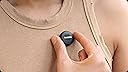
🎤 Mic Air: Light as a feather, loud as your ambition.
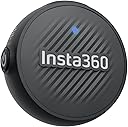
The Insta360 Mic Air is an ultralight 7.9g wireless lavalier microphone delivering 48kHz high-fidelity audio with built-in noise cancellation. Designed for creators on the move, it offers a 10-hour battery life and a stable 300m wireless range, connecting effortlessly via USB-C to Insta360 cameras and smartphones. Its versatile magnetic, clip-on, or pendant design ensures discreet, comfortable wear, making it the perfect companion for professional-grade audio capture anywhere.
| Antenna Location | Video Conference, Video Recording |
| Asin | B0FFW4KXR8 |
| Audible Noise | 20 db |
| Brand | Insta360 |
| Customer Reviews | 5.0 5.0 out of 5 stars (11) 5.0 out of 5 stars |
| Enclosure Material | Plastic |
| Frequency Response | 48000 hertz |
| Item Dimensions | 6 x 4 x 2 inches |
| Manufacturer | Insta360 |
| Mfr Part Number | CINSABWA-CINSABWB-ALT1 |
| Microphone Form Factor | Lavalier |
| Model Number | 1 TX + 1 RX |
| Number Of Batteries | 1 9V batteries required. (included) |
| Number Of Channels | 2 |
| Number Of Items | 2 |
| Unit Count | 2 Count |
| Upc | 810132546617 |
User
Great little microphone
I’ve been using the Insta360 Mic Air for about a week now, and I’m really impressed. Setup was literally plug-and-play — I connect it to my phone and my insta 360 X5. The sound is super clear, even in busier environments, and it does a nice job cutting out background noise.Connecting to Your Phone• The Mic Air has a USB-C receiver.• Plug the receiver directly into your phone’s port.• The mic pairs automatically — no Bluetooth setup required.• Once connected, your phone recognizes it as the main audio input, so any video or voice app will use it.To connect the Insta360 Mic Air to the X5 camera.*Press and hold the power button on the Mic Air for approximately 6 seconds until the blue light flashes rapidly, indicating pairing mode.*On the X5, swipe down to access the shortcut menu, tap "Bluetooth Headset/Microphone," and select "Insta360 Mic Air" from the list to establish the connection.*The camera will then connect to the microphone, and the AirPods icon will appear on the screen, showing that the mic is ready to use.
Trustpilot
1 month ago
2 months ago