Buy anything from 5,000+ international stores. One checkout price. No surprise fees. Join 2M+ shoppers on Desertcart.
Desertcart purchases this item on your behalf and handles shipping, customs, and support to Israel.
⌨️ Elevate your workspace: Comfort, power, and seamless multitasking in one sleek keyboard!
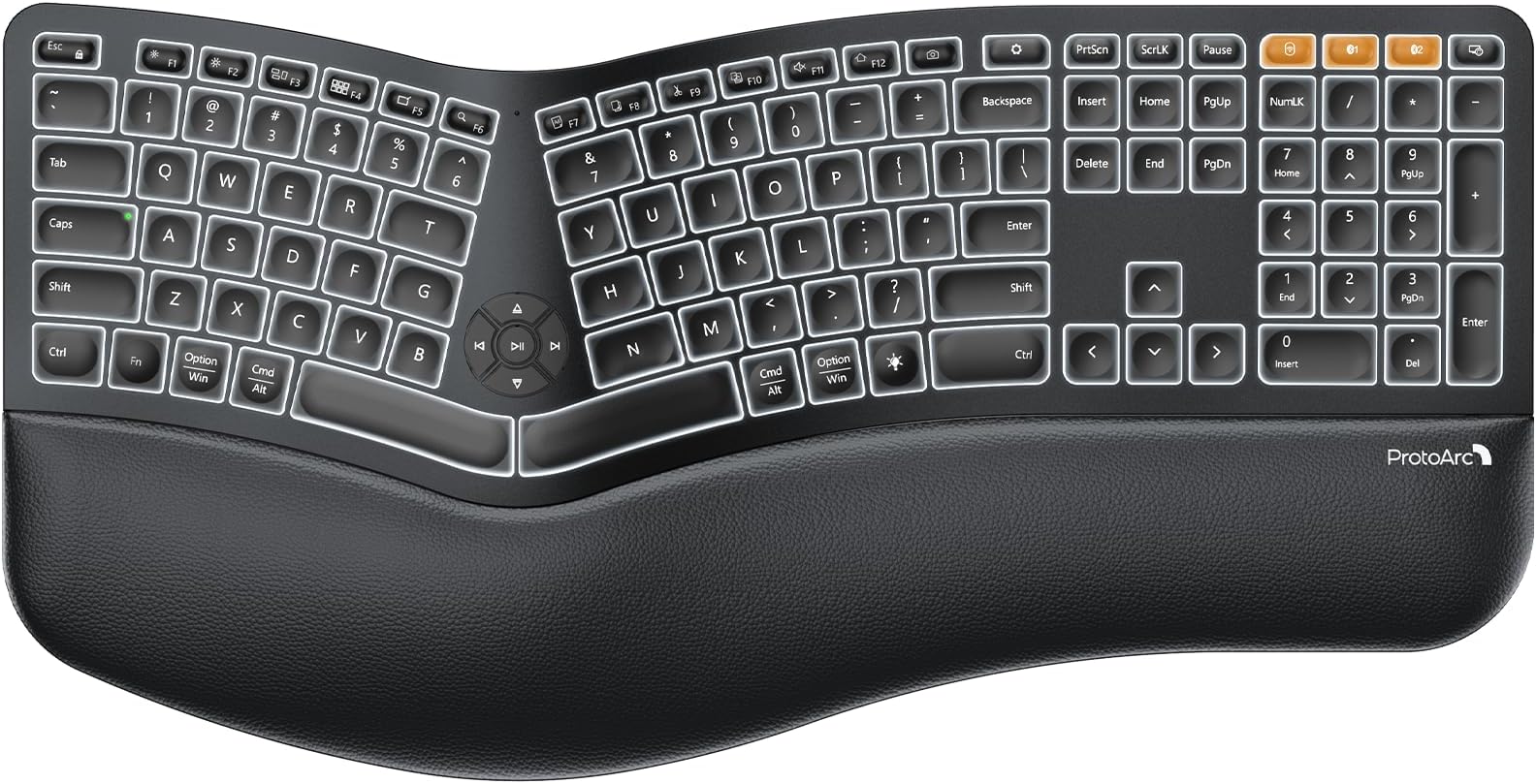
The ProtoArc EK01 Plus is a full-size, backlit ergonomic keyboard featuring a unique curved split design and cushioned wrist rest that reduces wrist fatigue by 54%. It supports multi-device connectivity with dual Bluetooth and 2.4G USB, allowing seamless switching between three devices. Powered by a robust 2000mAh rechargeable battery, it offers up to 100 days standby and adjustable LED backlighting for comfortable typing in any environment. Designed for Windows, Mac, and Android, this keyboard combines premium comfort, quiet scissor-switch keys, and versatile connectivity to boost productivity and promote healthy typing posture.


| ASIN | B0DJ6TC9D8 |
| Additional Features | Backlit, Ergonomic, Full Size, Multi-Device, Rechargeable |
| Antenna Location | Business, Everyday Use, Multimedia, Personal |
| Best Sellers Rank | #34 in Computer Keyboards |
| Brand | ProtoArc |
| Built-In Media | 1 x 2.4G USB Receiver, 1 x ProtoArc Backlit Wireless Ergonomic Keyboard, 1 x Type-C Charging Cable, User Manual |
| Button Quantity | 117 |
| Color | Black |
| Compatible Amazon Tablet Models | Amazon Fire HD 10 11th Generation, Amazon Fire HD 10 13th Generation, Amazon Fire HD 10 Kids Pro 11th Generation, Amazon Fire HD 8 11th Generation, Amazon Fire HD 8 Kids Pro 10th Generation, Amazon Fire HD 8 Kids Pro 12th Generation, Amazon Fire HD 8 Plus 12th Generation |
| Compatible Devices | Laptop, PC, Tablet, Windows/Mac/Android |
| Compatible Operating System Family | Windows |
| Compatible Tablet Computer Models | Samsung Galaxy Tab S7 FE 12.4" |
| Connectivity Technology | Bluetooth, USB-A |
| Customer Reviews | 4.2 out of 5 stars 1,339 Reviews |
| Enclosure Material | Plastic |
| Hand Orientation | Ambidextrous |
| Keyboard Backlighting Color Support | Single Color |
| Keyboard Description | Multimedia |
| Keyboard Layout | QWERTY |
| Manufacturer | ProtoArc |
| Minimum Required Operating System Version | Windows 8 |
| Model Name | EK01 Plus |
| Model Number | EK01 Plus |
| Number of Keys | 117 |
| Number of Sections | 1 |
| Power Source | Battery Powered |
| Recommended Uses For Product | Business, Everyday Use, Multimedia, Personal |
| Special Feature | Backlit, Ergonomic, Full Size, Multi-Device, Rechargeable |
| Switch Type | Mechanical |
| Unit Count | 1.0 Count |
| Warranty Description | 2 Year |
C**N
Love this keyboard! The backlight and responsive keys are a huge plus!
This keyboard is a delight to use. I wasn't sure if I would be happy with this type of keyboard as I am a fast touch-typist (over 100 wpm) and had read that the type of keys like this keyboard uses weren't that good for fast typing. But I've found exactly the opposite to be true. I'm actually typing faster now on this keyboard! The ergonomic design is perfect for maintaining a healthy posture for your wrists while typing. I like the cushioned palm rest, it really takes the fatigue out of typing for long periods of time. It's a full-size keyboard as well, which is great as I use all of the function and additional keys every day. I like the quietness of the 'clickiness' of the keys. Not overly loud, just a nice responsive sound as I type. The backlighting is truly a plus! I've never had a keyboard with backlighting before and now I wonder how I ever got along with it! Especially for typing in dimly lit areas or at night. It's really versatile as well. It has three ways to connect devices, one WiFi which requires use of the provided dongle, and two Bluetooth connections. I've set mine up to use one Bluetooth for my PC and the other one for my Android phone. I also have the Wifi connector enabled for my PC as a backup. UPDATE: About two months after purchasing, I had some problems with intermittent repeating keys. It didn't happen very often, but often enough that it became annoying to me. The keyboard comes with a two-year factory warranty, so I contacted Protoarc directly. They were so kind and understanding. They helped me troubleshoot the problem and when those steps failed to resolve the issue, they then offered to replace the keyboard free of charge, which I did. Within a week my new keyboard arrived, and it's been rock solid with no repeating keys. I was really impressed with their assistance and quick action to resolve this for me. I highly recommend the Protoarck EK01 Plus keyboard.
B**Y
Great keyboard; feels good on my RSI wrists
After almost 20 years, my Microsoft Natural Keyboard 4000 started to break down on me. I've had to learn to touch type because the letters have worn off over the years. I have been in development/IT/cybersecurity for many years and have carpel tunnel/RSI/whatever-its-called-these-days and a natural keyboard with a split key design is a necessity. But I'm quite picky with my keyboard and wanted to find something that would suit me. This unit fits the bill perfectly. I don't like really loud mechanical keyboards. Some people do but I do not. This keyboard has a good tactile feel to the keystrokes so that I can tell if my presses registered without me having to look at the screen, but it's not so loud that people on my zoom calls ask me to mute my microphone because of the noisy keys. Another feature I like about this one is that it is similar (not identical) to my old unit regarding the wrist rest. It is some type of faux leather with some texture to it, but is also slightly padded. Not so much that it makes it awkward, but just enough to keep it from being too firm. Very comfortable. The keys are spaced appropriately and I had no trouble adjusting to this new keyboard even though the keys are significantly different from my last one. Some of the nice features about this keyboard are that it has volume up/down controls in the center of the keyboard, along with play/back/forward keys too. There are some handy keys available for use with this unit as well, but I'm a pretty simple user. While my last keyboard was usb, this one is wireless, but I had a requirement of not wanting a bluetooth keyboard. I have a KVM switch on my desk for my home laptop and my work laptop, as well as other "mad scientist" computer experiments, and this keyboard allows me to plug in an RF USB receiver into the KVM instead of being forced to use bluetooth. It does have bluetooth and an easy to use switching system for multiple computers (separate buttons included above the numeric keypad), but because I'm sometimes installing operating systems, etc., it is a must for the keyboard to appear as a native USB HID on the target computer. This ProtoArc device works perfectly in that regard and I've had no problems with any computer I've worked on so far, and I've tried at least 7 various units. It works great with my KVM, or plugged directly into the computers. Another feature I didn't think I would care about but has been very handy on quick trips into the office when I do not turn on the overhead light is the backlighting of the keys. I thought this would be very over-rated but has turned out to be the "surprise" utility function for me. overall the feel is great, functionality is superb. I hope to be posting about a new model in about 20 years when the keys are so worn off that I can't tell what key is what anymore. I'll definitely see what ProtoArc has to offer for human input devices at that time as well...
A**M
Nice feeling keys, not too heavy, shortcuts work good enough.
So, my microsoft sculpt ergonomic spacebar broke and I needed a replacement. I actually went through 2 other keyboards before landing on this one. So I'm going to compare the sculpt, Meetion, Nulea 7 color, and ProtoArc. All of them were Wifi + 2x bluetooth. I use with both. I've had the MS Sculpt for years, I like it. In that time I've needed to replace a couple key caps, but it's been good. I really like the feel of the keys and I'm used to the shortcuts. Every one of these new keyboards seems to have a different idea on what alternate shortcuts the function keys do, I wish that were standard. The biggest issue with the MS Sculpt was it was bluetooth only, so I had to pull out and old wired keyboard every time I needed to go into bios, that was a bit of a pain. But I liked the use, feel, lightness of it enough. It took 2 AA batteries that I replaced maybe 2 times a year. All the new ones recharge via USB-C, but that needs to be done maybe every 1-2 weeks? So not bad since I can plug it in to the pc that it's next to for that. All the new keyboards also have a wifi dongle so I can use them in bios. First I tried the Nulea. The feel of the keys is the same as the ProtoArc, it actually has a lot of similarities. I really like the key feel. But what absolutely destroyed and made me hate the Nulea was the missing right CTRL key, OMG that drove me insane, 100% garbage without it. They have this stupid "light" button instead, it's so worthless without the right ctrl key. On top of that, I use a lot of complicated keyboard shortcuts, and depending on the wiring of the keys, some might not work. In my case Ctrl+Shift+Win+Page Down did not work, which was problematic for me as well. So I ended up returning that. Next I tried was the Meetion. It was lighter than the others, good and thin too. It doesn't have the flat keys, but keycaps. I like good key caps, but those they were not. It felt super cheap, but the biggest deal breaker was often repeated stuck keys, at least once a day. After a few days of that I returned it. I've been using the ProtoArc for a few weeks now, and it's great. It does have that light key on the right, it adjusts brightness and honestly I don't really care about that feature and wish I could remap it. But all that matters there is that it actually has the right ctrl key. My keyboard shortcuts work, I can use it in BIOS. It's probably about an oz heavier than my original microsoft sculpt. The only part that isn't great are the volume keys, well, all the keys in that little circle of keys in the center between the halves. That's why I deducted the star, but they work, and the keyboard looks great otherwise. So I'm happy with it and hopefully will have it another 5 years at least. Edit: So, after about 6 weeks of using it, the up arrow just fell off, it looks like the part that holds half of it down was malformed during manufacturing, I suppose that can happen. But it caused me to come here and reevaluate my review, and I've actually added back that star, so it's 5/5. Reason being is, first, after using it more, the volume keys didn't bother me as much, just got used to them, and mainly, when I contacted customer service about the key issue, they were very prompt to respond and sent me a replacement right away, they said it would take 4-5 days, but somehow it arrived the next day, and it works great, so very happy with that. One thing I also forgot to mention in the original review, is that it has one of those silicon keyboard spill covers, which is a really nice feature! Specifically because you can usually only find those made on laptops. So if you want your keyboard to always be easily cleanable you can use it all the time. I did use it for a couple weeks, but it slowed down my typing a little like any other cover I tried, but I do like having it.
A**R
UPDATED: Excellent Keyboard But Has Battery Life Issues after One Year of Use
UPDATED REVIEW: 4/21/2026 - I've knocked my rating down from a 5 star to 4 star and here's why - I've had this keyboard about a year now. The battery life has significantly dwindled and recharging it take about 24 hours. The charge lasts about a week or so before the battery needs recharging again. Despite this flaw, I still love this keyboard. I just hope I won't need to replace it often because they aren't cheap. UPDATED REVIEW: 5/19/25 - I've had this keyboard for a month now and I am so pleased with it. I functions perfectly, love the way the keys sound (not too loud but people know my fingers are flying), the backlighting is so nice in a darker office, which is how I prefer it. I hate fluorescent lighting so never turn the overhead lights on. I have naturally long nails that I spend a nice coin on to keep looking professionally manicured and the keys on this keyboard seem to be customized for just that purpose - long or short fingernails, your fingers won't slip off the keys. I think that's probably really important for some of the ladies reading these reviews. I've owned and used a myriad of wireless keyboards. This one tops them all. I will only ever buy and use ProtoArc. And no, this is not a paid ad. This is a genuine review. I paid for my keyboard myself. First and foremost, I’m a keyboard snob. Truly. I’ve been a paralegal for nearly 20 years and spend my whole day in front of a computer. Prior to that I worked in medical billing again spending my whole day on a computer. You could say I’ve spent my career typing. As such, I am VERY particular when it comes to keyboards. When I find one I really like, I hold onto to it until its demise. By then, that model has usually been replaced by something else. I was reluctant to try this keyboard. I’ve hesitated buying anything new for more than a year eking out the last bit of life from my old one. I’ve read many, many reviews about many, many ergonomic keyboards. I originally purchased an ergonomic Lenovo Go but you had to buy the number pad separately and it just was a hassle to not have an integrated number pad. The keyboard itself was nice but had its quirks. I found myself searching again and coming back to this keyboard. After reading reviews from people who didn’t receive the item in exchange for their review, I felt confident that I should at least give it a go. I am glad I did. This is just my initial assessment but the keys are smooth strokes, the ergonomic alignment is perfection, and the leather wrist pad allows for smooth transition while moving across the board while typing. This keyboard has the feel of a super high end piece of technology. If you are hesitant I understand your reluctance. But I would highly suggest you try it out. Worst thing that happens is you return it. Good luck and best wishes for your keyboard search!
D**.
Excellent Ergonomics and Thoughtful Design!
Excellent Ergonomics and Thoughtful Design! I recently picked up the ProtoArc EK01 Plus, and I’m thoroughly impressed with the quality and attention to detail. Right out of the box, you can tell this company prioritizes the customer experience. It even includes a personal note from the keyboard designer and a handy sticker you can put on the bottom of the device with their customer service contact information(if you want) I personally love these kind of small touches they go a long way. The typing experience itself is good. The split ergonomic layout combined with the wrist support creates a very comfortable typing experience; the wrist padding is very comfortable and feels like it has memory foam in it. The keys have a great tactile feel, and the adjustable backlighting is perfect for staying productive in low-light or dark environments. As a nice bonus, it even comes with a silicone keyboard protector to keep everything clean. My favorite feature is the connectivity. It is incredibly easy to switch between the 2.4 GHz connection on my work computer and Bluetooth for my tablet. If you’re looking for a comfortable, versatile keyboard that handles multiple devices seamlessly, I highly recommend the EK01 Plus!
D**K
Keyboard Nirvana
Recently became in need of a solid wireless keyboard. Have been using wired forever and landed on this wireless beauty. Keys are super responsive, overall quality of keyboard and materials used are top-notch and doesn't feel like cheap plastic. Solid build with attention to detail in the layout, shape and aesthetics. I purchased a different wired ergo keyboard earlier this week and the difference between the materials and quality between the two are leagues apart. The backlight is going to make using this late into the night or those super early morning sessions on the computer be a breeze with the lights off. Connecting the keyboard to the PC via the included WiFi nub was standard plug and play, also has 2 Bluetooth connections that can be activated via BT1 and BT2 keys. Using the provided USB cable to charge the keyboard took roughly 75 minutes to bring it from whatever charge it came with to full. It is obscenely comfortable on your hands. I can say after using ergo keyboards for over 30 years this is hands-down the most comfortable, most natural keyboard I've ever used.
H**H
Easy to program and buttons are numerous and programable
A wonderful keyboard. As comfortable as the expensive one from the company I will not mention. Easy to set up and charging is automatic. Also has keys that the other does not have especially the window key. After setting up the keyboard I just startup my computer and the keyboard starts itself.
T**M
Great keyboard (if I can figure out how to stop double spacing).
Bought this to replace a Microsoft Ergonomic keyboard that I spilled coffee over and half the keys stuck in the down position. I loved that keyboard and had to my old Logitech ergonomic backup keyboard while I decided on a new one. Needless to say, the thing spill guard on this is appreciated! I love the size of this keyboard: thin, can tilt backward or forward. To me, the keys feel great. Love the bluetooth for two devices: I used to use two separate keyboards between my personal and work laptop and that was a pain to switch between, now I only have to use one. My biggest complaint so far - and it may or may not be user error - but I find that the space bar tends to type to spaces very regularly. Like I said it could be user error as the space bar is split into to and I could be inadvertently hitting with my left had as I try and reach for the lower keys. But I dont know why a two-spacebar would be any different that one long one if I was hitting it twice. That is pain as my day is spent in projects and emails that I now have to constantly check for extra spaces. I know find myself slowing down to avoid extra spaces and find that now I'm not putting any spaces in. Go figure. Other than the spacing thing, I do really like the keyboard.
M**E
excelente!!
Les van mis comentario, uso bastante el teclado, vengo de un Logitech mx keys muy bueno por cierto pero nada ergonómico, este teclado me ha ayudado bastante con el tema del dolor de muñecas, es bastante buena la iluminación y el famoso retraso de reconexión no me lo ha hecho, las teclas son suaves al tacto y no necesitas hacer mucha presión para escribir, la batería me dura una semana mas o menos, sí le doy bastante uso, el cambio entre mac y windows no me ha afectado ya que el teclado cuenta con la iconografía de ambas plataformas, el único pero que le pongo es el lenguaje que solo es en inglés, bueno eso vi cuando lo compre, como escribo sin ver las teclas no me afecta pero las persona que buscan los signos ortográficos si tendrán problema por que no son los que deberían ser hay que buscarlos picando uno por uno hasta que salga el que deseas, !tómenlo en cuenta!, el teclado cuenta con un cubre polvo transparente de latex, eso me gusta pero sinceramente no lo uso me dificulta escribir rápido, se lo pongo cuando no lo uso.
A**Z
Genial
O único mal é não ter a tecla "< >"
L**S
buen teclado
Muy ergonómico pero recomiendo no conectarlo vía Bluetooth ya que tarda en responder
L**E
So comfortable to use
Game changer - I only got this last night and it is amazing. I have always used wireless keyboards and was always nervous about ergonomic as they looked hard to use. The built in wrist rest is amazing and the split key pad is a lot easier to use and after a bit of practice I believe it will improve my typing the correct way as well as the speed. Also the keyboard protector is amazing. i also got the same brand mouse and key and although I had a mouse support this is levels above. The mouse still takes a bit f getting used to but I'm sure after practice it will be more natural. it feels so good in the hand which is the main thing.Just takes getting used to that the left and right clicks are on the side. All up it was around $200 for everything and seeing as I WFH one day a week and spend time on this all day I really think the investment is worth it.
S**N
Fantastic keyboard!
Excellent keyboard. I previously had a Microsoft Ergonomic 4000 keyboard. I was eyeing the Logitech ergo K860 but that one is way overpriced. Gave this one a shot and it's incredible. Same tried and true ergonomics as the Microsoft keyboard but with better chicklet style and backlit keys. Daily use for several weeks now, and my wrists feel normal again after a long day of typing. The only negative I can think of, and this is a being a bit nitpicky, is that the keys when pressed could be quieter. Overall highly recommend.
Trustpilot
3 weeks ago
3 days ago