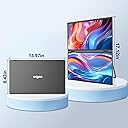
🚀 Elevate your workspace: triple the screens, triple the hustle!
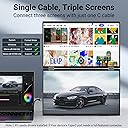
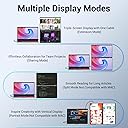
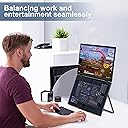
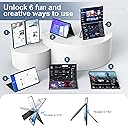
The InnoView 15.6" Laptop Screen Extender offers a portable triple-monitor setup with dual 1080P IPS displays stacked vertically. Designed for Windows and Mac users, it features automatic 90°/180° rotation, anti-glare flicker-free screens, and requires a 30W+ power supply per monitor for optimal performance. Ideal for professionals craving enhanced multitasking and productivity on the move, backed by an 18-month warranty and dedicated customer support.


| ASIN | B0CPXCHZC8 |
| Aspect Ratio | 16:9 |
| Brand Name | InnoView |
| Colour | Black |
| Compatible Devices | Computing devices compatible with HDMI or VGA interfaces |
| Contrast Ratio | 1500:1 |
| Customer Reviews | 3.7 3.7 out of 5 stars (130) |
| Display Technology | LED |
| Display Type | LCD |
| Hardware Connectivity | HDMI, VGA |
| Has Color Screen | Yes |
| Image Brightness | 250 |
| Item Dimensions D x W x H | 39.8D x 26W x 6.1H centimetres |
| Item Weight | 2.27 kg |
| Manufacturer | InnoView |
| Maximum Display Resolution | 1920 x 1080 |
| Model Name | INVPM009-02B |
| Model Number | INVPM009-02B |
| Mounting Type | Wall Mount |
| Native Resolution | 1920x1080 |
| Network Connectivity Technology | HDMI, VGA |
| Picture Quality Enhancement Technology | IPS |
| Product Features | 1.Support screen expansion, copy, merge mode 2. The upper and lower structure saves space. 3.Multi-angle adjustment |
| Refresh Rate | 60 Hz |
| Resolution | FHD 1080p |
| Screen Finish Type | Glossy |
| Screen Size | 15.60 |
| Shape | rectangular prism |
| Specific Uses For Product | Business, Travel, Temporary Workstations, Photo Video Editing, Gaming |
| Total HDMI Port | 1 |
| Total USB 3.0 Ports | 1 |
| Total USB Ports | 1 |
| Total Video Out Ports | 1 |
| Viewing Angle | 178 Degrees |
A**R
Edit: innoview staff contacted me and we're very gracious and kind to solve my issue. I now have a working monitor and am loving it again! Old review: Loved this monitor when i got it, I knew that colour recreation wasn't going to be the best but I need it more for productivity so I didn't mind paying the extra bit to have a 3 screen (laptop monitor included) solution. I bought this monitor as a solution for myself to help with editing on the go but just this past month I tried using it while traveling and nothing I do will make the top monitor connect again. I tried, reinstalling the software after uninstalling, new cables (TB4) and powering the monitor separately while connected to the computer. all typical solutions won't allow it to connect. "TL:DR" Overall if you want a long-term solution for a dual-screen monitor, this isn't it!
A**Y
I recently got my hands on this dual-screen portable monitor stand, and let me tell you, it's been a game-changer for my workflow. Right off the bat, the color accuracy and vibrancy of these screens caught my eye. I'm talking crisp, vivid displays that make everything from spreadsheets to videos pop. Now, you might be thinking, "Two extra screens must take up a ton of space, right?" Wrong. This design is sleek and surprisingly space-efficient. The screens sit one above the other, not side-by-side, so it barely takes up more desk space than my laptop alone. But the real magic? It's like having two additional monitors without the clutter. The boost in productivity can't be overstated. Having the extra screens lets me spread out my work, keep reference material handy, and multitask like a pro. It feels like I've got a command center at my fingertips. Setup was a breeze, too. It's literally plug-and-play. My laptop powers the screens directly, so no need for extra power cables cluttering up my workspace. A single Type-C cable is all it takes to get everything up and running. No fuss, no muss. Overall, this portable monitor stand has been a stellar addition to my setup. It's efficient, user-friendly, and has significantly improved my work efficiency. Highly recommended for anyone looking to up their productivity game without sacrificing space.
R**N
I'll preface this by saying when the monitor does work, it's actually very good and convenient. But this is such a breaking issue that all previously positive comment I had has become moot. I connected this to my mac and followed all directions and things were working great for a week or so. However all of a sudden the next time I power my mac on, I see this notification pop up in the top right corner of my screen and it keeps popping up and taking primary away from everything. I can't type anymore because of this pop up notification and I'm unable to do any work. I unplugged from my machine, uninstall drivers, and re-install updated ones and things were working fine, but after another week I get this again. I have messaged customer service but they have not messaged me back. I'm already past the return policy time period so I'm now stuck with it. Overall this has not been a great experience
B**G
Device requires drivers to be installed as admin, and then I end up eventually see display artifacts and issues even on my main laptop display. Device has a lot of promise, but is an end-to-end poor and unreliable experience. Have missed the return window and now i'm pooched.
O**O
The top screen tends to turn off randomly and sometimes does not re-engage coming out of sleep mode.
Trustpilot
1 day ago
4 days ago