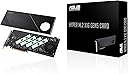
Desertcart purchases this item on your behalf and handles shipping, customs, and support to Israel.
🚀 Unlock hyperspeed storage with ASUS Hyper M.2 x16 Gen5 – because your data deserves the fast lane!
The ASUS Hyper M.2 x16 Gen5 Card is a high-performance PCIe 5.0 expansion card supporting up to four NVMe M.2 SSDs with a combined bandwidth of 512 Gbps. Designed for both AMD and Intel platforms, it features advanced thermal solutions including a large heatsink and active fan to prevent throttling during intense workloads. With RAID support and robust power delivery, it enables professionals to build ultra-fast, reliable storage arrays for demanding computing environments.


| Asin | B0CKH9FWRQ |
| Best Sellers Rank | #37,640 in Computers (See Top 100 in Computers) #7 in RAID Controllers |
| Brand | ASUS |
| Compatible Devices | Computer, Laptop |
| Customer Reviews | 4.3 4.3 out of 5 stars (132) 4.3 out of 5 stars |
| Hardware Interface | PCI Express x16 |
| Item Dimensions L X W X H | 12.2L x 1.3W x 27.9H centimeters |
| Item Weight | 1.9 Pounds |
| Manufacturer | ASUS |
| Mfr Part Number | HYPER M.2 X16 GEN5 CARD |
| Model Number | HYPER M.2 X16 GEN5 CARD |
| Number Of Items | 1 |
| Operating System | Windows, Linux |
| Style Name | Classic |
| Upc | 197105353282 |
User
Nice looking card and performance
The ASUS Hyper M.2 x16 Gen5 Card is an excellent option for adding up to four NVMe M.2 SSDs to your PC. One of the main reasons I chose it is its support for both PCIe 5.0 and PCIe 4.0 drives.The massive solid-aluminum backplate and cover act as a giant heatsink, helping keep the SSDs cool while also giving the card a clean, high-quality appearance. The included cooling fan is another nice feature, especially when several high-performance NVMe drives are installed.Performance is excellent, with extremely fast transfer speeds, particularly when multiple drives are configured in RAID. Despite its solid construction, cooling features, and PCIe 5.0 support, it is often priced lower than many comparable four-drive M.2 expansion cards.Before purchasing, make sure your motherboard supports PCIe bifurcation and that your processor and motherboard provide enough available PCIe lanes. To use all four SSD slots, your PCIe x16 slot needs to support a x4/x4/x4/x4 configuration. Without the proper bifurcation settings or sufficient PCIe lanes, the system may detect only one or some of the installed drives. It's important to check your motherboard manual, BIOS options, slot configuration, and any lane-sharing limitations before installation.Overall, this is a well-built, attractive, and high-performance expansion card that offers excellent value for the price, provided your system has the required PCIe support.
User
No sirve para 4
La peor compra de mi vida. Utilizando Intel 9 13900K con una tarjeta madre Asus ProArt Z790 wifi creator y no es compatible. La instale en el primer slot, con bifurcacion activada y no aparece 4x4x4x4 sólo 8x8 por lo que sólo lee 1 SSD no 2 ni mucho menos 4, me arrepiento totalmente de esta compra y como pasó el mes ya no pude devolverlo difícilmente volveré a comprar algo de Asus
User
Fits well with my b650x ax gigabyte and amd rygen 9 7900
Fits well with my b650x ax gigabyte and amd rygen 9 7900 , birufication is needed to run it , I am using 4 samsung evo 990Looks premium
User
Know your MB PCIe allocation, Read the manual.
I you have a board that supports X4X4 on the 2nd PCIe slot at 5.0 this is a no brainer. I will list reasons for and against.1. It is slim2. It fits 4 5.0 M2 drives3. It has a 4 pin PWM header4. It is the best solution for cooling 5.0 M2s..5. It is built much better than the previous Generation.6. It works automatically in my As Rock boardCons.1. It must be a MB that has at least 2 PCIe slots wired to the CPU for more than 1 drive to be recognized by the OS.2. On X670E and X870 there are only 4 or 5 boards that support this and they are all expensive.3. It has no on board controller like the WD AN1500.If you know what this is and are tired of the M2 sitting under your GPU adding to the thermal load in the case making the fans spin that much faster? Then this is the solution. I have some Crucials connected and the blaze through operations. It is the fastest drive to download and install Epic Games.
User
Future proofing system
Of course this is like the previous generation cards that require PCIe bifurcation on the slot it’s put into.A lot of consumer motherboards these days do 1x8/2x4 in the first/second slot respectively. This means this device can be useful to optimize IO with limited PCIe slots and lanes while still having a graphics card in the first slot.In my case I have a B550 board with only one usable NVMe slot due to having a peripheral on my 3rd PCIe slot. Having this card allows me to make use of the unused second slot to add an additional 2 NVMe drives at full speed.This is nothing special and now there are many cards that do this but what I like about this card is that it is the only one I’ve found so far that supports Gen 5 speeds making it a long term purchase.It is packaged with a few goodies, including extra mounting screws and also foam spacers for single sided drives to get adequate pressure against the front side thermal pads.Another goodie which is very cool (literally) is a connector to motherboard fan headers which would allow software control of the fan speed. Personally I don’t use the fan at all since I’m only using two PCIe 4.0 drives which don’t get that hot compared to 5.0 drives.Finally, I was surprised to see a 6-pin PCIe power header on this board. My two drives seem to work fine without this plugged in but I can see it providing extra power if there were 4x Gen 5 drives running at full power.All in all, I’m happy with this purchase as it should hopefully come useful for a long time so long as I intend to upgrade to PCIe 5.0 components some day.
Trustpilot
1 week ago
2 weeks ago