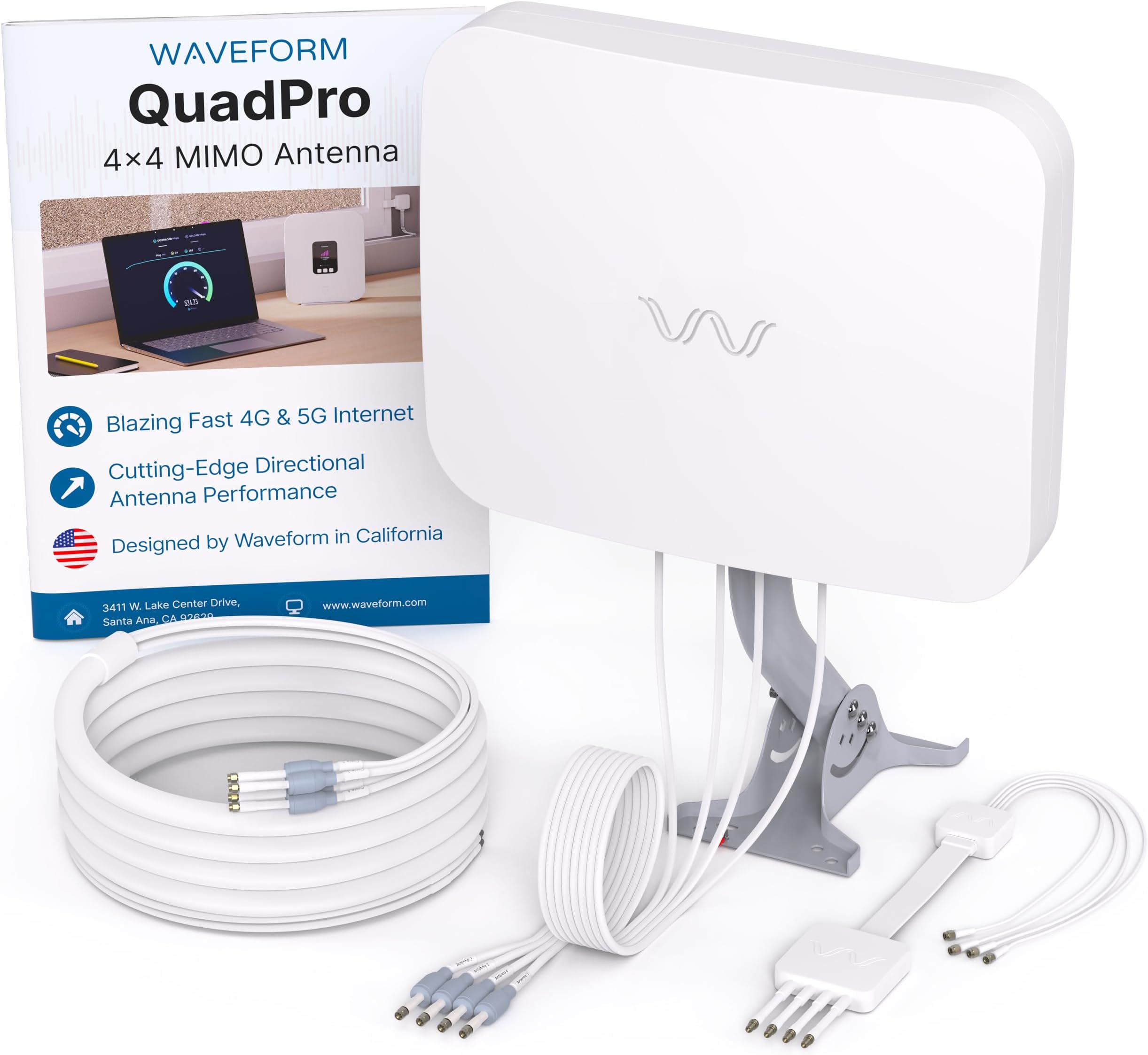
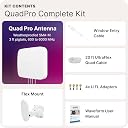
This should be the only review of this product that you will need to read. I'm serious - I'll give you the complete low down on the Waveform QuadPro 4x4 MIMO Panel Antenna Kit. Here's my story. I work for a small marine company that has been forced to endure really crappy DSL from the sole telecommunications company in the area that provides wired telecommunications infrastructure to our location (yeah, I'm talking about Bell Canada). Capped at 50Mbps, which frequently dropped to under 5Mbps at various times throughout the day, we needed to find an alternative internet source. After much research, we discovered Rogers 5G for Business Internet. Advertised as capable of up to 500 Mbps down and 30 Mbps up, and priced competitively, it seemed like the best alternative we had. But I knew there was going to be an issue - signal strength. I knew this because, aside from having really crappy wire-based communications, we also exist in a virtual dead zone when it comes to wireless signals - we get almost no signal off the Bell towers, and very little signal from the Rogers towers. But I thought, well, might as well give it a shot - Rogers offers a 30 day trial to give their service a try, and if you aren't satisfied, you can pack up the modem and send it back to receive a full refund. So, I ordered the Rogers service and the next day the box arrived with the Nokia 5G Gateway 12 router/modem and a new sim card to pop inside. I inserted the Sim, powered up the modem and waited while it attempted to lock in a signal from the tower. Needless to say, it took what felt like forever, but it finally stopped blinking - indicating it had locked in. I fired up my laptop, connected to the new Nokia Wifi and immediately pulled up speedtest.net. I could tell by the length of time it took to load the page that the speed result was not going to be great. I hit "Go", and waited. First speed test came back with 23 Mbps down, 2.1 Mbps up. Ok, not promising, but at least it connected and got a signal. I read the small set of instructions that came with the device hoping for some advice on how I might achieve greater speeds. It suggested taking the modem and plugging it in near windows (my office is all windows and faces the direction of the closest tower), but I followed the directions and tried a dozen other locations in the dealership - upstairs, near windows, closer to the far end of the building - everywhere, hoping for better results. They did not come - the best speeds I could achieve were no higher than about 60 Mbps down, and 5.5 to 7.5 Mbps up. I was disappointed, to say the least. However, I figured there had to be a way to increase antenna power, and if I could do that, I could possibly get better speeds. So, I jumped onto ChatGPT and I asked it "how can I get stronger 5G internet signals with my new Rogers 5G for business internet package?" Immediately, it suggested looking for external antennas, but also noted that my Nokia router from Rogers did not have removable antennas (which I would need if I wanted to connect an external antenna to my system). ChatGPT, if you have used it before, always suggest a handful of products - typically ranging in quality/price from best/most expensive to ok/least expensive. Nothing was different here, it offered me 5 suggestions with the Waveform QuadPro 4x4 being the highest quality suggestion, but also the most expensive option as well. None the less, I wanted the best shot at success, so I logged into my amazon account, searched for the product, gasped when I saw the price, read the reviews, understood how the technology would theoretically work.....and hit the "Buy Now" button. It would arrive the next day, and what I always love about buying through Amazon - I knew I'd have 30 days to try it out, fiddle with it if need be, and if it didn't work, I'd get a full refund - no questions asked. However, I also knew that I would need a new modem/router with external/removable antennas, and after having a second conversation with ChatGPT, I decided on the GL-iNET EX3000 Puli AX modem/router - which cost almost as much as the Waveform QuadPro antenna kit! Now, if you've stuck with me this far, we are about to get into the nitty gritty of this new setup, and your patience with my story telling is about to pay off.Everything arrived the next day. I opened up the new GL-iNet router, plugged in the rogers sim, fired it up and tried the service using the normal antennas that came in the router box - no discernable difference- still capped out at about 50 - 60 Mbps - certainly not worth a $550.00 layout for the router as it did not improve anything over the included Nokia router from Rogers. I stared at the Waveform Box on the ground, sighed deeply....and then decided to give it a go. I opened the box, gave the installation instructions a quick once over and then grabbed the mount kit, walked out the front door with my ladder in hand. We have a front entrance way arch that is about 10 feet high and I decided I would mount the antenna at the top of that arch - it kept it within 20 feet of where I would enter the building with the cabling and attach it to my new router. Installation was easy, it's basically the same arm you would get with a satellite installation from Bell or Dish or DirectTV. Mount the arm, then mount the antenna to that arm. The antenna attachment allows for easy alignment and can be adjusted both sideways, and up/down. Once I got the antenna mounted, I then ran the wiring back inside the building to my router. There are 4 antenna leads that come from the Waveform antenna, and I discovered that the way you plug them into your router matters. Lead 1 needs to go to the Antenna labelled "Main" on the router. Lead 2 goes to the DIV/GNSS connector. Leads 3 and 4 can then plug into MIMO 1 and MIMO 2 - HOWEVER, after much experimentation, I found that plugging Lead 4 into MIMO 1 and Lead 3 into MIMO 2 worked best and resulted in best speed results. The other two antenna's are for WIFI and you should simply use the antenna's provided by GL-iNet in the box for those two.Once I got all of that figured out, this is where YOUR patience really gets tested. I'm not kidding - be prepared for several hours of slow, meticulous, documented aiming of your new antenna. The first day I spent 3 to 4 hours on the ladder. Use your cell phone, connect to the GL-iNet Wifi and login to the router's configuration page. On the first page you will see your cellular connection overview. It will list things like your 5G provider, IMEI, Active Sim (yes, it is a dual sim router and you can use one or two sims), your signal strength (Poor, Good, Excellent), and Sim Card Settings. However, the page you want access to while testing your antenna direction, is achieved by clicking on the "View more Information" link located directly below the "Sim Card Settings". Once you click into that link you will be presented with all of the info you need access to in order to discover and zone in on the best direction of your antenna. On this page, scroll down to the section labelled "Cells". It is here that you are presented with LTE signal and NR5G signal results - you will use these while aiming your antenna. Now, my understanding is that some 5G systems/services might work a little differently, but Rogers system works in NSA mode (Non-Stand Alone), which means the device uses an LTE connection to communicate with the network's "brain" (the core) while layering on a 5G signal to provide the actual high-speed data download. Some 5G providers use SA (Stand Alone) systems, which don't rely on LTE signals at all, but in my case, LTE is relied upon, on top of the 5G signal. This means I need to achieve strong LTE signals, along with strong 5G signals in order to achieve best speeds. I'm not going to lie, this reliance on LTE adds an additional layer of difficulty when trying to find the best direction for your antenna. Using the "More Info" page, you will slowly turn your antenna 1/4 of an inch at a time, pausing in between each movement and hitting "Refresh" on your browser to get updated signal readings from the "More Info" page. When it comes to 5G signals, there are three main numbers you will want to look at: RSRP (This number measures raw Signal Strength) - you want the highest number (closest to zero) that you can achieve. For reference, if you achieve higher than -80dBm, you probably live extremely close to the tower and you will likely be able to achieve the highest possible speeds. Likewise, if you are lower than -110 dBM, you will struggle to make a connection, and even if you do, your results will be bad (when I was connected to the Nokia modem/router, my RSRP readings were around -113to -115 dBm). However, there are a couple of other numbers you need to be aware of, and they can greatly impact your results as well. Perhaps the most important number is the SINR number. SINR is MORE important than RSRP when it comes to achieving your best speeds. SINR measures the Clarity of the signal relative to the background noise/interference. It will not matter how strong your RSRP signal strength is if your SINR clarity result is low - you will receive crappy speeds if you don't have a good SINR result. In this regard, you are looking for numbers higher than zero - the higher, the better. So, above 20 dB and you are laughing - speeds will be lightning fast. 12-19 dB, you are in a really good spot and while you probably won't achieve maximum speeds, you can expect a decent result. 0 to 12 dB, you will possibly have a connection, but it won't be terribly reliable and you could experience drop outs or lag. So, you're aiming for 12 dB or greater if possible, combined with an RSRP between -80 to -105 dBm. There is another number that is measured called the RSRQ - which essentially measures "noise" on the signal. With this, you are looking for numbers closer to 0. If you can achieve -9 dB or better, you will be in good shape, if you achieve -10 to -14, you should still be ok for most business activities, -15 to -20 dB will cause some issues, and below that - forget about it. However, if you can achieve decent RSRP and SINR results, your RSRQ numbers will be fine, which is why you should only be focusing on the SINR and RSRP numbers while pointing your antenna. Ok, after several hours, I found my best direction for achieving my best 5G SINR and RSRP results. I had achieved RSRP of -98 (a full 15 - 17 dBm higher than my Nokia connection), and a SINR of 17 (My Nokia SINR numbers were typically under 10 dB). I got pretty excited, until I tested my speeds - not as low as the nokia results, but still in the 120 Mbps range. Not bad I suppose - double what my Nokia modem was giving me, but could I justify the $1300 spend between the Waveform Antenna and GL-iNet router for 120 Mbps?? I'm not sure what my boss would have said, but she hired me for a reason - I am a like a dog to a bone when I am trying to achieve results, and 120 Mbps was not going to cut it. So, I consulted ChatGPT again, and quickly found out that on systems like the one that Rogers uses, the LTE signal also needs to be healthy in order to achieve the best speeds. It also informed me that while I had achieved a significant improvement in my RSRP and SINR signals when compared to my Nokia results, I would not likely be able to achieve the maximum 500 Mbps speeds that the Rogers 5G system said could be possible....and that I should expect a 200 to 250 Mbps range. Ok, I would be very happy if I could achieve 250 Mbps - that would be 5 x faster than my current Bell DSL connection that provided 50 Mbps at the best of times and only 5 Mbps at certain times of the day! But right now, I was only getting 100 to 120 Mbps. But it was getting dark, so I decided to leave it for the following day. That night I did a little more research and discovered that finding that sweet spot where LTE signal was good AND 5g signal was good could be very tricky to find. I don't really understand technically why this is, but apparently these signals can travel at different heights?? Yeah, it didn't make sense to me either, but the advice I kept seeing was "slide the antenna up or down a foot", and try adjusting the angle up or down for the antenna a little bit at a time to find the sweet spot. Yeah, I wasn't looking forward to this either - I foresaw several more hours on the ladder. The next morning I climbed the ladder again, re-connected my phone to the wifi, logged back into the wifi admin page, and clicked on "View more Information" to get started again on re-positioning my antenna to obtain the best "combined" signals. When it comes to LTE signals, you're focusing on the same two results again - RSRP and SINR - and you are looking for the same results - the higher these numbers are, the better. What you will quickly realize is that once you find an amazing LTE result, you will most likely discover that your 5G result is not so great anymore - not necessarily unusable, but essentially the result flip flops and you still end up with less than optimized speeds. I played around with this for about an hour, with no great result. So, I decided to try the recommendation of moving the antenna up a foot. Surprisingly, this did make a difference - I was able to get much closer results between the LTE and 5G signals, BUT, the fine-tuning really happened once I got the direction right, and then I started to adjust the up/down angle of the antenna. I found that I needed to angle the antenna upwards about 15 degrees before I realized the optimum signal strength and quality between the LTE and 5G cells. In the end I achieved LTE RSRP of -99 and SINR of 17 AND 5G RSRP of -99 and SINR of 14. These results have produced download speeds up to 265 Mbps and upload speeds up to 26.5 Mbps. These results can vary through the day due to traffic on the tower, but I never drop below 100 Mbps down and 10 Mbps up. I will also mention that LTE and 5G bands matter - look into it. In my case, the LTE band always wanted to lock in on Band 66, but I found that I get better speeds and LTE signal rates on Band 2. Likewise with 5G, it would lock in on Band 78 sometimes, but I get best results on Band 77. So, I used the "Band Masking" settings located under "Sim Card Settings" to block out all other bands other than Band 2 on LTE and Band 77 on 5G - thus forcing the modem to lock onto Band 2 and Band 77.There is absolutely no doubt in my mind that I would have been able to achieve these speed improvements without the Waveform QuadPro 4x4 MIMO Panel Antenna Kit. It helped me achieve much higher signal gains than otherwise possible, and proved to be worth it's high cost when compared to it's competitors. This further re-enforces the old adage "you get what you pay for."There is one side note I would like to offer here. Most of the modems that come with these 5G services that have internal antennas - you can typically take them apart, find the internal antenna plugs/connectors and purchase pigtail adapters that you can run to the external of the antenna, which will then allow you to plug in the leads from the Waveform QuadPro. I was able to achieve this, which I had initially hoped would allow me to return the GL-iNet router and save myself $550.00. HOWEVER, even though I could get the external leads plugged into my Nokia modem, I ran into other issues where the Nokia firmware did not give me the ability to configure the settings that I had access to on the GL-iNet router. However, it is possible that you will not need access to some of those settings, and if that is the case, those pigtails are usually only about $10 for the pack of 4 - which is a hell of a lot cheaper than the $550 you would spend on the GL-iNet router.Bottom Line - This Waveform QuadPro Antenna Kit is second to none! If it cannot improve your signal/data throughput, then I highly doubt any other product can either. Buy It! You won't be disappointed.