We remain fully operational. Our teams are working around the clock to ensure your deliveries continue safely.

DOWNLOAD THE APP


Copyright © 2025 Desertcart Holdings Limited
DOWNLOAD THE APP






Buy anything from 5,000+ international stores. One checkout price. No surprise fees. Join 2M+ shoppers on Desertcart.
Desertcart purchases this item on your behalf and handles shipping, customs, and support to Israel.
⚡ Stay connected, stay in control — power your world remotely!
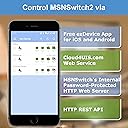
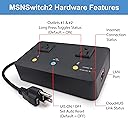
The MSNSwitch2 is a professional-grade internet-enabled remote power switch featuring two independent AC outlets, designed for seamless remote reboot and power cycling of critical devices. It monitors internet connectivity and automatically resets power to maintain uptime, controllable via smartphone app, cloud service, web browser, or API. Ideal for IT managers, home lab enthusiasts, and self-hosters seeking reliable, automated power management with easy setup and robust connectivity diagnostics.


| ASIN | B0CL5J13V4 |
| Best Sellers Rank | #18,870 in Electronics ( See Top 100 in Electronics ) #694 in Power Strips |
| Brand Name | Proxicast |
| Circuit Type | 1-way |
| Color | Black |
| Compatible Devices | Modems, Routers, DVRs, PLCs, Industrial Computers |
| Connector Type | Plug In |
| Contact Material | Metal |
| Contact Type | Normally Closed |
| Control Method | App |
| Controller Type | Android, iOS |
| Current Rating | 10 Amps |
| Customer Reviews | 4.2 4.2 out of 5 stars (85) |
| Included Components | UIS-722b Switch, Ethernet Cable, User Guide |
| International Protection Rating | IP20 |
| Item Dimensions | 6.3 x 3.75 x 0.1 inches |
| Manufacturer | Proxicast |
| Material Type | Plastic |
| Model | UIS-722b |
| Mounting Type | Wall Mount |
| Number of Items | 1 |
| Number of Positions | 2 |
| Operating Voltage | 120 Volts |
| Operation Mode | ON-OFF-ON |
| Part Number | PWR-UIS722b |
| Smart Home Compatibility | Smart Home Compatible |
| Specification Met | FCC, RoHS |
| Switch Type | Push Button |
| Terminal | Blade |
| UPC | 850021295363 |
| Unit Count | 1.0 Count |
| Upper Temperature Rating | 70 Degrees Celsius |
| Warranty Description | 1 year |
| Wattage | 1100 watts |
T**Z
Works perfectly
I bought a second one! I am using the first one to ping my unifi Dreamteam machine and unifi UNVR recorder for my unifi cameras. I have a UPS and send shutdown command via ssh to those devices if the ups battery has less than 6 minutes left. In case the electricity comes back after the UPS battery die, then the two devices will automatically restart. But if the electricity comes back before the ups battery dies the unifi devices will stay off until someone unklug and plugs them. This will be now done by this device. The fine settings it allow help in the set up a lot. I LOVE IT!
A**R
Great 👍
Easy to set up, so far it does what it needs to do.
F**R
Fewer site visits
If you've ever had to drive to a remote site to manually reboot networking gear, you know how much it sucks. This pings multiple sites to make sure your router is still functioning, and automatically power-cycles the equipment in case something goes haywire. Lots of configuration options.
D**N
Hoaky Product and Misleading Description
The product listing advertises that the device can send email notifications, but doesn't tell you that this devices has several levels of subscriptions and that the email notifications are only provided by paying 59.99 annually. The device seemed to stop trying to connect after a few minutes, and I tried to restart the device form the local network four times and got a "server busy"-type of message every time. Eventually it worked. It doesn't tell you how long it has been up for, so, because of all of the sporadic error messages and inherent connectivity issues that are part of the normal usage of this device, it's not obvious whether it actually restarted or not (without looking at another device behind it that *does* keep a timestamp). It takes a really, really long time to startup and establish connectivity (maybe five minutes). The app favors functionality rather than aesthetics. It's grating to use. I've found other devices that are more reliable, more responsive, have a quicker startup time, and have a more pleasant app.
D**L
Struggling to get REST API to accept any credentials? Check the API White List configuration!
Struggling to get REST API to accept any credentials? The issue is straight forward, I just missed the 1 line in the documentation that made note that the 'API White List' must be updated. The entire switch, web interface, cloud interface, etc. Can be working but the REST API will refuse to work unless the API White List is updated. The issue that had me stuck initially was that the error message just says basically access denied... when the credentials were correct because I could sign on to the web interface for example. It was the additional validation via the API White List that was the issue. Why not 5 stars... that will happen once I have finished testing the device in full, and it passes all the testing we plan for it.
K**N
Automatic rebooting of your home modem and router. A must have for a smart home!
This is a terrific device. It monitors your house internet and when internet connectivity to outside world is lost, it power cycles (hard reboots) the cable modem and after a short while the house router. If your house is a smart home like mine, losing internet connectivity like I did when we were traveling can be very frustrating. In my case Xfinity was working in the area and caused a service interruption. When reaching service, their stock answer is to reboot your modem and router! Which I could not do. I mention my home application, but this device will work at any remote site that needs a stable internet connectivity.
R**N
Works great
Works great at getting the modem and WiFi Router to sync up in the right order
S**.
It just works without any problems.
Working great. It was easy to setup with the default settings and has functioned flawlessly through numerous power outages. It also has many features beyond the default settings. You can remotely manage it with the app or the web interface, or use it to power reset critical devices.
D**C
Impossible to use the App when internet IP is dynamic...so was useless at the cottage. It just won't connect. This is where I wanted to use it to reboot my modem and router and where outages often occur. Works well in the city where the connection is PPPoE. But haven't had modem/router problems in the past decade, so switch is not as useful here.
C**N
Good part: Vendor still providing firmware update by 2024. Bad part: Only works on generic network environment. In isolated intranet it won't works. Cannot open Web GUI interface.
A**T
How can I get this unit replaced under warranty? It doesn't work properly, power is intermittent.
Trustpilot
1 month ago
2 weeks ago