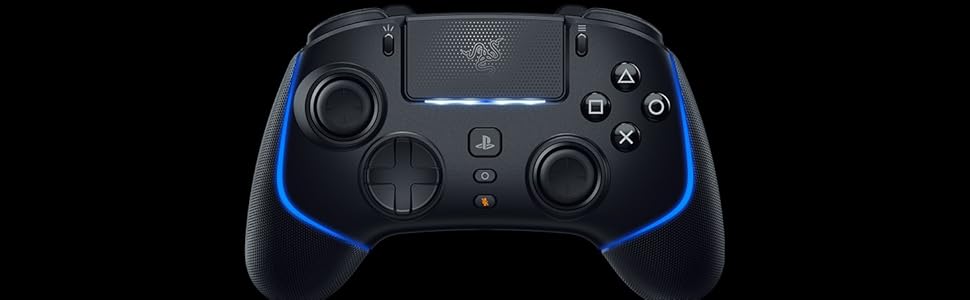
🎯 Elevate Your Game with Precision and Speed!
The RazerWolverine V2 Pro is a wireless pro gaming controller designed for PS5 and PC, featuring Mecha-Tactile Action Buttons for rapid response, an 8-Way Microswitch D-Pad for precise control, and customizable layouts with 6 remappable buttons and interchangeable thumbsticks. It offers a seamless 2.4GHz wireless connection, making it ideal for competitive gaming.


I**M
Best controller you can buy right now
I was skeptical as i own few custom controllers , i can tell you this is by far the best one
S**M
Responsive
I’m using the Razer Wolverine V3 Pro on my PC and I set it to the 1000Hz mode. It’s very responsive for FPS games. Make sure to lower the deadzone values in any game you play with this controller.
S**X
Best Xbox Wireless Remote
This is easily the best wireless Xbox remote. Great options and customization with a decent Xbox app to support those configurations. The only negative is the relatively weak battery that is good for about 6-8 hours MAX and there is no charging dock like for other high end remotes. The remote is pretty light, so doubling the battery size would make a great improvement for the next version.
H**D
GOOD
GOOD
N**M
Do not buy
Ive used this for 5 months. Didnt realise although it appears wired/wireless optional - it cannot be used without the wire. It feels horrible/thick, the back buttons are way too close to the center so you have to stretch your fingers in an uncomfortable way to even use them (i dont have small hands either) and to top it off after 3 months the left stick stopped working. DO NOT BUY HUGE WASTE OF MONEY.
D**D
Nice but better options available
The controller is nice - not great, especially when you consider the price point, the alternatives and that it is a wired controller - in short: get another controller. quick summary of the controller It is light because there is no internal battery It feel cheap and plasticky - like there is too much empty space inside the controller. When you move the thumbsticks and it touches the controller, you get that empty echo sound - not great it is responsive, the buttons press with good feedback and travel the D-pad is too close to the left thumbstick, meaning you press down instead of left a lot of the time there is this empty space in the middle of the controller that feels like it was meant to serve a purpose the menu button placement is convenient the options button placement is terrible - the left thumbstick is directly in the way so no quick button presses ever the worst thing about this controller for me is the size - it is far too wide and i have big hands. the extra buttons ( m1 - m6) are not ideally located with the M1 & m2 button unreachable unless you completely change the way you hold the controller the software to configure the controller is basic but functional. not a lot of work was done there but it works.
K**I
منتج جميل جدا
O**.
Original packaging sealed
Original Razer
S**T
J’ai choisi la Razer Wolverine V2 Pro pour jouer sur PS5 et PC, et on sent tout de suite la différence avec une manette classique. La prise en main est excellente, les grips sont confortables et les boutons mécaniques réagissent super vite. Les sticks interchangeables sont un vrai plus pour adapter le style de jeu. En filaire ou en sans-fil 2.4 GHz, la connexion est stable et sans latence. C’est clairement une manette haut de gamme pensée pour l’e-sport, avec une précision impressionnante. Le prix est élevé, mais on comprend pourquoi quand on l’utilise.
C**Y
Ich habe bereits ein Razer Sabertooth (leider an Kabelbruch gestorben) und ein Razer Wildcat (funktioniert nach wie vor). Da ich einfach mal was neues wollte und vor allem etwas mit mehr Buttons und besseren Sticks, habe ich ein paar aktuelle Optionen durchprobiert. 1. Versuch - Thrustmaster ESwap X Pro Die austauschbaren Sticks sind eine super Idee - für manche Games, wie z.B. Diablo 4 kann es sogar Sinn machen das D-Pad auf die rechte Seite zu packen. Leider lässt sich aber dann nicht mehr einstellen welcher Stick auf der linken Seite, welche Achse übernimmt. Trotzdem lässt sich das Gamepad so ganz gut nutzen. Negativpunkte sind allerdings ordentlicher Stickdrift bei beiden Sticks und die Buttons auf der Rückseite sind ergonomisch kaum zu gebrauchen. Zu nah beieinander und zu weit in der Mitte. In dieser Mischung ist es weder für große noch für kleine Hände zu gebrauchen. Nettes Konzept - Umsetzung suboptimal. 2. Versuch - das Razer Wolverine V2 Chroma Das Gamepad, was ich am Ende behalten habe. Liegt ergonomisch gut in meinen (relativ großen) Händen und meine Mittel- und Ringfinder fallen praktisch automatisch auf die Tasten an der Rückseite. Das D-Pad hat im Gegensatz zum Wolverine Ultimate ebenfalls Microswitches und fühlt sich damit hervorragend an und ist sehr akkurat. Die anderen Buttons fühlen sich ebenfalls sehr gut an - etwas mehr Widerstand beim Klicken als beim Wolverine Ultimate oder bei meinem Wildcat aber immer noch ein sehr eindeutiger und angenehmer Druckpunkt - Geschmackssache aber per se kein Vor oder Nachteil. Die Sticks sind in meinen Augen allerdings ein echtes Highlight. Absolut Null Stickdrift, auch jetzt nach 3 Wochen fast täglicher Nutzung - besser als jeder andere Razer Controller und die meisten anderen Gamepads auf dem Markt. Super nice! Die austauschbaren Sticks machen auch keine Probleme und sind eine gute Ergänzung, die ich auch nutze. Der einzige Nachteil ist, dass man nun die Profile nur in der Software editieren oder wechseln kann. Als PC gamer stört mich das weniger, ist aber bestimmt potentiell nervig für Konsoleros. Am PC wird das Gamepad übrigens anders als bei allen Vorgängermodellen immer zu 100% beim Neustart oder einstecken erkannt. 3. Versuch - Razer Wolverine Ultimate Ein gutes Gamepad, keine Frage, und wenn man einen guten Deal kriegt, auch sein Geld wert. Allerdings hat er minimalen Stickdrift ab Werk - nichts weltbewegendes aber halt nicht so gut wie beim V2 Chroma - die Sticks bieten auch insgesamt weniger Widerstand und sind damit alles in allem etwas weniger akkurat. Bei diesem Modell lassen sich die Tasten auch am Gamepad programmieren - ein klarer Pluspunkt. Leider hat es aber auch wie die anderen Vorgängermodelle das Problem, dass es nicht immer zu 100% erkannt wird, wenn man den Rechner neu startet oder das Pad neu anstöpselt. Manchmal braucht es da ein/zwei mal ein und Ausstöpseln. Die Buttons auf der Rückseite funktionieren, fühlen sich aber so an als wären sie etwas enger übereinander und das macht die Ergonomie für mich geringfügig schlechter. Beide austauschbaren D-Pads sind interessant, aber keines davon ist so gut wie das eine vom V2 Chroma und die switches darunter fühlen sich eher matschig an. Insgesamt also auch ein super Pad, aber die Vorteile V2 Chroma überwiegen für mich ganz klar. Also, insgesamt ist das Razer Wolverine V2 Chroma für mich der Gewinner was Qualität und Ergonomie angeht. Die Sticks sind die mit Abstand besten, das D-Pad ist besser als die beiden austauschbaren vom Ultimate und die Ergonomie passt nahezu perfekt für meine Hände. Habe in diversen Reviews gehört, dass sich das Plastik weniger wertig anfühlen würde, aber ich bin wohl zu abgestumpft, um sowas zu merken - mir ist kein Unterschied in der Wertigkeit zum Ultimate aufgefallen - für mich fühlen sich beide gleichwertig an. Wer also ein High-End Pro Controller sucht, dem würde ich empfehlen das Razer Wolverine V2 Chroma mal auszutesten.
S**.
I had the Razer Wolverine Tournament Edition, that was good. Bought this Razer Wolverine V2 Chroma. Good as always. No stick drift out of the box. Make sure you download the Razer software from Microsoft store and update the controller. My settings - Top two buttons A(left), Y(right), Bottom two buttons LS(left), RS(right), Middle two buttons X(left), B(right). I use the tall stick at right and round stick at left. This controller is specially for Hardcore shooting Game(s). Careful the stick is super sensitive. My dead zone setting in razer software is 2. You'll receive a long USB C cable with the controller. It's a wired controller no Bluetooth. In Xbox Elite series 1 or 2 or any other pro controller you'll not get the top two buttons. This is Razer exclusive. Enjoy :).
B**Y
Best quality ever, very strong
C**K
I have been playing shooters with various premium controllers for more than 15 years now. This one with 6 programmable buttons is way better than any other elite controller. I use steam input mapping and one paddle to make all buttons shift to another function and one paddle to use as sensitivity clutch. The options are seemingly endless combining it like this. A little bit getting used to, but once you find a mapping that suits you , you will never want any other controller again.
Trustpilot
1 day ago
1 month ago