🚀 Travel Smart, Surf Secure: Your pocket VPN powerhouse
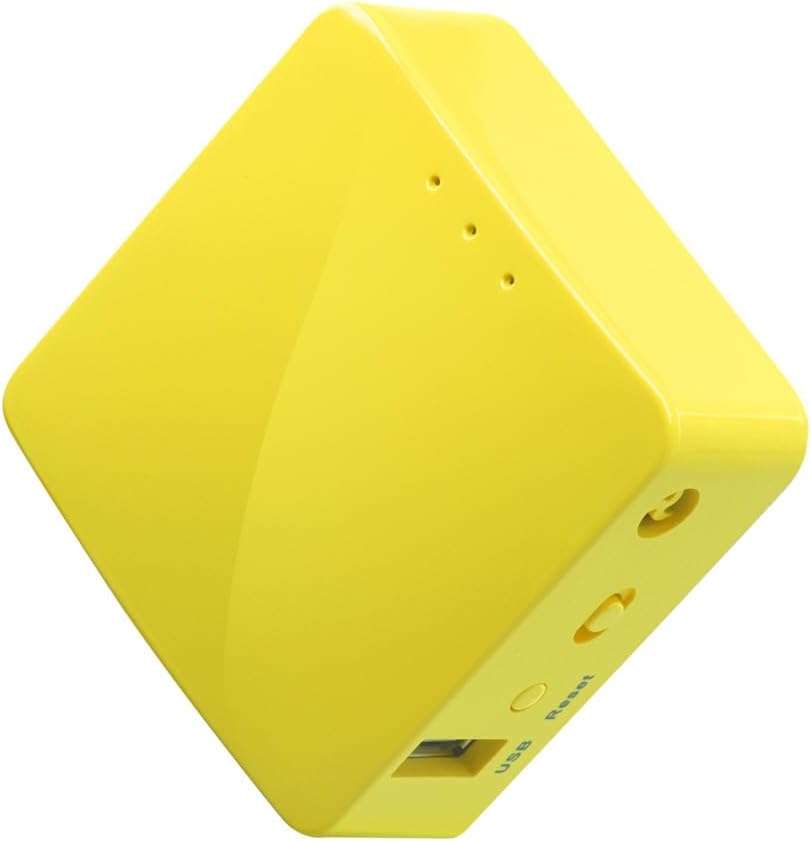
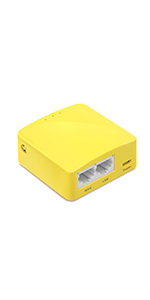
The GL.iNet GL-MT300N-V2 (Mango) is a compact, ultra-lightweight travel router featuring dual Ethernet ports, USB 2.0, and pre-installed OpenWrt firmware. Designed for professionals on the move, it offers robust VPN support (OpenVPN & WireGuard) to secure public and hotel Wi-Fi connections. With 128MB RAM and 16MB flash, it supports advanced customization and easy setup via a web admin panel or mobile app, making it an essential tool for secure, flexible connectivity anywhere.


| ASIN | B073TSK26W |
| Best Sellers Rank | #3,877 in Electronics ( See Top 100 in Electronics ) #33 in Computer Routers |
| Customer Reviews | 4.1 4.1 out of 5 stars (12,729) |
| Date First Available | July 9, 2017 |
| Is Discontinued By Manufacturer | No |
| Item Weight | 1.41 ounces |
| Item model number | GL-MT300N-V2 |
| Manufacturer | GL Technologies |
| Product Dimensions | 2.3 x 2.3 x 1 inches |
C**H
Makes Nintendo Switch work in Hotels
My requirement for this device was fairly specific. I travel every week for work and have begun bringing my Nintendo Switch on these trips with me. The problem is that the Nintendo Switch is notoriously horrible at connecting to wifi with a captive portal (aka registration splash screen). Such as hotels or other public wifi might require for confirmation to connect via a browser window. Basically the Switch hidden browser is worthless for these situations and hardly ever works. So I bought this device as a work around. By using this router to connect to the hotel wifi I only need it to make the connection and then it rebroadcasts my own private network. Which the Nintendo Switch can connect to just like any normal wifi that doesn't use captive portals within internet browsers (such as your home network). Setup was fairly straightforward. Granted I am a Network Engineer so I have a slight advantage. However, I found the instructions easy enough for anyone. My only minor complaint is that the router doesn't start broadcasting unless you toggle the "mode" switch located on the side (next to the reset button). The instructions aren't clear on that and the toggle switch itself isn't even labelled (but it is called out in the manual). Anyway turn that on first. Once I had setup the router per the instructions. I went ahead and pre-connected all of my devices (phone, laptop, Nintendo) while it was connected to my home network. Then a few days later I setup the router in a hotel. Using my phone I went to the router IP address (admin menus) and connected it to the hotel wifi. Then I launched a browser via my phone to do the hotel wifi registration. Done. Now the router is on the hotel wifi and all of my devices are connected to the router. One IP address. One registration (instead of having to register multiple times for multiple devices). Turned on my Nintendo Switch and it worked perfectly. No messing around with the Nintendo browser. So in summary. The router works on hotel wifi with captive portal. You only need to perform the hotel registration once and all of your devices are good. For $20 something bucks this just saved me a month of hotel registration headaches that I have been fighting. Thumbs up and highly recommend for anyone else in a similar situation. Side bonus this will give your personal devices an extra layer of protection from those public networks. This router is also very small (about 2x2 inches) so it easily fits inside a Nintendo Switch travel case if you own one.
S**Y
Affordable VPN router
Small and perfect for streaming devices to get past Geo-restrictions to watch content from other countries. The downside is that it's powered through micro USB instead of USB-C. It does not come with a USB charger so you need one. Works with surf shark wire guard VPN. You can connect your cell phone as an Internet provider in a pinch if necessary. Surf Shark doesn't have a VPN client for Apple TV. This solved the problem. Additional Info. The router runs OpenWRT and supports multiple VPN profiles in memory which can come in handy to access streaming content from across the globe. It supports multiple protocols such as Open VPN, L2TP, IPsec, WireGuard, & IKE2. The company also provides cloud management apps for Android and perhaps Apple. So once you set up your various VPN profiles, switching between them can be done easily with the phone app. Several popular VPN providers are already listed but you can manually set your VPN profiles using your provider vpn.conf from their website or enter it manually with a cell or PC. Here is another plus, if you add an inexpensive ethernet switch to the LAN port, you can connect multiple streaming devices. I use an Apple 4K Gen 3 and a Nvidia Shield TV 2019. My Roku can connect to this router using the built-in 2.4Ghz wifi hotspot this router provides. This won't replace a full home main router unless your needs are very modest. But given its small size, the modest needs of streaming devices, and how small streaming devices like Amazon Sticks, Roku, and Walmart streaming devices are, it is a no-brainer for travel as you can put them inside a case and pack it with your luggage. Just a reminder, this does not come with a USB dongle/charger. But most people have many lying around in draws from old phones.
V**6
nice little thing
this particular model is not super powerful (cpu/ram) but very tiny and offers many things out of the box as promised. it supports openvpn and wireguard vpn, the UI/UX is nice as well. it uses openwrt which gives you a lot of flexibility if you are interested in customizations. storage is limited, you’d need to flash it with your own set of packages and loose the manufacturer polished experience if something extra is needed. in my cases i wanted to use it for a personal ipsec s2s vpn tunnel, which is not supported by default and requires kernel settings not present in the default one + a bit more custom configuration/routing etc. overall i’d recommend it and buy it again even though it didn’t give me what i needed out of the box, it’s better than tp-link travel router. this particular model should work fine for a few wifi clients.
R**E
A good router
I recently purchased this Wi-Fi router, and I’m really impressed with its performance. The setup was straightforward, and it works seamlessly with all my devices. The signal strength is strong throughout my home, even in rooms far from the router. Streaming movies and online gaming are smooth, without any noticeable lag. The security features give me peace of mind, and I appreciate the parental controls for managing internet access. Overall, it’s a reliable router that delivers excellent speed and coverage at a reasonable price. Highly recommend!
C**N
Don’t be cheap!
Don’t be so cheap that you buy this piece of crap. Spend the extra $10 and get a better unit. This one is so cheap, they don’t even label what the 3 lights are or what the switch is and even in the little piece of paper it comes with, it does t go into any real detail about it. And yeah, it is about $10 cheaper than a lot of the other units, but man do you really pay for it when you jack around for 2 hours trying to set it up compared to the other systems that connect and are easy to configure right out of the box.
L**K
I set one up as a wifi repeater to extend wifi range on a second floor of a house. Note that it is a repeater and not an extender, so it appears as a new wifi network rather than just extending the range of an existing network, but the effect is otherwise the same once you connect devices on the second storey to the new wifi network. This is actually how you might use it in a hotel or public wifi area to add an extra layer of security (connect to the wifi firewall router which is then protecting you before passing the connection through to public wifi, especially if you use the VPN feature). Interface made sense. Not 100% perfect but intuitive enough to figure out. No Ethernet connection required for setup. Very good device for the money.
M**O
📝 DESCRIPCIÓN Mini enrutador WiFi portátil ideal para viajes, con funcionalidades avanzadas de seguridad y extensibilidad. * En Amazon puedes encontrar un modelo superior, con wifi dual: https://amzn.to/3VBX7sR 🧾 ESPECIFICACIONES - Marca: GL.iNet - Modelo: GL-MT300N-V2 - Banda de frecuencia: 2.4 Ghz - Estándar de comunicación inalámbrica: 802.11m - Velocidad máxima: 300 mbps - Tecnología de conectividad: USB, Por cable, Ethernet, Wifi, Inalámbrico - Color: Blanco 📦 CONTENIDO · Enrutador inalámbrico GL-MT300N-V2 · Manual de usuario · Cable de ethernet · Adaptador de corriente (enchufe UE+Reino Unido) · 2 años de garantía 📲 APP • glinet 💶 PRECIO • 14 de Marzo de 2024: 25,49€ 🟢 PROS • Diseño compacto y portátil, ideal para viajes. • Económico • Funciona como repetidor para redes Wi-Fi públicas. • Fácil de configurar y usar. 🔴 CONTRAS • No tiene banda de conexión de 5Ghz • No tiene puertos Gigabit para una conexión de alta velocidad. 8️⃣ VALORACIÓN Este router inalámbrico es ideal como opción para viajeros que necesitan conectividad privada y segura. También es perfecto para poder utilizar en tu vivienda, para mantener una red privada con VPN. Este router es el más básico de la gama, sin compatiblidad con wifi 6, sin doble banda wifi, con velocidades mayores en la banda de 5 Ghz y sin puerto de ethernet de gigabit. En cuanto a velocidades, tengo las siguientes: - Sin VPN: 85 Mb - Con VPN TCP: 6 Mb - Con VPN UDP: 9 Mb - Con Wireguard: 22 Mb Con algunos protocolos puedo ver IPTV sin problemas y jugar online. En cuanto a su diseño, es muy compacto y portátil, con diferentes opciones avanzadas de configuración, que garantiza una experiencia de uso satisfactoria. Tiene una fácil configuración y es muy versátil, que lo hace ideal para una variedad de situaciones gracias a su portabilidad. Entres sus funciones, tienen la opción de funcionar como: - Modo Router: En este modo, el router funciona como el dispositivo principal que gestiona la red local. Se conecta al módem de Internet y distribuye la conexión a Internet a través de cables Ethernet o de forma inalámbrica a dispositivos como pcs, móviles, tablets, etc. También realiza funciones como asignar direcciones IP a los dispositivos conectados, administrar el tráfico de la red, y proporcionar seguridad a través de cortafuegos y protocolos de seguridad como WPA2. - Modo Punto de Acceso (AP): En este modo, el router se utiliza para extender la red existente cableada a dispositivos inalámbricos. Se conecta a un router principal a través de un cable Ethernet y luego emite una señal WiFi para que los dispositivos inalámbricos se conecten a la red. Es capaz de realizar funciones de enrutamiento y gestiona la asignación de direcciones IP en su red. - Modo Repetidor (Repeater) o Extensor de Rango: En este modo, el router recibe la señal WiFi de otro router o punto de acceso y la amplifica para extender el alcance de la red inalámbrica. Se coloca en un área donde la señal WiFi existente es débil y la amplifica para proporcionar una cobertura más amplia. Funciona retransmitiendo la señal WiFi recibida desde el router principal. - Modo Tethering: El tethering permite compartir la conexión a Internet de un dispositivo móvil con otros dispositivos, como ordenadores o tablets, utilizando un cable USB, Bluetooth o Wi-Fi. Es útil cuando no hay acceso a una red Wi-Fi tradicional, convirtiendo tu móvil en un punto de acceso portátil. Su configuración se realiza desde un explorador, una vez conectado a él y también tienes la opción de configurarlo desde la app glinet. ✅ CONCLUSIÓN Es la primera vez que utilizo uno de estos router y me gustó la facilidad de uso y configuración. Soy usuario a nivel básico y conseguí de una manera rápida, crear mi propia red vpn. Tiene una buena relación calidad / precio, en comparación con otros modelos que encontré por Amazon. No es un dispositivo para grandes velocidades, pero es válido para transmisiones en streaming. 👍 RECOMENDABLE. ✳️ Espero que mi comentario ✍️ te haya sido útil 😃
L**0
Recomendo uso para o PS2..
P**U
Ce routeur est vraiment pratique, joli, performant, et securisé en déplacement, mais montre vite ses limites si plusieurs équipements y sont connectés. Facile a configurer, et pour les experts OpenWRT est présent sur le routeur. Un vrai plus. Il prends en charge WireGuard et autres VPN. On peut lui mettre une camera pour faire de la video protection, ou un disque dur pour le transformer en NAS. Satisfait de ce routeur en déplacement jusqu’à 5 appareils
A**E
Since July 2018, I have acquired six GL-iNet routers, and I can say without hesitation that these are some of the finest networking devices I have ever owned. Within their price range they are a class of it's own . My collection includes: - **1× GL-XE300 (Puli)** – Compact 4G LTE router (purchased July 2018) - **1× GL-X750 (Spitz)** – Versatile cellular router (purchased May 2022) - **1× GL-X1200 (Amarok)** – Dual-band wireless industrial gateway (purchased May 2022) - **1× GL-X3000 (Spitz AX)** – Their flagship 5G Wi-Fi 6 cellular gateway (purched June 2023) - **2× GL-MT300N-V2 (Mango)** – Ultra-portable travel routers (most recent purchase, December 2025) Over seven years as a loyal customer, every single one of these devices has exceeded my expectations in terms of build quality, functionality, and longevity. Outstanding Technical Support – They Go Above and Beyond What truly sets GL-iNet apart from other networking companies is their exceptional customer support, here are two concrete examples: Custom OpenWRT Compilation Support When I needed a specific OpenWRT configuration for my GL-X1200, the support team didn't simply point me to documentation and wish me luck. Instead, they worked with me directly to create a custom OpenWRT configuration that I could compile and flash onto the device. This level of technical engagement is unheard of from most hardware vendors. Persistent Problem-Solving With my GL-X3000, I encountered a frustrating SIM card compatibility issue with my German provider. The support team invested many hours working through the problem with me, meticulously testing different configurations and modem settings until we resolved the issue. Their patience and technical expertise were remarkable. They treated my problem as their problem until it was solved. The support staff are friendly, respond quickly, and possess genuine technical depth. They don't read from scripts – they understand their products at the firmware level. Hardware Quality and Durability These routers are built to last. Until this day I am still using the GL-X750 in my motorhome. Firmware Updates and Long-Term Support GL-iNet provides firmware updates for several years after product launch, which is increasingly rare in the networking industry. They actively patch security vulnerabilities and add new features. But here's the real beauty: even when GL-iNet officially ends firmware support for a product, you're not left with abandoned hardware. All their routers are based on OpenWRT, and the community maintains OpenWRT images available on GitHub that extend the useful life for most of these devices for many more years. You can continue running secure, updated firmware long after most consumer routers would have become e-waste. The GL-X3000's Game-Changing eSIM Feature The GL-X3000 (Spitz AX) deserves special mention for its exceptional eSIM management capabilities. Using GL-iNet's physical eSIM card, you can store multiple eSIM profiles on a single card and switch between them through the admin panel. This is invaluable for: - Travellers who need connectivity across multiple countries - Anyone wanting to avoid expensive roaming charges - Users who want to switch carriers without physically swapping SIM cards - Privacy-conscious users who can purchase eSIM profiles anonymously The profile management is intuitive – you simply scan a QR code from your eSIM provider, download the profile to your router, and enable it when needed. I've used this feature extensively across Europe with excellent results. OpenWRT Foundation – Power User Paradise Every GL-iNet router runs on OpenWRT with their user-friendly interface layered on top. This gives you the best of both worlds: - **For beginners**: A polished, intuitive web interface that makes VPN setup, repeater configuration, and basic settings accessible to anyone - **For power users**: Full LuCI access and the ability to install additional OpenWRT packages, SSH into the device, and customize everything Want to run AdGuard Home, Tailscale, WireGuard, or ZeroTier? It's either built-in or installable. This flexibility is unmatched by most mainstream consumer routers. Conclusion If you're looking for networking hardware that combines professional-grade features, open-source flexibility, exceptional build quality, and genuinely helpful technical support, GL-iNet is the answer. These routers have earned a permanent place in my network infrastructure. After six routers and over seven years of continuous use – from my first GL-XE300 in 2018 to my newest GL-MT300N-V2 just last week – my only regret is not discovering GL-iNet sooner.
Trustpilot
1 week ago
1 month ago