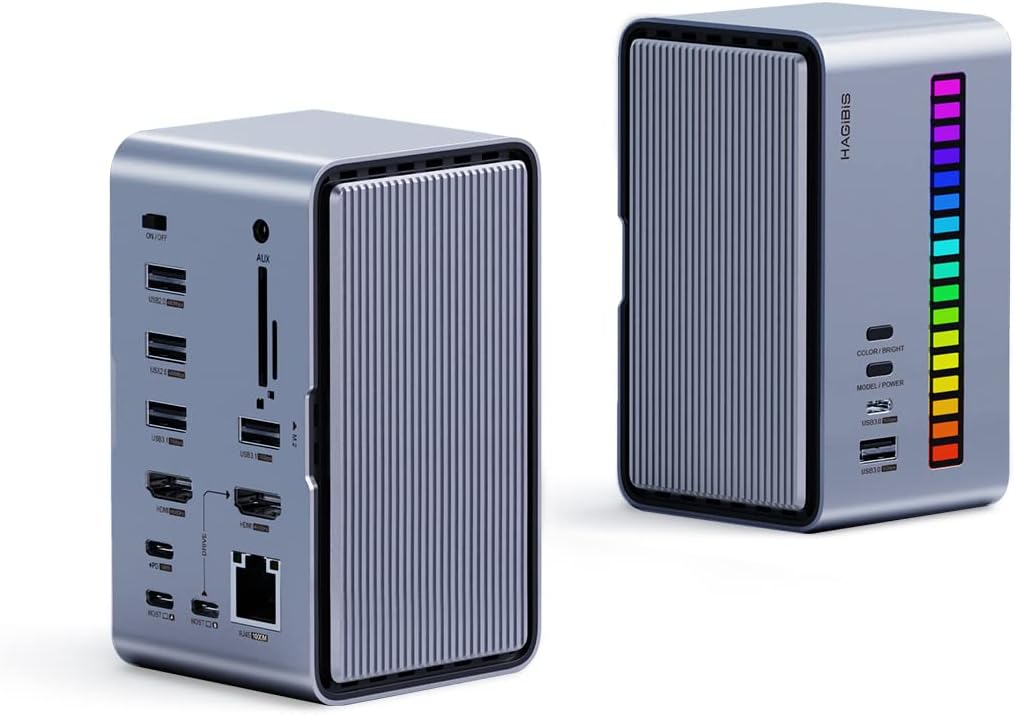
🌟 Power Your Productivity with Color & Speed!
The U100 Pro by Hagibis is a cutting-edge USB-C docking station that combines dual 4K@60Hz monitor support, a built-in M.2 SSD enclosure, and a customizable RGB LED strip with voice and memory modes. Featuring 100W power delivery, gigabit Ethernet, and versatile USB 3.1 ports, it transforms any workspace into a high-performance, visually dynamic hub tailored for modern professionals.


| ASIN | B0B1WM9KJJ |
| Best Sellers Rank | #288,434 in Electronics ( See Top 100 in Electronics ) #2,301 in Laptop Docking Stations |
| Customer Reviews | 3.8 3.8 out of 5 stars (49) |
| Date First Available | May 21, 2022 |
| Item Weight | 1.44 pounds |
| Item model number | U100 Pro |
| Manufacturer | Shanghai Xinxie Industrial Co., Ltd |
| Product Dimensions | 4.72 x 2.75 x 2.67 inches |
C**E
Todo perfecto, lo unic9 malo es que no traiga el csrgador de resto excelente
A**T
Good hub
Works OK with an M1 Max Macbook Pro. I Initially tried to connect it using my own USB-C cables and Thunderbolt 3 cables but HDMI wouldn't turn on. Needs to be connected to the machine using the cable included with the hub in order to work correctly. My complaints would be that there's not enough information in the manual or the manufacturer's website, I had to guess my way around to figure out the right port to use to connect to the Mac (it's the bottom left port on the side with many ports). I am not using power delivery so I cannot comment on that. All in all I am happy with the purchase.
F**O
After about 10 uses and average of 1.5 hours its Dead no longer working, 3 with SSD Installed
I have only use this thing to make backups of Computers when i need to recover from HHD Failure or Virus, so it's not usedevery day only as needed. It started smelling burn only mic with led strip works. It does not show on Windopws device Manager, or recognices USB, SD Flash, SSD or charge the Laptop. Very Cheap thing only lasted about 20 hours of use at most. Funtionality was great while it worked, you can only charge from 2 USB C conectors in Back (Laptop) and in the front conectors 1 USC and 1 USB A the others are just there for data transfer I do not think you can expect things to break in storage while not used and be happy.
A**R
Docking station
Extremely reliable works great with my laptop. Able to have all different internal plugs.
P**.
Pretty nice little dock with useful features
I'm a fan of this USB C dock for a few reasons. First is the size. It's pretty small, especially in comparison to the Lenovo USB C dock. Although it's definitely not on the same level of capabilities as that dock either. But this dock does exactly what I need it to and the ability to add a NVMe SSD to it makes it all the better. The front has a column of LEDs that you can somewhat customize or just turn off. They built in a microphone so that the LEDs will respond to noise, which is kind of an odd feature for laptop dock. But it is what it is. The LEDs also act to show the NVMe drive activity. The host USB C port is a power pass through port. So, as long as you connect a USB C laptop adapter to the correct USB C port on the dock it will pass that power through to your laptop (or whatever other USB C device you have connected to that particular USB C port). The dock has two HDMI ports and the description mentions it will support two monitors. But I was never able to get the second port to work. The user manual talks about how you have to connect a device to the second USB C host port to make it work. I'm only using one monitor with it so it's not an issue for me. The ability to add a NVMe SSD to the dock is a very handy feature. It shows up as a drive as soon as you connect to the dock. In my case I'm using it to make backup images of my laptop when I'm connected to the dock. The little rubber pin that secures the SSD can be a bit tricky however. I found that it was easiest to insert the pin in to the corresponding retaining hole first. Then insert the SSD and push the pin over just enough so that you can slide the end of the SSD by it and then let it lock in to place. It's easier to do that what I'm probably describing. The cover for the SSD slot (and the opposite side cover for the SD card storage area) is held in place with magnets. So it's entirely toolless. There are plenty of USB A and C ports in addition to the gigabit Ethernet port. One of the more surprising features, and one I'm finding I'm using pretty frequently, is how it acts when you plug a Samsung phone in to it. When I connect my S21+ it not only charges the phone but it also shows up as a DeX device! This means, when my phone is connected to the dock, I can use it as a desktop computer. Complete with mouse and keyboard and displayed in desktop mode on the connected monitor. The apps switch to a desktop mode, complete with tabs, etc. It's far more useful than I would have ever imagined.
D**1
Performs as advertised
This product was easy to install & set-up on my newly purchased Apple M2 Mac Mini Pro. My only concern is that the SSD can run rather hot at times. I enjoy the fact that it only requires the one Thundervolt 4 Port & therefore frees up additional Ports on the Mac. It has allowed me to attach an external 16 T hard drive to one of the free Thurddervolt ports on my Mac to be used as a time machine & other uses. So far I am impressed with this docking station for my Mac.
A**Z
Product works 1/2 way..
I have tested this product and it works 1/2 way, the HDMI port does not function at all. My PC kept sending me error messages not recognizing the device (windows 11), par4e made of cheap plastic. Not worth the money I paid for it.
L**D
The build quality is amazing.
I really enjoy this dock. I was having initial issues getting two displays to work but it turned out it was a user error my MacBook air M1 only supports one external display so no amount of configuration would get this to show two monitor outputs. I did test it with a windows laptop and managed to get both external displays to work. it is amazing, to say the least. Although I would recommend this for a NUC computer or a full desktop rather than a laptop as the SSD drive could get damaged if you remove the dock while the SSD is being used. Amazing idea, I love its compactness and the music lights are a cool factor too.
B**N
The internal NVME is on a 10GB link so you can do 1G per second IF you have a fast SSD I got 934.985 MB/s and write of 940.849 MB/s You need to take the time to understand the control, the light bar can display NVME activity and ambient sound at the same time, would be nice to have a sensitivity adjustment but it work! The host connection can hook 2 pc with 2 display. Case is hard plastic and look like anodized but the side panel are anodized aluminum, it also include 2 USB-C to USB-C 10GBS cable You need to use high bandwidth cable with this and or any other docking hub so it is nice they include them and they are 1M long each. I fitted a Samsung NVME with integrated heat sink. They provide a heat conduction pad as well, the case do not get hot. For the Card Storage side, I don't plan to use it and it seem flimsy but that's not a major selling point anyway. I use it on my Linux PC, haven't tested much the display output but I have no doubt it will be fine. Take the time to understand the HOST and PD option, this is more a docking station than a simple HUB.
R**O
Meu queridinho, melhor hub que conheço incluindo espaço para nvme.
M**Y
It make me confused Not all ports working Small item 😞
J**T
Great product. Could not get it to work with second monitor, but that was a problem with my laptop I believe.
J**C
It is an intriguing unit with lots of features. However transfer speeds are lacking. Connected mouse kept lagging. Possibly because the unit relies on usb connection for both power and data transfer. It is 200$ for a glorified usb hub.
Trustpilot
2 months ago
2 weeks ago