Buy anything from 5,000+ international stores. One checkout price. No surprise fees. Join 2M+ shoppers on Desertcart.
Desertcart purchases this item on your behalf and handles shipping, customs, and support to Israel.
⏰ Own your time, own your day!
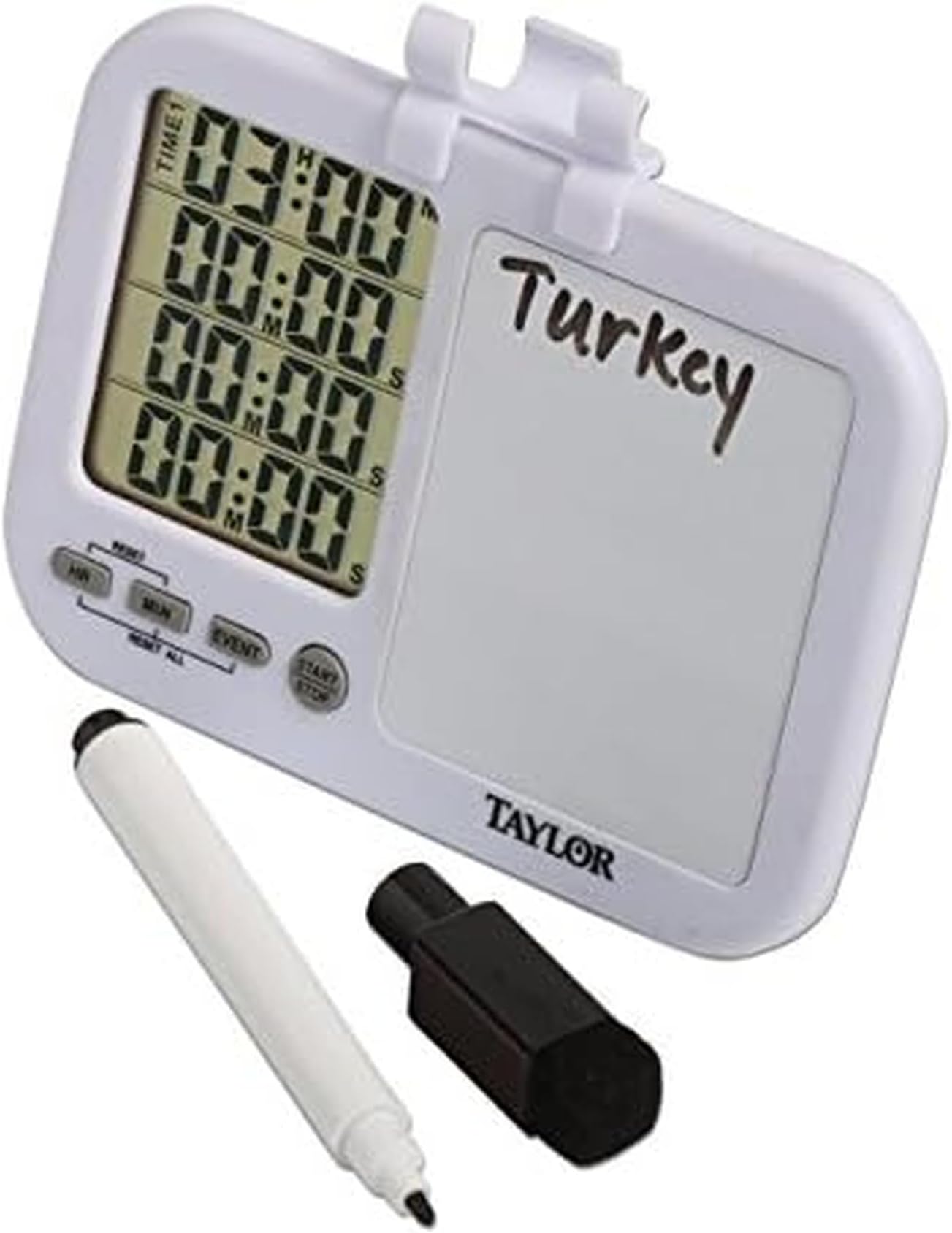
The Taylor 5849 Four-Event Digital Timer is a versatile, multi-tasking powerhouse designed for professionals and busy millennials. It tracks up to four independent timers simultaneously with unique alarms, features a built-in dry-erase whiteboard for labeling and notes, and offers a large, easy-to-read LCD display. With flexible mounting options and included batteries, it’s perfect for managing kitchen tasks, study sessions, or project timing—helping you stay organized and ahead in any fast-paced environment.


| ASIN | B006OK7RRO |
| Best Sellers Rank | #26,267 in Kitchen & Dining ( See Top 100 in Kitchen & Dining ) #150 in Timers |
| Brand | Taylor |
| Brand Name | Taylor |
| Color | White |
| Customer Reviews | 4.1 out of 5 stars 2,155 Reviews |
| Global Trade Identification Number | 00077784058497, 00735343484018 |
| Included Components | Timer |
| Item Dimensions D x W x H | 1"D x 7.5"W x 5.5"H |
| Item Type Name | Taylor Four-Event Digital Timer with Whiteboard for School, Learning, Projects, and Kitchen Tasks |
| Item Weight | 0.05 Pounds |
| Manufacturer | Lifetime Brands Inc. |
| Manufacturer Part Number | 5849 |
| Manufacturer Warranty Description | Warranty. |
| Material | Plastic |
| Material Type | Plastic |
| Model Number | 5849 |
| Number of settings | 8 |
| Product Dimensions | 1"D x 7.5"W x 5.5"H |
| Screen Size | 3.75 Inches |
| UPC | 735343484018 887672522487 077784058497 |
| Unit Count | 1.0 Count |
J**C
Very useful and flexible timer
I really like this timer. I actually got it to count how much time a pottery kiln was operating (at high power, and at low power) so I could figure out how much electricity was being used. For this purpose, I use two timers, both in count-up mode, but only one timer actively counting (the high-power timer, or the low-power timer, depending on how the kiln is set). A pottery kiln needs to operate for many hours, and this timer can count to more than 24 hours. But I also use the timer in the kitchen for various purposes. For example, sometimes I'm far enough away from the microwave that I can't hear the beep when it's done. So I set a timer to count down the desired time value, and carry the timer with me into the other room so it can remind me when the microwave is done. Also, it's common for microwave cooking instructions to tell you to let the food stand for five or ten minutes after the microwave shuts off. In this case, I set the timer at the same time I start the microwave, but set the timer for five or ten minutes longer. Then I can just wait for the timer to beep, indicating dinner is ready. There are four separate timers, each of which can count-up or count-down, and each of which can be set, started, paused/resumed, stopped, or reset, independently from the other timers. The operational buttons only affect one timer, and you select which of the four timers by pressing the EVENT button. This shows a "TIME" icon in front of the timer you will be affecting, and the icon moves from one timer to another as you repeatedly press the EVENT button. To make a timer count down, press the HR and MIN buttons as desired to set an initial time value. You can press HR or MIN repeatedly, or you can hold down the button to scroll the value quickly. The minutes value scrolls to 59 then wraps around to 00 without affecting hours. The hours value scrolls to 24 then wraps around to zero. Therefore the biggest count-down time you can enter is 24 hours and 59 minutes. You can not enter seconds, you can only enter whole minutes. However as the timer counts down, once it gets below one minute, it will show the final seconds counting down, you just can't enter seconds for an initial value. To start the count down, press the START/STOP button and the time value will start counting down. You can press the START/STOP button again to pause the timer, then press START/STOP again to resume, as many times as you want. When the count reaches all zeros, the timer starts beeping, and will beep for quite a while until you press START/STOP. Any timer that displays 00 hours 00 minutes 00 seconds will operate as a count-up timer. The easiest way to get all zeros is to reset the timer (see below). Once the time value has been reset to all zeros, press START/STOP and the timer will start counting up, press START/STOP again to pause, again to resume, etc. Also, once an active count-down timer counts down to all zeros and starts beeping, it also automatically starts counting up, until you press START/STOP to stop the timer (and the beeping). To reset a single timer, press the HR and MIN buttons together, and the timer with the TIME icon will reset to all zeros. To reset all four timers, press the HR, MIN, and EVENT buttons together. Note that an actively counting timer won't reset, you have to pause the timer first before resetting it. It's important to note that all four timers are independent, and the button presses only affect the timer that has the TIME icon in front of it. So for example, you can set an HR/MIN value in timer 1 to make it count down, and start it counting, then reset timer 2 to all zeros to make it count up, and start it counting, then set timer 3 to count down, but a different value than timer 1, and start it counting, then reset timer 4 to all zeros but leave it inactive. Then you can pause timer 1, then pause timer 2, all without affecting timer 3 or 4, then resume timer 2, then resume timer 1, then pause and reset timer 1, then start counting up on timer 4, etc. Just remember to press the EVENT button to select the desired timer before you use any of the other buttons. There are a few relatively minor issues: - It has no on/off switch, so once you put the batteries in (two AAA batteries, which are included), the display stays on continuously. This used to bother me, and I used to take the batteries out, but eventually I got tired of doing that and decided just to leave it on all the time. - There is no backlight, so the display can be hard to read in dim light. - It has a couple of magnets on the back so you can stick it on your refrigerator, but this is not a very secure mounting method so I don't use it. While you are pressing buttons on the timer, it can slide around a bit, and even pop off the refrigerator and fall. - It has a tilt-out arm in the plastic base so you can stand the timer up, but the tilt-out arm is so flimsy I'm sure it would break right away, so I don't use it. You don't really need a stand - you can press the buttons just fine while the timer is laying on a flat surface, or while holding it in your hand. As an engineer, I think it's a pretty neat and powerful gizmo, and if I was a kid, it would be a pretty cool kid toy.
C**.
Nice timer with multiple timers in one device plus a whiteboard built in
Very nice timer! It has multiple timers that you can set independently. Once you get used to the procedure it goes really smoothly. I love that it has a whiteboard where you can write down what the timer is for (that's what I love the most about this timer is that it lets me NOT FORGET what I set the timer for). The pen which was included with mine also had an eraser on the tip of it, and the pen is still writing fine after about a year of use. The eraser is still working great too. And the whiteboard still looks white! I never had to use any sort of solvent or cleaning solution on it - only just use the little eraser that came with the timer. The stand felt a little flimsy at first, but it's really held up well for a whole year, so it is fairly sturdy! I treat it carefully so as not to break its stand. The timer alarm is loud enough that I can hear it in an adjacent room very well. The color of mine was white with black writing on it. The white was a pure white color.
K**G
One of better timers on the market within bounds.
This timer is designed to be both hung on the refrigerator or set on a counter. The main reason I only gave this little gem 4 stars was the first time I put it on the refrigerator, the magnet stuck to the frig and separated from the unit. I had to glue the magnet back onto the unit (which was not that hard, but still. . .) Secondly, the unit does not "stick" very well on the frig. The magnets are very small, like less than a quarter of an inch wide, giving the unit only two small connectors to metal, thus tending to create a weak link onto the refrigerator door. I like the fact that when the alarm goes off, it keeps going for quite a while (like until you turn it off), and it keeps track of how long over the time you went. You can set up multiple times for different things which is a feature none of the rest of my timers has. The numbers are not very big, but you can read them if your vision is reasonably good. The little clip board is a mild joke, but you could write a very few words on it. It comes with a battery preinstalled; all you have to do is pull the little plastic piece out of the back, and presto, the unit starts working. You also have to remove the plastic piece on the front that give you the fake numbers, no big deal. It seems to be a good unit so far. The unit makes a kind of weird sound when it goes off, and you can hear it the next room if you have the door open (it's not super loud, but neither is it faint). POSTSCRIPT: Today I noticed that this timer does not have a "second" timer; that is, you cannot set it for 3 minutes and 30 seconds, only hours and minutes. Most of the time that is not a problem, but, like today, I needed a timer that would count down a given amount of seconds. The timer does count down seconds; it is just that you cannot set it for seconds.
K**F
One of the best digital multi-timers
I use timers for a lot of different tasks, and need to be able to track 15 minute intervals, 24 hour intervals, and everything in between. I really wasn't that happy with another Taylor model multi-timer, but decided to test out this model. The button configuration is quite different and that makes all the difference. With this timer, there's the obvious advantages of 1) the whiteboard to help keep track of which task is finished, and 2) 4 timers displayed at once. There is also a feature that I haven't seen in other multi-timers - it only takes three button presses to stop the alarm and restart the timer to repeat the previous interval. That is a huge advantage for me. For contrast, a different Taylor multi-timer takes 6 button presses to accomplish the same thing. For some, the inability to set seconds could be a problem, although it is easy enough to work around - to set the timer for 2 minutes 30 seconds, set the timer for 3 minutes then let it run down for 30 seconds and pause it. At that point the timer is ready to go for 2:30. The alarm is loud - very loud. Each timer has its own alarm sound, but I've yet to match alarm sound with the timer, so this feature is meaningless for me. There are not very many timers that can count down 24 hours, but this one can, and that's a huge plus for me. The magnets are not strong enough to hold the timer securely on my refrigerator (an inconvenience that doesn't affect me as I don't keep the timer there, but I test that feature anyway). The whiteboard pen works well and securely attaches to the timer.
N**N
These timers are handy but don't seem to last long.
I first bought this timer several years ago and it worked until last year. Replaced it 9-1-24 and as of 12-3-25 it stopped working. I could not set the timer or access any "event" at all. Old batteries were fine, new batteries did not help, timer just could not be set. Only worked 15 months. So I got another one but the brand new one had the very same problem. Not happy, but I like this timer, so I returned the new defective timer and requested a replacement. Just got the replacement and it is working as it should at this time. I will update if the replacement fails. Also, the magnets on the back are indeed very weak and will not hold the timer in place. I had to glue tiny button magnets on the back of the timer to hold it in place on my fridge. Only the original timer from years ago had decent magnets.
J**L
SO helpful!
Not sure why it took me this long to buy this but I’ll never go without again! SO helpful when cooking multiple items and not having to use my phone or have lots of little timers everywhere! Easy to use and adjust time or zero out and restart without messing up another timer. Loud finish sound.
C**Y
Disappointed
The magnets don't hold it to the fridge or stove. The tilt base doesn't come out far enough to stand it up and laying it down makes the display hard to read because it's faded at that angle. The beeping with each button press is way too loud.
K**E
Easy to drop/break - loud - easy to use
Updated review after 2nd timer - dropped rating from 4 to 2; bought 2nd timer after first stopped working. I got this timer so I could have up to four times going at once! It does that well. PROS: The display is easy to read. It keeps four timers going and it is great to have the tiny white board so I can write was is tied to each timer. The dry erase pen has a magnet, which is nice so that I don't have to put it back into the holder on the timer. CONS: The loud alarm can't be muted. Each time you press any button (e.g., set the time, change the event, pause, start) you hear the beeping noise. It does not seem it would need to beep at every press of a button. Another issue - the back of the time is not as wide as the front of the timer, so this means when you press buttons on the either side of the front of the timer, it can tilt and fall to floor. Big issue - the magnets are not strong enough to stay on my fridge or stove. I put another strong magnet under the timer so it can't slide down past that point. That is working so far. UPDATE: that worked for awhile, but still dropped on floor after pushing buttons on one side or timer or other. After three drops the noise stopped completely. So, I have a timer without any noise - not very useful.
C**Y
Works as it aShould
Works great
J**Y
Super useful in the kitchen
Having four independent timers is incredibly useful when cooking a meal with multiple components, like keeping track of how long your pasta is cooking while also making sure to sear the meat for a few minutes per side, AND also keeping track of how long something is baking in the oven. We multitask all the time when cooking, and one timer at a time simply doesn't cut it. I like how easy it is to set up different default countdowns, and I have my unit programmed to give me 1-minute, 3-minute, 7-minute, and 15-minute timers. These generally work out well and for longer times, I can just re-start a timer with a single button press or change the timer countdown. This unit is mounted magnetically on my fridge door and always ready for action.
D**S
Tiny buttons!
The whiteboard is a useful addition to this 4-channel timer. It's great to be able to see all 4 timers at the same time. However, the buttons are tiny and not easy to press (compared with the other 4-channel timer that I have, General TI388).
B**J
A great help!
I love that I can write down what which timer is for. I have so many things on the go sometimes, that I forget what needs to be done. This little tool helps out a lot! Easy to use and doesn't take up too much space. At this point, I wouldn't want to be without it.
R**C
The good: 4 channels of timers
The good: 4 channels of timers, counting up or down. When counting down, it passes through zero, sounds the alarm and keeps going UP again, so you know exactly how long has passed. Simple enough to use. Each channel has it's own alarm: eg: channel 3 goes "beep beep beep -- pause -- beep beep beep". Ch. 2 does two beeps etc. The mini-labeler is brilliant, assuming it can be cleaned and not lost. The annoying: Magnets in the back are too weak to support the unit on a fridge door. Pop-out stand is too shallow to prop it up stably. Buttons are small and finikey. Beeps loudly at every push; Has a dollar-store feel.
Trustpilot
2 weeks ago
3 weeks ago