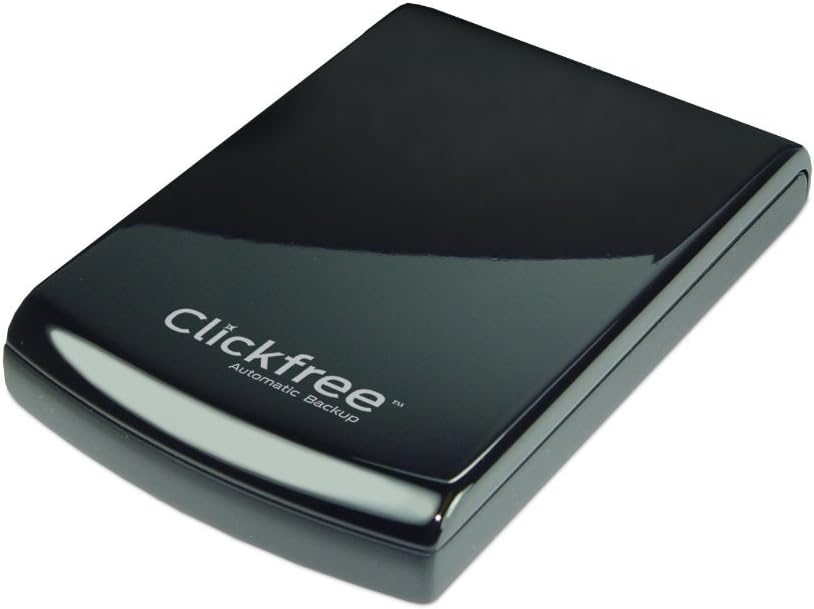
Clickfree C6 Automatic Backup 1TB USB 3.0 External Hard Drive Compatible with Windows
Product ID: 3958424
⚡USB 3.0 Speed
💾1TB Storage
🛠️Easy Repair Tools
🔒 Secure Your Digital Life with Ease!
The Clickfree C6 Automatic Backup 1TB USB 3.0 External Hard Drive is designed for effortless data management, automatically backing up your content, software, and Windows operating system. With smart organization features and a comprehensive repair suite, it ensures your files are safe and easily recoverable, all while being compatible with multiple Windows versions.
T**I
"Easy to Use," hardly!
Like so many things these days, this alleged back-up is a miserable failure. My computer recognizes their HD, but then, everything goes haywire. My SCSI and RAID controllers say they now won't work properly because of my attempted installation. In fact, I think one of them is gone and I don't know how to get it back.Their advertising claim that this thing is "so easy to use" is a bold-face lie. The instruction "manual" is like a very bad fold-up road map. It gives the same little bit of information over and over again in some 57 languages. Do you suppose this might be another part of Obama's desire to have the world love us?Their on-line help is a bad joke, too. On-line "chat" (no telephone available) M-F, 9 AM-5 PM EST only. How's that for being customer friendly? And, with this being Memorial Weekend Sunday, how much do you want to bet they WON'T be there tomorrow.? All they really have is a web of customer-helping-customer information. It's not cataloged or sorted in any way that I can see. So, it's a good luck, sucker (that's me), we got your money, so go get lostlI'm running an old HP desktop and Windows XP SP3, both of which I like and don't intend to leave to buy Microsoft's latest extortion attempt on us stupid Americans. I'll quit computers first!Please provide me with return instructions for this piece of junk in case I don't receive proper help from the idiots at Clickfree. This is especially important because I don't believe they give a damn!Oh, and about your admonition up above there about contacting the manufacturer before "leaving feedback," I already sent them a complaint similar to this one. It's anybody's guess as to when/if somebody there will even see it.Signed: A very disgusted Todd who spent just about all day trying to get this "easy product" to work.
L**N
Great backup device, kudos to Clickfree support, read my review.
Worked flawlessly on my 5 year old Dell which just quit, did'nt want to spend 75 dollars to see what was wrong with it.So, I got a new HP from Costco & my Clickfree would not work on it, just kept searching for files then finally got an error message.I called Clickfree support & was on the phone with a tech for over an hour & a half, could not get it resolved. I thought maybe the HP is the problem, so I took the Clickfree to Costco & hooked it up to one of their HP display models, guess what? Would'nt work on it either. I went home & called HP support, no luck! I then went back to Costco & bought a Seagate backup drive to try out of curosity, would NOT work on my HP. So, I took the HP & Seagate back to Costco, went home & ordered a Dell XPS 8700 on line from Costco. Hooked up my Clickfree to the Dell, worked like a charm, just like it's supposed to. I e-mailed Clickfree to let them know my problem was not with their device, but HP. I should mention the transfer of my files from my Clickfree to my new computer went without a hitch
B**R
Get a regular Clickfree (or not)
1) This Clickfree will indeed produce an image of your whole system. It will save your programs, etc. But please note that trying to restore a complete disk image on a new computer that is different from your *exact* current model is not guaranteed to work well. (The Clickfree literature says as much.) It is really only designed for restoring your complete system onto the *same* computer.Honestly, this would only be useful in a small number of cases of computer loss or failure. This is not going to help you migrate your system onto a new computer (unless you somehow desire and manage to purchase the exact same computer as you had before).So, while the file-backup functionality is good, the system imaging functionality that comes with the C6 is unnecessary for most people. I would suggest getting a cheaper Clickfree drive without this feature.2) But wait--maybe not.I have been using Clickfree backup systems for about 8 years. (I previously had an older model without the system imaging feature. It was just as good as the C6 if not better. I only switched because it ran out of space.) The process has always been smooth and easy--plug in the drive, respond to one or two Windows or antivirus prompts of "Do you want to allow Clickfree to run?", and then sit back and relax while the drive backs up my existence. The whole thing was indeed click-free and practically effortless.This has recently changed. Now, for the first time when I plugged in my drive, I was prompted to install an "update." Update what?! This--or any interruption requiring extra clicks--had never happened in my years of using Clickfree. But, since I trusted the company, I said yes (although there was, suspiciously, a prominent option to say no.)Wow, do I regret saying yes. Now, every time I plug in my drive for backup, an infomercial-style ad from Youtube begins to run, making annoying jokes about "sitting back and cracking your knuckles" while you enjoy your backup, and mostly hawking a new product to buy for organizing photos.There is no way to disable it, no way to stop it from running automatically, and even no way to stop it when it starts.And there is no way to roll back the update, which included *only* this "feature."Now, using a Clickfree for backup is one of the most grating and unpleasant experiences of my day--to the point where I'm reluctant to back up my computer at all. I paid a premium for an effortless, easy, hassle-free backup product--and now it has become worse than the free alternatives.All I can ask is--what was Clickfree thinking? People who like to organize photos and crack their knuckles are not the only ones using Clickfree. Some very busy people are too--as well as some people who'd rather not hear an infomercial screaming at them every time they want to protect their files.So, final recommendation--if you get a Clickfree, DON'T click "yes" to the update.
B**L
Fast and reliable
This has been a great drive so far. I have had it for 2 weeks now and it has backed up my OS image as well as every file on both 500 GB drives on my computer without any problems. It has performed 4 more "mini-backups" of new and updated files on my computer with no problem. Don't do anything with Device Manager in Windows when backing up. You can run other applications such as word, excel, Photoshop etc. with no problem while backing up. A great product.
A**R
Great Backup System
I purchased this as my last Clickfree had broken after 4 years.I think the price of this Clickfree is really good it has a lot of storage room and also I like it because it backs up my Windows System and programs which is great. I ordered on a Sunday and it arrived on a Tuesday which was very fast delivery.I used my last Clickfree to transfer all my old photos .and data onto my new laptop and it was so easy just one click and it was done I really do recommend this backup system it is so easy.
T**N
Five Stars
Very easy to use connected first time and I just followed instructions and everything worked correctley
H**.
Würde ich wieder kaufen
Das ist die zweite Clickfree Festplatte die ich mir gekauft habe.Das Sichern der Daten geht super einfach. Anschließen und fertig, der Rest geht von allein.Beim ersten mal braucht die Platte etwas länger, ist aber normal und akzeptabel,Der komplette PC mit 5 Partitionen ca. 500 GB Daten in zwei Stunden.
H**S
Clickfree Festplatte.
Leider ist bei der Cickfree Festplatte keinerlei Bedienungsanleitung vorhanden. Ansonsten bin ich auch mit dem Preis sehr Zufrieden. Ich habe die Platte noch nicht benutzt.
Trustpilot
1 day ago
1 week ago