


Desertcart purchases this item on your behalf and handles shipping, customs, and support to Israel.
🎨 Elevate your art game—draw smarter, not harder!
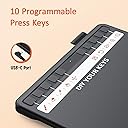
The UGEE S640 is a sleek, lightweight digital drawing tablet featuring a 6.5x4 inch active area and 8192 levels of pressure sensitivity with tilt support. It includes a battery-free stylus and 10 customizable express keys, compatible across Mac, Windows, Linux, and Android platforms. Perfect for artists, students, and professionals seeking a portable, eco-friendly tool to enhance creativity and productivity.



| ASIN | B092VM5CVF |
| Active Surface Area | 25.2 square inches |
| Additional Features | Stylus |
| Best Sellers Rank | #32 in Computer Graphics Tablets |
| Brand | UGEE |
| Color | black |
| Compatible Devices | Laptop |
| Connectivity Technology | Interface |
| Customer Reviews | 4.3 out of 5 stars 5,739 Reviews |
| Item Dimensions L x W | 6.4"L x 8.5"W |
| Item Weight | 375 g |
| Manufacturer | UGEE |
| Mfr Part Number | UGEES640 |
| Model Name | S640 |
| Model Number | S640 |
| Native Resolution | 5080 LPI |
| Number of Items | 1 |
| Operating System | Android,Linux,Windows |
| Pressure Sensitivity | 8192 levels |
| Screen Size | 6.3 inches |
| Software Update Supported to Date | unknown |
| Special Feature | Stylus |
| Specific Uses For Product | Painting |
| Target Audience | Student, Teacher |
| UPC | 850013593279 |
R**N
Shaken, not Broken Please.
This thing is pretty neat. I had fun with it for the 5 minutes I got to play with it before it would do whatever it wanted, with no regard for what I wanted to draw. I didn't even get to check out the buttons on the pad. Maybe someday I'll be able to find one that doesn't die so easily, but I doubt it. I doubt I can even get my money back. I'm starting to wonder JUST how much the postal people throw stuff around, because it seems like my packages either don't make it to me (after being told they were dropped off at the front door), or break shortly after I unwrap them. (2 of the items from this order have broke already). I sure hope people get their act together.
D**O
Muy recomendada
Excelente producto, pueden ver la calidad en el vídeo.
Z**I
Good cheap/beginner tablet
I've been using this for about a year and a half now and it's really good for its price. It has flaws though (of course, it's a cheap tablet) PROS: Generally good to use; low price; has all the key features of a tablet (pressure, tilt, pen angle); plenty of buttons even if I don't use 'em CONS: Screen protector bubbled after a little under a year & before that showed my pen lines; pen angle is pretty janky (maybe I don't know how to use it but it's probably just the cost-cutting measures); the replacement nibs I got were for the screen tablets for some reason (I later bought the correct ones) Overall a really good value IMO. Don't be fooled by the longer looking cons, I just elaborated on them more.
P**R
Why pay more
I bought this tablet because it was the cheapest on the market. I used to have a gig as a computer animator and rocked a multi-thousand dollar Wacom and while I'm not going to begin to say this table is as good, I was stunned at how well it did work given it's super low cost. It was a simple plug and play thing as well, no installing drivers or any of that stuff .. plugged it in to a USB on my MacBook Pro and bam there it was. Happy so far.
W**B
Awesome addition for photo editing
This little gadget works great for editing pictures or signing lots of documents. great price too!
M**G
Doesn't work right.
Did not work properly. If you draw a picture or line it doesn't line up correctly to where you are drawing it on you tablet or phone. Tried updating the software and it Stull doesn't work. Tech support wasn't help. Company wouldn't refund or take return.
A**Z
Still works great!
It does what it needs to do! It works amazing and feels really nice to write on. the pressure sensitivity works if u have the drives of course. I got this a while back but I think it was like not too expensive so I liked it. I know a lot of big name brand drawing tablets can be really high up there in price. I loved it. Still use it.
D**A
Driver Doesn't Work
The tablet itself works well enough, but I had issues with getting the driver to work. It's unfortunate because you need the driver to control pressure sensitivity and change what the buttons do.
G**Y
Writing pad review
It’s very good
S**.
Awesome Pen Tablet Review!
Excellent for Online tutors. I use it as a senior Mathematics Teacher from Japan! Very conveninent and easy to use !
M**N
Great value for money
works very well, and there's so many customizable buttons i love it
O**E
Ottima tavoletta grafica, ricca di accessori e super personalizzabile
Prodotto eccellente sotto ogni punto di vista, specialmente considerando il prezzo accessibile. La penna è reattiva, precisa e ha un'ottima sensibilità alla pressione. I punti di forza che ho preferito: I 10 tasti programmabili: Un vero punto di svolta. Si configurano in un attimo e permettono di dimenticarsi della tastiera mentre si lavora. La dotazione di accessori: Nota di merito speciale per la presenza di tantissime punte di ricambio nella confezione. Un'attenzione al cliente fantastica che fa risparmiare soldi in futuro. Compattezza: Dimensioni ideali, non ingombra e si adatta a qualsiasi postazione. Che sia per disegno, fotoritocco o anche per prendere appunti digitali, fa il suo dovere alla perfezione. Assolutamente consigliata!
M**T
Für Anfänger ganz gut
Ich benutze dieses Grafiktablett um Skizzen zu erstellen. Schnell gelernt, evtl sind die tasten auf dem Stift etwas störend, man gewöhnt sich jedoch schnell daran. Die Tasten auf dem Tablet lassen sich programmieren und so lässt sich damit auch bequem Arbeiten. Das Grafiktablett ist präzise, wenn auch die größe - zumindest in meiner Konfiguration - etwas verwirrend ausfällt und es definitiv nicht von Vorteil ist, wenn man selbst schräg auf den Bildschirm guckt. Das kann ich aber jetzt auch nicht dem Grafiktablett ankreiden. Es macht was es soll und ich finde für diesen Preis gar nicht so schlecht. Man sollte natürlich auch passende Software benutzen, ich für meinen Teil benutze für Skizzen das mittlerweile kostenloser Programm Sketch up
Trustpilot
4 days ago
2 months ago