🚀 Elevate your video calls with pro clarity and on-the-go flexibility!
The Logitech C525 USB HD Webcam delivers crisp 720p HD video at 30fps with fast autofocus and HD light correction for consistently sharp, bright images. Its 360-degree swivel and foldable design make it ultra-portable, while the built-in noise-reducing microphone ensures clear audio in busy environments. Perfect for professionals seeking reliable, high-quality video conferencing on any platform.
| ASIN | B0050FBISI |
| Batteries | 1 Lithium Ion batteries required. |
| Best Sellers Rank | #1,265 in Webcams |
| Brand | Logitech |
| Color | Black |
| Customer Reviews | 4.5 4.5 out of 5 stars (1,679) |
| Date First Available | August 17, 2011 |
| Hardware Platform | Mac |
| Is Discontinued By Manufacturer | No |
| Item Dimensions LxWxH | 5.91 x 3.15 x 8.27 inches |
| Item Weight | 3.17 ounces |
| Item model number | C525 |
| Manufacturer | Logitech |
| Max Screen Resolution | HD |
| Product Dimensions | 5.91 x 3.15 x 8.27 inches |
| Series | c525 |
| Standing screen display size | 3 Inches |
T**L
Great bang-for-buck
I purchased this webcam to work from home. My laptop has a built-in webcam, but as I'm using a docking setup with two monitors, it was annoying to shift my entire arrangement to participate videoconference meetings. Long and short: This suits me perfectly for my needs -- teleconferencing from home, several hours a day. Easy to set up, good exposure, nice contrast, doesn't oversaturate, and the audio works well. If you're looking for something under $100 and don't need the uber-res, gamer-preferred, high-end webcams to stream, record, and post to YouTube your Minecraft gaming adventures, this is a solid solution. Details: I'm using a state-issued Dell Latitude 7290 (8GB RAM, 1.9 GHz CPU) running Windows 10 Enterprise. Experience - Install and Activation: Very straightforward. Out of the box, I simply plugged it into one of the USB ports on my dock. I didn't need to install any drivers (I'd have known, because all our state-issued laptops are administratively locked; can't install anything without admin support), and the webcam was recognized by Skype, WebEx and Zoom. Note that I did have to tell each of those platforms to use the webcam because I have two detected by the system. Apologies if the info below is too pedantic: - Skype: Go to Tools > Video Device Settings, and select "Logitech HD Webcam C525" from the drop-down. - WebEx: When you join a meeting, select "Logitech HD Webcam C525" from the "Select Video Connection" drop-down. Same for audio, if you're calling in from computer. - Zoom: Go to Settings > Video, and select "Logitech HD Webcam C525" from the drop-down. Experience - Audio and Video Quality: My team members, with whom I meet almost daily, quickly noticed the difference in video quality and commented on it. It's a definite improvement over the built-in webcam. I really like the "I'm tracking you" feature. If for some reason I shift my position in the frame, the webcam adjusts. Given I'm trying to work with four pets in the house, this happens a lot (because they all apparently can sense when I'm in a videoconference, and that is THE TIME to try to get into my lap). - Hue: I notice I look a mite greener than usual. The camera does lean toward the cool side of color temp, but I'm not bothered by that much. Turning on and off various lights helps warm things up a bit. Not a big deal for me. - Exposure: I'm truly happy with this. I face three tall, broad windows looking onto my back yard. The webcam readily adjusts to the level of sunlight hitting my face at any given time. - Saturation: I think it's a good balance -- not too undersaturated, not too clownish. I've worn things from dark shirts to pale blouses and multicolored jackets; no oversat or undersat so far. - Artifacts: Four days in with frequent, daily use, no issue with streamers or artifacts.
N**L
Great for solo shooting in a video call/chat; not great for group shooting
Software enhancements are great (RightSound, Auto-focus, RightLight, Anti-flicker and Image orientation), all of the needed settings are preset which makes it easy to use, just simply plug and use. The 32-bit application which gets included once driver is installed in a windows 10 OS is great; the newer application is bad I hope it will improve eventually Very suitable for solo shooting in a video call/chat/conference; not great for group shooting. Video quality is decent. Microphone quality is decent, though I still prefer a separate mic which is closer to the speaker. Portability is a plus and the camera tilting and rotation gives decent flexibility in finding the right angle.
G**D
Good For A Couple of Folks Zooming
Got this for my parents so that they can zoom for church, and for us to remotely celebrate a monumental birthday. Works well for this purposel
R**E
A nice sweet spot for a video call camera
I bought this to get my 88 year old Mom on some video calls using her Chrome Box computer. I tried it first on an old Chromebook. It is small and light. It installs easily, plug and play, and the camera has a wide range of adjustments. Video calls were great - the mic and camera worked better than I expected for the price. Why pay more?
R**D
I use it for every zoom call!
My PC camera isn't great, so I needed an external camera. After talking with my IT connection, he suggested this brand. Great color and easy to use. Just plug ut into my USB port and it's good to go! Plus, it's small and easily fits into my backpack along with my computer.
J**Y
Plug and Play
This Logitech webcam just clips onto the top of my Dell 24” monitor, and the USB cable easily stretches down to the tower pc that is sitting on the floor next to my desk. I downloaded the installation software from the Logitech website, and was able to use the camera in no time at all. I have had a few Zoom training sessions and classes so far, and the camera functions seamlessly with the Zoom app. The video and quality are good.
A**S
Clear, crisp video; great microphone; easy set-up
So much better than the camera in my laptop. I have an external monitor and was tired of having to have my laptop open to use the camera. This external camera not only allows me to preserve my precious desktop real estate but the great microphone also eliminates the need to dial into videoconference meetings with my mobile phone. This is making my WFH experience so much more efficient.
C**.
Not easy to find a camera but this one seems to do a good job
Clear picture
V**E
Ottima. Si installa in un attimo, audio e video di qualità eccellente. Meglio avere un buon pc e buona ram, perché potrebbe rallentare un pochino i pc meno prestanti (mi è successo mentre sistemavo i settaggi di zoom e varie nel pc fisso, che ha due anni ed è piuttosto performante, in effetti, ma solo mentre sistemavo i settaggi, è bastato rifarlo e aspettare qualche secondo fra un "comando" e l'altro. Nessun problema invece con il portatile, che è in realtà meno performante del fisso... Comunque, a parte questa piccolezza (che magari dipende anche solo da altre cose installate nel mio pc fisso) in fase di settaggio, la webcam funziona egregiamente, anche con una connessione media la qualità di chi riceve è sempre ottima, mi chiedono spesso che webcam stia usando perché "mi si vede e mi si sente proprio bene!" Consigliatissima, anche se hanno impiegato settimane per mandarmela. Occhio alla disponibilità, se avete fretta.
K**N
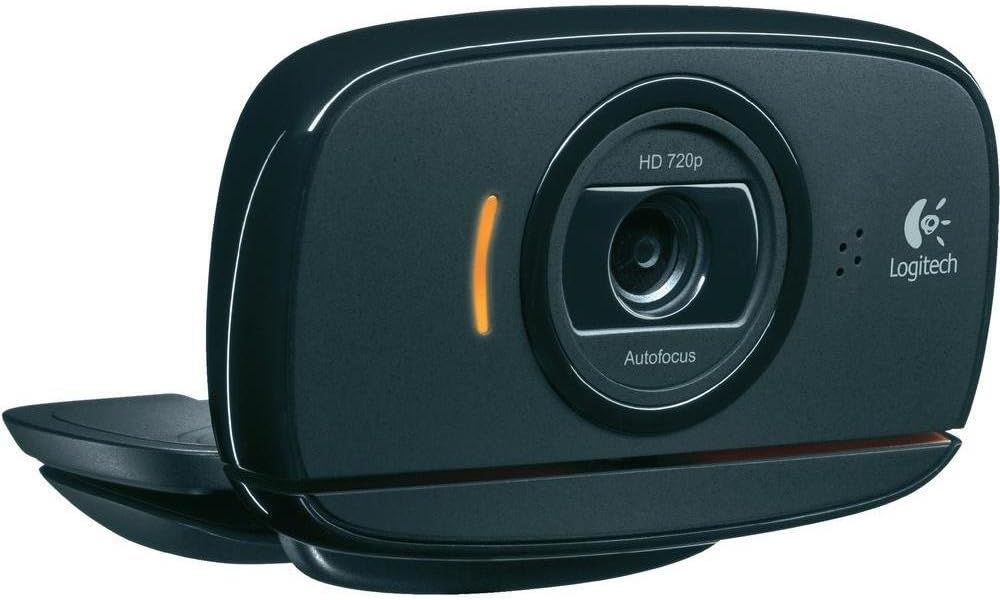
This is an excellent little webcam. The picture quality is very good and it works well with Skype on my PC (it is nice too not to have to fiddle with a headset and microphone for each conversation). The microphone is sensitive and sitting a metre or so from the camera, speaking normally it picks up my voice just fine. It will also pick up voices of other people in the same room. The camera is light and sits comfortably on top of the monitor with just a gentle pressure in its clamp to keep it attached. I have a pair of speakers placed behind the monitor and get no problems with feedback. The camera works well even in low light and produces a natural colour balance when the "RightLight" setting is enabled. I have not changed many of the settings but the picture zoom works fine, and when zoomed the camera view may be moved up and down using its software without having to touch the webcam. An orange LED to the left of the camera lens shows when you are being filmed, which is nice to know. In my case on Windows 7 it worked straight out of the box - a great little camera which I can highly recommend.
D**.
Hierbei handelt es sich um eine Webcam, die bis zu 720p unterstützt. Sie lässt sich schwenken - worauf ich geachtet habe - und besitzt einen Autofokus. Die Befestigung ist simpel und passt auf so ziemlich jedes Gerät. Die Aufnahmen durch die Kamera sehen gut aus, nur manchmal macht der Autofokus kurzzeitig Unsinn. Ob man so viel Geld für eine Webcam investieren möchte, ist jedem selbst überlassen - mich zumindest hat das Produkt überzeugt.
S**I
Excellent camera. The picture is good, the integrated mic is very good. One minor issue is mounting it on the screen, it doesn't feel stable but it's good enough for me!
P**6
Cette webcam est un produit sérieux très bien adapté à un usage familial et même semi professionnel. L'installation est facile et rapide et le matériel est immédiatement reconnu et utilisable sous Windows 7-64. Point n'est besoin de se lancer dans un fastidieux déchiffrage d'une éventuelle notice pléthorique car le fonctionnement est ergonomique et intuitif. La qualité de l'affichage est irréprochable surtout eu égard au prix du matériel et à l'usage mentionné plus haut.
Trustpilot
2 weeks ago
2 months ago