


Desertcart purchases this item on your behalf and handles shipping, customs, and support to Israel.
🌟 Elevate your desk game with the Redragon K552P — compact, customizable, and built to last!
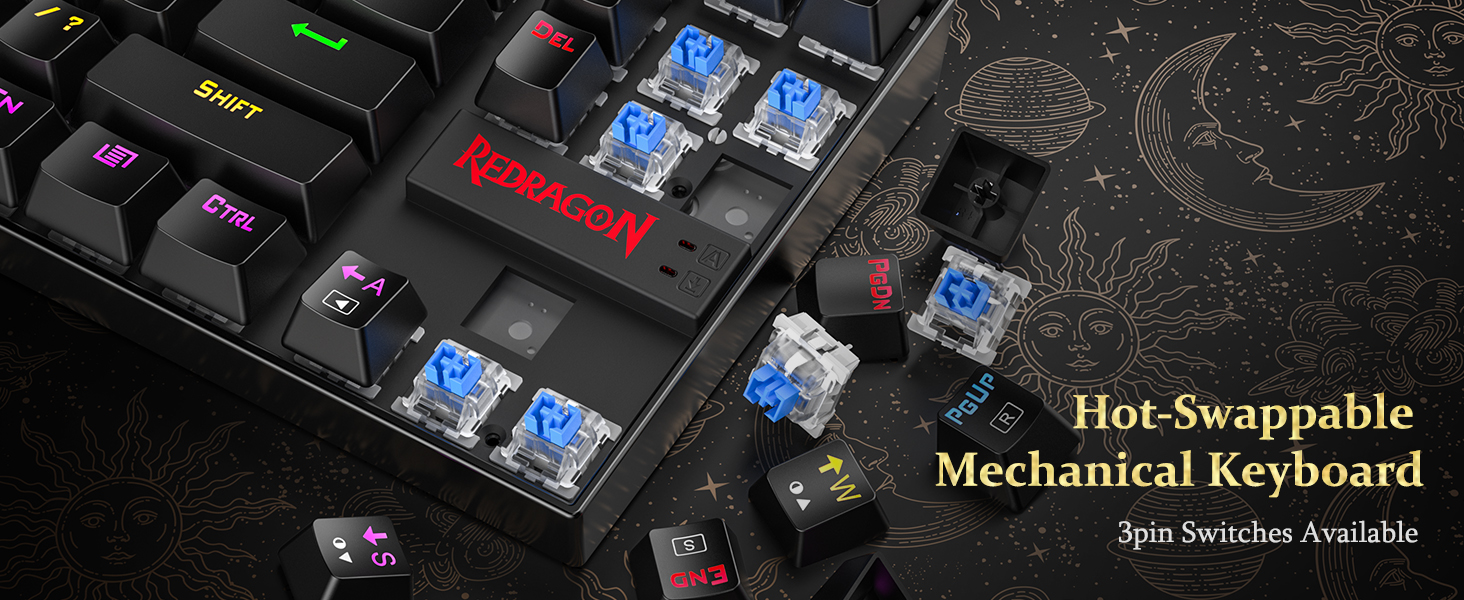
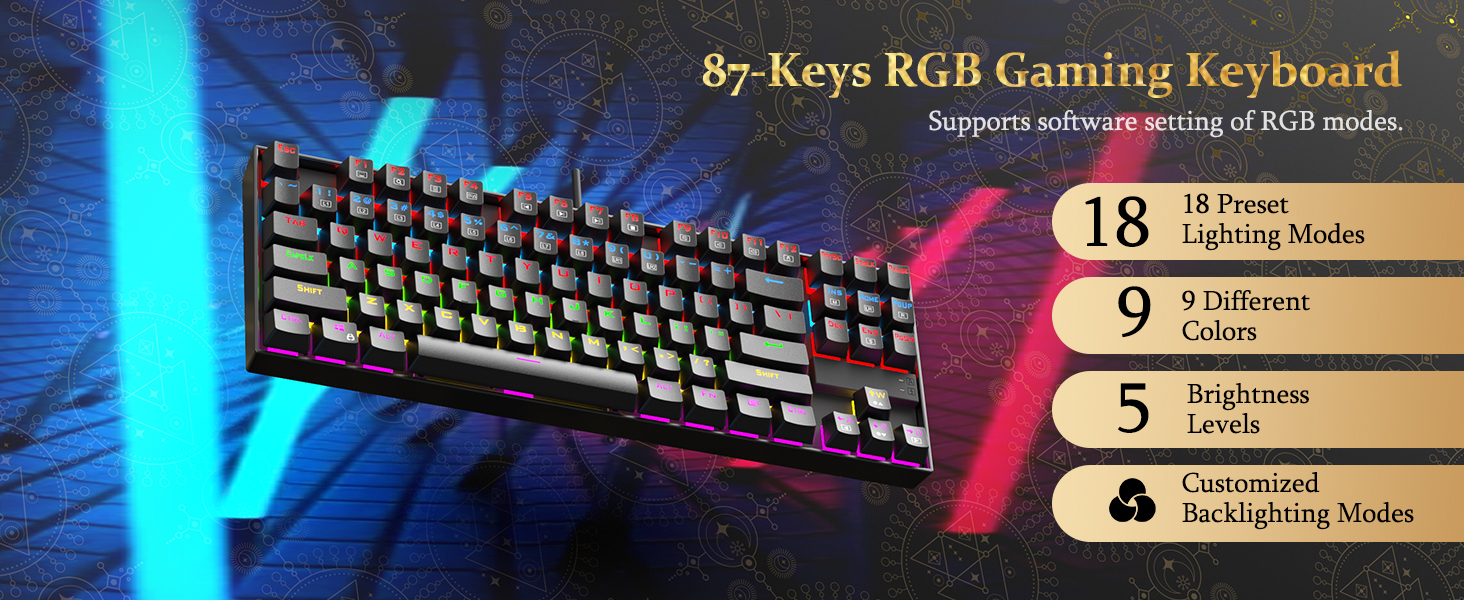
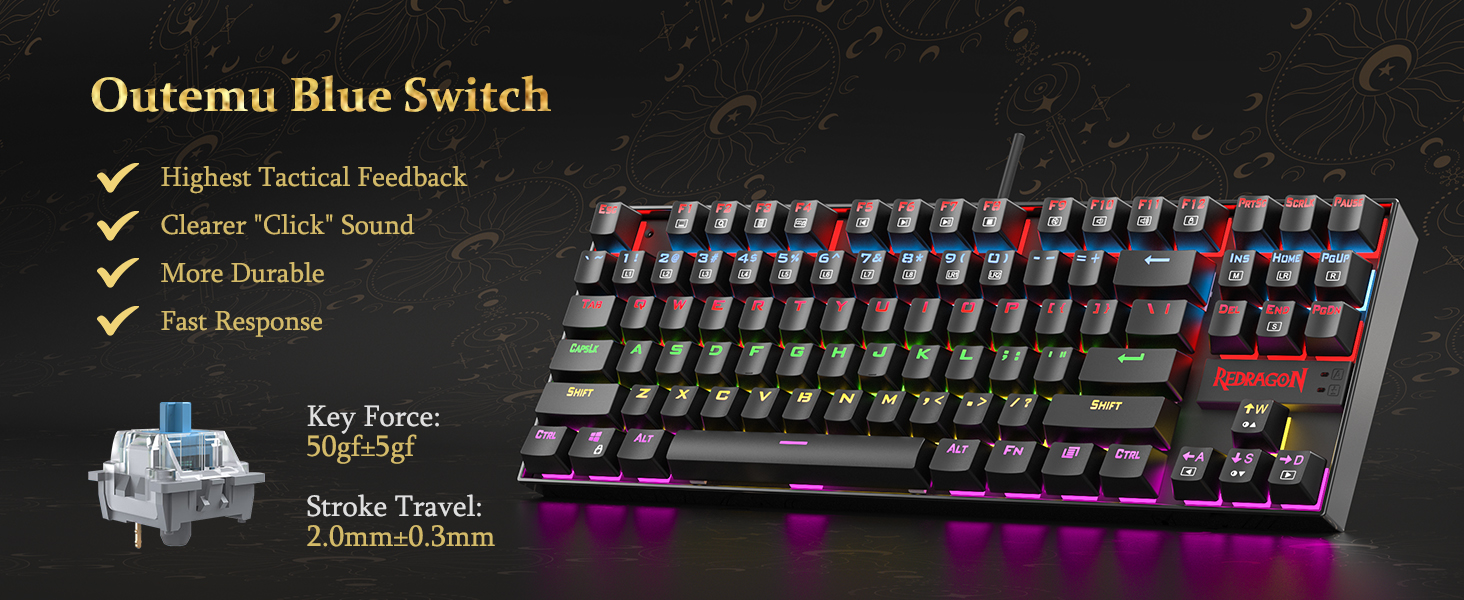
The Redragon K552P is a compact tenkeyless mechanical keyboard featuring 87 keys with hot-swappable clicky Blue switches, 18 customizable RGB backlight modes, and a durable metal frame with spill resistance. Designed for gamers and professionals alike, it offers N-key rollover, programmable macros via software, and dedicated multimedia controls, all in a portable, ergonomic design that maximizes desk space without compromising performance.





| ASIN | B019O9BLVY |
| Additional Features | Backlit, Ergonomic, Hot-Swappable Blue Switches, Portable, Programmable Keys |
| Antenna Location | Business, Everyday Use, Gaming, Student |
| Best Sellers Rank | #817 in Video Games ( See Top 100 in Video Games ) #105 in PC Gaming Keyboards |
| Brand | Redragon |
| Built-In Media | Keycap Puller, USB Cable |
| Button Quantity | 87 |
| Color | Black RGB |
| Compatible Devices | Gaming Console, Laptop, PC, Tablet |
| Compatible Operating System Family | MacOS, Windows |
| Connectivity Technology | USB |
| Customer Reviews | 4.7 out of 5 stars 12,388 Reviews |
| Enclosure Material | Aluminum |
| Global Trade Identification Number | 04895173505935 |
| Hand Orientation | Ambidextrous |
| Item Dimensions L x W x H | 13.94"L x 4.86"W x 1.46"H |
| Item Weight | 900 g |
| Keyboard Backlighting Color Support | RGB |
| Keyboard Description | Gaming, Mechanical,Keyboard |
| Keyboard Layout | QWERTY |
| Language | English |
| Manufacturer | Redragon |
| Mechanical Keyboard Switch Model | Redragon Blue |
| Mfr Part Number | K552 |
| Minimum Required Operating System Version | Windows 10 |
| Model Name | Kumara |
| Model Number | K552-RGB |
| Number of Items | 1 |
| Number of Keys | 87 |
| Number of Packs | 1 |
| Number of Sections | 87 |
| Power Source | Corded Electric |
| Recommended Uses For Product | Business, Everyday Use, Gaming, Student |
| Series Number | 552 |
| Special Feature | Backlit, Ergonomic, Hot-Swappable Blue Switches, Portable, Programmable Keys |
| Style Name | Classic |
| Switch Type | Clicky |
| Theme | gaming |
| UPC | 619257218733 796172194219 791334442481 727196136206 619257218740 |
| Unit Count | 1 Count |
| Warranty Description | NO |
| Water Resistance Level | Water Resistant |
A**1
Redragon K552
I had been contently using basic keyboards for years at work and home, without a second thought. Then, a few weeks ago, a colleague introduced me to the world of mechanical keyboards. At first I thought it was a little bit stupid that this was even a thing to be excited about. But immediately after talking to that person, I knew I needed to have one. This is why Prime exists - It was a purchase that couldn't wait. I always liked the feeling of those old school IBM keyboards. I'm not much of a gamer, but I do use a keyboard all day long for work - programming, writing documents, endlessly revising wording in controversial emails, etc - so why not invest in a keyboard that makes me a little happier during that time? I chose this keyboard because it had the clicky blue switches, looked solid, had nice RGB, was tenkeyless, and had an overall good reputation. I was not disappointed when I received it. It feels very satisfying to type on. The tenkeyless form factor is perfect for me - I had never used num pads, but would find it frustrating not to have dedicated arrows, function keys, and Insert / Home / etc they way they are here. With the RGB, I find myself sticking to the mode where all keys are one static color. The flashy effects are distracting to me, but might be inspiring to some folks. The typing angle is comfortable with or without the legs extended, but the keyboard slides around the table a bit without them. There was another very similar Redragon keyboard (Visnu) that I was also considering. I went with the Kumura because it has a more compact form factor. Now that I've been sucked into the mechanical keyboard world, here's what I think I would change. (Many other reviewers have already mentioned all of these things). The keyboard has a little bit too much of a "gamer" look to it, partly due to the font of the keycaps. It sounds like PBT keycaps have a nicer feel to them than the stock ABS ones anyway, so I would consider swapping to a custom set at some point. The raised Redragon logo is also a little bit too "gamer" looking too - I noticed that some other Redragon keyboards have a more subtle logo. A detachable cable, and maybe Bluetooth, would be nice too. I enjoy the clicky switches a lot, but am curious to try tactile but non-clicky switches which are apparently a little less obnoxious in an office environment. (Like many folks, I have been working from home during COVID). Maybe I would go with a white keyboard too. Overall, I think the Kumura succeeds in being a very nice entry into mechanical keyboards. It was under $40 when I purchased it. In retrospect, I would also have considered something like the Ajazz K870T, which is about $60 but has the features left on my wish list. But then again, $60 sounded like it was out of my price range at that point. UPDATE Here's an update after three years. This keyboard is still my daily driver, and I have modded it a bit. - Rubbed out the logo on the front of the keyboard with an eraser. - After about year one, I swapped out the stock keycaps for a set of Matcha PBT dye subs with ZDA profile (ASIN: B08QJGH5VT). These were about $38. - About 1.5 years later, I swapped out the clicky blue switches for Akko Jelly Blacks (ASIN: B09K7QX9QK). These are linear with a bit of resistance, and are compatible with the Outemu sockets in the board. It costed about $34 for two boxes of switches. - I lubed the switches and stabilizers with the lube from this kit (ASIN: B09YLLVGX4). - I added a slab of mass-loaded vinyl to the case to dampen some of the case noise. This also makes the keyboard much heavier, which I prefer. A 12" x 12" square of MLV costed about $10. I have enjoyed tinkering with the keyboard and trying various mods suggested on YouTube. One particular channel that inspired me is Consumer Tech Review. The look, sound, and feel has changed substantially from the stock setup. Especially with the clicky actuation gone, most of the sound comes from keys bottoming out and feel comes from the anticipation of them bottoming out from when they are pressed. The Matcha keycaps completely change the vibe from "gamery" to "retro" / "enthusiast". The RGB doesn't shine through these, but it does show up in the gaps between keys which is good enough for me. It's kind of stupid, but the sensory experience of the keyboard makes working just a little bit more pleasurable, and it's been interesting to vary the experience through the customizations. The budget TKL market seems competitive now, but I like this one because the case is solid and the PCB has been reliable. More recent keyboards include things like gaskets to improve the feel and layers of foam to improve the sound. I'm curious to see what kind of differences those things make in person, but I am also trying to avoid blowing too much money on this stuff. The main thing on my wish list would be a detachable USB cable. It appears possible to do that by soldering and making some alterations to the case, so that's an option.
J**N
Clickety clackity
I just got this keyboard today and I LOVE IT! In the video I compared it to my Red switch keyboard just in case anyone wanted to hear the difference. I accidentally bought the white one weeks ago thinking that it had blue switches, but it did not (this is why you shouldn't impulse buy). I suppose I could have just bought blue switches but I’m lazy. I still enjoy using my red switch keyboard and plan to keep it. I do use the white one for WFH and it causes no issues. I plan to use both for work and for gaming as well. If you want a keyboard with more clicky sounds then be sure to buy one that explicitly says that it has blue switches and not red. I really like that the colors change on this keyboard as well. My white keyboard is a rainbow color rgb so its like one solid color for each line. But this one the keys change different colors and the lighting options are more vast than the red switch keyboard color options. One thing I noticed was maybe the brightness on both keyboards and idk if it just looks brighter on my red switch because it’s a white keyboard. I'd say the keyboards from this brand are pretty affordable as well and great for if you are a budget gamer. I haven't been disappointed from this brand so far. Eventually I'll buy different keycaps to replace the black ones but it still looks pretty nice in black I must admit. I also really like the heavy feel and typing wise it's great! I just love the clicky sounds when I type! But also it’s just as loud, so I probably wouldn't recommend using this keyboard in like an office work place setting as it might grate on someone's nerves, if they arent used to the sound. Personally I find it quite satisfying!
D**O
Limited software
Well my first gaming keyboard, so far so good, I like the sound, and the feeling. But the software is a little limited, and the lighting settings. The rest is a really good keyboard.
R**B
Great budget mechanical keyboard.
I'm still getting used to this board, so I may update this with an extra star in time. So far so good, the switches are wonderful if you want something loud, and I mean LOUD! These are Outemu switches, which are clones of Cherry MX Blues. These are definitely louder than Cherry's, so just be aware. If you want a clicky, tactile switch, these are the ones. Key caps are nice, I think maybe a bit more curve to them could have done them justice, but I'm not complaining. No mush with these, you'll want an accurate, straight type of depress to get the most out of this key board. May have to raise your key punches a bit more than typical boards where you can sort of roll over to the next key instead of striking with command that's required for accurate strokes with this key board. Again, I'm still getting used to it and the tall key caps, so this may be on my part. The RBG choices are plentiful and beautiful, from solid colors to rainbow, and even changing direction, you can't go wrong if you like colors. The key caps themselves light up, as well as a boarder around the keys. Lighting level is adjustable as well. So far, for the price, I'm beyond satisfied. I mentioned this in another review, but you can not go wrong with Redragon if you want to avoid paying double, sometimes triple the cost for a good key board. One tier adjustable height with legs, built in cord board side, but there's screws so I assume you could detach the cable from the board if you so choose. F1 through F12 are your media controls if thats what you're looking for. Overall, I recommend this board by far if you want something clicky, tactile, and loud. If you want a similar feel but quieter, take a look at Browns and other switches. Oh and it does not bend, quality is top notch for the price, and I'm not saying that as if you should expect a compromise in quality, this is a fine product and worth every dollar.
C**S
Good buy in 2026f
Not a bad keyboard, even in 2026. As long as the noise levels isn't a dealbreaker with you, the switches sound good and the keyboard is responsive. This keyboard is known for being a reliable tank, at a good price. The stabs aren't bad, maybe it's masked by the blue switch noise. Colors are nice and bright. It's a excellent buy for 30$, but once over 40, I'd advice looking into the Aula F75, especially if you aren't into Clicky switches, as the Aula doesn't provide anything other than Linear options but those linear options are better than the linear option for the redragon k552. Keyboard is a buy it and it just works.
C**N
I LOVE IT!
This keyboard is amazing! That is basically all I can say about it. I have had it for a few days, (will update if needed) and I already love it! Typing on it is so comfortible and feels like pillows on your fingers. The actuation force is perfect in my opinion and the clicky clacky sound is so satisfying (especially coming from a quiet membrane keyboard). I didnt really use the number pad at all so this tenkeyless keyboard is really nice for saving space. I got the fully RGB edition for $59.99, and it was definitely worth it! Right when I picked up the box I knew it is very good quality because of the weight. I took it out of the box and it felt really nice to the touch, and seems like it should be atleast $100. It also looks amazing with the RGB leds with all of the awesome different functions and colors. I was just using a membrane keyboard and have never had a mechanical keyboard before, nor have I even felt one. Already, I can tell I am in love with mechanical keyboards, I am typing this review with the keyboard right now and I dont want to stop typing because it feels sooo good! If you are looking for a fairly cheap mechanical keyboard, go with this one! It is definitely worth every penny, plus some. I would recommend if you like having different colored backlighting on your keyboard and have $60 to spend, then go with the RGB edition. I hit FN + end twice and customized the leds to the Seahawks colors. Go hawks! I did free shipping because I wasnt in a rush to get it (even though I wanted it as soon as possible) and it came in just about 7 days/1 week. Im sorry for the length of this review (if you are even reading this anymore please click the helpful button below) and I guess im gonna have to stop typing on this keyboard for now:( Anyway, I very highly recommend this keyboard! Have a good day. *UPDATE* I wanted to add that I figured out how to turn on the leds when the computer is shut down. All you have to do is either hold the FN button until it turns on or press FN + END or whatever so it will turn on. So now whenever I turn my pc off I Turn the leds on for something to look at. You can also change all the leds just like when the pc is on and even do the FN + END/5 and customize the leds. I just wanted to update the review so if anyone wanted to know if you could do that, well now you know. Also, the keyboard is holding up really good and I am still super happy with my purchase.
S**O
great for price, could use more configurability for its lighting
when i bought it it was super cheap. i have no complaints. i wish they had advance software like logitech gives their keyboards. maybe reddragon will do that in future. for a dirt cheap tenkeyless, great deal.
A**W
A Good Launch Point
This KB came highly recommended as a great starter for someone wanting to get into the world of mechanical keyboards. Seeing as I am in that bracket I can say that I agree! It gives you a lot of what makes MKBs appealing for a very good price. I'll give the positives first but I do have some gripes. It's very solidly built, like you could kill somebody with this thing. The light modes and customization are very nice for a sub 50 dollar KB and on that note the RGB (for the most part) is very bright and vivid! And probably the biggest appeal to me as someone starting off is that this is hot swappable which allows you to get a feel of what switches you really like without much hassle. Feels great to type on and with the legs out is very grippy to whatever surface you have it laying on. Now for my gripes, and these are less quality and more my opinion. For being a wired kb a braided cable would be a much appreciated improvement. I know this is personal but I hate the bar with the logo on it so much, and I wish this just wasn't a thing on the kb at all. It's garish like the annoying decals a dealership puts on the car you're paying for. The keycaps aren't the worst but they block a lot of the RGB light which getting new keycaps will reveal to you. All the colors are nice on the RGB EXCEPT white, which is almost lavender with the stock keycaps. And probably the worst thing about this keyboard is that it does not have a working driver to customize it's RGB in a program. It just hasn't been fixed by Red Dragon at all.
A**H
Best keyboards ever
Very impressive performance
N**A
Probably the best mechanical keyboard you can get at this price.
RGB effects are quite impressive and the keystroke sound is quite prominent and it does sound more like the old school keyboards. I like that. Pressure for key press is slightly more than some of the more expensive models but honestly, I'm a heavy typer so it works well for me plus the difference to me is marginal. The USB connection tip is really good quality. And lastly, this keyboard itself is very well build. In fact you could compare it to other more premium build ones. That's probably the most impressive bit.
S**R
Best budget RGB Mechanical keyboard
Bought it on Amazon and it got delivered in 3 days, I initially encountered a problem with my keyboard as a row of keys from caps,a,s,d,f... was non-responsive. Got a replacement in a week, pretty happy with the experience. New keyboard works fine. Now, onto the keyboard itself. The RGB lighting on this board is nothing short of spectacular, especially when you consider the price point. It's very customizable and you can easily switch on the go. The lighting is crisp and the font actually looks better in person than i thought. The key switches are pretty good, although I noticed that typing on larger keys isn't as smooth as on smaller ones. But given the affordability of this keyboard, it's honestly the best mechanical option available in its class. Keyboard is heavy and pretty sturdy. What sets the Redragon Kumara apart is its full customizability. There's a plethora of compatible switches and keycaps on the market, and you can find numerous helpful modding tutorials on YouTube. This makes it an ideal choice for beginners looking to dive into the world of keyboard modding. In conclusion, after a slight hiccup, my experience with the Redragon Kumara mechanical RGB keyboard from Amazon has been overwhelmingly positive. Its impressive RGB, decent keys, and modding potential make it a standout choice in the budget mechanical keyboard category.
K**R
Good buy
Great gift
T**S
Melhor teclado que já tive.
Excelente produto, melhor teclado que já tive na vida. Excelente a digitação. Agora faz bastante barulho ao teclar, caso se incomodem ou precisem de silêncio este teclado não é para você.
Trustpilot
1 week ago
1 month ago