Desertcart purchases this item on your behalf and handles shipping, customs, and support to Israel.
🎮 Dominate your game with style and precision — don’t just play, conquer!
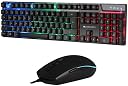
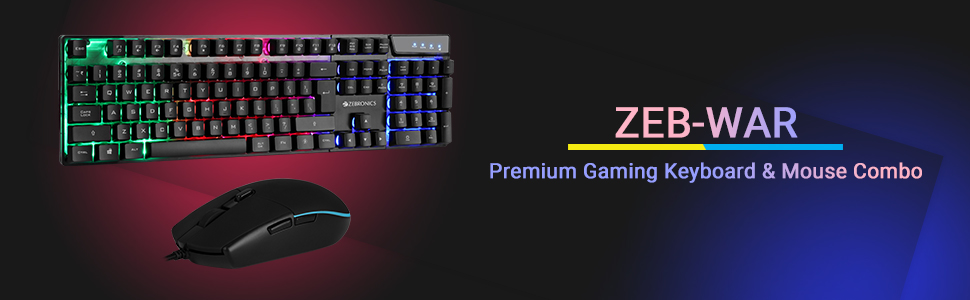
The Zebronics War Gaming Keyboard and Mouse Combo offers a robust, high-performance setup featuring a 3200 DPI optical mouse, gold plated USB connectors with braided cables for durability, and vibrant multicolour LED lighting. Designed for gamers and professionals alike, it combines ergonomic comfort with long-lasting keystroke and button life, compatible across multiple operating systems, backed by a 1-year warranty.


| ASIN | B0814Z58YM |
| Are Batteries Required | No |
| Best Sellers Rank | #70 in Computers & Accessories ( See Top 100 in Computers & Accessories ) #203 in Gaming Keyboards |
| Box Contents | 1 mouse , 1 keyboard |
| Brand | ZEBRONICS |
| Brand Name | ZEBRONICS |
| Colour | black |
| Compatible Devices | Gaming Console |
| Compatible Operating System Family | Linux, Windows |
| Connectivity Technology | Usb |
| Customer Reviews | 3.9 out of 5 stars 5,558 Reviews |
| Hand Orientation | Right |
| Importer Contact Information | 13/7, Smith Road, Royapettah CHENNAI-600002 |
| Item Type Name | ELECTRONICS |
| Item Weight Unit of Measure | 1040 Grams |
| Keyboard Description | Gaming |
| Keyboard Layout | QWERTY |
| Manufacturer | 13/7, Smith Road, Royapettah CHENNAI-600002, Zebronics India Private Limited |
| Manufacturer Contact Information | 13/7, Smith Road, Royapettah CHENNAI-600002 |
| Manufacturer Part Number | Zeb-War |
| Model Number | Zeb-War |
| Movement Detection | Optical |
| Network Connectivity Technology | Usb |
| Number of Keys | 63 |
| Number of Packs | 1 |
| Operating System | Chrome OS, Linux, Mac OS, Raspberry Pi OS, Windows 10, Windows 2000, Windows 7, Windows Vista |
| Other Special Features of the Product | Backlit, Ergonomic |
| Packer Contact Information | 13/7, Smith Road, Royapettah CHENNAI-600002 |
| Power Source | Corded Electric |
| Special Feature | Backlit, Ergonomic |
| Unit Count | 1 Count |
| Warranty Description | 1 Year Warranty. Carry into Service Center. For List of Service Centers, see Product Information |
S**R
Very good product at best price. Good deal
One of the best product. Look is beautiful. Wireless. Keys are soft to use. Very nice.
A**N
Great Budget Combo with Minor Quirks
This wireless keyboard and mouse set delivers fantastic performance and responsiveness for the price. The color scheme looks great on any desk, and the wireless connection remains rock solid. While the build quality feels a bit cheap and the backspace key returns slowly, it remains a highly usable budget option. Upgrading to a more robust body and USB-C charging would make this combo absolutely perfect
F**K
Mouse dose not work
Mouse dose not work
T**X
unreliable for everyday use
I bought the Zebronics Wireless Keyboard & Mouse Combo (104 UV-printed keys, 12 multimedia keys) and used it for about two months. At first it seemed fine — the keys felt decent for the price, the multimedia shortcuts worked, and the wireless connection was stable. The build is lightweight and the UV-printed legends looked good and readable. However, after roughly eight weeks I started getting frequent random key presses. The keyboard would register keys I hadn’t touched, often repeating characters or inserting unexpected input while typing. The behavior got worse over time and made the keyboard unreliable for everyday use, especially coding and long typing sessions. I tried swapping batteries and re-pairing the dongle, but that didn’t fix the problem. Because of the persistent ghosting/random presses, I stopped using the set. Pros Affordable price for a wireless combo. 104-key layout with 12 multimedia keys, useful shortcuts. UV-printed key legends remain readable. Lightweight and compact. Cons Random/ghost key presses started after ~2 months, making it unreliable. Troubleshooting (battery change, re-pair) didn’t help. Build feels budget-class; long-term durability is questionable. Verdict If you need a cheap, temporary wireless keyboard and mouse for light tasks, this combo is okay. But if you depend on consistent, accurate typing (coding, writing, data entry), I wouldn’t recommend it — the random key press issue makes it unusable in the longer term. Consider spending a bit more on a better quality keyboard or choose a Zebronics product with a stronger warranty and proven reliability.
P**H
Value of money
Product very well and looking is very nice
K**I
Mouse quality is very cheap. Also the material used in the items is not so great.
Keyboard is good for the price value. But the mouse is very cheap. The material used are cheap. You can get many better keyboard at this price.
V**D
Value for money combo. CHECK THE END FOR RGB FUNCTIONS.
1 MONTH REVIEW I bought the combo for 1200 and I must say it is one of the best purchases value for money purchases I have done on Amazon. Received it without any damage to the products. Packaging was excellent. However, there was no user manual for the various buttons. No software disc to control the RGB and DPI on the mouse either but you don't need it nor should you expect it at this pricepoint. Coming down to the actual products, the keyboard was way bigger than I imagined it to be. Going from a basic flat keyboard to this felt like a huge jump but I got used to it after a day or two. The mouse is really smooth and works really well even without a mousepad underneath it. The changeable DPI settings are really handy when you are playing a new game and need to change the sensitivity quickly. For work - I work as a content writer so I needed a keyboard that wouldn't hamper my typing speed and this keyboard delivered. My typing speed was 60-70 wpm with 80ish accuracy with my old keyboard. It jumped to 90-100 wpm but with 94+ accuracy after using this new keyboard for the FIRST TIME. Let that sink in. The mouse is excellent though it's sensitivity can be hard to manage if you arent used to it. You can simply lower sensitivity in windows or set the DPI setting to 1600 to resolve this. For gaming - The keyboard has literally no input lag and ghosting. Even if I pressed 3-4 keys simultaneously they would all get registered without any problem. The keyboard feels quite clicky even for a membrane keyboard which makes your gaming experience even more fun. I tried the mouse in various FPS games like Doom, Modern Warfare, CS and Black Ops and it did NOT disappoint. My aim was accurate and precisely where I wanted it to be. However, I couldn't land super accurate shots every time because of the sensitivity but it's not the mouse's fault, it's because I don't have a mousepad to go with it. Pros - 1.Keys are clicky even for a membrane keyboard. 2.Keys can be removed and replaced easily. 3.The RGB is decent and has various modes but I don't use it that much. 4.No ghosting whatsoever. 5.The DPI settings on the mouse work flawlessly. 6.The RGB on the mouse looks absolutely stunning. 7.The mouse model is identical to the Logitech G402 which costs more than this combo combined. I confirmed this with my friend who owns the mouse. 8.Customer care is responsive and I received a response under 2 days after submitting query. 9.Can't get better value for money. Cons - 1.No user manual. You will need to either call customer care or figure out everything yourself. To spare you the trouble, I'll include a few function keys in the bottom so be sure to check them out. 2.The keys aren't backlit which basically means you can't use the keyboard in the dark without any lights on (See photo attached) 3.The keyboard is a bit bulky. Definitely not something you should carry around. 4.The side below the keys is not covered with opaque plastic which basically means you can see everything inside. Some may find it neat. I personally didn't. Shortcut keys for the keyboard Zebronics didn't bother to tell - Fn + Pgup - To increase the brightness of the RGB. Fn + PgDn - Same as above, but it decreases the brightness. Fn + Lightbulb button besides right Cltrl - Switch on/off RGB and switch between the different color modes. Fn + Windows key - Locks the windows key. These are the ones I can remember from the top of my mind. Other Fn keys are pretty obvious. And for mouse, Hold the DPI button (the one below the middle mouse button) if you wanna turn the RGB off. Hold it again to turn it back on.
M**I
Excellent Value Wireless Keyboard & Mouse Combo!
I recently bought the Zebronics Wireless Keyboard & Mouse Combo and I’m really impressed with the overall experience. For the price, this combo delivers great performance and features that are usually found in more expensive sets. What I love about it: Smooth wireless connectivity — The 2.4 GHz connection is stable with virtually no lag, and the tiny USB receiver works seamlessly on both my laptop and desktop. Comfortable keyboard with 104 UV-printed keys — The keys feel solid and have a nice tactile response. The UV printing ensures the letters won’t fade even with heavy use. Dedicated ₹ (Rupee) key & multimedia shortcuts — The ₹ key and the 12 multimedia shortcuts make everyday tasks like adjusting volume, play/pause, and opening email or browser much more convenient. Accurate wireless mouse — The mouse tracks smoothly and feels comfortable in hand. The sensitivity is good for both work and casual browsing. Plug-and-play — no drivers needed — Just plug in the USB receiver and everything works instantly. Overall, this is a fantastic budget combo for anyone who needs reliable wireless input devices for home, office, or study use. Great build quality for the price — definitely recommended! 👍
Trustpilot
5 days ago
4 days ago