Desertcart purchases this item on your behalf and handles shipping, customs, and support to Israel.
🔥 Stay cool, perform cooler — your SSD’s new best friend!
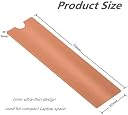
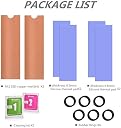
The M.2 Copper Heatsinks Cooler (2 Pack) offers a high-performance, ultra-thin copper solution to dramatically reduce SSD temperatures. Equipped with dual-thickness nano thermal pads, it ensures perfect contact and compatibility with most M.2 2280 PCIe NVMe SSDs, including popular Samsung EVO and PRO models. Designed for compact laptops and desktops, it prevents thermal throttling and extends SSD lifespan with easy, secure installation.
| ASIN | B07XD8M43P |
| Best Sellers Rank | #18,107 in Computers & Accessories ( See Top 100 in Computers & Accessories ) #132 in Laptop Cooling Pads |
| Brand | MHQJRH |
| Brand Name | MHQJRH |
| Cooler Heatsink Compatibility | M.2 2280 SSD |
| Cooler Heatsink Material | Copper |
| Customer Reviews | 4.5 out of 5 stars 507 Reviews |
| Item Weight | 0.05 kg |
| Manufacturer | YATENG |
| Model | SRP-0104 |
| Mounting Type | Chassis Mount |
| Number of Items | 2 |
| Number of Packs | 2 |
| Part Number | SRP-0104 |
K**Y
Excellent solution for EVO 970 Plus and HP Omen
Hp Omen dc-15xxx and the boot drive is a 512gb SSD M.2,. I replaced it with a 1TB Samsung EVO 970 Plus, which ran very hot. Idled at 57C, any use took it over 65C. Samsung Magician reported it as "too hot". Bought this. If you have an HP Omen dc-15xxx and 2ant to pop in the 3VO 970 Plus, this is fantastic: - Replaced the thermal pad that came with the HP for the 1mm one in this kit. Leave the warranty sticker on the EVO in place. Also make sure you remove the top layer of plastic from the pad after sticking it down to the platform, exposing the pad to the SSD when you reslot the new one - Gently remove the sticker on back covering the thin useless copper "heat sink sticker". Then GENTLY remove the copper sticker. It's easy, just don't use a knife or the like, use your fingernail, plastic spudger, etc. - Peel the clear cellophane off the side of the copper heatsink from the kit. - (here's where you want to spend $6-7 extra). Use a bit of Polyimide tape (1/8"-1/4" wide) to attach the copper heat sink to the back of the EVO. It can be purchased here on Amazon, it's a VERY thin heat resistant tape. INSTEAD of using the rubber bands, make 2-3 wraps of the tape around each end, and same in the middle, thereby attaching the copper sink from this kit to the back of your EVO. I don't trust the rubber bands, they don't fit very well and the Omen has a surface the SSD presses onto (with the therm pad), so the bands only fit around the very outer edges (poorly), and no way to secure the middle. You don't want to make sure a heat sink sits very flush on the board/chip it's protecting or it's useless. The tape allows a VERY secure fit, and by doing a few wraps at each end AND the middle, it secures VERY well and it's so thin, the pad will touch the EVO completely when reslotted. Now go ahead and insert the SSD, close it up, and do your thing. My EVO 970 Plus now idles at 45C, and will NOT go over 57C no matter how hard I push it. That's results!! Sorry for the long tutorial, but there is scarce little info on the HP Omen and how these EVO 970 Plus work in them, so I figured I'd share the success in case it helps anyone else. TL/DR: This kit worked wonders on the heat dissipation in a tight space with poor airflow, especially with a VERY hot running SSD like the EVO 970 Plus. Get some Polyimide thermal tape and dump the rubber bands, instead wrapping 2-3 tight wraps at each end and one in the middle to hold the copper heat sink tightly to the SSD. Perhaps the kit should include a small 1/8" x 6" roll, but it's cheap enough to buy as an extra to do the job correctly when the bands won't work.
S**J
Coooool product
Very satisfied with this product. Recently bought a Samsung EVO 970 Plus M.2 SSD drive and discovered it runs hot, even at idle (51-53C). Found this heatsink cooler and figured I would give it a shot. Installed it in my Lenovo T490. Now my idle temperature is at least 10C less than before. Of course when running heavy read/write cycles the temperature rises but the high temperatures reached are lower than before, and the temperature also seems to decrease faster once SSD processing operations conclude. As mentioned in another review, the thermal gap pad is delicate and can tear, so you'll want to be gentle handling it. I ended up the thinner of the two thermal pad sizes, the 0.5mm one, since I wasn't sure if the 0.8mm one would result in enough clearance between the heat sink and the bottom cover of my laptop. I ended up not using the rubber bands since the SSD board with the bands would no loner align well with the motherboard port for the drive. Didn't have kapton tape (would have preferred to use it) but instead used a small amount--emphasis small--of electrical tape (rated to 105C), just enough to wrap around the sides of the copper heatsink/thermal pad/SDD board sandwich in four locations to keep the stack together. Made sure not to cover much of the copper heat sink so as not to degrade the thermal cooling behavior of the heat sink. Pretty sure this method isn't ideal, maybe even generally discouraged, but it works well enough. Happy that my drive temperature is lower and don't need to worry about temperature anymore.
R**Z
They are actually very easy to install
I had read some reviews where people had problems installing the rubber band so I was very careful during the installation but they come with 2 extra rubber bands in case you messed it up. Before the installation I was not having any thermal problems at all but I installed them because I wanted to extend the life of my 2 SSDs as I use a gaming laptop and can get quite hot.
S**R
Works better than expected, First one I found that fits in an HP Laptop
I have an HP Elitebook 850G6 which is a very thin business class laptop, Core I7 8th Gen with 32GB Corsair 2400 memory, I just recently upgraded from a Samsung EVO Plus 970 1TB to a Samsung EVO 2TB. There is not a lot of good airflow due to the thinness and lightweight of this laptop. I was without a problem able to put the 1mm thermal tape on the on top of the sticker so I do not void the warranty, and add the 1mm copper plate to the top. Last night before purchasing this and it arriving today I was not only getting high temp warnings but it was saying to high in Samsung magician, this was just NORMAL running at about 56 degrees C. When running a stress test just for the sake of it, it was running 65 degrees C. I added the heatsink, its now running under NORMAL circumstances about 43 degrees C and after running a stress test only went up to 46 degrees C. A huge improvement to stop all the throttling from the heating up. This company also makes heat sinks for the memory also very thin at .5mm I purchased those as well. I am happily pleased for the price and again because its so thin yet copper very conductive it was BETTER than expected!!!
D**R
Perform as intended.
Adding these and some thermal pads inside my high performance laptop has significantly reduced its temperatures. I would make sure to build these up until touching the case to aid heat dispersion.
R**R
Packing heat in a small package
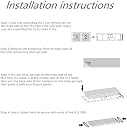
I honestly wasn't sure what impact these heat sinks would have but I am pleasantly surprised. My system set up is a MSI GE73 Raider with a Samsung 860 EVO and a 970 EVO. I only installed one heat sink to 970 EVO since the nvme drive runs hotter. The 860 was left bare and only has factory installed thermal tape underneath in contact with the motherboard. I did not install any tape under the 970, it is also a new drive. Installation: After cleaning I applied the thicker thermal tape to the top of my 970 EVO and making sure to line it up evenly with the chips. Application of the copper heat sink was simple, just lay it on top and make sure it's positioned more toward where you screw the drive into your motherboard. Gently apply pressure with your fingers to sandwich everything together, be careful not to apply too much pressure as this is a very expensive sandwich. Stretch out the rubber bands with your fingers and fit them over the drive. I used 3 rubber bands, 2 by the edges and 1 in the center. The bands were easy to stretch just enough to fit around everything without losing their elasticity. Performance: For the price, awesome. My 970 nvme drive usually runs around 44°C to 46°C at idle and can shoot up around 70°C or higher during performance. These are nearly identical stats to my other 970 EVO that I've had for 2 years. I ran a benchmark before installation and after. Before, the temperature would reach around 70°C. After, the drive struggled to reach 60°. Another thing to note is that it cools down at a faster rate. The drive also idles comfortably around 38°C and sometimes creeps up to 40°C so the 860 EVO (the sink-less drive) doesn't feel lonely. I do also have a notebook cooler underneath my laptop, typically all the time. Good airflow will have an impact on how well this and any other heat sink performs. Thank you for reading my review, hope this helps!
D**J
THE COPPER HEAT SINK IS GREAT...THE RUBBER BANDS ARE NOT
So you have a copper heat sink attached by heat strip and 2 rubber bands around the plate. Everything is fine, except for the small rubber bands, I broke all 5 on one plate!
J**A
Cumple y muy bien
Este producto es genial y cumple lo que promete mi disco bajo mucho la temperatura
J**A
Buen producto
Buen producto
J**E
Falta explicação ou polimento
Funciona bem porém não te explicam que tem um lado certo, a lateral de um dos lados é afiada e corta as ligas de suporte
B**B
Exactly as Advertised
It is better to have some kind of heatsink than nothing at all. These are perfect for my laptop.
A**H
Good product and good packaging
The product came in a transparent box with a tape outside on the lid i expected it to come in a transparent zip bag but the packing was good the copper plates had filiming on it to protect from scratches the plates and thermal pads were in a good quality bag the bag was really good quality there were wipes dry and wet and some rubberbands i installed it in my hp pavillion gaming laptop 15 that has samsung 970 evo the temps are really good now aroud 50 c on load i made a sandwich of this two copper plates and installed it in my laptop as you can see in the pics and instead of rubberbands i used a thermal pad to keep it together as i had heard many times the rubber breaks after long use and the seller the GlobalGenie were really good. customer care was good my product was late in customs thats why i contacted them and they were really helpfull i recommend to buy from Global Genie overall good experience
S**0
Disipador de calor para SSD indispensable.
Es justo lo que buscaba para instalar mi nuevo SSD en una laptop y tenerlo en buena temperatura. El pequeño estuché incluye los dos disipadores de cobre, thermal pads, manual, ligas térmicas para asegurar el disipador y unas pequeñas toallas para limpiar. La instalación es fácil, solo hay que alinear el thermal pad con la SSD y quede centrada, para acoplarlo con el disipador. En mi caso no use las ligas térmicas, las cuales sirven para asegurar el disipador con la SSD. Se usan, por lo que miré en un tutorial, en caso que se instale la SSD de lado en una computadora de escritorio. Cumple con su función como tal, es muy recomendable adquirirlo para aquellos usuarios que piensan instalar una nueva SSD en su laptop y tener la esa SSD en temperatura estable.
Trustpilot
2 weeks ago
1 month ago