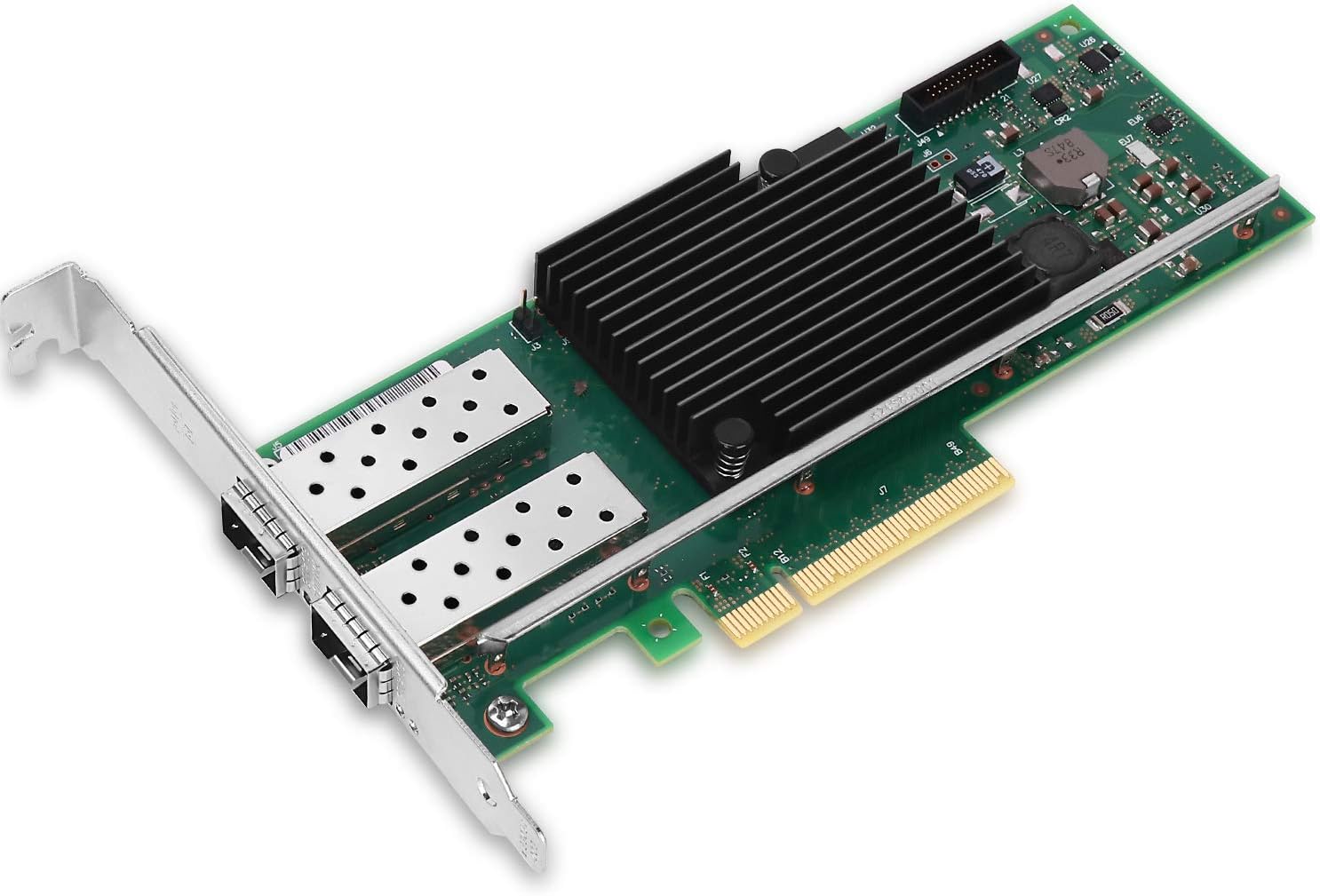
🚀 Upgrade to 10GbE power — because your network deserves the elite edge!
The Vogzone 10Gb PCI-E NIC Network Card features the original Intel X710-BM2 chipset, delivering ultra-low latency and stable 10Gbps speeds via dual SFP+ ports. With PCIe 3.0 x8 interface and broad OS support including Windows, Linux, and VMware, it’s engineered for high-performance data centers and professional setups demanding reliable, scalable connectivity.


| ASIN | B07SKQT6MJ |
| Best Sellers Rank | #21 in Internal Computer Networking Cards |
| Brand | Vogzone |
| Color | X710-DA2-10G(2*SFP+) |
| Compatible Devices | Desktop |
| Customer Reviews | 4.4 out of 5 stars 368 Reviews |
| Data Link Protocol | Ethernet |
| Data Transfer Rate | 10 Gigabytes Per Second |
| Hardware Interface | Ethernet |
| Item Dimensions L x W x H | 8.8"L x 5.9"W x 1.1"H |
| Item Weight | 7 Ounces |
| Manufacturer | Vogzone |
| Mfr Part Number | V-X710-DA2 |
| Model Number | V-X710-DA2 |
| Product Dimensions | 8.8"L x 5.9"W x 1.1"H |
| UPC | 778601246355 |
| Warranty Description | 3-Year Free Warranty |
W**M
Great performance + latency, handles all features I tested, and is pcie 3.0 x4
I think I am going to give this a 5 star review for now. It was the first one with every feature I needed working and no performance issues. The first 10GB/s NICs I bought were the Marvell Aquantia ones integrated into some high end motherboards. They were crap. They would crash all the time, latency issues were a big problem, and they didn't handle vlan tagging on windows (probably due to driver issues). Would not recommend. The second 10Gb/s NIC I bought was a X540T1 and it wasn't supported by Intel for windows anymore, so I had to find a windows 10 driver and install the .inf file manually. On top of the difficulty in getting it set up it was pcie 2.0 x8, so not ideal for most people's computers. It also gave my motherboard trouble with a warm boot where my motherboard would get stuck with a post code indicating something in one of the slots was having issues. The third was an ASUS XG-C100C (shares the Marvell Aquantia chip integrated on the motherboards I bought) which was stable, did pull drivers right away with windows, and handled VLAN tagging without any problems at all. Great right? Only, it had horrendous latency which was very noticeable when connecting to game servers, but not so much when transferring files or performing speed tests. I assume the Marvell Aquantia chip and board + software was tweaked to be more stable, handle certain features, etc which is why it worked so much better than the integrated ones I used previously, but it still wasn't worth keeping since I play games on my machine nearly every day. This one that I bought and am reviewing right now is perfect. Warm boots just fine, handles VLAN tagging, and great low latency for gaming. Plus it's pcie 3.0 x4 which makes it a great option for a lot of high end computers. The one thing I am unsure of is durability and on top of that I haven't tested both ports at the same time. I would assume they work, but I just can't be 100% on that. It does use an intel chip though, so I assume it would work just fine and hopefully has adequate cooling since I assume the board is 3rd party? Not sure on that. Also durability, which is something I would assume is OK on these. I mean, I have only had mine for a day so I will update this review if and when it fails. Anyway, 5 stars and I am buying a second one.
K**E
Solid 2.5GbE network cards, working well for me with Windows, Manjaro, and Truenas
I bought a couple of these to connect my main PC and my home NAS, using a GLiNet Flint 3 as my router/switch and these cards have been very solid so far. I have only been using them for about a month, but pretty good so far. Both cards worked instantly in Windows, Manjaro Linux, and Linux truenas scale (based on Debian), no need to install drivers or anything. Speeds have been solid running at about 260MB/s through 150ft of CAT6, my NAS is in an outbuilding. I did several long transfers of 2-3 TB with mostly no issues. During one transfer I did have a issue where networking just stopped wrong entirely on my PC, but I think that was more of windows problem when I was trying to do too many transfers at once from an old spinning rust hard drive and something in windows crashed. Zero issues with Manjaro and truenas and no issues since in windows when I just have a few transfers going at once. Cooling seems to be sufficient, both my nas and PC have very good airflow, so it might have issues in a worse environment, but it seems good for me.
R**O
Works as noted
Works great , easy install, no drivers needed. Using with 2gb isp and getting full 2gb speeds
B**B
Works fine in Ubuntu and unRAID, no driver installation needed - getting over 2GB speeds!
** Update: 2/15/ 26 ** I've been using this card for 7 months and it still works great. An unbelievable value at under $12 when I bought it. ** Previous Review Below: July 2025 ** I can’t believe the affordable price of this device. You could literally buy two of these for the price of a single TP-Link 2.5GB network card! And that’s why I bought two of the Vogzone cards. I thought if these don’t work, I’d return them and buy Intel-based network cards. But the Realtek are so much cheaper that I thought it would be worth a try. I installed the Vogzone network card with curiosity, unsure if it would work or not. Pleased to see it works well without having to install drivers in Ubuntu 24.04. I installed the 2nd one in an unRAID server (running Slackware Linux) and that also worked fine, no issues. Speed tests show 1.5-2.3gbps for the devices that are connected to a 2.5 gigabit switch, so I am happy with that. Looks like Ubuntu and unRAID/SlackWare are using the “r8169” kernel driver for this network card. BTW these cards show up in Linux as “Realtek Semiconductor Co., Ltd. RTL8125 2.5GbE Controller (rev 05)”. I’ll update the review if anything of interest happens, but so far I’m happy with the purchase. Yes, it is a bit more work to open a computer case and install a card, but these are so affordable I think it is worth it. If you are OK with spending a little more (around $20 per device), you could buy an RTL8125-based USB 3.0/USB-C dongle and use that instead. In that case you just plug it into a port on the case! Because the Realtek 2.5GB network devices generally have the same chipset (RTL8125) then that should work fine as well. By buying these Vogzone cards I saved about $16 total, which means the switch I bought to use with these cards only cost $32 instead of $48 as I applied the savings to that! (BrosTrend 2.5GB white plastic 8 port switch; works great too). I recommend this device based on preliminary performance. The device comes in a plain box with a printed label. Inside the box is a plastic bag (doesn’t appear to be anti-static, might be?) containing the very small network card. It also includes a half-height card bracket, which you could easily swap if you need the shorter bracket. By default the card had the full-height bracket installed, which worked perfectly in my mid-tower PC case. I’m taking 1 star off as the packaging is very minimal. The cardboard box isn’t sealed at all, not shrink wrapped, so it feels like anyone could have tampered with the product before it was delivered. It also contains zero instructions; no spec sheet, driver information, etc. If you want any details you’ll need to review the Amazon product listing! So the customer experience isn’t fantastic, but experienced users will be able to easily install the card and enjoy the savings from the lower cost. Working great so far!
J**D
If you need a network card I recommend this one.
I bought this to upgrade my little OptiPlex that could and I have no complaints with it. It was very easy to install and I'm happy it came with the sff cover. It get's the full speed it advertises.
C**S
Dirt cheap price but didn't work
I bought the 2.5 gb pcie card. It seemed a really good deal, dirt cheap price, same realtek8125b chipset as similar cards. When I opened it, the first red flag was it looked different than the listing images. Primarily the heatsink design, a small finned black one rather than the larger red one in the images. Also, notably it was missing the "ver: 2.0" text printed at the top of the card. Sure, sometimes designs change, so I installed it. My computer recognized there was a new card but when I connected ethernet, it said there was no internet. Switched back to on board nic and found drivers for the chipset and installed. Switched back to the 2.5 nic, this time my computer registered the link speed as 1000/1000 (Mbps), not the 2500 Mbps as advertised, in settings but trying a speed test barely got 50 Mbps. Did some more troubleshooting, different cables, different pcie slot. Maybe it was just bad luck I got a bad card. But ended up returning this and spending twice as much on a TP-Link TX201 which just worked.
L**N
Good little 2.5G card
Exactly as it says on the tin, and for the price you can't beat that.
P**9
Delivered the speed as advertise! A+
TX/RX shown a consistency of 2.2Gbps or around 275MBps in Windows 11 (aware of Byte vs bits! 275 x 8 = 2.2Gbps). At time, a short burst can be seen up to 2.6Gbps. They are plug/Pray no driver is needed but should make sure your PC chipset is updated for optimal performance. Beside above, I have been running it only for few days and so far, so good! Will update on longevity or if encounter any.
Trustpilot
2 weeks ago
1 month ago