![ClearClick Video to Digital Converter 2.0 (Second Generation) - Record Video from VCR's, VHS Tapes, AV, RCA, Hi8, Camcorder, DVD, Gaming Systems [Requires Working VCR/Camcorder & Tapes]](https://m.media-amazon.com/images/I/91c1O5fWJfL._AC_SL3840_.jpg)


Desertcart purchases this item on your behalf and handles shipping, customs, and support to Israel.
⏳ Don’t let your memories fade—digitize your past today!
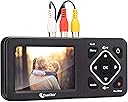
The ClearClick Video to Digital Converter 2.0 (Second Generation) is a compact, user-friendly device that converts analog video formats like VHS, Hi8, and camcorder tapes into digital MP4 files without needing a computer. Featuring a 3.5" preview screen, SD recording resolution (640x480 or 720x480), and direct recording to USB or SD cards (up to 512GB), it offers hassle-free preservation of your vintage videos with improved audio/video sync and auto stop functionality. Perfect for professionals seeking a reliable, plug-and-play solution to safeguard nostalgic footage with a 1-year warranty and dedicated US-based support.


| ASIN | B07V9JNRZY |
| Best Sellers Rank | #38 in Video Converters |
| Brand | ClearClick |
| Built-In Media | 3-RCA Cable, Power Adapter, User's Manual, Video2Digital Converter 2.0 |
| Cable Length | 3.5 inches |
| Color | Black |
| Compatible Devices | Camcorder with 3-RCA or S-Video, VCR with 3-RCA or S-Video |
| Connector Type | RCA |
| Customer Reviews | 4.5 out of 5 stars 5,432 Reviews |
| Finish | Hdmi |
| Input Voltage | 5 volts |
| Item Dimensions | 6.3 x 3 x 0.9 inches |
| Item Weight | 6 ounces |
| Item dimensions L x W x H | 6.3 x 3 x 0.9 inches |
| Manufacturer | ClearClick |
| Mfr Part Number | Video2Digital Converter 2 (Second Gen) |
| Model Number | Video2Digital Converter 2.0 (Second Gen) |
| Number of Items | 1 |
| Number of Ports | 7 |
| Package Quantity | 1 |
| Power Plug Type | No Plug |
| Specific Uses For Product | Analog Video To Digital, Converting VHS To Digital, Video Conversion |
| UPC | 798578763372 |
| Unit Count | 1 Count |
| Warranty Description | Full 1-Year Warranty From ClearClick |
| Warranty Type | 1-year warranty |
T**J
Amazing Little Device!!
Like many people in my age cohort, I have a collection of old videotapes on obsolete formats - About 52 Mini-DV tapes taken of my kids from birth to age 10 on my 1990's-era Sony camcorder, and about 16 old VHS tapes taken by me and other family members. I was considering sending off my tapes to be converted to digital format, but hesitated on sending my only copy of precious family memories out to a conversion service, and then paying the really high price for the conversion. As I looked at options, I originally thought about converting my tapes on my computer, but it involved buying and installing a video capture card, buying and learning the appropriate software, etc. Then I came across this device and read the reviews and took a chance on it. Best decision I ever made!!! This device is amazing - Incredibly simple to operate, and produces great quality video, especially for the price. You literally plug the RCA cables into the device, put in your memory stick, then press play on your old device, and record on this device, and you're on your way. Best of all, it doesn't tie up your computer to do all of this work, and lets you see the progress via the built-in screen (you can also listen as you record it if you want). I would generally just set a tape to record while I was at my computer doing other things, and found I could knock out this whole project in the matter of a few weeks, vs. the months I was expecting it to take. That said, here are a few things I learned along the way in working with this device: - The device has a way to stop recording after a certain period of time. My mini-DV tapes are all 90 minutes, so I though the 90-minute setting would work great. However, I found that my tapes ran 4 minutes longer on average than the 90 minute timer on the device, so you can't necessarily rely on that (not sure if the discrepancy came from the actual recorded length of my tapes, or from the device itself). - When you have finished recording, a counter shows your full recording time. I found that if I removed the memory stick while this was still displayed, I got a corrupted file message when I tried to transfer the file to my computer. However, if I waited until the recorded time counter disappeared (just takes a few additional seconds) this problem went away. - The device lets you record at 720x480 or 640x480 (the old 4:3 format that cameras used in order to be compatible with old tube-style TVs). I found that if I tried to use the higher-resolution 720x480, the image appeared stretched/widened. I found that the 640x480 worked great to record all of my older-format tapes. - I initially an into a bit of a hitch when I started to record my VHS tapes. I got a "signal not detected" message that I initially couldn't resolve. I tried using the included RCA cables, and then cycled through several of my own cables, and eventually found a set that (apparently) made this problem go away. - I believe the device's specs said that a 128 GB memory stick was the max, but I used a high-speed 256-GB stick from Samsung, and it worked fine. Anyway, I can't say enough great things about this device. I usually don't leave reviews on products, but I was so enthusiastic about this one that I just had to share. Hope this helps.
R**N
Performs very well
As someone who has a treasure trove of memories tucked away in various analog formats, finding a way to preserve and relive those moments has always been a priority for me. Enter the ClearClick Video to Digital Converter 2.0 (Second Generation), and it's like I've found a time machine for my cherished memories. Right out of the box, the sleek design of the converter caught my eye. It's not just about looks; the build quality is top-notch, ensuring that this device isn't just a one-time use gadget but a durable piece of technology that I can rely on. The user-friendly interface allowed me to convert my old VHS tapes and camcorder recordings with absolute ease. It was a plug-and-play experience that required no complicated setup. Whether it was my old gaming sessions on classic systems or the precious moments of my family's past celebrations, this converter handled it all. The compatibility with VCRs, VHS tapes, AV, RCA, Hi8, and more made it the only tool I needed for all my digital conversion tasks. The quality of the digital files is astounding. The videos are clear, the colors are vibrant, and the sound is as crisp as the day it was recorded. It's truly remarkable how this device breathes new life into footage that I thought was doomed to fade away. The ClearClick Video to Digital Converter 2.0 has exceeded my expectations. It's an invaluable device that has allowed me to safeguard my family's history and enjoy it in the modern digital era. I would recommend it to anyone looking to convert their analog memories with zero hassle and complete satisfaction. This review is based on my personal experience with the ClearClick Video to Digital Converter 2.0 (Second Generation). It's a product that has not only met but surpassed my needs, providing a seamless bridge from the past to the present. A big thumbs up from a very happy customer
J**Y
worth every penny and simplistic to use
I am an I.T. professinal and have been trying for years to capture my VHS tape to digital media.I have tries may USB devices by multiple companies and internal $800.00 capture cards with codec buiilt in. After several trys over many device across many years I always have the same or similar problems - Dropped frames during capture - dropped, corrupt or otherwise missing. This causes one or more problems depending on the device you are using. Some throw up color bars, some just stop capturing video but keep capturing audio thus putting the audio track and video track out of synch on the concluded capture and other similar issues. Mush of this is NOT any one devices fault but rather is result of the VHS tape format or the tape degrading over time. The results vary form device to device however depending on how each specific device handles such situations. Now for the GOOD NEWS - This device captures the video no matter what - missing or corrupt frames are recorded and mere blips or squiggles due to the degraded source material and the audio track is kept in synch with the video. In the end you still have some blips or squiggles in the capture where the source signal has degraded BUT the overall capture is intact and in sych and viewable. You need to learn that these blips can NOT be fixed as it is a cause of the aged tape and it original format of VHS etc. I have invested thousands in sophisticated technology devices that have not gotten the job done. This gadget gets it some as best as could be expected when dealing with inferior source materials that have substantially aged. I highly recommend it. When capturing later and or higher quality ANALOG source materials the device delivers a flawless capture. If your intent is to capture digital source a different device is needed. Also note neither will capture copy protected materials in violation of copyright laws. This is not intended to cheat copy written materials or to pirate such! For the intended purpose of capturing and digitizing analog personal materials I highly recommend this device and while more costly than other devices that claim to do the job this device actually gets the job done!!
J**S
Digital Converter 2.0 - So Easy to Use
I'll try and keep this short and to the point - I received this product in the mail a couple of weeks ago and just made my first digital conversion today. It is SUPER east to use. Literally plug in your yellow and white RCA cables to the back of a VCR (if you have one, I had to order one from Amazon, lol). Plug the RCA cables to the top of the device and presto, you will have sound and picture in a matter of seconds once you push play on the VCR and make sure you're on the correct mode setting on the device. I read the directions when I first got it, but they're really short, so once you know what you're doing, I think you're going to play through the VCR, hit record on the device, and just walk away while it does its thing. I just finished recording a copy of the 1989 NBA all star game I had and the picture is amazing. I've got over 100 tapes to convert, and my theory is that the picture, once digitized, is only going to be as good as the original tape (I remember back in the day that programs taped at 6 hour speed would not be as clear as those taped at 2 hour speed - just a thought). Now, because it's been 32 years since I've played that tape, I thought there would be issues, but there weren't. I'm guessing family videos and such (things I really bought the converter for) will be a bit more grainy because they were recorded on a shoulder-carrying camcorder from 1988. Again, I think the digitized copy will only be as good as the original recording, OR as good as the quality of the VHS tape is NOW. Reading through A LOT of other reviews before I bought this device I saw that people commented about not being able to pause the recording because after hitting "pause" the device will actually stop. For my sake, that doesn't bother me because what I know I do want to transfer over will most likely be the entire tape, so I'm not bothered by not being able to pause because I probably wouldn't have done a lot of that anyway. I am now recording the final game between the BULLS and LAKERS in the 1991 Finals and the picture showing through the device seems as clear as the tape itself when I first recorded it. So far, I'm VERY happy with it and would recommend it! Only reason I rated it 4 STARS is because of the sound that is produced out of the device while the transfer happens. It's very soft and you basically have to be holding the device, or sitting very close to it to hear it. Imagine leaning in close to someone to whisper to them and that's what it's like. I would prefer just a little bigger device for a better speaker if that's what it takes. Screen dimensions: W 2 3/4 inches by H nearly 2 inches.
S**1
Best investment I've made in years.
I was on the fence about spending the money on this device but after converting over 30 videos from my old Sony Handycam Vision Hi-8 ccamcorder and a few from old VHS tapes via VCR, I am so pleasently suprised and pleased at just how easy and straight forward this thing works. It's amazing. I'll quickly just give you a very simple idea of how easy using this device is. I start off by plugging it in with my phones micro usb connection to power it up. I then plug in a little USB device that my movies will be copied to. Next, I plug an S-video cable into the device and connect the other end to my handycam (I used the provided red/yellow/white cables when using the VCR) -that's the video connection. I then used a cable that plugs into the audio out connection on my handycam and has the red and white male connections on the other end that connect to the converter -now I have audio connected. From here, you just press play on the handycam or VCR and when you see the video on the devices screen, press the record button. When I saw that the screen was fading out (something I always used when I was playing camerman..) I would get ready to either hit the middle button (to pause the recording) or I'd hit the record button to end that particular video. If that event was not over with, I'd hit the pause button again to resume recording. But if that event was done and another was beginning, I'd hit the record button to end that video. Since the next segment had started to play, I'd rewind it a bit back to the beginning and then hit record to start another recording. It's just that easy. You can also easily see your videos on the USB by pressing the mode button. Everything is well thought-out and simple to grasp. This device has given me so much piece of mind just knowing if anything were to happen to my 'master' recordings, I now have them backed up on my hard drive and in the cloud to share with all my friends and family. I converted a video for my mom from the 50's that she hasn't seen in decades and she was in tears. Worth every penny.
L**.
Very easy to use - a seamless process!
I had already ordered a box from a paid digital converting business when I saw this. It works so very well! Easy to use - and I just set a VHS up at night, let it convert, check it in the morning and move it off the flash drive to my computer's hard drive. Easy to use, and I am delighted that I can share family videos now!
O**R
Worth the Expense to preserve and convert old video files
Over many years working as a videographer and photographer for myself and for an array of clients, I have accumulated a large collection of past recordings and in a variety of formats including MiniDV cassettes. Overall, I had scores of them stored. Recently I began looking at these collections and their content and decided there were at least some of them I wanted to preserve in a digital format. I spent a lot of time online looking for solutions before settling on ClearClick and after several hours of using it am very happy with the results. There are a few things I would change at least a bit. First, the instructions with the unit initially discuss the use of a USB or SD card (in a USB adapter as I am doing in the attached photo) for video capture. However only several pages later do they provide the crucial information that the formatting to be used is MS-DOS FAT32. Having that listed earlier in the documentation would have been helpful. Another item: You insert your cassette in your camera (In my case a Canon XH A1 purchased in the late 1990s) and start play. When you do, the image and sound play through ClearClick and you can start recording using the Record Start/Stop button. But it took me a bit of time to learn that to start recording you need to hit the button very briefly. A longer press captures a still image. If you do it correctly, a timer will appear next to the red camera icon in the upper left and document the length of what you are recording. With that, another nit to pick: The camera icon ALWAYS shows as red which can lead you to think it is recording. When you do start recording, the icon remains red, but the timer appears, letting you know that you ARE recording. There is a feature that allows you to stop a recording at a set time such as 30, 60, 0r 90 minutes. With my cassettes it is possible to record slightly more than 60 minutes, so using this option with a cassette that contains slightly more than 60 minutes is to select 90 minutes. Don't know whether it is possible, but it would be a better feature if users could select a custom time to avoid a recorded file that could include 20-30 minutes of blank. That said, Clear Click works well...provides a pretty good look at the video and sound as it is playing and so far has worked very well for me. I have found it best to fast forward through a given cassette to get a better understanding of content (is the cassette full of recordings or only partially used). Knowing that, I can start a recording and come back around the time I know it is concluding, or work on other things while it is transferring. Clear Click does not improve the quality of the original and given the age of the cassettes I am transferring, there are obvious signs of degradation in image quality. There are a variety of third-party apps you can try that do provide some degree of image enhancement. I use Final Cut Pro for editing and their latest update provides enhanced tools for such tasks. Another package I like is Wondershare Uniconverter 16 which provides a vast array of tools including file conversion, compression, image quality enhancement and more.j Bottom line....I was a bit reluctant to spend this much to solve my problem, but after about 10 cassette conversions I am ahead of the game, given what I would be charged by third party conversion services. You can't do stuff in batches so you have to invest the time, but if you really want to convert and preserve past treasures, Clear Click is a very good tool to do so.
D**N
WORKED PERFECTLY OUT OF THE BOX
I used this to take the analog signal from my Infrared camera and record it due to the Camera's "computer" (really a windows based palm pilot). The camera outputs 720 DPI but the old "computer" that was used to capture images was only recording in 320 DPI so that is a big upgrade. The second feature is that I can now record the entire Infrared scan as a video. The original "computer" that came with the camera could not do that. As a bonus I can take still images (720 DPI screen captures) while it is recording and I don't have to stop the recording of the video. This is a huge improvement!!! It has a color screen!!!! My old one was in black and white. Now I can see in real time the color spectrum produced by the camera instead of looking at it later or just using a grey scale spectrum for my work. To make this unit portable to work with my camera out in the field I also purchased a 12v to 5v 3A converter and wired it up to a Female USB pigtail (both sold on amazon for less than $20 for both). This unit appears to only need 1A (per the included power supply) but having 3A capacity means that the converter is not being maxed out. Since my IR camera is powered by a larger 12 volt battery (similar to a motor cycle battery) it has more than enough amperage to run both of these devices. My total battery life with both devises running run time for both the camera and the ClearClick is about 6 hours. The bottom line is that although this unit is not sold for the use that I am using it for it turns out that it is absolutely perfect for my application. I have improved the DPI on the captured photos by 2X. I now can capture video Overall Quality of the unit I got was fine. It lacks a premium feel like a modern high end cell phone has but this is 1/10th the cost of a modern cell phone. The unit is lightweight for its size but this is to be expected from modern electronics in plastic cases. The buttons have a nice feel to them. The screen is very bright. Overall I am very pleased with this product. I think it is a decent value for the money. FOR MY APPLICATION there are two things I would like different. 1. Make the case our of metal. Brushed aluminum would be perfect. This would add a much more premium feel to this product. 2. Rotate the screen and the buttons 90 degrees putting the screen over the buttons. THIS WOULD ONLY BENIFIT MY SPECIFIC USE CASE. It would not improve the units functionality for its intended use by the designer/seller. This change would probably make it not as good for its intended use. The layout of the unit for its intended use looks to have been very well thought out. With the unit sitting flat on a table the various plug location make sense as does the screen and button locations. Overall I am very pleased with my purchase. I may purchase a 2nd one to keep as a backup as I am sure these will eventually stop being made as the need to convert analog video to digital media decreases. Very pleased with this and how it worked with my existing equipment. Glad I found this product
Y**.
INCREÍBLE! ÉSTE ES EL PRODUCTO QUE BUSCAS!
En el pasado compré una "capturadora" de USB... Pero no funcionó como debía, aparte, necesitas tener un programa que capture bien (ya no existe casi ninguno, y los que hay son del año de la canica) así que finalmente decidí comprar esta capturadora... Y MIS RESPETOS. Al principio me dolió el codo por el precio, pero vale completamente la pena! Ya he digitalizado varios VHS y VHS-C y puedo decir con toda seguridad que es la opción que buscas. Es fácil de usar, en el instructivo te guían a un video de YouTube que te enseña paso a paso como empezarla a usar. En cuestión de 10 minutos ya sabes todo lo que tienes que saber y estás listo para empezar a capturar tus videos. Algo muy bueno es que aquí no requieres de una PC. Literalmente todo lo puedes trabajar en dónde esté tu reproductor. Yo lo que hago es poner a digitalizar algún video en lo que trabajo en mi oficina. Es una maravilla, es un producto maso menos del tamaño de un celular de los grandes. Si quieres digitalizar y no sabes la opción correcta, créeme que es esta. Aunque sea mucho más caro que otras opciones, es una excelente opción. Mis respetos para la marca.
C**M
No 16:9
This was quite an expensive experiment. For those who are not so tech savvy, don't want to spend time in front of a video editing program and have shot there videos in either 3:2 or 4:3 format I guess this is the easiest way to archive precious family memories. I have still my old Sony Digital8 camera which had allowed to shoot in 16:9 but this device only allows 3:2 or 4:3 capturing so the videos will be "squashed". Now you can manually change the aspect ratio in a video editing program or when you use VLC player on a PC you can change the aspect ratio for playing to 16:9, but that's all not the ideal solution after spending this money. I may go back to firewire before the tapes "die"...
S**S
Fantastic machine.
I transferred all 50 of my mini dv tapes to usb without a single problem. I am not very computer literate but all went very well. I had done a lot of research and I'm so happy I found this product. And no, I'm not an employee of the company!
L**.
Amazing product, amazing support.
I run a digitizing business and have many of ClearClicks products, including 3 of these. They work amazing, and if there is an issue of any sort - their support is quick to respond and resolve. I did have an issue with one of the units, they replaced it without issue. I will not purchase other products, they works great, they're reliable, and do a great job.
S**M
Easy to use
Easy to use and great for transfers. Did all of our VHS to digital. Quality is great and multiple inputs are useful.
Trustpilot
4 days ago
1 month ago