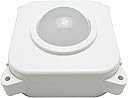
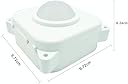
🎯 Upgrade your arcade, upgrade your legacy!
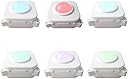
The ThunderStick LED Arcade Trackball (TS-UTB01) is a premium, industrial-quality replacement trackball designed for Arcade1Up Atari 12-in-1, Centipede units, and PC/Mac/Raspberry Pi via USB. Featuring 7-color adjustable RGB lighting, plug-and-play installation with no soldering required, and high-precision movement detection, it elevates your classic arcade experience. Note: Not compatible with Arcade1Up Centipede Legacy units. Perfect for millennial gamers seeking nostalgic performance with modern flair.
| ASIN | B07T1FQFRM |
| Additional Features | Versatility |
| Antenna Location | Arcade Gaming, Computer Use |
| Are Batteries Included | No |
| Are Batteries Required | No |
| Best Sellers Rank | #293,958 in Toys & Games ( See Top 100 in Toys & Games ) #73 in Computer Trackballs #611 in Plug & Play Video Games |
| Brand | ThunderStick |
| Button Quantity | 11 |
| Color | Ts-utb01 |
| Compatible Devices | Mac, Personal Computer |
| Connectivity Technology | TTL serial |
| Customer Reviews | 4.5 out of 5 stars 348 Reviews |
| Enclosure Material | Acrylonitrile Butadiene Styrene (ABS) |
| Hand Orientation | Ambidextrous |
| Hardware Platform | PC |
| Item Weight | 0.45 Kilograms |
| Manufacturer | ThunderStick |
| Mfr Part Number | TS-UTB01 |
| Model Name | TS UTB01 |
| Model Number | TS-UTB01 |
| Movement Detection | Trackball |
| Movement Detection Technology | Trackball |
| Number of Buttons | 11 |
| Operating System | Multiple |
| Power Source | Battery Powered |
| Range | 10.0 meters |
| Special Feature | Versatility |
| Style Name | Modern |
| Theme | Video Game |
| UPC | 631089576652 |
| Unit Count | 1.0 Count |
K**R
a “must-buy” for your Arcade1Up Atari Legacy Tempest cabinet if you are a Crystal Castles fan
I became interested in an after-market trackball when I realized my scoring potential for the Crystal Castles game was being reduced by the trackball that came with the cabinet. The original trackball is fine for very casual play, but I wanted the best chance possible to reach later screens / maps I could never archive back in the 80s arcades. ^.^ Based on about an hour’s worth of research across various Arcade 1-Up modding community web sites this trackball was mentioned frequently as a great balance of cost & quality. I’m not very skilled in electronics work but a couple of YouTube videos made me confident that I could perform the trackball swap on my own. All you’ll need beyond the new trackball itself is a Phillips head screwdriver (to remove the 15 screws), and a selection of flat-head screwdrivers (to pry the original trackball from the cabinet control deck once the screws are removed — since the trackball housing is also slightly glued into place — and also to pry the new trackball case open because you have to remove a jumper). The three (3) most challenging parts of the install for me were : 1. removing the electrical connection between the original trackball & the control deck’s printed circuit board (since it seemed to be slightly glued into place … but some gentle back-and-forth wiggling eventually solved the problem) 2. prying the original trackball away from the glue securing it to the control deck (the flat head screwdrivers were very useful with this step) 3. removing the jumper from *inside* the new trackball housing (there is a jumper inside the unit designed for ensuring proper input latency for compatibility with legacy devices, and you absolutely 100% _don’t_ want to leave this jumper in place for use in an Atari Legacy Tempest cabinet … trust me! ^.^ … the printed instructions that come with the trackball point out how to find this jumper) From start to finish this successful install took about 90 minutes (and as I mentioned before I’m not skilled with this sort of work). Within three games played of Crystal Castles using this new trackball I’d added 10,000 points to my previous high score. This little modding project has been a great experience, and has also given me a wonderful sense of satisfaction that I made this great piece of tech nostalgia work even better … just like my memories from the 80s arcades! Oh, did I mention you get to select the glow color for this trackball? ^.^ I opted for blue, to carry over from the Tempest livery on the cabinet side panel artwork.
M**H
Great Product .... but BIG TIP - don’t open the new trackball assembly with the ball pointing down!
Great looking and works great for Atari Legacy 12 in 1 Tempest cabinet. The original Arcade 1up trackball that came with it was garbage and started sticking 2 days after I got it which was a real disappointment. Glad this one was available and at a reasonable price. This looks and works way better and the blue led light inside looks cool. Only bad part the installation was not plug and play. You have to open the trackball open to pull the tumbler switch. Not so hard but it was not mentioned if you un clip the trackball housing with the ball facing down the entire insides falls out when you open it. That cost me an additional hour installation trying to reverse engineer how the insides are supposed to go back together. I had to open the Arcade1up trackball to see the internals to compare how the new trackball went back together. There should be a warning sticker saying open unit with trackball facing up . I’m betting this has happened to many. Other confusing part in the directions it says you have to hook the stock spinner cord to the new trackball for it to work and that was not the case for me. The cable harness didn’t even fit the new trackball and it worked fine without hooking it up. Mines is the 2020 model non lit riser so maybe the newest version you have to do that step Otherwise a great product definitely worth the 35$!,
C**E
Cool Light-Up Trackball
I bought this for my Arcade1Up Tempest, and it works great. I have the aftermarket waterfall control deck, and the hole for the trackball is slightly smaller than the stock deck, which made it fit too tightly for the trackball to move. My remedy was to grind away some material from the interior of the casing until it wasn't squeezing the trackball anymore. Other than the modifications I had to make due to my aftermarket parts, the install was easy and went smoothly. The LEDs add to the visual appeal of my machine, and the trackball is much smoother than the stock one. I was advised to apply oil to the bearings while I had it apart for modifications, so that probably helped.
C**Y
Needs some improvements. Especially the bearings.
Like many others, I was blown away by the GRS spinner so an upgraded trackball seemed line a no brainer. Unfortunately, that isn't really the case with the ball I recieved. I don't mind the noise this ball makes so much, but It quickly developed a squeak. The bearings feel like they might be grinding and I'm considering a return. Installation was fairly easy(I heated the screws with a soldering iron to melt the glue holding them) until it came time to plug in the spinner wire for the 12in1. The case was ridiculously difficult to open. I ended up searching the floor for one of the tiny bearing collars that just fall off the shafts. Then trying to fit all the wires in the tiny notch while closing the case is no easy task. Having a cut out for the plug would have done wonders. Moving left or right tends to move up and down far too easily. Seems like the ball needs just a little less sensitivity overall. I like the colors, but changing them once assembled means opening up your control deck every time. A slow fade is sadly not an option here either. I think the ball is good overall, but still needs some tweaking. I'd flash pay $10 more for a few improvements. Better bearings, a cutout for connecting the spinner, and maybe a remote for the RGB LED..
A**H
Good, but needs more work.
Greets All, My Trackball came today and was eagerly excited to install it, which I did and played with it a bit and then decided to give my review of the Trackball, this is stock Arcade1up 12n1. So without further procrastinating here it is: The Good: The trackball is a nice drop in replacement, I like the mini wheels as I call them that the recorder rod slips into which gives it the free spinning you get, it is wonderful to have a trackball that actually spins and dont have to break your wrist trying to get the ship across the board. It is responsive to the direction you move it, sometimes too sensitive. I like the touch of the led with picking quite a few colors. The trackball recorder works well where there is no pause when spinning the ball quickly like the original trackball that would freeze or go batty. The Bad: The trackball has a grinding noise it not as noticeable unless you spin it fast as if you had to go left or right quickly, so spinning you will hear this, more so left to right then up or down. The trackball is very light, I understand it has to be to make it glow, but I think it should have been heavier. The original trackball feels good in weight. The recorders or the PCB is way too sensitive, most will see this that have played Millipede or Centipede back in the day. I was a master at both and know how it should be reacting, this is too sensitive, it is also too jerky when trying to move up slightly, instead it moves more then you need to. The quick spin either to the left or right does not move like it should for that little effort, but if you move it by hand slightly it moves much more. When moving little bit during normal play you can see the spaceship jitter which again I believe its too sensitive. Overall: I understand that we are playing with a mame emulator, but after I fixed my original trackball from not spinning freely, my two complaints of the original trackball was the recorder not responding to the quick movement from one end of the screen to the other without it getting stuck and sometimes it not being precise. Short of that I had no issues, but still the spinner was a vast improvement and also has its shortfalls its by far better then what was originally there. With the trackball not so sure. To make this superb, the values of the X & Y axis and sensitivity needs to be adusted quite a bit to make it work properly. I think with the new values it could be near perfect IF the sensitivity, the jitter, and the speed are able to be within the right values. Still have to see if it really will make it playable any better then what I have or not. Clearly the default values are not good at all. I figured out why if you spin the trackball too fast why it moves slow and when you move it slowly it moves faster, its the recorder disc the gap is too small based on the free movement of the axis. The disc was made correctly with 25 spaces/gaps which should work and does with light passing through, but they were made too small which when spun very quickly creates a smaller window for the light to pass through. *EDIT* 7.25.19 I have been testing values, I have uploaded the values that seem to stabilize the jitter and sensitivity. This is for a STOCK 12 n 1. Values may work with the centipede arcade, anyone willing to try. (NOTE: to change values you must have the USB connection. If you do not then you CANNOT change values).
M**.
A must do!
This is a fantastic upgrade over the stock trackball!
A**R
MUCH BETTER THAN STOCK ARCADE 1UP TRACKBALL
Nothing beats a bearing type trackball. I've used trackballs for about four a long time, and I've had trackballs that just have their optical sensors held in place by a pin inserted through holes at each end of a plastic assembly. No bearings. That type is very sluggish, and hard to roll. The trackball that came with the Arcade 1up machines is NOT a bearing type trackball. I couldn't get that stock trackball out of my 1up machines fast enough, because they just won't move freely, like a bearing type trackball does. As soon as I saw Glen's Retro Show vid about this new trackball, I placed my order. It's very easy to install. The only issue I've noticed, and this happens with ALL bearing type trackballs, even commercial arcade trackballs, is there's sometimes an occasional binding that occurs, when you roll the ball. Sometimes two bearings will touch each other, and they'll bind, or stop rolling. It's a rare occurrence, but is known to happen in bearing type trackballs. Just something we have to live with. There's nothing wrong with the trackball. Some people have reported a grinding sound, when rolling the ball. That's just the bearings rolling around the bushing, dropping down to the bottom of the space they're in, as they roll around. It's the same sound you hear in a skateboard, or roller blade / skate wheel. It's perfectly normal. There is one issue with the Arcade 1up machines, mainly with Centipede, and Millipede. Arcade 1up ramped up the sensitivity for the analog controls in the hidden MAME menu, to compensate for the garbage trackball that came with the cabinet. As a result, the increased sensitivity provided by the GRS trackball is now amplified, many fold. Therefore, trying to control Centipede, like in the arcade, results in some awkward control behavior. However, if you use slow inputs on the trackball, the gameplay will be fine. The other trackball games in the Arcade 1up machines seem to work very nicely with this trackball. Once your warranty expires, I recommend you solder in a USB header, and keyboard, so you can access the hidden MAME menu, and reset the analog controls in Centipede, and Millipede, to allow more realistic trackball behavior. I'm really enjoying my GRS trackball, and have also set my LED dipswitches for a magenta colour, which looks very nice. You can set it to whatever colour you like. I did notice the trackball now comes with it's own built in daughter board, for allowing the spinner in the 12 in 1 to work along side the trackball, without having the external daughter board in place. I'll save that for a MAME machine, later on. You do have to open up the trackball to plug in the spinner, if you have the 12 in 1. If you already have the daughter board for the 12 in 1, and just can't be bothered with opening up the trackball, the daughter board will still work without any conflicts. The rolling action of this bearing type trackball feels so much better than the stock trackball.
G**N
Drop in replacement for partycade centipede
Bought a partycade centipede from HSN. Trackball was less than good. This made it professional! Accurate and 100x better than stock. If you still want the "stock" look, gut the thing and use the original trackball with the guts from this unit. I did have to open mine up to align the optical sensors (they were a bit bent) but I was going in there anyway to remove the jumper for partycade use.
Trustpilot
1 month ago
3 weeks ago