


Buy anything from 5,000+ international stores. One checkout price. No surprise fees. Join 2M+ shoppers on Desertcart.
Desertcart purchases this item on your behalf and handles shipping, customs, and support to Israel.
🎧 Elevate your audio game—because your ears deserve the VIP treatment.
The Creative Sound Blaster X-Fi Surround 5.1 Pro is a sleek, USB-powered external sound card that upgrades any PC or notebook to immersive 5.1 surround sound. Featuring Dolby Digital Live for seamless multi-channel output, SBX Pro Studio for enhanced audio fidelity, and a handy IR remote for effortless control, it delivers studio-quality sound with gold-plated RCA and optical outputs. Ideal for professionals and audiophiles seeking a plug-and-play solution with superior noise reduction and versatile connectivity.
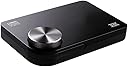


| ASIN | B0044DEDCA |
| Audio Output Mode | Dolby Digital, Stereo, Surround Sound |
| Brand | Creative |
| Built-In Media | Sound Blaster X-Fi Surround 5.1 Pro |
| Compatible Devices | Personal Computer |
| Customer Reviews | 4.3 4.3 out of 5 stars (995) |
| Global Trade Identification Number | 05390660184611 |
| Hardware Connectivity | USB |
| Hardware Platform | Headphones |
| Item Type Name | Sound Blaster X-Fi Surround 5.1 Pro |
| Item Weight | 0.21 Kilograms |
| Manufacturer | Creative |
| Maximum Sample Rate | 48 KHz |
| Mfr Part Number | 70SB109500000 |
| Model Number | 70SB109500000 |
| Platform | Windows 7, Windows 8, Windows Vista Business, Windows Vista Enterprise, Windows Vista Home Basic, Windows Vista Home Premium, Windows Vista Ultimate, Windows XP Home Edition, Windows XP Professional |
| Signal-to-Noise Ratio | 100 dB |
| Surround Sound Channel Configuration | 5.1 |
| UPC | 031112861197 033585325602 763615974936 191106000893 493212760341 666670087736 630934746707 523160909476 999998306204 132018167830 071090098857 782386489760 546511736996 172302806465 054651173699 001910322084 054651184619 045556033355 803982813275 806293524007 731215287244 196221637238 |
| Warranty Description | One Year Limited Hardware |
C**G
configuration and use
major EAX update right here: march 8 , 2014 the x-Fi pro 5.1 supports EAX on windows 8.1 and probably windows 7 too. When I first used it on XP ,..XP does not support Alchemy and I never herd any EAX effects with known EAX programs , on XP. ( Alchemy.exe was never supported on XP ) . I went into the creative folder and saw Alchemy.exe . drag a short cut to the desk top for easy access. Add\verify any EAX programs are on the right side pane in the Alchemy applet. x-Fi supports at least EAX 3.0 and I think possibly 4.0 ,..and maybe even 5.0 . Why ? because the Witcher 1 game only supports 4.0 and in the default alchemy.ini file, the withcer 1 is included in the default list( Alchemy auto detected witcher 1 ). Plus the voice counts are at 129 , and only EAX 5.0 supports 129 voices . So, I guess MB2 or the new MB3 is still usefull,..BUT the x-Fi SB1095 is a USB product . So put in on your note book or desktop PC Windows 8.1 and no need to get MB3 . I only talked about MB2 and MB3 to add\provide EAX 5.0 . But the desktop has only the SB1095 installed and I get all the EAX via the Alchemy.exe applet . And , DDL dolby digital live is there too, for the SP-DIF optic port , provides 4.0 and 5.1 channel audio on the optic port . x-Fi unit version SB1095 retail box dated 2011 CD dated 2010 driver update supports windows 8 ( it also updates w7 too ) *** x-Fi Pro can replace internal x-Fi extreme gamer, minus 7.1 minus EAX *** x-Fi 5.1 Pro has all the I\O features of an internal sound card. *** add MB2 to restore EAX to 5.0 HD( windows 7 ) *** I was skeptical since Creative doesn't advertise it that way, but that's how it is. ***** video editors can pan\edit 5.1 audio , on the notebook ! ***** see MB2 note: below Bass Management: recently found bass management is available in the THX settings: Creative console THX --> Speakers enable it( speaker turns blue ), ignore the slider. Now at the top left, click the "Gear" advanced settings and set the bass management slider to 118 Hz ( I know it works with the analogue jacks, have not tested on the optic out ) XP : games run with 5.1 4.0 2.0 , analogue jacks only. In the creative console, leave the creative console speakers set to 5.1 . Un-sync speaker config check box( do NOT check ). now if needing 4.0 , use windowsXP audio applet to set to 4.0 and the quad will now work. If going back to 5.1 , use the windowsXP applet again. For XP, always keep Creative's speaker sync Un-checked. windows 7 : games run with 5.1 4.0 2.0 analogue or optic, our choice. *** the volume knob on the box only works with analogue setup *** MB2 note windows 7: I no longer have the MB2 feed the x-Fi Pro device( selected devices ) I disable the MB2 device, from playback devices, I also disable MB2 in device manager. the installed EAX gadget and EAX 5.0 HD are still avialable to the x-Fi Pro box. The reason for disabling the MB2, it was interfering with the Direct Sound 5.1 audio editor. four configurations for a notebook to get 5.1 , 4.0 and 2.0 support with the: x-Fi surround 5.1 Pro usb box: 1. pair with the turtle beach Z6A ANALOGUE 8 speaker headphones( windows 7 or XP ) 2. pair with the turtle beach DSS2 box OPTIC( windows 7 only, as XP can only ....do 2.0 here ) 3. pair with a Dolby home theater OPTIC( windows 7 only, as XP can only do 2.0 here ) 4. pair with a Dolby home theater ANALOGUE discrete 5.1 speakers ( windows 7 or XP ) ALL windows 7 configurations may add MB2 to get full EAX 5.0 HD ALL XP configurations, EAX may NOT work . ALL XP configurations, No version of Dolby Digital Live will install onto XP ....for this x-Fi Pro box . ....( amusing because creative has Dolby Digital Live for XP with many different ....internal x-Fi sound cards ) XP: software DVD player that has Dolby built in, can play 5.1 on the optic. windows 7: may not have EAX support either, but Creative's MB2 software ............can add full EAX support. *** my configuration on the windows 7 notebook is: 3 items,.... x-Fi Pro box, MB2, turtle beach DSS2 gives: 1. Dolby Digital Live "DDL"( allows 5.1 4.0 2.0 Dolby audio onto the SPDIF optic out ) 2. 5.1 4.0 positional audio on the SPDIF optic and on the analogue jacks, my choice. 3. full EAX 5.0 HD ( 2.0 3.0 4.0 5.0 with 129 3D channels, all via MB2 ) 4. IR remote control 5. creative update supports windows 8 6. its usb so it's portable 7. the x-Fi box acts as a dongle, so No activation is needed for the "DDL" . And the hauppauge 950 Q usb TV tuner using player 2.4c it's the only release that ever worked right. The TV tuner is on the fastest usb port( shares the IRQ with the SATA harddrive ) The x-Fi Pro is on the next fastest usb port The usb mouse is on the slowest usb port the 2.2 Ghz single core Celeron does pretty good, 4 gig DDR2 800 Mhz mem. intel graphics, regular series 4, NOT the 4000 HD, oh that would have been good. actually the x-Fi Pro sound card is kinda light weight. CD audio 16\44100 at 1,411,200 bits per sec. 1.44 Mbs . Next, studio quality audio is 24\96 at 4,608,000 bits per sec. 4.6 Mbs still should be easy for 2.0 usb Dolby 5.1 audio at 448,000 bits per sec. is even easier. Plays 1920 x 1080 TV crap really nice with this config. Don't need a quad core. tweak tip: I did backup of windows 7, then reinstalled as a bare min. install, ............that was an option to do so. It did help the machine run better. This was the best windows 7 tweak for the pre-installed machine. Out of usb ports: TV tuner, sound card, mouse, DSS2 box ...................that's 4 devices and the machine only has 3 ports. ...................DSS2 box only needs USB power, powered via external USB . *** final comments: 1. Full set of output options. Analogue 5.1 jacks( No Dolby ), ......optic output( Dolby ) , headphone output( No Dolby ), line in , mic in 2. IR remote control( with battery ) 3. external volume\mute knob( only works with analague configuration ) 4. No power button( speakers may pop during re-boot, power up\down ) 5. Uses 400 ma on the usb port, usb ports max at 500 ma 6. Plays and records up to 24 bits per sample at 96,000 samples per second . 7. works good for games , movies , music. 8. Allows video editors( on a notebook ) to pan\edit 5.1 audio star rates 5 max: 4 stars for XP features , No reasonable working EAX , No MB2, No Dolby Digital Live 4.5 stars for windows 7 features , MB2 may be needed to get good EAX 5 stars for Creative update , software download supports windows 8 EAX : programs detect the 64 3D channels, but it never works on XP. Playing music, the EAX presets sometimes work, most the time not. That's my experience with the EAX on XP. For windows 7, MB2 was already installed, and the x-Fi Pro box has good working EAX . The x-Fi 5.1 Pro box is the total usb sound card for a notebook, it totally trumps the Recon3D. I would have gone for the Recon3D if it had the same I\O and features of the x-Fi Pro. I also passed on the x-Fi HD usb box . Creative needs to redo the x-Fi 5.1 Pro with the new Recon3D engine to make it the new Hot item.
A**E
Appropriate Design
In this quick write-up I will outline different aspects of the product. After unpacking, this worked immediately upon connecting to my laptop (Windows 7 x64) - no compatibility issues. After loading up the software (took a couple of minutes), the volume control becomes operational, the blue LED on the unit will flash when you have muted the volume, the remote will work (line-of-sight to the sensor), and all software control can be accessed through the control panel or entertainment console. From the entertainment console you can: - Control the levels of the 5.1 analog outputs (although I don't use these in practice) to setup your speaker balance, and also set subwoofer crossover to any frequency from 10hz to 1000hz in the TruStudio menu - Set options between 2 channels or 5 channels of audio (plus sub) and test that they are operational - Control EAX effects, which are basically reverb patterns, nothing I plan to use - Control TruStudio Pro, which can be useful in some situations (I turn the surround option on very subtly when using headphones on a multi-channel source), including noisy environments (smart volume, dialog plus) - Use the graphic equalizer to obtain an accurate response through the passband of your speakers/headphones; I personally use this to compensate for slight roll-off of my headphones in the bass, and their resonance at 1khz and 8khz - Control the mixer, including microphone/line-in, "What U Hear," and pass-through of the line/mic inputs to your speakers for input monitoring - Activate Dolby Digital Live, which will mix all audio into a 5.1 stream for playback over the optical output; note that if you have a source using Dolby Digital or DTS, you will want to set the sound option in your software to bitstream, meaning this is bypassed to avoid additional processing by the sound card. Dolby Digital Live is intended for everyday sound and use, rather than actual Dolby or DTS sources What U Hear allows you to record whatever you're playing without actually patching the output to the input with a cable. I find this useful if I think I hear clipping - simply record the sound and verify that it's clipping. There is a myriad of other uses for this, as well. For DTS-HD or Dolby-HD sources, you will need HDMI, which this sound card will not allow due to bandwidth limits. My laptop has an HDMI output which I use when I want to bitstream these codecs for movies. Pros: This card is much quieter than the internal Realtek solution used on my laptop, one reason I bought it. The noise floor on this card is at least 50dB lower. The output gain on this card is higher than the internal, meaning I don't have to have at 100% for DVD and Blu-ray and STILL not be loud enough. Instead, I can run it around 45% volume and any louder would be uncomfortable with DVD and Blu-Ray. Accurate soundfield placement in headphones - I tested a 5.1 source with discrete channels and can confirm that this card's processing will do a good job with this if you have it turned on (you can deactivate all processing if you wish). The output uses a limiter so that you won't experience clipping, meaning much less distortion if you push things too hard on the EQ. Other: This card claims 24/96 capability. I did tests and found that for both playback/recording, the card rolls off to -3dB at 48khz, on-par with specs. It is a similar case, rolling off slightly in the infrasonics, -3dB at 3hz. As for the 24-bit claim, the resolution is 24-bit, BUT signal/noise ratio is slightly over 100dB, effectively limiting the dynamic range to the equivalent of 17-bit. Due to dither, the psychoacoustic dynamic range will approach 19 bits. This is NOT an issue for most people. You still obtain the benefits of 24-bit, including a reduction in quantization noise, just not through the full dynamic range. In other words, the card will not be the limiting factor in most systems. I intend to use this card to record. I was a bit wary of buying a card directed towards normal consumers, but after testing it looks like it will be a non-issue. I'll have to do further testing to confirm this. Cons: At the price, nothing more can really be expected of this card. It would be great if this functionality were paired with HDMI, though. There might be video cards out with such a connection. My laptop has HDMI, but it is noisy when using it for internally mixed PCM audio. There is one issue that I've had with it, and that is an odd polary distortion when using DirectSound to record. It also has no balanced connections, which I would not expect for the price, anyway... I would recommend this to any consumer that wants an upgrade in functionality and less noise than integrated sound. Programs are available for sound processing, but you will still be limited by the hardware.
D**A
Una Muy buena compra para los que desean tener mejor calidad de sonido en su pc y tener soporte al 5.1 por la salida de audio óptico y también se puede usar en PS4 para mejorar la calidad de audio los uso con un headset hyperx alpha
D**Y
Works great in Windows 10, just need to download the latest drivers from Creative's site. My PC only has stereo sound through a 3.5mm speaker port and 5.1 through an optical toslink port. Not really a problem when it came to movies as I could use that optical out and pass-through Dolby Digital or DTS using Kodi. For games though, unless the game itself supports Dolby Digital or DTS (I'm not aware of any games) I was stuck with stereo sound. This sound card solves that issue thanks to the Dolby Digital Live feature or even just the 5.1 analog outputs. I'm still not 100% sure which option I want to go with as they both have their quirks and pros/cons. Using Dolby Digital Live + Works perfectly with games, sends a nice 5.1 Dolby signal to my stereo + Works well with Kodi. Set the output to 5.1 and don't use pass-through and everything will be converted to 5.1 Dolby + Just 1 wire for games and movies - Since it's not using pass-through everything is Dolby, which means DTS will be converted to Dolby as well Using 5.1 Analog Out + Still works great for games in my setup as my receiver has an analog 6ch input mode + With Dolby Digital Live disabled, pass-through works in Kodi again for un-converted Dolby and DTS - So many wires. Front Left/Right, Back Left/Right/, Sub/Center, and Optical - Extra work for changing sources and telling Kodi to pass-through etc, not really a huge deal though, just not as non-tech friendly Overall this device works greats and sounds fantastic. Even using headphones sounds better than when I used the integrated sound. As bonus, this thing comes with a remote that works in Kodi. It's a little bit limited (no stop button but you can stop by hitting enter and then selecting stop) but it works well and I was able to program the remote into my Logitech Harmony remote. The device is actually in there but it's finicky, so what I ended up doing was adding an original Xbox DVD Remote as the device and then I used the IR learning mode to program the buttons that this remote has. I also had go into the troubleshooting and set the number of signals sent from 3 to 2 as the it would often register an input twice. Then I just put the input delays down to 100ms and it's all set and working great. Not very plug n' play as far as remotes go but in the end I got it working well. If you only need the analog out or the optical out using pass-through there are much cheaper options, but to me this device seems like a perfect solution for anyone who games and watches movies on their PC and uses an older sound system that doesn't have HDMI or a 6ch input.
G**V
BUT REMOTE IS NOT INCLUDED THIS IS CHEAP PRODUCT FROM CREATIVE 5.1 AUDIO PROCESSING IS VERY GOOD AGAIN REMOTE IS NOT INCLUDED
J**S
J'ai acheté cette carte son externe après plusieurs tentatives bancales de connexion de mon NUC à une barre de son Yamaha (YAS-306) possédant une entrée audio de type SPDIF mais sans HDMI. J'ai, dans un premier temps, utilisé un extracteur audio qui récupérait le son à partir de la sortie HDMI du NUC et le convertissait en SPDIF. Mais dès que je souhaitais passer en 5.1, malgré toutes les tentatives de reconfiguration audio de Kodi ou de l'extracteur tantôt cela semblait fonctionner, tantôt le son était assourdi et la qualité audio vraiment décevante. Mon objectif était de bénéficier d'un signal audio multicanal (5.1) stable et de bonne qualité (type DOLBY DIGITAL ou DTS). Avec cette carte son, l'installation est très simple sur Windows 7, elle se fait avec la carte son connectée au port USB du NUC et avec un pilote à jour trouvé sur le site de Creative (et disponible aussi sur le CD livré). J'ai ensuite modifié la configuration de Kodi en sélectionnant la sortie audio correspondant à la carte son Creative Sound Blaster. Le résultat est là : une installation vraiment simple, tout fonctionne de manière stable et enfin la barre de son fonctionne à merveille. ENFIN DU SON sur ma vieille Sony Full HD sans sortie audio numérique. Pour le réglage du volume sonore, la barre de son a le gros avantage de pouvoir récupérer les signaux de la télécommande du téléviseur (petite configuration à faire). Donc le réglage sonore se fait très simplement, pas besoin d'utiliser la télécommande fournie avec la carte son, celle de la télé suffit. Très satisfait de mon achat.
L**S
Excelente calidad de sonido y muy fácil de usar, ahora puedo usar unas bocinas 5.1 que estaba por guardar dado que mi laptop solo tiene salida de audífonos, ahora puedo usar las bocinas con el puerto USB.
ترست بايلوت
منذ شهر
منذ شهر