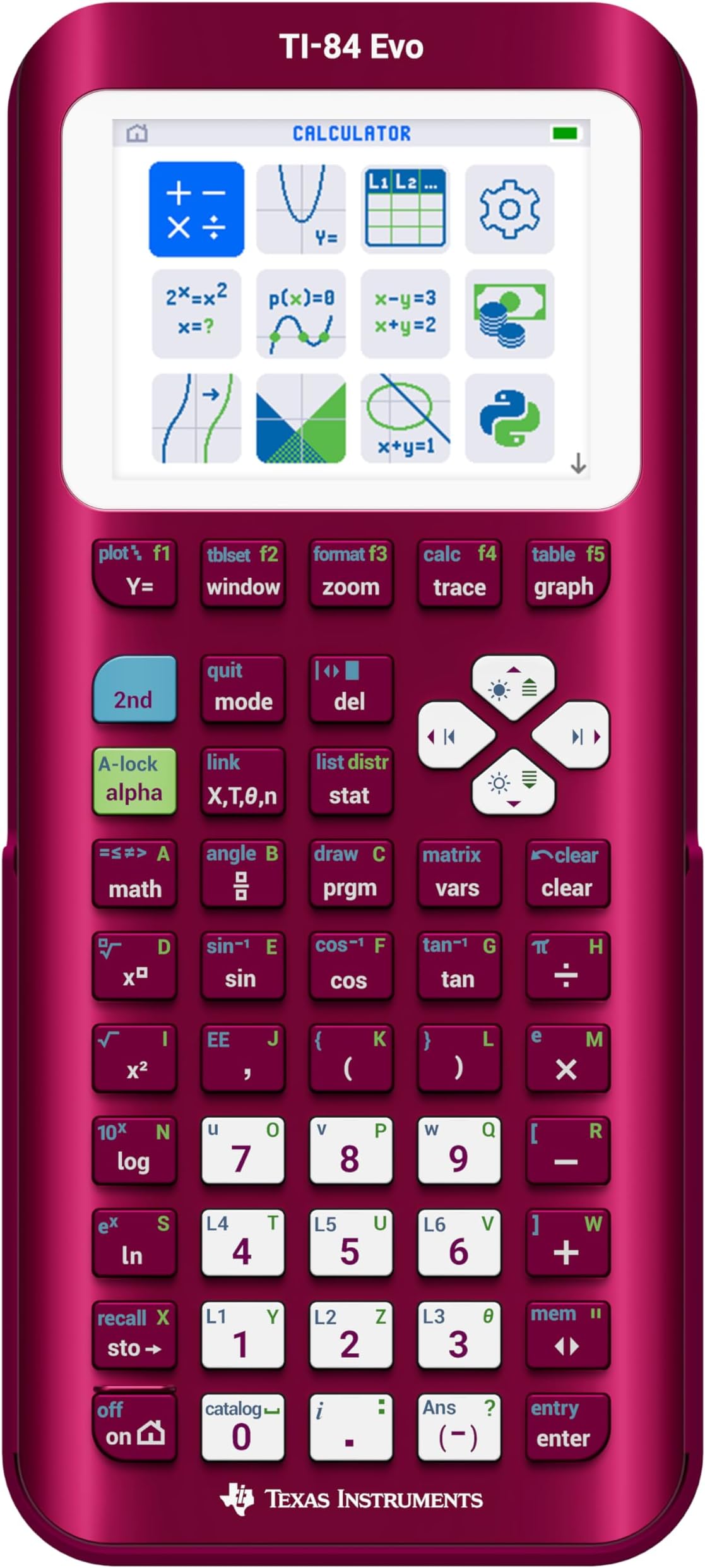

TI-84 Evo Graphing Calculator Texas Instruments, Raspberry – USB-C Charging, Python Programming, Faster Performance and Bigger Graphs Than TI-84 Plus CE
Product ID: 804713752
Buy anything from 5,000+ international stores. One checkout price. No surprise fees. Join 2M+ shoppers on Desertcart.
Desertcart purchases this item on your behalf and handles shipping, customs, and support to Israel.
The TI-84 Evo graphing calculator is the newest generation of the TI-84 series — designed to help students work smarter and build confidence in math and science. Durable enough to last from middle school through college, it’s built for everyday classroom use. • Faster performance with a 3x faster processor for quicker, clearer graphing. • Bigger, clearer visuals with 50% more graphing space make it easier to see patterns and relationships at a glance. • An intuitive, icon-based home screen that puts commonly used math tools front and center. • Simplified menus and buttons reduce visual clutter and make navigation easy to learn. • Universal USB-C charging with a rechargeable battery that’s built to last from class to test day. • Built-in Python programming introduces basic coding skills that connect to real-world applications. • Built for math at every level — algebra, geometry, calculus, statistics, and more. • Approved for major standardized exams, including ACT®, SAT®, PSAT/NMSQT®, IB® Diploma Programme, and AP® course exams. The TI-84 Evo is a high-performance graphing calculator designed for everyday learning. The all-new, reimagined interface means less time searching for tools and more time solving problems — so math just makes sense. A 4-year subscription to the TI-84 Evo online calculator is included with purchase. Review: Not a huge upgrade but honestly, pretty good. - Is it a major change? No. But the little changes they made ,to me make sense. The buttons feel so much better, the screen text and icons make it feel so much more modern and although the graphs are larger now, the text (font) being smaller actually fits more too making the screen just feel right. Also I love the USB C port. Much more convenient. It is a little pricey yes but as someone that uses their calculator on a day to day for work (engineering), it isn't a big deal. I also love the black (dark) case/cover. If you're wondering if you need to upgrade from a TI-84 Plus CE (including the Python version), the answer is more than likely no. But if you are buying your first graphing calculator and you have the money to buy this one, it is a solid choice, it doesn't feel like it will be outdated anytime soon. One thing to note, and maybe its just me. As of today 05/03/2026, the TI Connect CE software does not support the new Evo. The Evo has its own online based software that lets you update and upload files to the calculator and vise versa. You also get a subscription to their online TI-84 Evo (essentially an emulator). It okay. I originally liked the TI connect Ce software because you can write programs (TI Basic code) on your computer and then transfer it over to the calculator but this doesn't work with the new Evo, at least for now. The online tool and emulator also don't let you do this so hopefully it is a change that comes soon but time will tell. Until then if you still use the Basic TI code, you'll have to do it manually on the calculator. Tedious but doable for simple programs. Other than that. Great purchase. I'd definitely recommend. Review: Overpriced but nice and modern - Cool calculator after their long streak without releasing a new 84 series calculator. A bit over priced but the colors and quality are good and precise. The usb c charger is good for staying modern with the universal charging and overall it's a good calculator but can't wait for better software updates. a few minor mold defects on my product but its super small and probably something that will get fixed. overall the calculator looks good and has a lot of similar characteristics to the 84 plus ce. some of the buttons got moved around or changed on this calculator and it messes with muscle memory on the key presses. the "APPS" button is just gone sadly and replaced with a useless "function / function" button..... but {math}, {enter} does the same thing.. or just using parenthesis right. i assume the change was made for lower level understandings and comprehensions on division. overall though the design looks sleek and modern much like its predecessors. might use it for my AP physics and Calc BC tests in a few days. really just got the calculator so me and my friends could have first look at a new calc and so we could make jokes about "dropping evo calc at the bridge" (clash royale reference). but so far (1 day after launch is when im reviewing it. overnight delivery coming in clutch lol) its a cool calculator. would rate like 8/10 overall. just super pricey for what it is and much slower than a ti-nspire for the same value or cheaper. the functions are easy and nice to use but some buttons seem unnecessary. cant wait to see further development and updates to it and the modding community for it.


| ASIN | B0G8S8VR28 |
| Best Sellers Rank | #3,911 in Office Products ( See Top 100 in Office Products ) #3 in Graphing Office Calculators |
| Brand | Texas Instruments |
| Calculator Type | Graphing |
| Color | Raspberry |
| Customer Reviews | 4.4 out of 5 stars 17 Reviews |
| Display Type | LCD |
| Item Dimensions L x W | 7.57"L x 3.4"W |
| Item Weight | 0.45 Pounds |
| Manufacturer | Texas Instruments |
| Mfr Part Number | 84EVO/FC/1L1/A8 |
| Model Name | TI-84 Evo, Raspberry |
| Model Number | 84EVO/FC/1L1/A8 |
| Power Source | Battery Powered |
| Screen Size | 2.8 Inches |
| UPC | 033317210046 |
| Unit Count | 1.0 Count |
| Warranty Description | 1 year limited warranty, 1 year manufacturer, education.ti.com/warranty |
J**E
Not a huge upgrade but honestly, pretty good.
Is it a major change? No. But the little changes they made ,to me make sense. The buttons feel so much better, the screen text and icons make it feel so much more modern and although the graphs are larger now, the text (font) being smaller actually fits more too making the screen just feel right. Also I love the USB C port. Much more convenient. It is a little pricey yes but as someone that uses their calculator on a day to day for work (engineering), it isn't a big deal. I also love the black (dark) case/cover. If you're wondering if you need to upgrade from a TI-84 Plus CE (including the Python version), the answer is more than likely no. But if you are buying your first graphing calculator and you have the money to buy this one, it is a solid choice, it doesn't feel like it will be outdated anytime soon. One thing to note, and maybe its just me. As of today 05/03/2026, the TI Connect CE software does not support the new Evo. The Evo has its own online based software that lets you update and upload files to the calculator and vise versa. You also get a subscription to their online TI-84 Evo (essentially an emulator). It okay. I originally liked the TI connect Ce software because you can write programs (TI Basic code) on your computer and then transfer it over to the calculator but this doesn't work with the new Evo, at least for now. The online tool and emulator also don't let you do this so hopefully it is a change that comes soon but time will tell. Until then if you still use the Basic TI code, you'll have to do it manually on the calculator. Tedious but doable for simple programs. Other than that. Great purchase. I'd definitely recommend.
R**R
Overpriced but nice and modern
Cool calculator after their long streak without releasing a new 84 series calculator. A bit over priced but the colors and quality are good and precise. The usb c charger is good for staying modern with the universal charging and overall it's a good calculator but can't wait for better software updates. a few minor mold defects on my product but its super small and probably something that will get fixed. overall the calculator looks good and has a lot of similar characteristics to the 84 plus ce. some of the buttons got moved around or changed on this calculator and it messes with muscle memory on the key presses. the "APPS" button is just gone sadly and replaced with a useless "function / function" button..... but {math}, {enter} does the same thing.. or just using parenthesis right. i assume the change was made for lower level understandings and comprehensions on division. overall though the design looks sleek and modern much like its predecessors. might use it for my AP physics and Calc BC tests in a few days. really just got the calculator so me and my friends could have first look at a new calc and so we could make jokes about "dropping evo calc at the bridge" (clash royale reference). but so far (1 day after launch is when im reviewing it. overnight delivery coming in clutch lol) its a cool calculator. would rate like 8/10 overall. just super pricey for what it is and much slower than a ti-nspire for the same value or cheaper. the functions are easy and nice to use but some buttons seem unnecessary. cant wait to see further development and updates to it and the modding community for it.
N**E
Students Just Love to Do Math
I received my EVO about a week ago and I am actively using it to study Calculus. As an certified math teacher, I already believed the best overall calculator for math to be the TI-84. TI-Nspire is great for those seeking a degree in Physics or Engineering. My gorgeous lavender device is way faster at graphing and it has some really good modifications to the keys. Go online and see the new features, but if you are seeking a new calculator for 7th through 12th grade math or college courses (get a graphing calculator for homework even if the college refuses to allow one in class-it is a vital learning tool!), then purchase the Evo in your favorite color.
W**8
Get the 84+CE when it goes on sale.
I’m the special kind of person who looks forward to a Texas Instruments calculator launch. I have an advance degree mathematics education, am certified in my state to teach math, and use these products 8 hours straight on a 6-days-a-week basis. These are my daily workhorses…You get the idea. This calculator doesn’t feel like an upgrade from the TI-84+CE. It has a slower startup time, the same screen size, and it can’t even simplify radicals like the TI-30xs. My recommendation to families interested in buying a graphing calculator is to buy the TI 84+CE when it goes on sale.
C**.
Gorgeous, modern and easy to use
I just snagged a TI‑84 Evo for my son and we love it! The mint color is gorgeous and feels fresh, and the matte finish feels so nice to the touch and doesn’t get greasy with fingerprints. The home screen is full of big, colorful icons (Graph, Stats, Geometry, etc.). It’s way easier for a kid to figure out where to go, no endless text menus. The icon UI means my son started using it right away; the old button shortcuts are still there for when he gets more advanced. Graphs look smooth, and the new “slice” tool lets you play with curves on the fly. The TI‑84 Evo looks cool, feels solid, and is easy for a kid to pick up.
N**E
Not 3x as fast where it counts, actually slower than CE.
Want faster graphing? Go buy a TI-84 Plus CE Python instead. TI has intentionally put a speed limit on graphing and other TI-BASIC commands to make it just as slow as the original TI-84 Plus CE. Until this is removed, I see no reason for people to not just buy the CE Python for cheaper. You also lose the CE and 84+’s clock functionality, which is a bummer, though it wasn’t super useful in the first place. Come on TI, I know you can do better than this. That being said, it isn’t a bad piece of hardware The build quality is nice. the screen is still TN just like the CE but the screen tearing is no longer an issue, and the voltage issues resulting in checkerboarding on the more recent CEs seems to have been fixed. The buttons feel nice, and the OS is legitimately faster to navigate when TI isn’t artificially limiting the speed. TI-BASIC has been reimplemented from the ground up for the new ARM processor, and outside of needing a new file format (.8xp2 vs .8xp) and some of the quirks being taken out, it’s largely the same and feels pretty nice to work with outside of the artificial speed limit on graphing commands. Python is a bit better on here than the CE Python, certainly a little bit faster, but still not something I would actually want to use. You can still delete the Python app if you just want the extra space. 5.8/10 - Decent calculator, horrible design decisions on the OS. Why does it have a speed limit when it’s 3x faster??? So many issues could be solved with just a firmware update. Also, 160$ is way too much for this. Wait for it to drop to like 120$ or something if you can, or again, just buy a CE.
Q**U
It's different...
Expected a simple refresh of the TI-84 Plus CE. Instead, TI decided to go full cybersecurity nerd and rebuild the whole thing from the ground up. Graphing is noticeably faster, the menus look cleaner, and the new home screen is actually pretty nice. That part’s cool. What they didn’t mention anywhere in the listing is that they completely reworked the internals: multi-certificate boot system, hardware TRNG for “security”, and a ridiculously sandboxed Python runtime. None of this was listed. Not even a hint. So yeah, it’s faster. But my calculator now has better security than half the apps on my phone. Not sure who asked for enterprise-grade protection on a graphing calculator, but here we are. Would still recommend it, I guess. P.S. This calculator could pass an exam security audit and firmware check better than my laptop.
P**R
Awesome calculator
I upgraded from the TI-84 plus and I really enjoy using this calculator. It is familiar to use and is an easy switch from the older one. The higher processing power for graphs, improved button placement and USB C charging make it an awesome choice.
Trustpilot
4 days ago
1 month ago