We remain fully operational. Our teams are working around the clock to ensure your deliveries continue safely.

قم بتنزيل التطبيق


معلومات عنا
حقوق الطبع والنشر © 2024 Desertcart Holdings Limited
قم بتنزيل التطبيق





🚀 Elevate your home network to WiFi 7 — speed, security, and coverage that keeps you ahead!
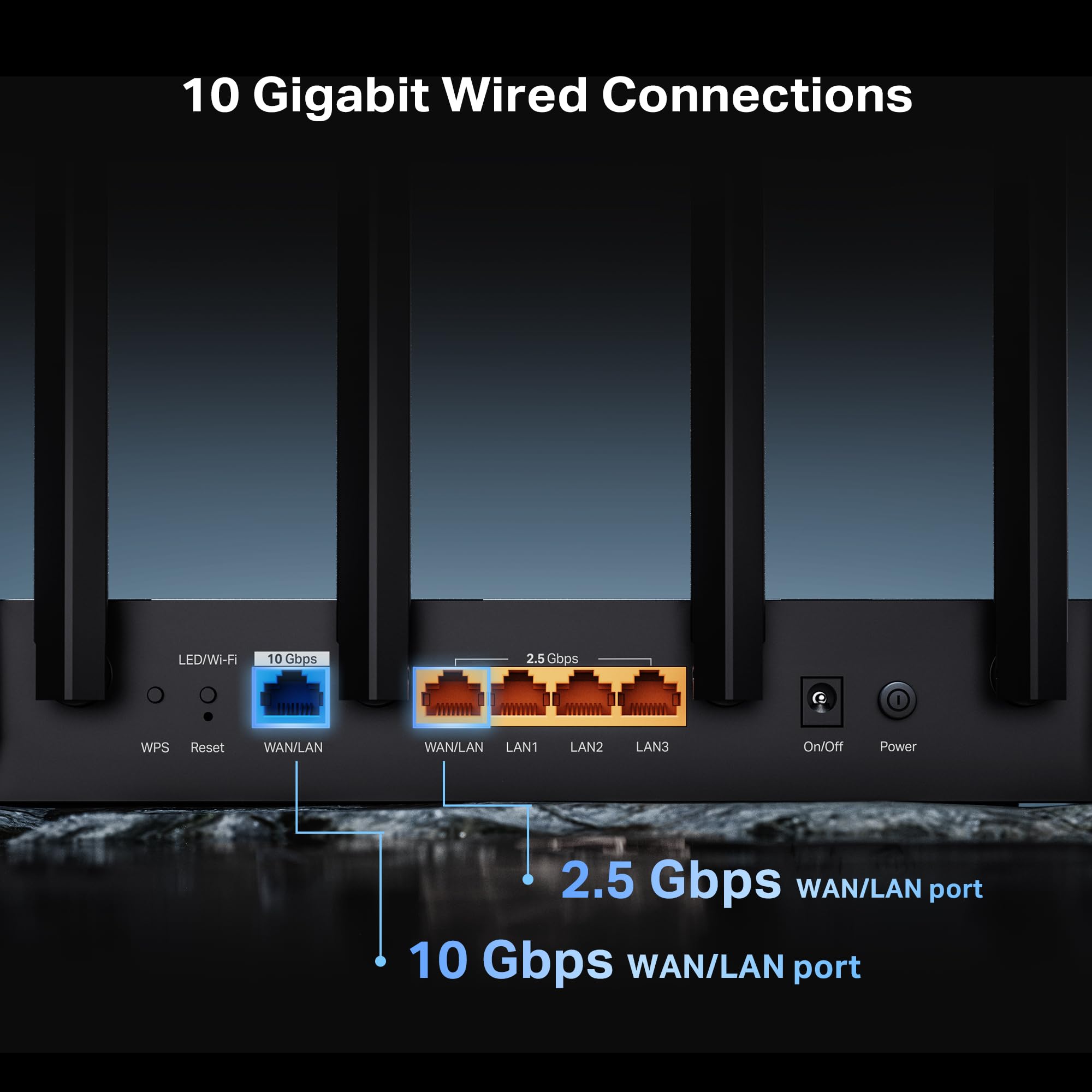
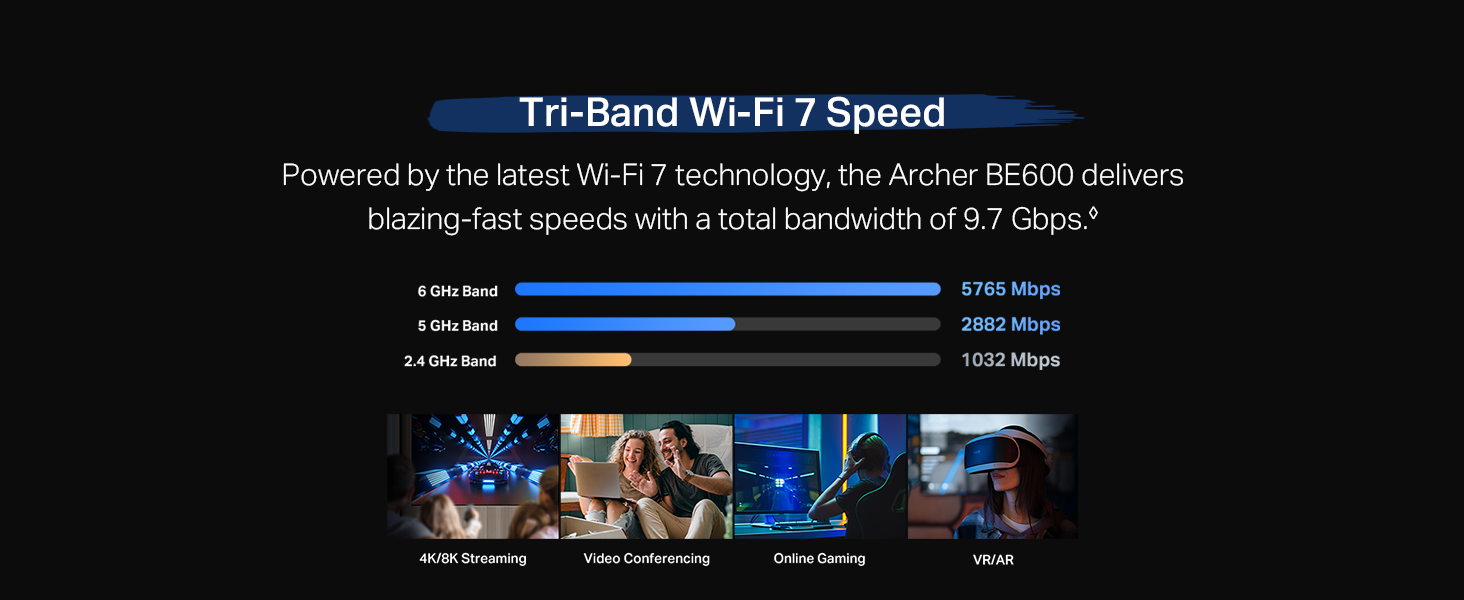
The TP-Link Archer BE600 is a cutting-edge Tri-Band WiFi 7 router delivering up to 9.7 Gbps total bandwidth across 6 GHz, 5 GHz, and 2.4 GHz bands. Designed for large homes, it covers up to 2,600 sq. ft. and supports 120 devices simultaneously. Equipped with a 10 Gbps WAN/LAN port and multiple 2.5 Gbps ports, it ensures ultra-fast wired and wireless connectivity. Advanced security features include TP-Link HomeShield, VPN client/server support, and WPA3 encryption. Easy to set up and manage via the Tether app, it’s ideal for professionals demanding seamless 4K/8K streaming, gaming, and smart home integration.



| ASIN | B0F76PQ2T8 |
| Antenna Location | Gaming, Home |
| Antenna Type | Internal |
| Best Sellers Rank | 161,561 in Computers & Accessories ( See Top 100 in Computers & Accessories ) 1,207 in Routers |
| Box Contents | 1 x Power Adapter, 1 x Quick Installation Guide, 1 x RJ45 Ethernet Cable, 1 x Wi-Fi 7 Router Archer BE600 |
| Brand Name | TP-Link |
| Colour | Black |
| Compatible Devices | Gaming Console, Personal Computer, Smart Television, Smartphone, Tablet |
| Connectivity Protocol | Wi-Fi, Ethernet, USB |
| Connectivity Range | 2600 Square Feet |
| Connectivity Technology | Ethernet, USB, Wi-Fi |
| Control Method | App |
| Controller Type | App Control |
| Coverage | 2600sqft |
| Customer Reviews | 4.2 4.2 out of 5 stars (253) |
| Data Transfer Rate | 9.7 Gigabits Per Second |
| Frequency | 6 GHz |
| Frequency Band Class | Tri-Band |
| Has Internet Connectivity | Yes |
| Has Security Updates | Yes |
| Is Modem Compatible | Yes |
| Item Weight | 1.7 Pounds |
| LAN Port Bandwidth | 10G/2.5G |
| Manufacturer | TP-Link |
| Manufacturer Part Number | Archer BE600 |
| Maximum Upstream Data Transfer Rate | 10000 Megabits Per Second |
| Model Name | Archer BE600 |
| Model Number | Archer BE600 |
| Number of Antennas | 6 |
| Number of Ports | 5 |
| Operating System | Windows |
| Other Special Features of the Product | Access Point Mode, Alexa Compatible, Parental Control, Private IOT Network, Support New 320Mhz channel in the 6Ghz |
| Router Firewall Security Level | True |
| Router Network Type | tri_band |
| Security Protocol | WPA3 |
| UPC | 840460603188 |
| Wi-Fi Generation | Wi-Fi 7 |
| Wireless Compability | 802.11.be, 802.11ac, 802.11ax, 802.11g, 802.11n |
T**S
Great wifi7 router at a great price - note US plug
Good signal with optional IoT network, well made, good value. Easy to use. Integrates with TPlink app which works well. Highly recommended for WiFi 7 on a budget. Note comes with US plug, so needs a UK plug separately
G**T
Yay. I love my new router. I have a lot of smarthome devices, and I host a home web/game server for work. I was very afraid that my port forwarding/dynamic DNS and smarthome would be a pain to migrate to a new router. I was wrong. I used the same network name and password as my old router, and all of my devices reconnected fine (except one chinese security camera which i fixed after). The range is as decent as my old Netgear Nighthawk R7000. The lower frequencies (2.4ghz) have higher range and are better for that. But for processing power of a router, this is it baby. This thing increased my network speed by ~100mbps down and also decreased my latency, pretty impressive. This thing will easily be able to handle all of my smart home devices, server needs and gaming/streaming needs. I think it was a worthy upgrade from my 13yr old router. Quick setup tip: make sure to power down your modem and router first, because your modem is expecting the previous routers MAC address, so you might have to call your ISP and have them send a reboot signal from their end to get your modem to accept the new router MAC address. Other than that, setup was a breeze. Dynamic DNS works well, port forwarding was easy, and there are SO many features I haven't even looked into yet. I also have a TP-LINK network switch, and the router and switch are playing nicely together. All and all, I had netgear routers for like 20 years and they were great, i'm pleased to say that TP-LINK is also great, time will tell though.
D**B
This router brought the fiber speeds back into this house that we've been missing. The range is excellent however I did buy a TP range extender to have another device share the bandwidth load and to keep home devices operating to their full potentials. Speed and ping is low and when it's not it's typically the isp bottling up and nothing a good restart doesn't immediately fix. The TP app is very functional and easy to navigate. I actually subscribed to thier anti-virus and canceled my more expensive one that didn't didn't cover as much.. Their security covers your entire network the other just the device.
N**F
So far after a couple weeks of use it has been fantastic. The tp link app is easy to set up and makes configuring the router a breeze! For more customization, go to the router configuration page on your browser and tweak some extra settings. Having the ability to separate devices, isolate them, and keep them from accessing other network devices is an amazing feature for certain smart devices that you dont want to communicate to other devices or the internet. You also have the ability to hide your networks and create guest networks. Utilize this! Overall coming from Xfinity gateways, this is a HUGE step up in home network performance. Tip: You can connect an external drive to the usb port on the router and have an easy setup network storage device!
M**M
Strange I am writing a review about a router, but here we are. At my house I have Verizon and used an old Netgear Nighthawk as an AP to extend the network. Used this TP-LINK to replace that Nighthawk. With the old Netgear, I had to go through a series of work to set the device in "bridge mode". With this new device? TP-LINK did that work for me automatically. Saved me a lot of time and was able to get this replaced very quickly. Unreal. And I now have a modern 6G SSID too. Amazing. Well-done.
F**P
I got this a few days ago. The unit I got works very well. I paid $400 for a Netgear nighthawk whatever it is but the wifi signal was very weak. my house is 2000 sf and the problem area was the tv all the way on the first floor as far away from the router as you can get. now the signal in the worst part of the house bounces between good and excellent. setting it up was pretty easy. i used a desktop browser and used the default settings. i think my only tip is to power off the box that carries the signal to the house, plug everything in and then fire it up.
ترست بايلوت
منذ 4 أيام
منذ شهرين