Buy anything from 5,000+ international stores. One checkout price. No surprise fees. Join 2M+ shoppers on Desertcart.
Desertcart purchases this item on your behalf and handles shipping, customs, and support to Israel.
🚀 Elevate your security game with 4K clarity and smart alerts—never miss a moment!
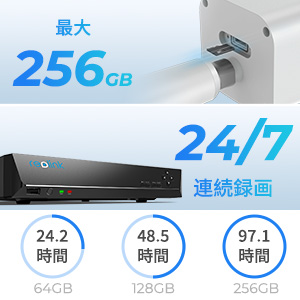
The Reolink RLC-810A is a rugged outdoor PoE security camera delivering stunning 4K (8MP) resolution with advanced AI detection for humans, vehicles, and animals. Featuring Power over Ethernet for streamlined setup, it supports flexible recording via microSD, NVR, or FTP. Night vision up to 30 meters and time-lapse functionality make it ideal for comprehensive 24/7 surveillance. Compatible with iOS, Android, Windows, and Mac, it ensures remote monitoring with crisp video and reliable alerts.


| ASIN | B07K74GWX5 |
| Amazon 売れ筋ランキング | 家電&カメラ - 11,039位 ( 家電&カメラの売れ筋ランキングを見る ) スタンダード型防犯カメラ - 49位 |
| UPC | 725423889727 |
| light_source_type | 赤外線 |
| おすすめ度 | 5つ星のうち4.4 1,374 レビュー |
| カラー | ホワイト |
| コントローラーの種類 | PC:Windows、Mac OS;スマートフォン:iOS、Android |
| ズーム倍率 (デジタル含む) | 6 |
| チャンネル数 | 1 |
| ナイトビジョン | 暗視 |
| ナイトビジョン範囲 | 30 メートル |
| ビデオキャプチャ形式 | MP4 |
| フォーカス機能 | マニュアルフォーカス |
| フォームファクター | バレット |
| フレームレート | 25 fps, 15 fps, 10 fps, 2 fps |
| ブランド | REOLINK |
| メーカー名 | Reolink Digital |
| モデル名 | RLC-810A |
| モータータイプ | デジタルズーム |
| ユニット数 | 1.00 個 |
| レンズマウントの種類 | 天井/壁掛け |
| ワット数 | 12 W |
| 互換デバイス | スマートフォン |
| 付属品総数 | 1 |
| 保証の説明 | 2年保証 |
| 写真センサーテクノロジー | CMOS |
| 写真センサー解像度 | 8 MP |
| 動画画素数 | 4k |
| 取り付けのタイプ | 天井/壁掛け |
| 同梱商品 | RLC-810Aカメラ、1Mネットワークケーブル、防水蓋、説明書、取付用具、防犯標識、ネジ |
| 商品の推奨用途 | 屋外セキュリティ |
| 商品の追加説明1 | モーションセンサー |
| 商品の重量 | 488 グラム |
| 商品本体サイズ | 10.8 x 12.2 x 19.6 cm |
| 商品種別 | 4K解像度屋外PoE防犯カメラ |
| 型番 | RLC-810A |
| 屋内/屋外使用 | 屋外用 |
| 屋内屋外での使用 | 屋外用 |
| 形状 | スタンダード型 |
| 必要電池数 | いいえ |
| 接続プロトコル | HTTPS, SSL, TCP/IP, UDP, HTTP, IPv4, UPnP, RTSP, RTMP, SMTP, NTP, DHCP, DNS, DDNS, FTP, P2P |
| 接続技術 | 有線 |
| 有効動画解像度 | 8 MP |
| 特徴 | モーションセンサー |
| 特殊な用途 | 屋外 |
| 管理方法 | 遠隔 |
| 警告タイプ | モーションのみ |
| 通信・接続インターフェース | 有線 |
| 部屋タイプ | 教室 |
| 防水性 | IP67 |
| 電圧 | 12 ボルト (DC) |
| 電源のタイプ | 電源コード式 |
| 静止画の有効解像度 | 8 MP |
漁**師
コスパ最高
画像がきれい 夜間の赤外線ライト付きが有り難い。
K**1
十分満足しております
カメラ本体も設置も設定も全て満足しております。 私の場合は、マイクロSDカードの録画で使用をしているのですが、高耐久のマイクロSDカードの価格が、カメラ本体の価格と同じくらいでした。マイクロSDカードは高くなりましたね。カードは、AIとの相談を重ねながらキオクシアの緑色の高耐久の256GBにしました。カメラの動体検知も完璧です。耐久性は、先日、購入して設置をしたばかりなので不明です。動画視聴ソフトは少しだけ改善して頂きたい点はありますが、甘受できる範囲内です。
麗**美
PCや他社のNVRに接続するには
恐らく意図的なのかもしれないが、PCや他社のNVRには接続できないようになっている。接続するためにはセキュリティを理由にブロックされているポート80や8080を手動で開放しなければならない。そして開放する為にはPCやスマホにReolink のアプリのインストールを要する。くどいがReolink のアプリをインストールしポートの開放を行うことによりReolink の縛りから開放され一般的なONVIFのネットワークカメラとして動作する。どこの4Kネットワークカメラも一緒かもしれないが確かに画面サイズは4Kサイズであるし映像も綺麗だが画角が広がり広角になっただけで解像度が高くなったわけではない、故に従来のカメラで識別できなかった小さく細かい対象物がこのカメラを使用し認識できるようになるわけではない。
P**8
屋内で利用
ルーター直下のpoeスイッチに接続して運用しています。 録画はモーション検知のみで検知はカメラ側で処理しています。 録画はRLN8-410とsynology surveillance stationで同時録画しています。 設定 解像度2560x1440 25fps 6144kbps synologyはrtspで安定して録画できています 異常過熱や異音等もありません。 sdカードを入れればカメラだけで完結します アプリも見やすくとてもよい 高性能で値段も安くおすすめです
熊**ん
い
防犯強化の為購入 画像、扱い、初心者もわかりやすくお手頃
A**様
今までのカメラより安くて高性能
今までのカメラが壊れたため、同じ様なものを探していました。 安くて性能が良すぎるのか今までサーバーとして使用していたパソコンでの録画がギリギリの状態のようです。 安い性能の良いサーバーがないか探してる状況です。
と**り
何が届くのか不明
良い点 4Kで映像がきれい POEで設置が簡単 悪い点 専用アプリが必要。ONVIF対応ですが専用アプリから有効にする必要がある 本製品は3つの焦点距離ラインナップがあり、どの製品が送られてくるか分からない。私に届いたのは6.0mmタイプですごい望遠仕様でした。防犯カメラとしては最悪です。35mm換算で80mm相当ぐらいです
K**A
性能機能より大切なのは信頼性
機能的には充実していて気に入ったのですが、肝心要の信頼性がいただけません。以前に使っていたHIKVISION製のカメラは4台とも屋外の連続運転で7年間も全くの故障知らずで稼働し続けました。こちらのカメラと交換したのも機能的に時代遅れになったからで、故障したからではありません。 ところがこのカメラは稼働を始めてからわずか三日で接続できなくなりました。たまたまハズレに当たったのか、それともこの会社の信頼性軽視の設計製造姿勢によるものかわかりませんが非常に残念です。 返金処理をした後もう一度同じ商品を購入してこの会社の製品の品質の判断をしたいと思います。 その後同一品を再度購入してみましたが、稼働後二週間も経たずに雨が降った翌日に接続不能になりました。本質的に品質に問題がありそうです。
M**A
Honest review
The camera is really functional and does what you want it to do. It picks up motion and you can prioritize recording. The instruction are super straight forward and there are a variety of camera that are compatible with the base. Running the Ethernet cables can be a bit cumbersome but in my experience it’s the best way to ensure connection. I wish you could communicate through the camera, but overall this is a great camera for the price especially if you get the bundle. It almost always goes on sale during holidays and especially Black Friday. If you want a camera system that works well and you can access remotely this is a great system.
H**Y
good resolution and vehicle detection AI
I bought this 8 MP ( 4K) and also 5 MP camera. The resolution on this 4K is of course much clearer than th 5MP model ( which isn't too bad either ) All the other features are the same for both models. The following is the review I wrote for the 5 MP and is the same comments. The AI motion detection for vehicles works really well. I haven't adjusted it for people yet . The time lapse feature did not work with the Android Reolink app. I contacted tech support and they were very responsive. They had me try some older versions of app and send in some crash reports from app so their software engineers could evaluate. Ultimately they admitted there is some bug in the app that they will hopefully solve in next version. They said with Iphone app the time lapse works. I found it refreshing that a company actually responds and follows up on something like this. Otherwise the android and windows apps work fine at live viewing, viewing playback from the SD card, changing settings, and doing firmware updates. If you have the Windows app running you can have it save longer motion clips directly to your computer hard drive, take photo snapshots, and live video . I have two of the Reolink cameras and one of them I installed on a remote solar powered cart that views my garden. It is linked over a bridged router . I was surprised that the video quality and playback worked so well considering I used older routers. This remote system I powered with direct plugged in 12v. The other camera I am using POE on the internet cable. It is nice to have both options. I usually leave the infared LEDs off , but when they are on they light up a large area . Construction on this camera is solid and quality. This new version is super simple to set up the angle with just one tightening ring to tighten . But one of the rings on camera was so tight out of box I had to use a channel lock pliers to loosen it up. The other camera was able to be loosened by hand. So all in all good product and excellent support from company.
W**5
Good Upgrade From the 4MP Cameras - Some Smart Home Integration Possible
I used this camera to replace an existing street facing 4MP Reolink Camera. Although I am happy with my 4MP system overall, I wanted something a little bit clearer for this location, particularly at night. The swap was very easy as both cameras have the same mounting plate (holes line up), the same wire connection and the NVR auto-detected the new camera immediately. The 4K camera did not disappoint - both the day and night quality are significantly better and you get a slightly larger field of view. I have attached night time captures from both cameras for comparison. For the reasonable price, I am considering upgrading a few more and re-purposing the the 4MP cams for less critical duties. I did consider the 5MP version, but for only $15 more (at the time I purchased) and no real need to integrate with 3rd party software (more on that below), I thought It was worth going all the way, The motion detection appears similar to the 4MP versions, you have the same options to adjust the sensitivity and detection areas. Since this camera sees a lot of foot and vehicle traffic, I am not utilizing alerts, but the motion events are still helpful to narrow things down when playing back footage. For the advanced users, although there does not appear to be a way to integrate this camera fully with 3rd party apps/software (I believe you can with the 4/5MP versions) - I was able to get the below snapshot URL to work (loads a still snapshot from the camera each time your reload the page). This same URL also works for my 4MP cameras. http://<YOUR NVR'S LOCAL IP ADDRESS>/cgi-bin/api.cgi?cmd=Snap&channel=<CAMERA'S CHANNEL NUMBER ON NVR>&rs=fsj78fjkdf&user=<NVR USER NAME>&password=<NVR PASSWORD> (Replace the <CAPITALIZED TEXT> with your systems info - channel number should start with 0) This URL will only work in a web browser if you are connected to the same network as the the NVR. I am an avid DIYer but not a networking expert - im sure there is way to use port forwarding or some other method to accomplish this from outside your network, but that it outside my wheelhouse. With that said, I was able to add this camera to my Vera Edge home automation hub as a "Generic IP Camera using the above URL which does allow me to access the snapshots through the Vera interface and Imperihome locally or remotely. This also opens up the ability to add snapshots from the camera to notifications/scenes or have it auto-reload a new snapshot a set interval on a tablet based dashboard like Imperihome or SmartTiles. I did not test it on SmartThings or any other hub, but if it worked on Vera, I assume its possible on others as well. Long story short don't dismiss it completely if you only need partial smart home integration - the snapshot functionality can be very useful for door bell/door lock notifications or other connected system triggers beyond the native Reolink motion based alerts.
K**Y
I would buy again. Camera is built sturdy.
Great camera, just installed this morning.
S**K
Looks sharp, day and night
I've tried a variety of cameras where this one now lives, until this camera they've been wireless. While they work most of the time, they disappear with unacceptable frequency. The best solution is wired, and POE is even better. My house is old and wiring changes are a challenge so getting an ethernet drop to where the camera is mounted was a challenge I procrastinated for a long time. Anyway, I have wire to the location where the camera goes. It's POE so getting it onto your network is easy. Outside of the need for network, nothing else has to go there. My switch supplies sufficient POE power so to get it on the network was as simple as plugging it in and letting it boot. Once it pulls an IP address, you'll need to use the Reolink app to set it up. This isn't hard and out of the box can record to an inserted SD card. I chose instead to use my Blue Iris computer to record from it and so you need to dive deeper into the settings to turn on the functions for that purpose. My thoughts on this camera so far are that I'll probably buy more for locations where a POE connection is available.
Trustpilot
2 weeks ago
2 weeks ago