Buy anything from 5,000+ international stores. One checkout price. No surprise fees. Join 2M+ shoppers on Desertcart.
Desertcart purchases this item on your behalf and handles shipping, customs, and support to Israel.
🎨 Elevate your digital art game with precision and style — don’t get left behind!
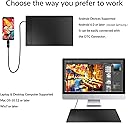
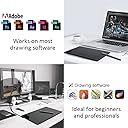
The VEIKK A30 is a sleek, ultra-thin graphic drawing tablet featuring a large 10x6 inch active area, 8192 levels of pressure sensitivity, and a battery-free tilt pen. It includes 4 customizable touch keys and a gesture pad for enhanced workflow, supports Windows, Mac, and Linux, and connects via a convenient reversible Type-C port. Perfect for professional designers, educators, and digital artists seeking a premium, plug-and-play creative tool with comprehensive accessories included.


| ASIN | B07DQP93BD |
| Active Surface Area | 10 inches x 6 inches |
| Best Sellers Rank | 15,590 in Computers & Accessories ( See Top 100 in Computers & Accessories ) 47 in Graphic Tablets |
| Box Contents | Battery-free Pen, Glove, Replacement Nib, USB Cable |
| Brand | VEIKK |
| Brand Name | VEIKK |
| Colour | 10 inch-A30 |
| Compatible Devices | Desktop, Laptop, Smartphone, Tablet |
| Connectivity technology | USB |
| Country of Origin | China |
| Customer Reviews | 4.4 out of 5 stars 5,259 Reviews |
| Display Type | LCD |
| Item Dimensions L x W | 21.2L x 33.2W centimetres |
| Item Weight | 570 Grams |
| Manufacturer | VEIKK |
| Manufacturer Part Number | A30 |
| Model Name | VEIKK A30 |
| Model Number | VEIKK-A30 |
| Model name | VEIKK A30 |
| Native Resolution | 1920x1080 |
| Network Connectivity Technology | USB |
| Operating System | Linux, Mac OS, Windows |
| Operating system | Linux, Mac OS, Windows |
| Pressure Sensitivity | 8192 Levels |
| Pressure sensitivity | 8192 Levels |
| Product Features | Programmable Press Key, Stylus Dock |
| Screen Size | 11.66 Inches |
| Special feature | Programmable Press Key , Stylus Dock |
| Specific Uses For Product | Designing, Drawing, Online Education |
| Target Audience | Designer, Sign for approval, Student, Teacher |
| UPC | 601707033812 |
| Unit Count | 1.0 count |
S**Y
VEIKK A30 Pen Tablet - Easy to use with great specs at an amazing price!
I received my Veikk A30 tablet this week, delivery was extremely fast (and free for Amazon Prime members!). The box design had me excited from the get go, tells you what you need to know in terms of report rate speed (250 RPS), Lines per inch (5080 LPI), levels of pressure sensitivity (8192) and size 10”x6” all of which are particularly impressive given the low price of the tablet. On opening the box, all components were well packaged with the tablet itself on immediate view with the accessories tidily stored underneath. You get; • A30 tablet • Battery free stylus pen with two hot key buttons • Type C USB adaptor cable • Nib replacement tool with spare nibs • Quick start guide Handling the tablet it feels light, looks extremely sleek and barely thicker than my smart phone. I was thrilled to find that it fit comfortably inside one of my padded laptop bag compartments although I can see the benefit of buying a tablet pouch to protect it rather than leave it on my desk inbetween uses. Setup was surprisingly straightforward and devoid of some of the language issues I’ve encountered when installing other Chinese gadgets. The tablet is powered via the USB cable so no need to charge it for first time use and plugging it into my Windows 10 laptop launched the setup utility. After a reboot, the utility launched on startup to enable me to set the hot key settings. Even though by default the stylus is set to work as a pen rather than a mouse, hovering the stylus over the tablet, without making contact gained immediate control of the mouse cursor. By default the primary stylus hot key was set to right mouse click but this was quickly changed to left mouse click whilst I configured the tablet and got used to using the stylus. The position of the stylus hotkeys and moving the cursor when hovering above the tablet takes a bit of getting used to but very quickly I stopped looking at the tablet and was navigating the software just from looking at my screen. In addition to the two hot keys on the stylus, there are an additional 4 hot keys on the tablet that you can tailor to input your most frequently used settings in your sketching software. Within 10 minutes of opening the box, I was already using the stylus to sketch directly into photoshop. If I had one criticism, the stylus feels a little light and could do with being heavier but that’s probably a personal preference. I would also love to see a stylus holder mounted on the tablet itself, I can see myself spending time hunting for this in future! I want to spend a few weeks using the tool in earnest and complete a full drawing project before I can really comment on how the tablet has helped my creative process but on first impressions the VEIKK A30 appears to be a well designed quality product, simple to use with very good performance specs for an amazing price. Highly recommended.
S**B
Another great Veikk Tablet - the A30...
I’ve become quite the fan of Veikk tablets. Last year I purchased the A15 for the office and was impressed with the quality/functionality for the price – I now wanted a new tablet for the home office, so once again, after searching online and looking at all the tablets now on offer by various brands such as XP-Pen, Huion etc (not forgetting Wacom – they are just more expensive!), I decided to once more give Veikk a spin – this time it’s the A30… The box contains the usual suspects: Tablet (obviously!), Pen, USB-C cable, spare nibs (& extractor tool), instruction manual and a ‘Thank you for purchasing this tablet’ card which, on reverse, gives you a link where to download the drivers (no more CD’s!). It’s not clear exactly what the guarantee is on this, but there are contact details listed for the Veikk website – plus, if you’re not happy and/ or the product is faulty, I guess you can simply return to Amazon etc… After unplugging my older, smaller tablet and un-installing the drivers, I plugged in the A30, went to Veikks website and downloaded/installed their drivers (interestingly, their drivers are a ‘one size fits all’ type – all their tablets run off the same drivers and are automatically detected). The tablet itself has a nice large 10”x6” drawing area – it really does seem huge compared to my old skool Wacom Bamboo 6”x4” I was still using! It’s quite thin (9mm), but feels very sturdy and well built – it’s very light and can be easily chucked into a laptop bag etc… It’s nice to see USB-C being used – its ‘looks’ a lot neater and takes up less room on my already cramped workspace (plus you don’t have to go through that ritual of ALWAYS plugging in a USB the wrong way around first…!) 😊 OK – test time… On the left side of tablet is a glossy vertical ‘strip’ which is where the touch-pad sits and four programmable ‘touch key’s (or ‘buttons’). I found using the touch pad was great in Photoshop etc – swiping up/down zoomed in/out of the canvas accordingly – similarly, swiping left/right increased/decreased the brush size too – a great timesaver when drawing/designing against an impending deadline – it all helps! One thing I noticed was that if used in a nice bright environment, the touch keys were easier to see – if you sit in a darker room/office, you can’t actually see them as well as they are flush with the tablet surface i.e. they aren’t raised or recessed… they do actually light up blue when accessed – it’s a shame you haven’t the option in the software to keep them on permanently (like a backlit keyboard), but it’s not really a deal breaker – you’ll get used to it as you use the tablet more… The pen is nice and light and doesn’t require charging! Still not sure what type of magic is used for this(!), but it feels nice to use and has the usual two buttons – one for ‘right-click’ mouse functionality the other for using the pen as an ‘eraser’ (or ‘rubber’ as we say in the UK! 😊) – as with the touch keys, you can re-assign them in the software to suit the way you work… It has 8192 levels of ‘pressure sensitivity’ – not sure how many levels I used to create the illustration accompanying this review, but I was able to produce a nice tapered stroke… Overall, for just £46, this tablet does everything I wanted at a great price… drawing feels smooth and the touch pad works really well - it’s also a nice looking tablet to have on my desk! Veikk are a fairly new player in the graphics tablet market AFAIK, but based on my experience with what they have produced so far, they really are great value for money – more competition is always good for us designers and/or the end-user – I look forward to using more of their tablets in the future! Artwork was created in Photoshop CC 2019 on a Windows 10 PC using the Veikk A30 tablet.
I**H
easy to use tablet
The pad comes with a USB C that is connected to the pad itself, the other end is a normal USB 2. The tablet as a whole is very portable with its pen coming with its own sleeve which protects it in the bag and prevents the tip from ever getting caught in anything. This is an exceptional budget tablet. For the price it is an extremely good choice for those starting out or on a budget. Setup was easy, pen is comfortable to grip and the tablet itself is a nice large solid surface. There are tablets with higher resolution surfaces, but they are more expensive, and in many cases not as nice to use, and the resolution of this device is more than good enough for my hobbyist needs. 100% Recommended.
A**F
High Quality, Feature Rich, Large Tablet - Ideal for Whiteboarding
In the world of lockdowns and remote working I wanted a digital way to be able to 'whiteboard' and brainstorm ideas. I am a big OneNote user and I have a projector connected to my laptop - so wanted to try and use a tablet with that set up. Based on other reviews I decided to go with the VEIKK A30 and I'm so happy I did. Size I needed a nice large size, and this is basically A4 size. It is ideal for the kind of whiteboarding usage I was looking for. Quality The whole product feels sleek and high quality. The ultra thin design, the buttons and touchpad, the pen - all feel of premium quality Setup Do not be put off by reviews talking about drivers and setup. They are old reviews. If buying post 2020 this is 100% plug-and-play with Windows. Windows detects it and switches to Windows Ink Workspace by default. Installing the Veikk software allows you additional control over the buttons. I needed the tablet to sometimes work with a monitor (in a multi-screen setup) and sometimes with a projector. The software made this a total breeze. Additional Buttons In a few clicks I had set up the buttons to be mapped to key shortcuts I wanted : undo, redo, go back, go forward. This is ideal for OneNote as you can quickly navigate between pages. I set the touchpad to allow me to easily zoom in/out/click right/click left. This is a powerful feature. Overall I am extremely happy with this. Great price, great feel, excellent functionality and well packaged. Do not hesitate to buy this.
L**R
Easy to use, very helpful for Digital Artists.
Upon arrival the tablet was boxed extremely well, the packaging was perfect and it came with a lot of helpful additional pieces like extra nibs, even protection for the tablet pen itself which is rarely considered by most tablet brands which I personally adored to see and a drawing glove to use with the tablet itself. I have a ganglion on my drawing wrist so having a drawing glove accompanied with a tablet is always helpful in ensuring protection of my wrist and hand while doing my job. I also really enjoyed the fact this tablet came with a USB-C cable input since this is more efficient and I do hope to see other tablets follow in its footsteps. There are a lot of helpful shortcut keys already embedded into the tablet itself which I really adore because the choices for the shortcuts are ones often used by artists like myself (e.g. CTRL-Z, etc.). So you can tell the creator of this tablet understood the target audience this was going for. The tablet’s shape, I believe is underrated. I’ve seen a lot of tablets go for the size of height being a priority taking up most of my space, but this tablet actually focuses more on width which makes it easier to use with a multi-purpose computer and even more relaxing to see on the desk in contrast to a tablet which I feel could be ‘over-sized’. This tablet is definitely at a perfect size and very comfortable to move around and use. I’ve been very comfortable using this tablet to do my freelancing work. It has been comfortable, convenient and very capable with the tasks I have to perform while doing my job. This tablet is extremely well for the price-range it has. I’d definitely recommend Veikk in the future to other artistic-loving friends as well as even family. I’ve already discussed it with some family members who are passionate about art and they’ve even seemed interested despite being the hard-to-convince type! I’d likely buy from this brand in the future myself. We as artists sometimes do struggle in finding a tablet but I even believe if beginner artists use this tablet, they’ll become very easily adapted to shortcuts which can be beneficial to know as an artist – So learning this earlier on will be a miracle-sent for some! Perfect condition, delivered rather quickly and with ease. Definitely worth more than what’s priced for it.
C**D
Genuinely impressive tablet!
The tablet arrived in a very sturdy, well packed and professional looking box, that wouldn’t look out of place next to some of the more well known tablet companies. Inside, i found the tablet to be packed extremely well and everything had its own little compartment to sit in. The A15 tablet itself came inside a packet, with the much appreciated drawing glove sitting on top. First impressions of the tablet were great! I was taken back by the build quality of the tablet itself. It felt sturdy all the shortcut buttons down the left hand side felt very responsive when being pressed. The red ring around the Veikk logo is not a scroll wheel, but it makes the tablet stand out and look nice, giving it another professional looking touch. The pen itself is extremely lightweight due to it being completely battery-free, with two more buttons along the side of it. Once again; the build quality here is fantastic! Also in the box were 20 spare nibs and a remover, a pen case, and a good length USB-C cable. Set up on my PC didn’t take too long at all. Using the 20 page quick start guide book that comes with the product; i was able to download the installer and have the tablet working very quickly. It should be noted that you must uninstall any other tablet drivers you have before installing this one. If you plan to use this as your main tablet, then it’s not an issue at all, but it’s something to be aware of. I restarted my computer and found the Veikk Tablet software running in the system tray. When i clicked open, i found a wide array of options that allowed me to customise everything i could want about the tablet and pen. All 12 of the shortcut keys along the side can be programmed to whatever you choose, including preset actions like Redo and Undo. I was extremely happy to find the option to flip the tablet and be able to use it left handed, as this was an initial worry for me, but it was quickly put to rest! As well as choose how the tablet works with a two, or more, monitor setup. The two buttons on the pen can be programmed in the same way as the tablet buttons, but by default, one is set to right click, which will more often than not end up being the eyedropper tool, and the other is set to a toggle between your Pen and Eraser on whatever are program you’re using. I found you can hold the Pen/Eraser button to use it as a temporary toggle, switching back to the tool you were using when you let go. This is such an extremely handy feature to have. You can also set the pen pressure in the tablet settings too, and test it in a handy pop up box. The pen also has a very impressive 8192 levels of sensitivity! Drawing with the tablet felt extremely nice. It has a slightly rough surface that feels a lot like drawing on paper. All the buttons worked on the pen and tablet itself with no issues at all, and i even combined some of the tablet buttons together for additional functionality. The pen is comfortable to draw with and is an extremely nice and comfortable size. As i mentioned at the start; it’s very lightweight, and glides across the tablet surface to result in a super smooth line. Although the glove isn’t needed at all, as the tablet has no touch sensitivity; to have one included in the box, makes drawing on it a whole lot nicer and a lot more smooth. I tested this product on the three most popular drawing programs out there: PaintTool SAI, CLIP Studio PAINT and Photoshop. All of them performed brilliantly and as i had hoped for, with the tablet becoming second nature to use as i flipped between them. All in all; i think this tablet is superb. I think the value for money is an easy selling point. To have so much in the box and the addition of 12 shortcut buttons, which do not compromise the 10.6” drawing space, makes this tablet one of the best tablets i have ever used. Having never heard of Veikk before as a company; i am going to keep an eye on them especially and see what else they release in the future! Buy this tablet!
F**H
VERY PROMISING TABLET!
First of all to start my review, I would like to mention I was surprised at how fast it was delivered, ordered on a Friday and came on the Saturday, a one day delivery. It was shocking. I was expecting this tablet to come after a week, but it came quite fast. This tablet VEIKK A50 Graphics tablet was very well designed with it's shortcuts overall, the ability to use the touch pad for zooming in and out on the canvas was making my workflow with drawing 5x fast as I didn't have to move my pen from drawing to zoom. The pen was very comfortable to hold however, whilst drawing on the tablet, it had a grasp of feeling of scratching the surface, but please don't be alarmed! It is not scratching the surface, after drawing on this tablet for a couple of days, I grew to love the feeling of drawing on it. Soon, it felt like you were inking with a inking pen on paper with this pen rubbing against the tablet's surface which helps to feel more natural. The pressure sensitivity of 8192 is an amazing thing to have, as someone who has had 1024 for the past decade, this was very pleasing to have. Another thing I would like to add, this tablet has a large drawing surface that doesn't make you feel limited when drawing large flowy lines. I recommend having medium sized tablets as they're more comfortable to use which this tablet has fit the criteria. From comparing to my old Wacom Tablet that is a small tablet (Grey) as seen in the photos has a large difference from the size of the tablet, this may help you to see how big it is. Lastly, VEIKK A50 Graphics tablet is extremely portable, i was able to fit in my laptop bag and draw whilst travelling. It is very light weight and thin so, It can fit almost any laptop bag or backpack. If you experience any troubles while installing, it comes with a handy instructions leaflet included as well as it being on their site where you install the drivers. It is very easy to install
S**G
Awesome tablet with a great price tag!
As a website/graphics designer I needed a tablet that can actually withstand high usage. Thought I would try out Veikk as I have read some good reviews about them. Saw this tablet (Veikk A15) and the price was too good to be true, so initially I was hesitant about the quality but thought I would give it a go anyway. And I’m glad I did! It arrived and the packaging was great aesthetically. The tablet itself looked good and hardwearing. When going onto the installation of it on my computer, it is so easy and straightforward that anyone could do it. It took no time at all. So I went straight on to testing it with my software and I’m impressed. The tablet is very responsive and the work area is perfect for my needs. The A15 tablet also has customisable buttons on the left for keyboard shortcuts, which again it a godsent for me. And you can switch between pen and eraser on the battery-less pen, that has saved me a lot of time. I have been using this little beauty for a few days now and not had any problems at all. It has withheld up to everything that I have thrown at it so far.. I love it! Having used more expensive brands in the past, I have to admit that this is a great contender. If you are looking for a tablet for freehand graphics etc that is reliable and affordable, I would definitely recommend the Veikk A15. I cannot sing the praises anymore for the Veikk A15… Keep it up guys, you’re doing something right!
Trustpilot
1 month ago
1 week ago