

Buy anything from 5,000+ international stores. One checkout price. No surprise fees. Join 2M+ shoppers on Desertcart.
Desertcart purchases this item on your behalf and handles shipping, customs, and support to Israel.
⚡ Print Fast, Print Smart, Print Quiet — Join the 3D Revolution!
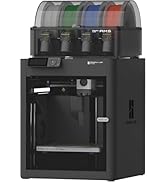
The Bambu Lab A1 Mini is a compact, high-speed FDM 3D printer engineered for professionals and beginners alike. Featuring a max speed of 500mm/s and 10,000 mm/s² acceleration, it delivers precise prints rapidly. Its fully automatic calibration and active flow correction eliminate setup frustrations, while noise levels stay below 48dB thanks to motor noise cancellation. Compatible with PLA, PETG, TPU, and more, it supports multi-color printing via AMS lite. Easy to assemble and controlled through user-friendly apps, the A1 Mini is the perfect gateway to professional-grade 3D printing at home or office.






| ASIN | B0CRYJBKQQ |
| Amazon Bestseller | #180 in Industrial & Scientific ( See Top 100 in Industrial & Scientific ) #1 in 3D Printers |
| Batteries Included | No |
| Batteries Required | No |
| Brand | BAMBULAB |
| Color Name | multicolor |
| Compatible Devices | Laptop, PC |
| Connectivity Technology | FDM 3D Printer |
| Customer Reviews | 4.5 4.5 out of 5 stars (1,048) |
| Date First Available | January 10, 2024 |
| Included Components | Bambu Lab A1 mini |
| Item Model Number | PF002-M-AU |
| Item Weight | 8.1 Kilograms |
| Item model number | PF002-M-AU |
| Manufacturer | BAMBULAB |
| Material | Metal |
| Operating System | Linux |
| Product Dimensions | 38.63 x 42.6 x 45.57 cm; 8.1 kg |
| Size | A1 Mini (without AMS lite) |
A**ー
ブラックフライデーでお得になってたので購入しました。 面倒な設定等も全部自動でやってくれるので3Dプリンターの知識が無い、初心者の方でも気軽に始められる素晴らしい機械(機会)だと思います。 3Dモデルを専用スマホアプリ(Bambu Handy)、PC ソフト(Bambu Studio)で見つけて印刷だけで終わりです。 専用アプリ、ソフトも凄く使いやすいです。直感でいけますし、慣れてきたら自分で設計した物を印刷できます。 印刷時間もかなり早い方だと思います。 音は説明には静かだと書いてありますが、サイレントモードの時のdBだと思います。 普通のモードだとかなりの騒音があります。 主な騒音は印刷開始時に発生する振動キャリブレーション?とファンの音です。 動画に載せて起きますので参考にどうぞ。 設置スペースは奥行510幅360高さ450mm位は必要です。 スプール(フィラメントのでかいボビン)設置するスペースを省いたら省スペース化出来ると思います。 本体足元のサイズは奥行310幅200mm位です。 防振対策で防振ゴム、ジェル+石プレート等工夫されてる方がいらっしゃいますのでサイズ等は参考程度に。 A1 miniを買ったらまず3P→2P変換アダプタを必ず用意して下さい。 無いと普通のコンセントに入りません。 付属のフィラメントはすぐに無くなってしまうので1kg等のスプールを購入すると良いと思います。 対応する素材PLA、PETG、TPU、PVAみたいです。 まだPLAしか使った事が無いですが、それだけでも色々作れるのでまずはPLAをオススメします。 メーカーはBanbu製ならそのまま設定できますが、社外製の物は設定にない場合があります。 その場合Banbu Studioのソフトから対応する社名等探して導入する形になると思います。 無い場合でも既存のBanbu製フィラメント設定で問題無く印刷出来ます。 今の所ELEGOO製のフィラメントを使ってBanbu製のフィラメント設定で使ってますが問題無いです。 セッティング方法は説明書が軽くしか書いて無いので、不安な場合はYouTube等に上がってる「Banbu Lab a1 mini」セッティング方法で調べたらすぐ出てきます。 レザー用刻印を作りたくて自分で描いた物をプリントして上手く出来たのでそのやり方を…… 全部無料で出来ます。 まず白黒で作った画像をSVGcode(登録無し)というブラウザ上でjpg、bmp等の画像をSVG形式に変換させます。 そのまま保存すればPCにダウンロードされます。 そして次に登録だけ必要になりますが無料の Tinkercad これもブラウザで3Dデザイン作成、インポートエクスポートも出来る物になります。 登録の際は生年月日にご注意下さい。(間違えて未成年にすると親等の許可が必要になるとかでめんどくさい事になります) .STL形式でエクスポートした物をBanbu Studioで読み込ませれば読み込んでくれます。 後は調整をして印刷で出来上がります。 どうぞご参考までに。
A**ー
Bambu Lab A1 miniを購入しました。液晶画面付きで操作が分かりやすく、初心者でも扱いやすい3Dプリンターだと思います。 セットアップも比較的簡単で、初めて3Dプリンターを使う人でも迷わず始めやすいです。印刷品質も十分高く、この価格帯でここまで使いやすいのはかなりコストパフォーマンスが高いと感じました。 ABSなど使用できないフィラメントもありますが、初心者であればまずはPLAから始めるのがおすすめです。PLAなら扱いやすく、A1 miniとの相性も良いので、最初の1台として十分満足できると思います。 とにかくコスパ重視で、初心者向けの3Dプリンターを探している人にはかなりおすすめです。
テ**ン
アプリとの連携も完璧で、データもWi-Fiで送れるので、一切の手間がなく気持ちよく印刷ができます。
A**ー
過去に3Dプリンターの購入を考えた時には、かなり敷居の高い物でしたが、これは家電に近ずいています。 と言ってもある程度理解が無いと失敗が連続します、日中に出来たことが夜間になると出来なかったり等が有ります。 それでも素人が世界でただ一つの物が作れる素晴らしさが有ります。 ABSが作れないのは残念です。
A**ー
3dプリンターに興味がありセールの時に購入しました。注文から約2日で到着しました。箱を開けると、本体、小物類、取り付けるパーツなどが入っていました。組み立ては私の場合AMSなしのもので5分から10分で組み立てができました。セットアップも簡単でキャリブレーションも自動でした。パソコンからbambu studioをインストールしました。ここでアカウントを作成することをお勧めします。プリントもとても高速で小さいものなら数分で印刷できます。3dプリンターを始めてみたいけどよくわからない!という方にお勧めです!
山**郎
3Dプリンターを初めて購入したので比較はできないのですが、少なくとも何も考えずに電源を入れて、初期データのプリントをしたり、ダウンロードしたデータを印刷したり、CADで自分でデータを作って印刷したりとしましたが、インクジェットプリンターと大して変わらないぐらい、何の問題も起きませんでした。 組み立ても特に難しいことはないですし、キャリブレーションも自動で行ってくれるので、特に手間取ることもありませんでした。 少しだけ印刷可能な大きさが小さいとは思いますが、その分魂魄に収まっているのだと思いますし、それ以外は何も気になることがなく、それだけよくできた3Dプリンターなのだと思います。 3Dプリンターをレビューされているような方々がお勧めする理由がよくわかりました。
む**)
3Dプリンターはこの商品が初めてでしたが手順通りに進めていけば困ることはなく使用できる状態までたどり着きました。床置きなので防振防音対策には7層くらい重ねたものを用意してそこに設置せています。耐震シート、ベニヤ、ウレタンなど他にもいろいろ重ねて一番上には30mmの大理石です。プリンター台は質量が重ければ重いほど効果あるかと思います。プリンターでの製作はオーナメント飾りを製作したり、壊れたパーツの修理部品を製作して補修したりして楽しんでます。
渋**光
評判通りの素晴らしい製品でした。 おいた場所がちょっとグラつく所でしたが問題なく仕上がりました♪ ただ事前に知ってたのですが、コンセントが3ピンなので2ピンに変換するものがないとすぐに使えないのが難点でしょうね。
L**S
After 2 weeks of using, its good, and the price was not bad
R**S
This thing is amazing. I put off 3D printing for a while now not wanted to be bothered with the complication. This printer has apparently found a way around much of it and does everything for you. Maybe problems will arise many prints later but so far I printed 4 small things with the sample PLA and I'm surprised at the quality. I designed a couple basic objects and the software just automatically makes use of sensible fill space etc. I don't even have wifi right now so currently I'm just downloading print files to the SD card. It's real easy to set up and gives you an intuitive little guide for each process on the screen. It will initially take a little while to do calibrations but after that the basic prints are very fast. The motors can really move the print head and bed so I'd recommend making sure it has a nice dedicated place for it that isn't flimsy or wobbly. The build is pretty sturdy and the base is decently weighted. The basic process for me was exactly as follows: Unbox Assemble (just a few pieces, very easy) Let it calibrate (took like 20-30 minutes) Download Bambu Studio on PC Import a model into Bambu Studio and 'Slice Plate' (make file readable to printer) And either print from there over Wifi or just export it to a .3mf plate sliced file onto SD card I have no idea what I'm doing and just did that and it was printing no problems. I got on Tinkercad and just made random objects. Then I designed a small mount for something. The basic PLA seems sturdy enough to design all sorts of simple objects with 0 hassle cause you don't really need to play around with the advanced settings of the print. So far I'm just making cylinders and cubes and stretching/contorting their dimensions into a particular shape.. then just exporting them into a file I can open with Bambu Studio. Then slice and print.. The only downsides I can think of are that the plate size may leave more to be desired, and the camera has a very low frame rate (mainly just because it can manually do a timelapse for you). These are easily justified in the cost at under $300. Since there is already so much cool stuff out there to print that other people have designed, you can basically just buy a bunch of filament for this thing and go ham. I printed through the included sample filament they provided in about an hour, but a straight print would have probably ran through that in only 30 minutes. For about 20 bucks for 2.2lbs of basic PLA.. that's a whole lot of printing right there. Even if you just used a 1/4 pound of that to make a decently sturdy project enclosure you're getting pretty savey on the gravy over time.
A**Y
This is my first foray into 3D printing. From what I read online, Bambu Lab products are the go to if you want something that just works without learning how to build what is essentially a robot and spend huge amounts of time calibrating. The A1 mini proved to hold true to that. It was very much a plug in and go set up. It is amazing to see creations come to life before you, and so much fun designing your own models and seeing this thing make them a reality! Plus it keeps the SO happy when I can print little fixes for around the house and jeweller items for her. Truly a painless foray into 3D printing - I only regret not getting the fullsize A1 for the bigger print area!
C**L
Fantastica, sencilla de usar y gran calidad y velocidad
M**M
Simple and easy to setup. Can go straight to printing from uour phone. Then when your confident you can explore getting models from other places.
ترست بايلوت
منذ شهرين
منذ شهر