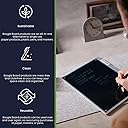
♻️ Write Smart, Save Smarter — Your Eco-Chic Office Essential!
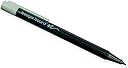
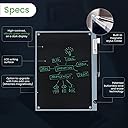
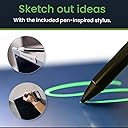
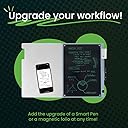
The Blackboard 2.0 Smart Scan Notebook is an 8.5x11 inch eco-friendly LCD writing tablet featuring vibrant green writing on a dark surface. It requires no charging, offers instant digital note saving via a free app with PDF/JPEG export, and includes a magnetic stylus with a secure lock-switch for travel. Perfect for professionals and students seeking sustainable, distraction-free productivity with seamless digital integration.


| ASIN | B0DM12XBB1 |
| Additional Features | Extra-Slim |
| Best Sellers Rank | #177,149 in Office Products ( See Top 100 in Office Products ) #1,507 in Memo Pads, Notepads & Scratch Pads |
| Brand | Boogie Board |
| Brand Name | Boogie Board |
| Color | Green |
| Colour | Green |
| Customer Reviews | 3.8 out of 5 stars 152 Reviews |
| Included Components | 1 x Digital Pen |
| Included components | 1 x Digital Pen |
| Item Weight | 0.5 Kilograms |
| Item weight | 0.5 Kilograms |
| Manufacturer | Kent Displays Inc |
| Manufacturer Part Number | BD20160001 |
| Model Number | BD20160001 |
| Number of Items | 1 |
| Recommended Uses For Product | Office, Home Office, Remote Work, Travel |
| Recommended uses for product | Office, Home Office, Remote Work, Travel |
| Special features | Extra-Slim |
| Target Audience | Student, Adult |
| UPC | 819459018012 |
| Unit Count | 1 Count |
P**E
Great writing tablet
A great tool for jotting notes quickly. I did find the external app a bit funky to work but it isn’t terrible. I will say if you are some who rests their arm on the paper you’re writing on and can smudge up a bit but it’s not too bad. I wish there was an option to erase spots and not just the entire page though. It has decent brightness and I don’t think you have to replace the battery for a loooooooong time
J**.
Much better than post-it notes and dry erase boards to quickly write down your thoughts.
I started using this as an idea pad to replace the piles and piles of post-it notes that were accumulating around my office. (I'm the sort of person that needs to write things down -now- or I'll be kicking myself for forgeting what it was later.) I've used dry erase boards in the past and never liked how greasy/messy they felt. Pros: - Lightweight, can be used/held in portrait or landscape orientation - High contrast green text on black background with always on display - No charging needed (has replaceable battery "CR2025" - Can write with any stylus, finger nail, etc. (any dull pencil-like object will work, you could probably use a bird feather if you're feeling fancy) - Writes smoothly and matte-like surface feels comfortable - Slide locks pen in holder for transport - Has physical erase button on side if you don't want to use back of pen to clear page - No powder buildup/grime that dry erase boards get over time Cons: - No targetable erase [All -or- nothing] (Kinda like writing with pen on post-it notes, if you make a mistake you either strike it out or start over) - Depending on your hand pressure while writing you may experience dot marks or artifacts from your knuckle pressing down on the page (See example image and how that also show up in the black and white scan) - A magnet touched near the front or back of the erase area will clear the page (for example you can write on this with an apple pen, but if stacked on top of an iPad that has an apple pen attached for storage it -will- reset the page so you might want to scan any important documents to the app before putting them in the same bag) - While scanning with the app you'll need to be mindful of any glare or reflections coming off the boogie board writing surface since your scanning it with your phones camera and that will transfer to the scan. I've included images of both how it looks when it's scanning in the app (Note: the reference points *green box* moved when I was taking the screenshot it usually automatically frames the black portion and how the end result imports into the app (black and white image) You can't really compare this to an iPad because their functionally different (That's like comparing a post-it note to a laptop, though I do like the more matte feel of writing on the boogie board compared to the glass feel of writing on an iPad, so that's a plus in my book I will say this really shines as a everyday capture tool for your thoughts and if there are any actionable items that you need to come back to you can simply scan them into the apps inbox to deal with later. Using it this way starts you with a clean slate each morning and you can even use the apps edit tools to quickly cross out progress or highlight important items <shown in example images: red pen and yellow highlighter> on your phone.
B**R
Works as advertised
It's nice to have a full-size board to work with. If you are right-handed, it will smudge while writing where your arm lays on the board. To me, that's not a big deal. It works just fine. I have an older version which is half the size and it still works great. I just wanted one that was larger.
R**Y
Doesn't sync, you're supposed to take pictures of it with your phone... really!
I'm looking for a LCD tablet that just syncs my notes somewhere. This looked like it was going to be a great option. There's one major issue: You have to take pictures of the screen with your phone to save the image... so really this is just a plain LCD tablet with some markers on it to help with scanning. It will not sync in any way without taking a picture with your phone, so what's the point? This took some research and watching videos to figure out since it came with no instructions. Apparently you can buy a special smart pen from them that will sync on its own, but even the link on their app to this product goes to a dead website and I cannot find it for sale anywhere. So $40 for a $5 LCD tablet? No thanks. I'll try another brand.
S**J
Useful but not an ideal office companion
I've gotten to the point where anything to reduce waste is desirable. When I left my last job, I found I had accumulated mounds of notepads and loose paper notes which all went into the reycling bin. Rechargeable and reusable is currently my preferable way to go. This blackboard is good for those quick notes that I scribble during phone calls. The ability to save the ones I need in an app is a great idea. Having to erase the entire board, not just sections, is less so. This board has some nice features, such as the choice to use the magnetic pen top or a button, a lock for the pen while traveling, and an optional folio. Unfortunately the folio ended up being a major hassle. The magnets repelled instead of joining smoothly. After trying a second folio, I exchanged the board for a new one and finally have a working set. The folio should be a part of the system to prevent unwanted marks when moving the board around. My wish list for additional features would be a lock to prevent accidental erasure and for the board to be rechargeable instead of using a button battery. It would be nice if an upgraded model had zones with separate erase buttons. Lastly, since my writing tends to be larger with the stylus pen, this does not have enough space to use for notes during a full hour meeting. I will keep this and use it for the quick notes and to-do reminders, but continue to use my erasable spiral books for the day to day meeting notes.
Trustpilot
3 weeks ago
1 month ago