
قم بتنزيل التطبيق


معلومات عنا
حقوق الطبع والنشر © 2024 Desertcart Holdings Limited
قم بتنزيل التطبيق





⌨️ Elevate your desk game with the WOBKEY Crush 80 — where speed, style, and sound collide!
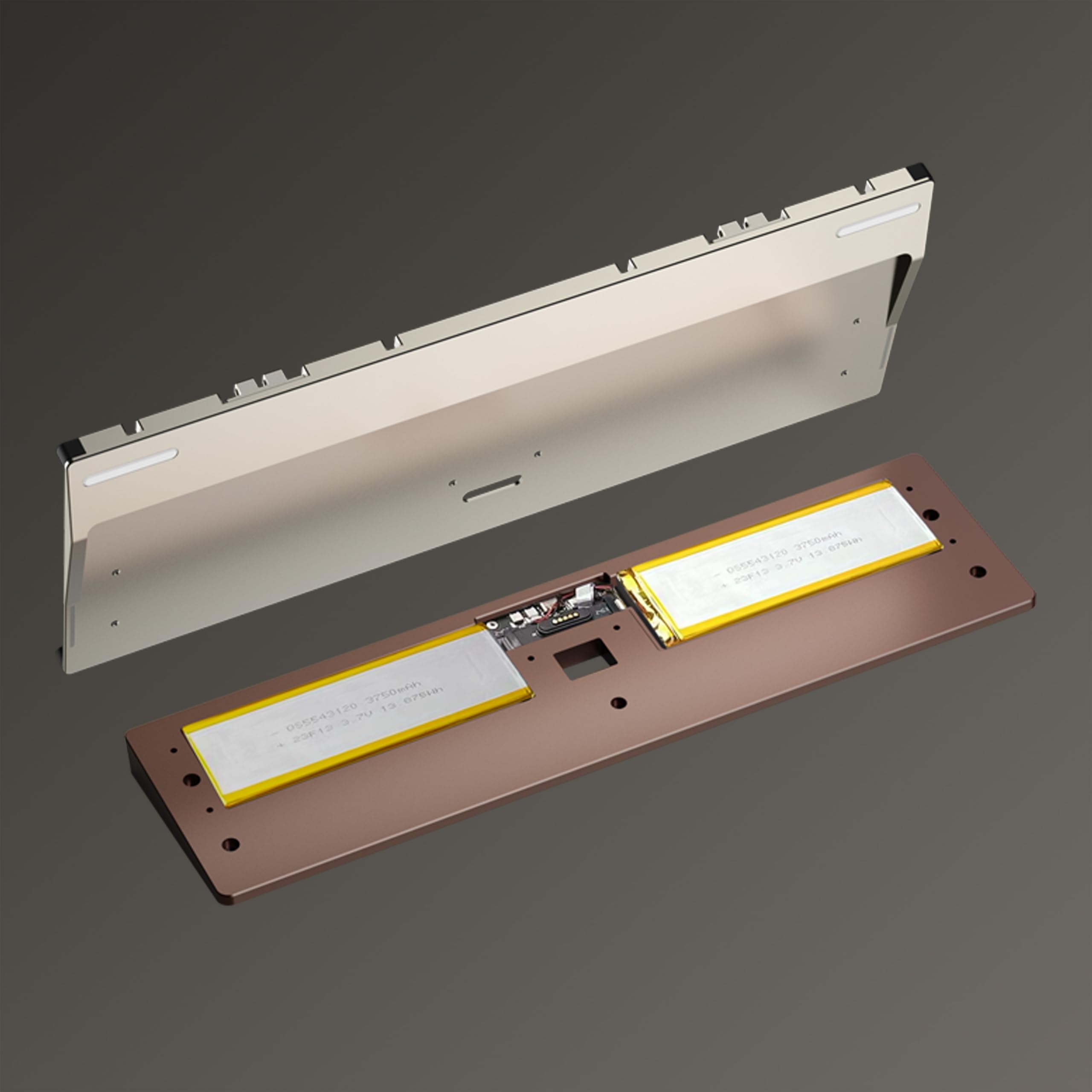
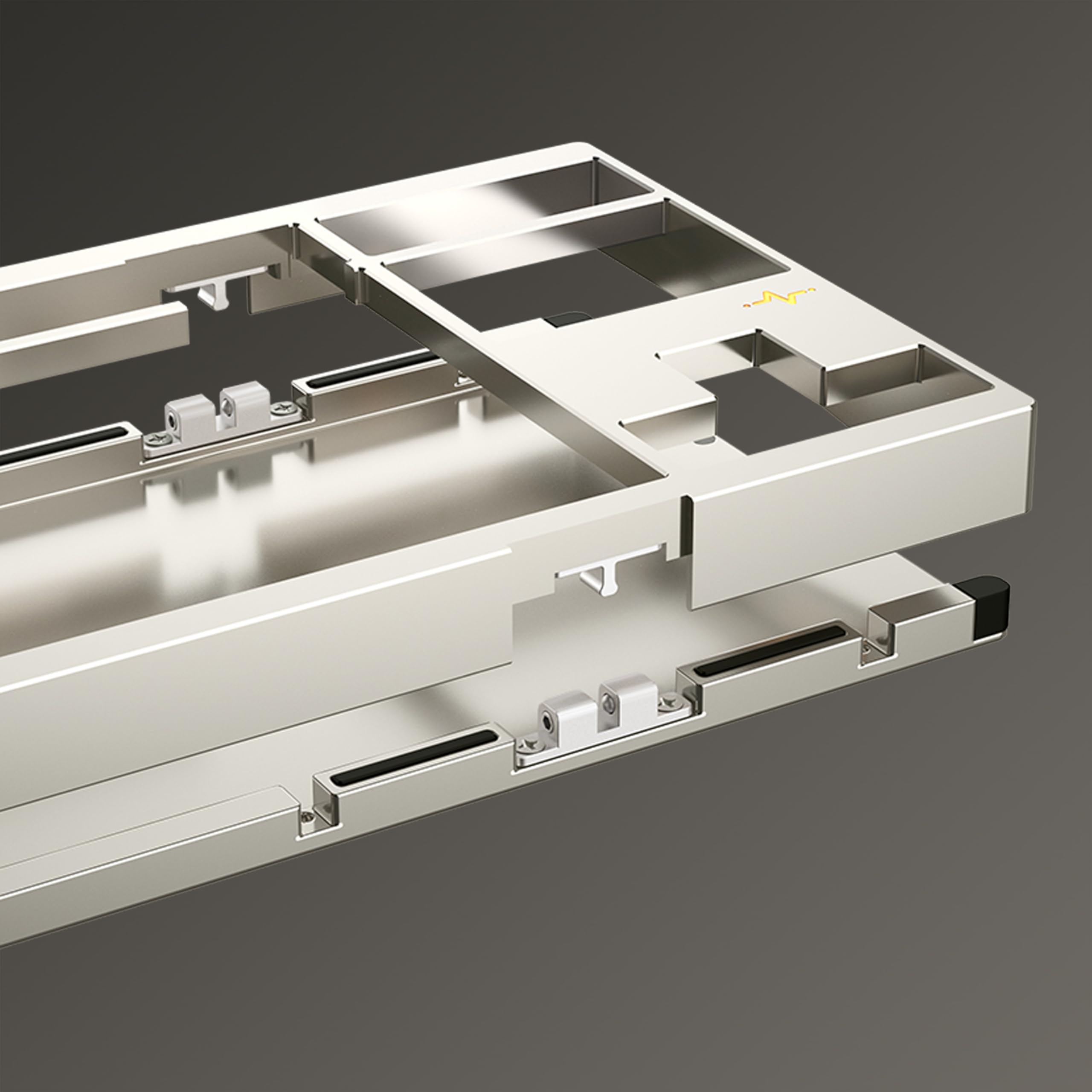
The KEEBMONKEY WOBKEY Crush 80 Reboot is a premium 80% mechanical keyboard featuring a CNC 6063 aluminum frame, 5-second quick-release magnetic design, and triple-mode connectivity (wired USB-C, Bluetooth, and 2.4GHz dongle). It offers superior acoustics with HMX Frost or Kailh Cocoa switches, durable double-shot PBT keycaps, and full VIA programmability with hot-swappable keys. Designed for professionals and gamers alike, it combines robust build quality, rapid modding capabilities, and versatile connectivity in a sleek, modern package.


| ASIN | B0DJ78YVJC |
| Additional Features | Hot-Swappable, Programmable Keys |
| Antenna Location | Gaming, Office |
| Best Sellers Rank | #2,605 in Video Games ( See Top 100 in Video Games ) #215 in PC Gaming Keyboards |
| Brand | KEEBMONKEY |
| Color | White |
| Compatible Devices | PC |
| Connectivity Technology | USB-C |
| Customer Reviews | 4.6 out of 5 stars 193 Reviews |
| Enclosure Material | Aluminum |
| Hand Orientation | Ambidextrous |
| Item Dimensions L x W x H | 14"L x 5.6"W x 0.9"H |
| Item Weight | 2380 Grams |
| Keyboard Backlighting Color Support | Single Color |
| Keyboard Description | Mechanical |
| Keyboard Layout | QWERTY |
| Manufacturer | KEEBMONKEY |
| Model Number | Lite Silver |
| Number of Batteries Required | 1 |
| Number of Keys | 88 |
| Number of Sections | 1 |
| Power Source | Battery Powered |
| Recommended Uses For Product | Gaming, Office |
| Series Number | 80 |
| Special Feature | Hot-Swappable , Programmable Keys |
| Style Name | Modern |
| Switch Type | Mechanical |
| UPC | 677899897136 |
| Warranty Description | 7 Days |
S**N
Great keeb
Love this thing. It's a bit loud if you switch the included metal plate but the keyboard just generally sounds great with no modifications. I changed all the switches because I prefer tactiles, and everything sounds great. The stabs are only snap ins but the spacebar needed no modifications to remove any sort of rattle. Insanely easy to open this thing up, cover just pops right up. Everything is friction fit so you can change the acoustic layers pretty much instantly. Case feels really well machined and it just looks beautiful. 10/10 keyboard I love this thing. The only comp I own price-wise is a Keychron Q5 and if I had to pick between both boards I'd go with this one all day.
D**.
It's SO good
This is maybe my 65th budget board in my collection (give or take a few), and I could not be more pleased with it, to the point where I'm contemplating buying 2 more in different colors (navy and warm silver), because they're so beautiful. To say that I have a love affair with budget boards would obviously be an understatement. I'd coveted the Rainy75 for a long time, but didn't want to deal with a case with screws and no place to store the dongle. I did eventually cave and buy one, after also purchasing a lot of the Rainy clones like the Inky75 (hands down one of my all-time favorite budget boards as well), Womier SK75, Womier RD75, Weikav Stars75, and Bridge75. All have their good and bad points, but the Rainy remains the one that started it all, and I think it's an excellent board with great acoustics, but the shortcomings that prevented me from buying it at first still persist. Well, Wobkey fixed all of those issues with this board, and although it's a larger form factor than I'd prefer, since I typically go for 75% instead of TLKs, it's such a great board that I'm willing to overlook the slightly larger footprint, since realistically, it's only an inch and change longer. This thing is a beast, weighing in at around 5 lbs. I think it's even heavier than the Womier SK87, which is one of my favorite budget TKLs (though that one can be had for less than 1/3 the price of this one, so I'd argue that it's hands down, the best value). The ball catch mechanism to open the case is flawless, and I LOVE that they implemented a magnetic connection. There are a couple other boards in my collection that have this feature, but it's such a game changer in terms of being able to rapidly disassemble things for modding. There's one board I have that implemented a magnetic connection in the case, but it's dangling by a ribbon cable, which kind of defeats the purpose. This board kind of just does all the things that you wish a keyboard would do. RGB is nice and bright, there are lots of foam options for you to play around with, AND this comes with an extra aluminum plate in case the FR4 isn't your cup of tea. I do wish it would come with a PP plate as well, to really give more sound options, but as it is, for a board in this price category, including an extra plate is basically unheard of. I'll be buying an extra plate from the website that rhymes with schmali-express though for more sound and feel options. The spray coating on the pink board is very well done and super smooth. I can't see or feel any inconsistencies in the paint and although I do wish they'd picked a slightly warmer pink, I do appreciate that they kept the color soft and light, since I have a couple pink boards in my collection that are pretty Pepto Bismol-y, and had I known they would differ from their product photos so much, I probably would've passed on them. The back weight is interesting, since it's mounted on a white base with the silver crackle over top. I actually like it quite a lot because it eliminates one of the most annoying issues with metallic back weights (in my opinion), which is that the reflective ones are usually fingerprint magnets and keeping them clean is an absolute headache. I don't have to worry about touching or scratching this weight because the texture hides everything. Plus it looks cool. Having onboard dongle storage on the bottom of the board is brilliant. I just don't know why every single board doesn't do this. I have a pill case filled with dongles of the other manufacturers who haven't gotten on board with this yet. Although I don't think many people will be traveling with this board due to its size and overall heft, I will. I bring a different keyboard into work with me on a daily basis, and having someplace to store the dongle without fear that it's going to get lost is a huge plus for this board. For the record, the Womier SK87 and the Weikav Lucky80 have this feature as well, and both boards have high marks from me, too. The switches that come with this board are ok - good, not great. They sound nice and offer a kind of a poppy clack, but the lube feels a bit inconsistent on some, leading to a scratchy feeling. Stabilizers are really well-tuned, but could benefit from a bit of extra lube. The keycaps are double-shot PBT and feel a bit cheap, but they're decent and very useable so that you can pull this board out of the box and start using it right away. Most of the fonts are crisp and well done, especially on the alphas, but there is a little bit of inconsistency on the modifiers. The tab, caps lock, enter, windows, and super buttons all have a bolder font than everything else - kind of an odd little thing, but unless you're specifically looking for it, it's not so obvious that you would immediately notice. I don't love the sound of the spacebar, but it's easily fixable with a little bit of fun tack, and I don't plan on keeping the stock keycaps for too long anyway. The fact that this board is VIA compatible is excellent - it allows you to customize your board to a degree that it should function perfectly for even the most sophisticated macro user, but you do have to search for the .json file and be sure you don't lose it, or else you run the risk of not being able to customize your board if it disappears from wobkey's website. My one and only gripe, and it's not even a big one, is that the on/off switch for wireless functionality is located under the caps lock key. This is currently pretty standard, so it's not the end of the world, but it does mean that if you do want to take this board somewhere with you and you plan to use it wirelessly, you'll also need to bring along a keycap puller. Speaking of the caps lock key - I thought that there wasn't an indicator light for when it's toggled on, but as it turns out, the ECG light on the right side of the board actually serves as an indicator. When caps lock is on, it turns white. Then it goes back to whatever color you had it set to once caps is off. Love that little feature, since I think caps lock indicators are an absolute must-have. Overall, I could not be more pleased with this board in looks, sound, and functionality. Now I just need to stop myself from buying 2 more of them.
N**K
A Better Value than the Rainy 75 and one of the best TKL boards on the market
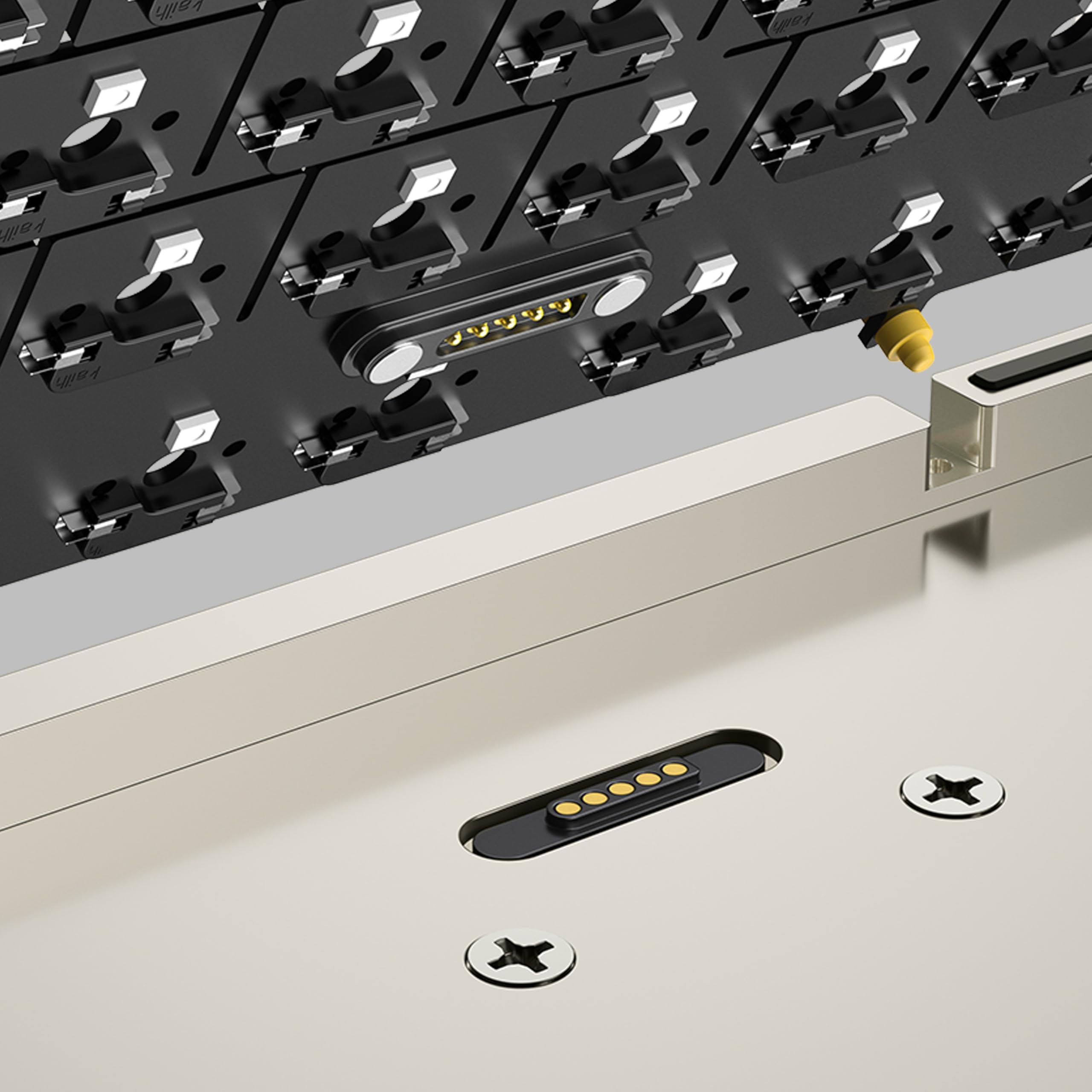
Okay, so I'm going to separate this review into a few different categories. I also own the Rainy75 (essentially the smaller sibling of the Crush 80 and still made by Wobkey) so I'm going to be comparing the two a lot. To quickly summarize my opinion though, I think the Crush 80 is a phenomenal board at this price and I think, in general, it's a better value purchase than the Rainy 75. Build Quality and Features: This keyboard has most if not all of the premium features you expect out of a good keyboard in 2025. It's got tri-mode connectivity (Wired, Wireless, Bluetooth), it's got RGB, It's got quality of life features like ball catch closure and pogo pin connectors. As far as quality, the Crush 80 feels very, very premium. It's made of CNC aluminum and it is very heavy. I believe it weighs around 2.4 kg or 5.4 lb. This keyboard is chunky and on the larger side, being a TKL (80%). The rubber feet, side RGB, RGB ECG feature, etc are all great. I think the navy blue one I got is anodized too, which in my opinion feels more premium than my spray coated blue Rainy 75. The magnetic ball catch case is so nice to have if you plan on modding this. Essentially, the case and assembly still feels very solid but when taking the keyboard apart to mod, you do not need any tools. There are no screws to handle unless you're fiddling with the bottom weight specifically. It takes 2 seconds to open this keyboard up. With the rainy 75, you have to take out 12 keycaps, which will reveal screws that, when taken out, will finally allow you to take the top of the case off. The Crush 80 is so much more convenient to mod. Another QOL feature is the POGO pin connectors. Instead of having a cable that connects the battery/case to the PCB, it's a simple contact-based magnetic connector. This means there is no cable to unplug and potentially break. You can just lift the PCB assembly right out of the case without unplugging anything internally. This is also a feature that the Rainy 75 is lacking. The Crush80 has some nice RGB accents on it aside from the key lighting. It's got an RGB heart ECG design that is above the arrow keys as well as two downward-facing RGBs; one on either side that will shine some light on your desk. Interestingly, I have not found an option to turn these off. Even when I turn the key backlights off (Fn+backspace) these accent RGB lights stay on. This doesn't bother me much though. Edit: I found out how to turn the accessory RGB off, it’s just a different key combo from the key backlights. The power switch for this keyboard is under the caps lock key. This means that just to toggle the keyboards power, you need a keycap puller. To use the keyboard in wired mode, power can be off. This is personally a non-issue for me as I just use this keyboard in wired mode. I'm not going to be traveling with this 5 and a half pound keyboard, so I personally don't have a reason to use the switch ever. One other thing this has that the rainy doesn't is a spot on the keyboard to store the wireless USB dongle. On the Crush 80, there's a little magnetic "hatch". If you remove the little cover, you'll see a spot to store the dongle. The rainy 75 has nowhere to store the dongle, meaning you will need to keep track of it. As far as sound and feel go, it's been an absolute privilege to type on this keyboard. It's marbly and creamy. The stock experience out of the box is wonderful. The keyboard is very loud though. I don't think this would be appropriate for an office setting at all. With this being a hotswap board though, it's easy to change out the switches for something quieter. If you do want a silent keyboard, swapping out the Kailh Cocoa switches on this for silent-oriented switches would make a massive difference. This is what I did to my Rainy75 and now it’s as quiet as a membrane or chiclet keyboard. The Crush 80 also comes with more accessories than the Rainy 75. You get a solid, premium-feeling case, a microfiber keyboard sleeve, a decent braided (non-coiled) USB-c cable, and an average keycap/switch puller. You also get parts like extra switches, extra rubber feet, extra gaskets and screws. They even provide an aluminum plate in case you want to swap out the FR4 plate, and they include additional poron foam that you can put in the keyboard. The Rainy 75 is still a very well-designed and functional keyboard, but I think that the Crush 80 is a better value with its features and included accessories. At the time of this review, the Crush80 Reboot Pro is only $21 more than the Rainy75 Pro. The crush 80 is even less expensive from other vendors, but buying from Amazon provides that peace of mind when it comes to delivery and returns. Wobkey themselves (The manufacturer of this and the Rainy75) do not have the best track record so being able to order this through Amazon is really nice. There have been many bad experiences reported with trying to get product support when issues arise, whether it’s lack of a response or just unwillingness to do an exchange. That’s why buying from Amazon is the safer (albeit more expensive) option as you have more flexibility for returns or exchanges.
M**A
Amazing keyboard!
This keyboard has been treating me well over the past couple months, I haven't even needed to charge it yet, but keep in mind I don't use the RGB lighting so this makes the battery just last significantly longer, the quality of the keyboard is superb, it's heavy, sturdy and especially doesn't sound hollow due to the mods this board comes with, it has gaskets for a soft typing feel that doesn't feel too mushy but doesn't feel too stiff either, the board also comes pre-installed with a force break mod so that it doesn't sound hollow, the switches it comes with are rather good! But for me the lightweight switches weren't up my alley, I swapped them out for gateron milky yellow pro v2's and it's made the board feel significantly pleasant to use, I love the magnetic ball latch system for ease of access on the internals it allows me to install mods easily as well so if your a big keyboard modder this might be the board for you! All in all I recommend this keyboard to those who really want the "end game" of keyboards I might say!
V**N
An amazingly well-built keyboard, just not one for me
I am impressed with the super high quality fit and finish of this keyboard. It is substantial and weighty and it looks great. It's OK for casual typing, although it doesn't excel at that. What really blows me away is the attention to detail with this board that most manufacturers don't think about, like the POGO pin connectors for the batteries that sit in their sculpted compartments, and the beautiful attention to cosmetic detail everywhere on this board. The storage space for the 2.4gHz dongle is a nice touch. The board's weight gives it a very satisfying feel. The keys have a buttery smooth and effortless actuation, but they bottom out effortlessly too, and they have no feedback at all, save for bottoming. I'm not sure what kind of keyboard user the Kailh Cocoa switches are targeted at, but it is for sure not targeted toward typists. You can't select alternative switches when you buy, but that is not a big problem because the board is hot-swappable. I can install switches that suit me. I knew that before I made my purchase, and I'm fine with it. I am not fond of RGB lighting or south-facing LEDs. I like north-facing white LEDs. It's nearly impossible to find a board with those characteristics today that also has support for swappable key switches. Keychron has some, but they are never in stock. So I bought this Crush 80 Reboot board anyway because of the build quality, the great reviews, and because being able to swap key switches is more important to me than the cardinal orientation of the LEDs or their color. The compromise of RBG color and south-facing LED was one I was willing to accept Another compromise I made was the support for wireless modes. I don't care about that. I only use wired mode, ever. I will never use this or any other board in wireless mode. (Honestly, I don't think very many people want that, but for some reason manufacturers think they do.) I am sure that if I keep this board, I will remove and recycle the batteries so I don't have to worry about their inevitable eventual degradation. But again, it's hard to find high-end boards that don't offer these undesirable wireless connectivity features. Now I want to explain why I'm rating this truly handsome and well-built board only 4 out of 5. It is because of F13. It is my fault that I didn't notice the existence of this made-up key in advance. I most certainly would not have purchased this board, no matter how many other desirable characteristics it had, if I had just been observant enough to notice that key. To be clear, the real F13 is Shift+F1. There is no such thing as a standalone F13 key, like this board so very weirdly sports. There is no reason for it to exist. It's only purpose is to make this board unsuitable for touch typists. The bizarre F13 key is positioned where the F12 key should be, with its right edge lined up with the right edge of the backspace key. F12, which should be in that position, is offset one key to the left. And every other F-key down through F5 is similarly misplaced. Only F1 through F4 are where they should be. The addition of the F13 key with the concomitant F-key misalignment is a serious flaw that makes the Crush 80 Reboot an entirely unsuitable board for a touch-typist. The only reason I didn't give it a lower rating is because this is an incredibly well-made board in all other respects, and I recognize that not everyone is a typist. All that said, I'm not willing to try to adapt my touch typing to accommodate that weird F13 key, since doing so would likely compromise my ability to type well on almost any other TKL board in existence. So I'll probably just sell this one on ebay and look for something else that suits me better. Maybe I can get my old WASD Code v1 board with Cherry MX Green switches working smoothly again. It's hard not to like the positive qualities of this board. It's a fine board in many ways. It's just not one for me.
D**D
Best keyboard I've owned so far
Very heavy and solid feeling keyboard. Battery lasts forever. The key switches sound amazing when typing. My wife wanted her own keyboard after hearing mine. I haven't had any issues when gaming, wired or wireless. Remembering all the keyboard shortcuts for controlling the lights, switching modes and showing battery life has been difficult but it beats having to install a heavy application like iCue or Razer Synapse. The web UI for configuration is a bit confusing at first but I learned how to use it. Taking apart the keyboard without any tools has made cleaning it so much easier! I can never go back to regular brand keyboards after owning this.
S**D
Unbelievably good value!
Genuinely a little blown away by this keyboard. Everything is basically perfect. The stabilizers are incredibly well tuned, the switches are smooth and nice sounding, the board is HEAVY at nearly 5.5 lbs, and it just looks beautiful. The build quality is what surprised me the most. The machining is really well done and the weight on the back is super nicely polished. For the price, it genuinely makes me wonder why anyone would spend $300+ on other customs when this thing is so good straight out the box. This is miles better than the Evo80 and my old Mode Sonnet in terms of build quality, sound, feel, and looks.
I**N
Amazing value, excellent quality
This keyboard is spectacular. Quality above and beyond my expectations, and the functional usage of it is so pleasant. Wonderfully clacky but not obnoxiously so at all, my typing is faster and more accurate coming from years of using Apple magic keyboards. I don't know how I ever fell into that hole to begin with as someone who started my typing journey in the 1980's, I should have known better. Customization with the VIA app is as good as can be expected, can be a little wonky but that's how it goes. Workable. Using BetterTouchTool for more powerful macros, and that works great too. This was a very solid purchase, i'm super happy with it.
ترست بايلوت
منذ يوم واحد
منذ أسبوع