
قم بتنزيل التطبيق


معلومات عنا
حقوق الطبع والنشر © 2024 Desertcart Holdings Limited
قم بتنزيل التطبيق

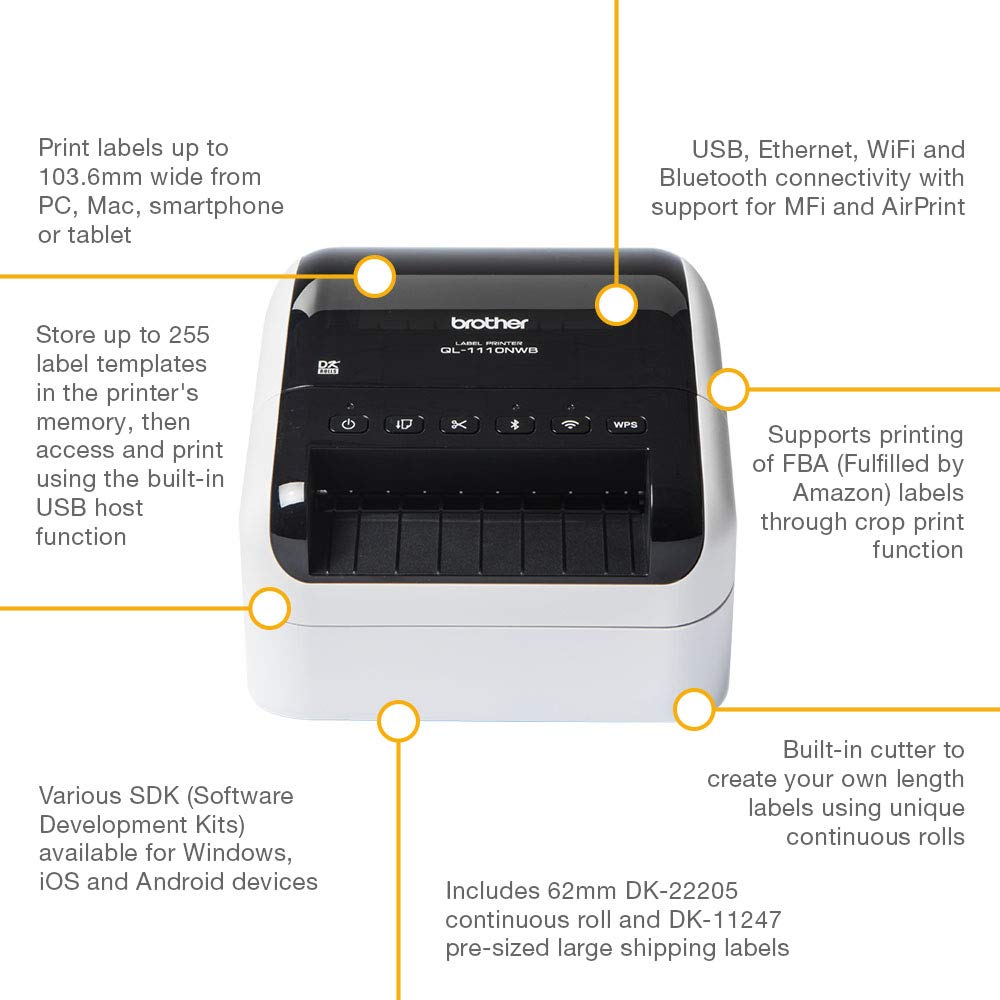


🚀 Print smarter, ship faster, connect easier — the pro’s label printer!
The Brother QL-1110NWB is a robust desktop label printer designed for professionals needing high-quality 4-inch wide shipping and barcode labels. Featuring versatile connectivity options including WiFi, Ethernet, Bluetooth, and USB, it supports printing from PCs, Macs, and mobile devices. With a rapid 110mm/sec print speed, 300 dpi resolution, and a built-in automatic cutter for continuous label rolls up to 3 meters, it streamlines high-volume shipping and fulfillment workflows. Its smart crop-print function and developer SDK make it ideal for integration into modern business environments.


| ASIN | B07C21X47C |
| Are Batteries Included | No |
| Best Sellers Rank | 5,229 in Business, Industry & Science ( See Top 100 in Business, Industry & Science ) 63 in Label Makers 96 in Labels & Labelling Equipment |
| Colour depth | 1 bpp |
| Compatible devices | Smartphones |
| Customer Reviews | 4.0 4.0 out of 5 stars (107) |
| Date First Available | 9 April 2018 |
| Dual-sided printing | No |
| Guaranteed software updates until | unknown |
| Included components | Labels & Continuous Tape Roll |
| Item Weight | 3 kg |
| Item model number | QL1110NWBZU1 |
| Manufacturer | Brother |
| Max input sheet capacity | 40 |
| Maximum black and white print resolution | 300 dpi |
| Maximum colour print resolution | 300 dpi |
| Maximum copies per run | 69 |
| Number of Ethernet Ports | 1 |
| Number of USB 2.0 Ports | 1 |
| Operating System | Windows, Mac & Linux Compatible |
| Print media | Labels |
| Processor Count | 1 |
| Product Dimensions | 29.5 x 24 x 24.5 cm; 3 kg |
| Sheet size | 104 millimeters |
| Warranty type | limited warranty |
J**.
Reliable and Efficient Label Printer for Business Use
The Brother QL-1110NWBc has been a game-changer for handling shipping labels in my business. Its ability to print wide-format 4-inch labels is perfect for my needs, and the labels come out crisp and professional every time. The setup was straightforward, and I appreciated the multiple connectivity options, especially the wireless function, which saves me from dealing with extra cables on my desk. What stood out to me was the speed—printing is quick and efficient, making it ideal for days when I have a high volume of orders. The build quality is excellent, and it feels sturdy enough to handle regular use without any issues. If there’s a downside, it’s that the replacement label rolls can be a bit pricey, but the quality justifies the cost. Additionally, the software could be a bit more intuitive, but once I got the hang of it, everything worked seamlessly. Overall, this label printer has streamlined my workflow and made shipping preparation much more efficient. I’d highly recommend it to anyone running a small business who needs a reliable and professional solution for label printing.
C**H
Quality price/ Quality product
Not the lowest cost thermal printer, but well constructed with loads of useful features. We already have a smaller Brother QL-810W but needed the wider format of the QL-1110 to give us the ability to print standard 4 x 6 shipping labels. We use the Royal Mail Click & Drop which can generate 4 x 6 labels in the pdf format. The print sppeds are fast, depending to a certain extent on the print quality settings. This is a printer for all day business use, though some may find the label roll cartridge a bit of a chore compared with external fan-fold label stock, if they are printing high volumes. The free Brother P-Touch editing software work well with the QL-1110, our QL-810W and also our Brother E-550 label printer. We have them all WiFi connected to our desk top computer. It is also possible to access lower level printer commands, via programming and the Brother SDK development kit. Connectivity on the QL-1110 NWBc is good and reliable with USB cable, wired LAN, WiFi, Direct WiFi and Bluetooth connection. These are solid well built devices that fully meet our business needs and operate reliably. Worth the extra money.
P**L
Great hardware let down badly by ancient software and poor UX
I bought this as like most people these days I print more labels than anything else. It is very reliable, always recognised by my PC and nearly always prints without error. Sadly, the software interface is really hard to use. I say that as a software designer with over 20 years in the field. It takes me twice as long as it should to do anything as I usually spend 5 minutes looking for basic functions. Also I recommend you save the install file somewhere safe as the website is as bad as the software. You have to find the device, prove you own it by flipping the printer upside down and reading off the too small serial number. Like seriously Brother, nobody is trying to use your software for free if they don't own one of your printers.
G**W
Brother QL-1100NWBC
Everything works ok except app it's not easy to print eBay label but after time finally sorted .the best way is to make labell screen shot on Adobe Reader then add new label on app and choice picture from files and printenyour paper size also I'm using other printing app via Bluetooth and working is well NokoPrint
J**.
Great thermal printer
Great printer and easy enough to set up, especially if you are familiar with Brother products. The label quality is good and different sizes of labels are available.
C**S
Setup takes a very long time. The iPad app sucks. You can only use proprietary Brother “DK” rolls.
SETUP ===== ⚙️ The instructions for this product are vast; the set up seems intimidating. WPS ==== MY ADVICE: Use W.P.S. for the setup! 🔧 My tip is to follow the instructions to load the roll, but then just use WPS (Wireless Protected Setup) to get the device talking to your network. MORE VIDS ======== 📺 I am preparing some short videos — one is attached to this review – please subscribe to my YouTube channel to see the others. NWB? ==== You might be wondering what the difference is between this model and the less expensive version, QL-1110 — without the "NWB" at the end. Well, the difference seems to be AirPrint compatibility — that is, the ability to talk wireless with Apple devices (iPhones and iPads). macOS ====== • I tried relying on the drivers built into Mac OS but the labels wouldn't print — they came out almost blank. • I eventually got it to work by downloading drivers from the Brother website. iOS === 📱 Current version of iOS app (Brother iPrint&Label) (version 5.2.1) has very low ratings. It is rated 1.6 stars on the App Store. I installed the app on iPad and I now understand why it has had such a negative reception! I'm unable to print a single thing because I keep getting the message: ⚠️ "The roll of labels or tape does not match the one selected in the application." ⚠️ I've tried numerous different permutations and I keep getting this error message. EDIT: • After much struggling, I found the fix • Tap "Check Media" [see attached video] • The app then selected the size "103mm x 164mm" and I was actually able to print! CONS ==== ⚠️ Terrible, fiddly iOS software. (Or I'm just too stupid to understand it!) 💰 You must use Brother proprietary DK Rolls. CONCLUSION =========== The hardware may well have potential — and Brother usually make cracking stuff — but as the experience on iPad is sub optimal. I hope that Brother completely overhaul the UI (User interface).
H**O
Terrible quality. New machine could not be added to Wifi. Even with Brother customer support and after I replaced my entire wifi system just for it, could not get the wifi to work. So we decided to just use the printer as is but wired. Three months later the printer can no longer be turned on. Called customer service which was slow and unhelpful. Still waiting for a refurbished system to be sent to us to replace the bricked one.
ترست بايلوت
منذ شهر
منذ 3 أسابيع