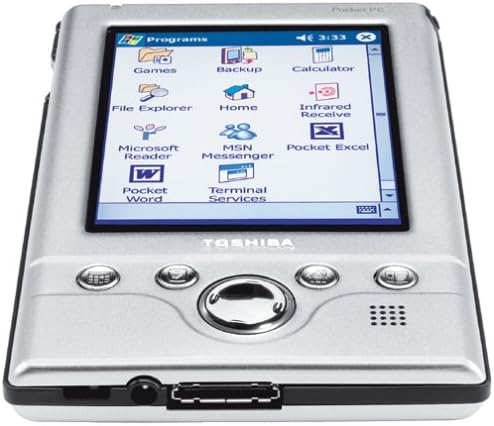


Toshiba e310 Pocket PC
Product ID: 6390427
Details
- BrandTOSHIBA
- CPU ModelIntel
- ColorBlack
- Graphics Card DescriptionIntegrated
- Hard Disk Size32 MB
- Model NameE310
⚡206 MHz processor
💼Lightweight & portable
📱Expandable storage
🚀 Elevate your productivity with Toshiba e310 – where convenience meets innovation!
The Toshiba e310 Pocket PC is a lightweight and ultra-thin device designed for both productivity and entertainment. It features a powerful 206 MHz Intel StrongARM processor, 32 MB RAM and ROM, and a vibrant 240 x 320 pixel TFT LCD screen that displays over 64,000 colors. With an expandable Secure Digital (SD) slot, this Pocket PC is perfect for professionals on the move, providing a complete package that includes a USB cradle, AC adapter, stylus, and more.
| ASIN | B0000658CD |
| Audio Output Type | Speakers |
| Bluetooth support? | No |
| Brand | TOSHIBA |
| Built-In Media | Toshiba e310, USB cradle, AC adapter, Stylus, Soft slipcase, Quick-start card, Warranty card |
| CPU Model | Intel StrongARM |
| CPU Model Speed Maximum | 206 MHz |
| Color | Black |
| Connectivity Technology | USB |
| Control Method | Touch |
| Customer Reviews | 3.5 out of 5 stars 53 Reviews |
| Display Resolution Maximum | 240 Pixels |
| Display Technology | LCD |
| Form Factor | Small Form Factor |
| Global Trade Identification Number | 00032017138018 |
| Graphics Description | Integrated |
| Hard Disk Description | 32 MB ROM |
| Hard Disk Size | 32 MB |
| Hard-Drive Size | 32 MB |
| Hardware Interface | USB |
| Human-Interface Input | Touchscreen with Stylus Support |
| Item Weight | 3.25 Pounds |
| Manufacturer | Toshiba |
| Model Name | E310 |
| Model Number | PA3169U-1POS |
| Native Resolution | 240 |
| Number of Ports | 1 |
| Operating System | Windows |
| Other Special Features of the Product | Lightweight |
| Processor Brand | Intel |
| Processor Count | 1 |
| Processor Series | Intel StrongARM |
| Processor Speed | 206 MHz |
| RAM Memory Installed | 32 MB |
| RAM Memory Technology | DDR4 |
| Resolution | 240 x 320 |
| Screen Size | 5 Inches |
| Specific Uses For Product | personal |
| Touch Screen Type | Touchscreen (type not specified) |
| UPC | 032017138018 |
| Video Processor | Intel |
| Webcam Capability | No |
B**L
My best...... PDA yet!!
Because of my job and my personal interest, I've had my share of PDAs. I'm not kidding, but I've owned (or currently own) the following PDAs since 1994: HP 100LX, HP 200LX, HP 320LX, Palm Pilot 1000, 5000, Palm Professional, Palm III, Palm V, Palm IIIc, 2xPalm VII, Palm m100, iPAQ 3630, and now the Toshiba e310. I started out with a DOS based handheld, then switched over to Palm-OS based PDA for about 5 years. For the past 2 years, I've been using the Compaq iPAQ Pocket PC. It has been working well for me, but I've always disliked the iPAQ 3600- and 3800-series for several reasons: 1. It's rather large and heavy, when compared to most Palm-based PDAs. 2. (3600-only) It has no expansion capability except for adding the sleeve, which makes the unit even larger. (3800 has SD built-in). 3. The notorious problem of dust getting under the screen, which is lit by the side-light 4. The screen is bright, but has always been somewhat "milky", or cloudy. 5. The infamous stylus latch is always broken So it's blessing in diguise that my wife broke the screen of my iPAQ a few weeks ago. It gave me an opportunity to re-evaluate the current Pocket PC market. After researching, I purchased the Toshiba e310 and have been using it for about two weeks. To put it simply, I love the Toshiba e310. I would venture to say that it's the best PDA I've ever owned. It's not perfect, but it's the best PDA for me at least. Before I purchased the e310, I looked for a iPAQ/e310 comparison review, but couldn't find it anywhere. Since there are many great general Pro/Con comparisons here at epinions as well as other sites, I'll focus on how this unit compares with the Compaq 3600/3800 series for those who is thinking about switching. 1. Size, weight, and form-factor: The Toshiba e310 is very thin. It's currently the thinest and lightest Pocket PC on the market. At 4.9 oz, it weights the same as a Palm m515 and the Clie 615 (both color). After carrying the iPAQ 3600 for 2 years, this is a very welcomed change. 2. Screen: While it's not as large, the color LCD on the e310 is visibly brighter and clearer than the iPAQ (I can still do a A/B comparison). It also doesn't have the nasty problem of dust getting trapped under the screen that iPAQ is notorious for. 3. Expandability: The e310 does come with a SD slot and there is no way to add a CF slot. After owning the iPAQ for 2 years and having all kinds of CF/PCMCIA accessories (wifi, wireless modem, memory card, GPS, etc), I can say with 100% certainty that I will not need anything other than memory expansion capability in a PDA. This may not be the case with you, so if you need to use CF accessories, look elsewhere. Currently there is only limited SDIO accessories available (memory and BlueTooth), but there will be more available in the future. The iPAQ 3800-series also has a SD slot built into the PDA itself (not the 3600-series), and it has the capability to take CF and PCMCIA accessories with optional sleeves. 4. Battery Life: Somehow the little unit out lasts my iPAQ by quite a bit. I read a lot of ebooks on my PDA, so I usually have to recharge my iPAQ several times a day (say, 100% to 65% after a 1 hour, especially with a CF memory card installed). With the e310, I find it lasts a lot longer (say 100% to 85% after 1 hour, even with a SD memory card installed). 5. ... Overall, I love e310's form-factor, screen, battery life, and price. I would highly recommend it to anybody who is looking for a Pocket PC. (We'll save the Palm OS vs. Pocket PC debate for another day).
H**L
Very disappointed
If it's not too late, I'm going to try and cancel my order. And I was SO looking forward to this PDA. It's not compatible with NT. Or Windows 95. I had to read that little fact in another reviewer's comments in this forum - I didn't see it anywhere in the technical specs. A call to toshiba support confirms it. So that means I'll either have to buy a new computer to sych it at home or do without synching since I don't imagine I can get my entire firm to change operating systems just because I bought a new PDA. Rats.
S**Y
Ebook reader only--very crashy
I bought this device to read ebooks, and it does ok for a low price (like under $100). I use Word, Tiny Ebook Reader, MS Reader and Mobipocket. They all work, within limits. This device is extremely crashy and locks up a lot if you try to do too much. Make sure you never have more than one application running, and I would never trust my contacts or calendar to it. As I bought it to use as a pure ebook reader, and got it cheap, I'm satisfied, but don't be fooled into thinking it's a real Pocket PC, it's just not stable enough.
R**U
Repeated crash and burn
So I have had this device for over six months now, and it's a great toy, no questions. Often used as a WMA player with a SanDisk SD card, though I haven't downloaded any games onto it yet (will I ever?), and PocketTV is nice to watch trailers on. I haven't had a PDA before. Nor do I use M$ Outlook. So most of the synchronization is useless for me. It's good to keep tasks, and take notes (including some data on Pocket Excel). But... the battery life [is bad], and I have had repeated crashes and data loss (lost some notes I took down at a conference - UGH). Have had to load PocketTV couple times. But my biggest gripe is the SD card. I couldn't get the ActiveSync to work properly, and now it seems to run if I take the SanDisk SD card out. Why on earth would SanDisk and Toshiba make their SD cards incompatible with each other? Can you imagine if a Lite-On or Yamaha CD-RW refused to work with a Maxell or Imation CD-R/RW? I wonder if Toshiba fixed this problem with their later devices. I just called TechSupport, and the guy very nicely said I had run out my 90-day S/W support, and the SD card and ActiveSync (d-uh!) came under S/W. I am not paying ... for the call! Anyway, it seems to work now, so... Atleast Toshiba's TechSupport people are polite and nice even if Toshiba doesn't offer much of it (time-wise). And their website seems to [be bad] as well... oh well... Maybe I should have stuck with the cheaper Palms... but toys for boys, and all that, y'know :) Avantgo is nice, but then... most of the stuff I could do on a cheaper Palm. Don't know about WMA, though - but now I have a separate MP3/CD player. Convergence is still far away...
I**O
A nifty, thin Pocket PC at an unbeatable price
I considered a number of PDA's before choosing the Toshiba e310. I am starting a new job and needed something to keep track of appointments, tasks, contacts, as well as documents, and a way to make quick notes. I also wanted a way to lug around texts as e-books (medical dictionaries and the like). Some of the factors that influenced my choice were: 1. Excellent reviews from previous Toshiba e310 users. 2. A very competetive price (after rebates). 3. Pocket PC operating system, instead of Palm OS. This is more intuitive for me to use. 4. Not having to use Graffiti. Instead the Toshiba has handwriting recognition that is quicker and easier (of course you can also use Graffiti if you insist). 5. Large color screen with good resolution: makes it easier to read the screen both indoors and out. You can also download cool skins. I have Nicole Kidman smiling seductively at me every time I turn the machine on. (Okay, this was not really the reason I bought this machine...um...). 6. MP3 and video playing capabilities, so I can use it to listen to music while traveling. 7. Easy one-touch recorder button - this enables you to make a quick note to yourself. You can set the recording level any way you like - stereo or mono, low quality (2k/sec) to very high quality (a whopping 172k/sec). 8. Attractive size - somewhat long, but very thin. Fits nicely in a shirt or jacket pocket. 9. I did not need wireless connectivity - so this downside was not very important to me. Nor did it matter much that (as of yet) there are not many support peripherals. They are coming, anyway. All in all, I am pleased with the machine. I had some slight problems with Windows Media Player, but a quick hard reset solved it, and all my info was sync'd back to the Toshiba e310 in no time flat. Battery time could be better (3-4 hours) but is tolerable. Syncing is fast and efficient. I am looking forward to a small keyboard (there is one currently available - PocketTop, with a driver now for the e310). Also, since some people have been having problems with memory cards - the Lexar cards work well. I have a 128mb that is running smoothly, and is much less expensive than some others (but avoid SanDisk - the Toshiba reps discourage their use).
A**H
Toshiba e310 is a great value
I'm a long time PDA user (starting with the original Sharp Wizards in the early '90s) and have been using a Casio E-100 (running WinCE) for several years. While still fond of my trusty old E-100, I found it was just too heavy to lug around in my pocket so I finally decided to upgrade to a new PDA running the latest PocketPC OS. I looked at the HP and Compaq units...then I saw the Toshiba e310 and was instantly impressed by its small size and light weight. Yipee! I could finally carry around my PDA without looking as if there was a brick in my pocket. The price of this slick little unit is an added bonus - nearly [price] less than most other PocketPC units - so I bought one and it's been my daily companion ever since. Here are a few of my observations after about 2 months use: PROS: 1) Lightweight - Being able to inconspicuously carry your PDA with you everywhere is the whole point of having a PDA, and the e310 is easily the smallest PocketPC available at the moment. 2) Solid Construction - With an aluminum body, the e310 feels very well built. There is no flexing or fiddly plastic bits, though the stylus is rather small and fits loosely in the silo. 3) SD Expansion slot - Yes, a CF card would have been ideal, but no doubt size constraints forced Toshiba to use an SD card instead. However, it does make adding memory easy and inexpensive (though I've yet to fill the onboard 32KB). 4) PocketPC 2002 - Microsoft has really refined the OS and the e310 is both fast and easy to use. There is also plenty of high quality third party software available on the 'net. (My favorites are ListPro, eWallet, and WIS Bar.) 5) Syncing with your PC - ActiveSync works flawlessly over a USB port, and you can choose to sync with Outlook, Money, and selected files (such as Word and Excel files or other supported apps). CONS: 1) LCD display - Dimmer and less contrasty than my Casio E-100, but a big advantage is that the e310 is readable in sunlight, so this is a fair compromise. 2) Wireless connectivity - The e310 is not an ideal choice if you must have wireless access since only Bluetooth is available on the SD format. I highly recommend the e310 to anyone looking for a powerful, versatile, and fun PDA that is easy on your pocket AND your pocketbook.
M**E
I would deny it...
If you told my boss that I said this, I would deny it, but I didn't buy this e310 for work. This is the most fun that I have had with an electronic "work device" since I bought my first PC. I've been reluctant to convert to PDAs for a number of reasons, but the thin size, great price, Pocket PC software, and my experience with Toshiba portables were enough to get me to pitch my paper scheduler and give this Pocket PC a try. So far the conversion has been going just fine. There are so many +'s that I can't mention them all. I'm not just referring to the cool features built into the OS, but the Pocket PC itself has many mentionables; like the record button on the top left side that makes audio notes a cinch. The screen is a definite strength. The adjustable front-light makes the screen comfortably viewable in just about any setting. It makes sense to invest in the relatively expensive screen overlays, because they double as anti-glare protectors. I say that even though I have never successfully got one on without a bunch of the tiny air bubbles stuck under the surface. Thanks to Adobe you can enjoy reading pdf files anywhere you can take this. Some of the annoyances are that on first look it would seem that both the USB cable accessory, that is sold separately as a replacement for the cradle, and the power cable won't fit in the bottom at the same time, but at a closer look the power cable plugs into the USB cord, so you can charge while you sync without the cradle. I do hope that more networking options become available for the SD slot. Currently the BlueTooth compatible device is the only one listed for this PDA. I also wish the industry would decide on a PC Card standard so all our cameras, PDAs, and portables could share cards without depending on conversion. No external keyboard yet either. The LI-ION battery-life is OK. It depends on how much you use the thing. There is no external access to the battery which I find a little strange. Without being read on the matter, I figure that the battery is accessed by removing the back-plate. I am a bit afraid of that moment when this PDAs durability is tested. I've certainly felt more rugged feeling Pocket PCs. But who knows, Toshiba is full of surprises. On the topic of the OS, the default settings for the input word-selection, that's like a popup AutoComplete as you type, bugged me. I don't like that the popup words are usually the longest form of the word, so you seldom use them. Luckily, I found the way to increase the number of words that popup, which helped. I find Toshiba's e310 PDA more than easy, efficient, practical, compact, sleek and enjoyable to use, it's a blast!
S**Z
Excellent entry level PocketPC
I bought the Toshiba e310 for my wife who wanted to use a PocketPC. Toshiba is a relatively new player in the PocketPC world, and I was a little bit skeptical. Having owned three different PDA's myself, I was curious to see if Toshiba could deliver a quality unit in the small and light form factor they were proclaiming. Toshiba has done an excellent job with the e310. My wife was thrilled that it was so light the first time she held it. She was accustomed to holding my older, thicker and heavier PDA's, and this was even lighter and smaller than my iPAQ! The size and weight of this PocketPC make it very functional; its small form factor does not diminish the unit's solid, quality feel when you hold it in your hand. As a basic PDA, it is wonderful. Your appointments, contacts and to do items are right at your finger tips. Plus, you can read and respond to email on the go. Great design in a small package makes the Toshiba e310 a great buy. The Toshiba e310 is the best value PocketPC for the money.
Trustpilot
3 weeks ago
3 weeks ago